A good mount does more than hold your projector in place. For a golf simulator setup, it helps you get the image centered, protected, and neatly wired for a cleaner overhead install.
Below, we focus on 10 options that make cable routing easier while supporting the kind of adjustability most simulator rooms need.
Best 10 Golf Simulator Projector Mounts with Cable Management Picks for 2026
Low-Profile Tray Mount
WALI Adjustable Ceiling/Wall Projector Tray

- Built-in cable storage keeps wiring organized
- Wall, ceiling, or floor mounting options
- Supports projectors up to 22 lb
Best For: Budget buyers who want flexible mounting and tidy cable routing
Heavy-Duty Flex Mount
Mount-It! 3-in-1 Projector Mount

- 3-in-1 ceiling and wall mounting options
- Integrated cable management for a cleaner setup
- 40 lb capacity with broad adjustability
Best For: Buyers who want maximum mounting flexibility and a professional-looking install
Portable Floor Stand
Hidden-Cable Adjustable Projector Stand

- Hidden cable slot reduces clutter
- Height-adjustable with 360° rotation
- Lightweight floor-mounted design
Best For: Portable or temporary projector setups with lighter devices
Compact Hidden-Cable Ceiling Mount
PUTORSEN Adjustable Tray Mount
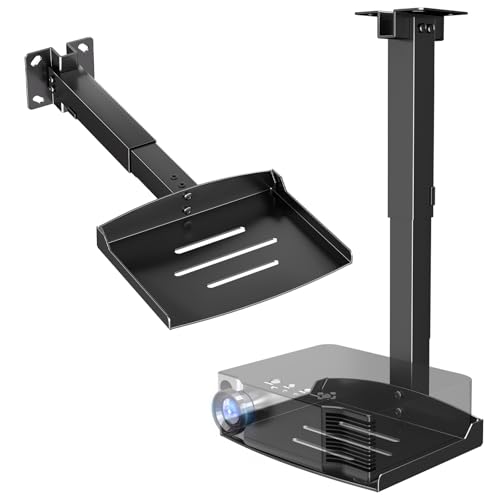
- 11.02" x 8.27" tray supports up to 22 lbs
- Height adjusts from 14.17" to 21.65"
- Hidden cable routing for a cleaner install
Best For: buyers who need a small wall-or-ceiling projector shelf with concealed cables
Rotating Cable-Routed Mount

- 360° swivel arm for easier alignment
- Tool-free height adjustment from 14.5" to 22.2"
- Hidden cable routing for power and HDMI cords
Best For: users who want adjustable aiming and concealed cables in a ceiling mount
Vented Cable-Managed Shelf
Appacare White Adjustable Mount

- Hidden cable management for a cleaner setup
- Vented tray base helps improve airflow
- Height adjusts from 14.3" to 21"
Best For: buyers who want concealed cables and better cooling in a white mount
Universal Ceiling Tray Mount for Flexible Setup
VIVO Hidden Cable Routing Tray Mount

- Universal tray fits most projectors without mounting holes
- Hidden cable routing keeps cords neatly out of sight
- Height adjusts from 12.3" to 20.4" for setup flexibility
Best For: buyers who want a clean no-hole ceiling mount for lighter projectors
Heavy-Duty Multi-Mount Option
Salange 3-in-1 Adjustable Tray Mount

- 3-in-1 design supports ceiling, recessed, and wall mounting
- Concealed cable management helps reduce visible cord clutter
- Steel tray holds up to 22 lbs for projectors and AV gear
Best For: buyers who need a versatile heavy-duty mount with organized cabling
Low-Profile Tray Mount – WALI Adjustable Ceiling/Wall Projector Tray
If you want a straightforward golf simulator projector mount with cable management, this WALI tray mount is a practical option. It supports ceiling or wall installation, offers height and angle adjustment, and includes built-in cable storage to help keep your simulator area cleaner and safer.
Best For: Budget-conscious buyers who want a versatile tray-style mount for a tidy golf sim setup.
Pros:
- Built-in cable storage helps reduce tangles and visible wiring.
- Works as a wall, ceiling, or floor mount for flexible placement.
- Supports projectors up to 22 lb, which covers many home-use models.
- Includes installation hardware and a step-by-step manual for easier setup.
Cons:
- Tray fit is limited to projectors under 13.7″ x 8.6″.
- Not as purpose-built for golf simulator protection as an enclosure-style solution.
This is a solid general-purpose mounting choice if you mainly need adjustable placement and cleaner cable routing. It is especially appealing when you want a lower-cost way to mount a projector without adding extra accessories.
Protective Floor Enclosure – Golf Sim Projector Cover with Turf
For golf simulator projector mounts with cable management that prioritize protection, this floor-mounted enclosure takes a different approach. Instead of hanging overhead, it places the projector at ground level inside a steel-and-polycarbonate cover with cord-management holes, ventilation, and an included cooling fan.
Best For: Golf simulator owners who want maximum projector protection without installing a ceiling mount.
Pros:
- Heavy-duty steel frame and polycarbonate panels are designed for impact protection.
- Cord management holes help keep cables organized and reduce pinching.
- Integrated cooling fan and ventilation ports support long simulator sessions.
- Synthetic turf topper helps it blend into a golf sim environment.
Cons:
- Requires floor space, so it may not suit compact rooms.
- Interior size limits compatibility to projectors within 13.7″ x 12.2″ x 6.3″.
This enclosure makes sense if your main concern is protecting the projector from balls, bumps, and accidental contact. It trades the simplicity of a standard mount for a more shielded setup that fits the golf simulator use case well.
Heavy-Duty Flex Mount – Mount-It! 3-in-1 Projector Mount
If you need a golf simulator projector mount with cable management and lots of placement flexibility, this Mount-It! model is a strong fit. It can be used as a flush ceiling mount, telescoping arm ceiling mount, or wall mount, and the integrated cable management system helps keep the install looking professional.
Best For: Users who want a versatile, heavy-duty mount for dialing in precise projector placement.
Pros:
- 3-in-1 design supports flush ceiling, telescoping arm, and wall mounting.
- Built-in cable management keeps cords concealed and organized.
- Wide adjustability with tilt, swivel, rotation, and extension range.
- 40 lb capacity suits many larger projector models.
Cons:
- Requires a solid ceiling or wall and is not for vaulted ceilings or drywall.
- Compatibility depends on projector mounting hole pattern and hole count.
This is the most flexible mount in the group if you want a polished setup and the ability to fine-tune alignment. It is a particularly good pick for installations where cable concealment and long-term support matter.
Portable Floor Stand – Hidden-Cable Adjustable Projector Stand
For a simpler golf simulator projector mount with cable management, this floor stand offers a portable alternative to ceiling hardware. The hidden cable slot, adjustable height, and 360° rotation make it useful when you want to move the projector around and keep cords out of the way.
Best For: Portable setups and smaller projectors that need easy repositioning and cleaner cable routing.
Pros:
- Hidden cable management slot helps reduce visible clutter.
- Height adjusts from 40 to 120 cm for flexible placement.
- 360° rotation and ±90° tilt support quick aiming adjustments.
- No additional tools are needed for assembly.
Cons:
- 2.6 kg load capacity is much lower than ceiling mount options.
- Works only with projectors that use a 1/4-inch mounting screw hole.
This stand is best when portability and simplicity matter more than permanent installation. It is a good fit for lighter projectors and secondary spaces where you want a tidy setup without mounting into the room.
Compact Hidden-Cable Ceiling Mount – PUTORSEN Adjustable Tray Mount
If you’re comparing golf simulator projector mounts with cable management, this PUTORSEN option is a practical pick for a tidy ceiling or wall install. The adjustable tray and hidden cord routing make it easier to place a projector cleanly while keeping the setup organized in a home theater, office, or simulator space.
Best For: Buyers who want a small, adjustable projector shelf with concealed cabling and flexible wall-or-ceiling placement.
Pros:
- 11.02″ x 8.27″ metal tray supports projectors and other small devices up to 22 lbs
- Height adjusts from 14.17″ to 21.65″ for flexible positioning
- Integrated hidden cable management helps create a cleaner setup
- Works with both wall and ceiling mounting
Cons:
- Tray size is relatively compact for larger projector bodies
- Not a dedicated golf-sim mount, so placement planning still matters
Overall, this is a solid choice if you want a straightforward projector shelf with cable concealment and a modest footprint. Its strength is simplicity: adjustable height, basic universal use, and a cleaner-looking install without extra clutter.
Rotating Cable-Routed Mount – PUTORSEN 360° Swivel Tray
For golf simulator projector mounts with cable management, this PUTORSEN model stands out for its 360° swivel arm and integrated cord routing. The rotating design makes it easier to fine-tune image alignment, while the steel tray and hidden cable path keep the setup looking organized in a home theater, office, or training room.
Best For: Users who want maximum aiming flexibility and a clean cable run from a ceiling-mounted projector shelf.
Pros:
- 360° swivel arm helps with projector angle adjustments and image alignment
- Tool-free telescopic height adjustment from 14.5″ to 22.2″
- Built-in hidden cable management conceals power and HDMI cords
- Steel tray holds projectors and other AV equipment up to 22 lbs
Cons:
- Ceiling mount only, so it offers less placement flexibility than wall-or-ceiling models
- May be more feature-rich than needed for very simple installs
This is a strong pick when precise aiming and a tidy finish both matter. The swivel arm is the key differentiator, and the integrated cable management makes it especially appealing for cleaner-looking simulator or media-room setups.
Vented Cable-Managed Shelf – Appacare White Adjustable Mount
If you’re shopping for golf simulator projector mounts with cable management, this Appacare shelf adds one extra advantage: a vented tray base. Along with hidden cord routing and height adjustment, that airflow-friendly design is useful for longer projector sessions in a home theater, office, or simulator area.
Best For: Buyers who want a white adjustable shelf with concealed cables and improved airflow for the projector.
Pros:
- Height adjusts from 14.3″ to 21″ for customized placement
- Hidden cable management keeps cords out of sight
- Vented tray base is designed to improve airflow and help prevent overheating
- Compatible with both ceiling and wall installation
Cons:
- White finish may not blend into every room or ceiling color
- Projector fit is limited to the listed size range
For buyers who care about both appearance and practical cooling, this mount has a nice balance of features. The vented shelf sets it apart, while the hidden cable routing and dual mounting options keep it versatile for different room layouts.
Universal Ceiling Tray Mount for Flexible Setup – VIVO Hidden Cable Routing Tray Mount
If you want golf simulator projector mounts with cable management that work even when your projector lacks mounting holes, this VIVO tray-style ceiling mount is a practical option. It uses a universal steel tray, adjustable height, and hidden cable routing to help keep the install clean while fitting a wide range of projectors and other devices.
Best For: Buyers who need a no-hole projector mount with a simple ceiling setup and concealed wiring.
Pros:
- Universal tray design fits most projectors without mounting holes
- Height adjusts from 12.3" to 20.4" for positioning flexibility
- Hidden cable routing helps keep cords out of sight
- Steel tray supports up to 11 lbs and can also hold other electronics
Cons:
- 11 lb capacity is lower than heavier-duty alternatives
- Not intended for sloped or pitched ceilings
- Tray dimensions may not suit larger projector bases
Overall, this is a straightforward choice if your priority is a neat ceiling install with hidden cable management and a tray that works with many projector types. It is best suited to lighter setups where adjustability and simple installation matter more than maximum load capacity.
Heavy-Duty Multi-Mount Option – Salange 3-in-1 Adjustable Tray Mount
For shoppers comparing golf simulator projector mounts with cable management, this Salange 3-in-1 mount stands out for its adjustable tray, multiple installation methods, and concealed wiring. The steel build and wide height range make it a flexible choice when you want one mount that can handle a projector plus other AV gear.
Best For: Users who want a heavy-duty, highly adjustable mount with concealed cable management and multiple installation options.
Pros:
- 3-in-1 design supports recessed, telescopic arm, and wall mounting
- Height adjusts from 11.8" to 21.1" for room-specific positioning
- Built-in concealed cable management keeps wiring organized
- Steel tray holds up to 22 lbs and supports projectors and other AV devices
Cons:
- Heavier-duty design may be more mount than simple setups need
- Large tray may be unnecessary for compact projectors
- Multiple install options can make planning more involved
This is the strongest all-around pick in the group if you need more load capacity and installation flexibility. It should appeal to buyers building a polished, tidy setup where concealed cable management and stable support both matter.
White Adjustable Tray Mount for Clean Installs – Putilsen Concealed Cable Organizer Mount
If you are shopping for golf simulator projector mounts with cable management and prefer a cleaner white finish, this Putilsen tray mount is built for neat, practical installation. It offers adjustable reach, a metal tray, and an integrated cable organizer so the setup looks tidy in a home theater or office.
Best For: Buyers who want a white ceiling or wall mount with concealed cables and a straightforward install.
Pros:
- Integrated cable organizer keeps cords neatly contained
- Adjustable arm spans 14.17" to 21.65" from the ceiling
- Supports up to 22 lbs on the 13.77" x 8.66" metal tray
- Can be used on the ceiling or wall for more placement options
Cons:
- White finish may not match every room or projector setup
- Product details mention compatibility with cameras rather than projector-specific devices
- No-hole installation is listed, but the install still depends on the included hardware and brackets
This mount is a solid pick when appearance matters and you want cables tucked away without sacrificing adjustability. Its weight capacity and dual-mount orientation make it useful for tidy, flexible installations in multipurpose spaces.
How We Picked the Best Golf Simulator Projector Mounts with Cable Management
For Golf Simulator Projector Mounts with Cable Management, we prioritized stable construction, meaningful adjustment range, and designs that help hide or route cords cleanly. We also looked for options that suit both ceiling and wall installs, since simulator rooms vary widely in layout.
Quick Comparison
The best choice depends on where your projector sits and how much flexibility you need. Tray-style mounts can be simpler for larger projectors or frequent repositioning, while arm-based mounts often offer finer aiming adjustments. Floor-mounted or standalone options can work when ceiling attachment is not ideal.
Key Buying Factors for Golf Simulator Projector Mounts with Cable Management
Mounting Style
Choose a ceiling, wall, tray, or stand design based on your room structure and projector position. Overhead mounts are common in simulator bays because they keep the projector out of the swing path.
Adjustability
Look for height adjustment, tilt, swivel, and rotation if you need to fine-tune image alignment. Even small misalignments can affect your simulator screen geometry.
Cable Routing
Hidden cable channels, concealed pathways, and clean exit points make the install look better and reduce snag risk. This is one of the biggest reasons buyers search for Golf Simulator Projector Mounts with Cable Management in the first place.
Weight Capacity and Platform Size
Make sure the mount supports your projector’s weight with extra margin. A wider tray or shelf can also simplify setup if your unit has an unusual footprint.
Installation Method
No-hole or low-drill options are useful in finished spaces, while fixed installations can offer a more permanent and rigid feel. Pick the approach that matches your ceiling type and long-term plans.
Who Should Buy Which Golf Simulator Projector Mounts with Cable Management?
If you want the cleanest overhead look, choose a ceiling mount with concealed routing and solid adjustability. If your room is shared or unfinished, a tray or adjustable stand may be easier to reposition. If your projector is heavier or you want maximum flexibility, look for a higher-capacity mount with a larger platform and strong cable management features.
In short, the best option is the one that fits your room layout, supports your projector safely, and keeps wiring organized without making alignment harder.