Choosing the right mount matters just as much as choosing the projector. For a golf simulator, you need stable support, the right drop distance, and enough adjustment to line up a clean image on a sloped ceiling.
This roundup focuses on practical options that can handle vaulted layouts, simplify installation, and help keep your setup secure, aligned, and easy to fine-tune.
Best 10 Golf Simulator Projector Mounts for Sloped Ceilings Picks for 2026
Adjustable Sloped-Ceiling Pick

- Fits flat, sloped ceiling, or wall installs
- 90° tilt and 360° swivel adjustment
- Supports projectors under 30 lbs
Best For: Flexible installs where ceiling angle and height vary
Vaulted Ceiling Adapter Pick
QualGear 3" Vaulted Ceiling Adapter Kit

- Built for vaulted and sloped ceilings
- Includes adapter, pipe, hardware, and manual
- 5-year limited warranty
Best For: Existing mount owners needing a sloped-ceiling adapter
Universal Height-Adjustable Pick
VIVO Universal Extending Ceiling Mount

- Fits most projectors up to 30 lbs
- 15"-23" telescoping height adjustment
- 360° rotation with tilt and swivel
Best For: Broad compatibility when you need height-adjustable mounting
Heavy-Duty Vaulted Ceiling Pick
VideoSecu Flat Vaulted Ceiling Mount

- Works on flat and vaulted ceilings
- Holds projectors up to 44 lbs
- Integrated cable management included
Best For: Heavier projectors in vaulted-ceiling simulator rooms
Flexible 3-in-1 Mount
Adjustable tray mount for flexible projector placement

- 360° rotatable tray with 0-90° tilt
- Height adjusts from 11.8 to 21.1 inches
- Built-in concealed cable management
Best For: buyers who want a versatile, tidy mount with broad angle adjustment
Sloped-Ceiling Ready Mount
High-capacity universal projector holder

- Supports flat or sloped ceiling installation
- Holds projectors up to 33 lbs
- 30° tilt, 30° swivel, and 360° rotation
Best For: users who need sloped-ceiling support and stronger load capacity
Heavy-Duty 3-in-1 Mount
Universal ceiling and wall projector bracket

- 40 lb capacity, highest in this group
- 3-in-1 mounting with flush and arm options
- Tilt, swivel, and 360° rotation for setup
Best For: buyers who want the strongest capacity and broad adjustability
Universal 3-in-1 Mount
Adjustable Ceiling/Wall Bracket

- 3-in-1 flush ceiling, arm ceiling, or wall mounting
- Steel build supports projectors up to 40 lbs
- Not compatible with vaulted ceilings or drywall
Best For: Flat-ceiling or wall projector installs with strong adjustability
Best Heavy-Duty Pick
Height Adjustable Extension Pole Bracket

- 3-in-1 flush ceiling, telescoping arm, or wall install
- Supports projectors up to 44 lbs
- Excludes vaulted ceilings
Best For: Sturdy projector mounting in standard ceilings or wall setups
Full Motion Ceiling Mount
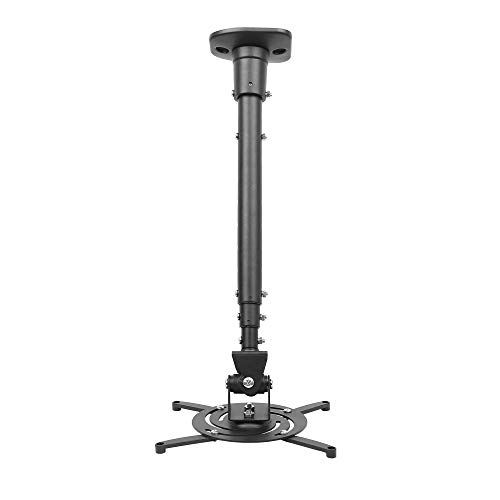
- 25° tilt, 90° swivel, and 360° rotation
- 43.6-inch extension arm for positioning
- Flat-ceiling use only
Best For: Flat-ceiling projector setups needing broad aiming flexibility
Adjustable Sloped-Ceiling Pick – suptek White Ceiling Mount
If you need golf simulator projector mounts for sloped ceilings and want one bracket that can also handle flat ceilings or wall installs, the suptek PR05LW is built around that flexibility. Its adjustable tilt, swivel, and height range make it easier to dial in projector placement when the room angle or screen position is less than ideal.
Best For: Users who want a versatile mount for sloped ceilings, with enough adjustment to fine-tune projector position in a golf simulator bay.
Pros:
- Supports ceiling, sloped ceiling, and wall installation
- Adjustable tilt up to 90°, 360° pan/swivel, and 30.7″-49.21″ height range
- Built from cold rolled steel and aluminium alloy for rust resistance
- Rated for projectors under 30 lbs with 3-hole or 4-hole mounting patterns
Cons:
- Not suitable for single-hole projector installation
- Only works with projectors whose mounting holes are under 12″ apart
- White finish may not match every projector setup
For shoppers focused on adjustability, this suptek mount covers the basics well and adds the reach needed for a wider range of ceiling heights. Just make sure your projector matches the mounting-hole and weight limits before buying.
Vaulted Ceiling Adapter Pick – QualGear 3" Vaulted Ceiling Adapter Kit
For golf simulator projector mounts for sloped ceilings, the QualGear QG-KIT-VA-3IN-B is the kind of accessory that helps a standard ceiling mount work on a vaulted surface. It is designed specifically as a vaulted/sloped ceiling adapter, making it useful when your projector setup needs a cleaner solution than improvised spacing.
Best For: Builders who already have a compatible projector mount and need a vaulted-ceiling adapter for a sloped golf simulator room.
Pros:
- Designed for vaulted and sloped ceilings
- Includes vaulted ceiling adapter, pipe, hardware, and installation manual
- Uses 1.5″ NPT thread compatibility
- Backed by a 5-year limited warranty
Cons:
- It is an adapter kit, not a full projector mount
- Only useful if your existing mount uses compatible threading
- Black finish may not suit every room design
This QualGear kit makes the most sense when you already own a mount and just need the parts to adapt it to a sloped ceiling. It is a targeted accessory rather than an all-in-one solution, which is exactly what some simulator setups require.
Universal Height-Adjustable Pick – VIVO Universal Extending Ceiling Mount
If you are comparing golf simulator projector mounts for sloped ceilings, the VIVO MOUNT-VP02W is a practical universal option when you need height flexibility from a ceiling mount. It is designed for broad projector compatibility and offers enough articulation to help with setup in a home theater or simulator room.
Best For: Buyers who want a widely compatible ceiling mount with adjustable height and angle control for a simulator space.
Pros:
- Fits most projectors and supports up to 30 lbs
- Telescoping height adjusts from 15″ to 23″ from the ceiling
- Offers 15° tilt, 15° swivel, and 360° rotation
- Quick-release hooks simplify installation and removal
Cons:
- Not compatible with several listed Epson, Mitsubishi, and LG models
- Not specifically a vaulted-ceiling adapter
- Requires projector mounting holes between 5.25″ and 12.5″ with arms
This VIVO mount is a solid general-purpose choice if your projector fits the compatibility rules and you want an adjustable ceiling solution. It is best viewed as a versatile mount first, with sloped-ceiling use depending on your room layout and installation plan.
Heavy-Duty Vaulted Ceiling Pick – VideoSecu Flat Vaulted Ceiling Mount
For golf simulator projector mounts for sloped ceilings, the VideoSecu PJ2B stands out as a heavier-duty option with vaulted-ceiling support and a wide load rating. Its adjustable height and rotating swivel arm make it useful when you need a mount that can handle a more substantial projector and still offer basic positioning control.
Best For: Users who want a sturdy vaulted-ceiling mount with a higher weight capacity for a golf simulator setup.
Pros:
- Fits flat and vaulted ceilings
- Supports up to 44 lbs for heavier projectors
- Includes integrated cable management
- Height adjusts from 18.1″ to 26.7″ with the extension pole
Cons:
- Left/right rotation is limited to 5 degrees
- No-slip adjustment system may still require careful setup
- Black finish may not match all room aesthetics
If strength and ceiling compatibility matter more than extreme articulation, this VideoSecu mount is an appealing fit. It is especially relevant for simulator rooms where a vaulted ceiling and a heavier projector call for a more secure mounting solution.
Flexible 3-in-1 Mount – Adjustable tray mount for flexible projector placement
If you need golf simulator projector mounts for sloped ceilings, this Salange 3-in-1 option is worth a close look because it combines tilt, rotation, and adjustable height in one setup. Its 0-90° tilt and 360° rotating tray can help you fine-tune projection without forcing the mount to sit unusually low, while the 3-in-1 installation design gives you more placement flexibility across ceiling and wall setups.
Best For: Buyers who want a versatile, heavy-duty mount with flexible angle adjustment and concealed cable management.
Pros:
- 360° rotatable tray and 0-90° tilt help with precise aiming.
- Height adjusts from 11.8 to 21.1 inches for different room layouts.
- Heavy-duty steel construction with up to 22 lb capacity.
- Built-in concealed cable management keeps the install tidy.
Cons:
- Tray-based design may not suit every projector shape or mounting preference.
- Lower weight limit than the other mounts in this roundup.
Overall, this is a practical pick if you want a flexible mount for a living room or office-style setup and value clean cable routing. For sloped-ceiling use, the combination of tilt and rotation is the main selling point, but you should still confirm your projector fits the tray and weight limit.
Sloped-Ceiling Ready Mount – High-capacity universal projector holder
For golf simulator projector mounts for sloped ceilings, the JOY worker universal ceiling mount stands out because it explicitly supports flat or sloped ceiling installation. It also offers a 3-in-1 layout with flush ceiling, telescoping arm ceiling, and wall mounting options, plus full-motion adjustment to help you line up your image more easily.
Best For: Users who need a higher-capacity mount that can handle sloped ceilings and wider projector compatibility.
Pros:
- Designed for flat or sloped ceilings.
- Supports up to 33 lbs for heavier projectors.
- 30° tilt, 30° swivel, and 360° rotation for image alignment.
- Adjustable length from 5.5 to 25.2 inches adds placement flexibility.
Cons:
- Compatibility depends on your projector’s rear hole spacing and mounting pattern.
- Weight capacity is strong, but the listing does not specify vaulted-ceiling use.
This is a solid choice if you want a mount with clear sloped-ceiling support and a strong weight rating. Its adjustability makes it useful when the projector needs more than just a simple fixed position, especially in rooms where the screen angle is harder to line up.
Heavy-Duty 3-in-1 Mount – Universal ceiling and wall projector bracket
If you are comparing golf simulator projector mounts for sloped ceilings, this Mount-It! model is best viewed as a flexible ceiling-or-wall solution with strong adjustability and solid build quality. It offers flush, telescoping arm, and wall mounting configurations, plus full-motion positioning, so you can dial in placement when your room setup requires more than a basic fixed mount.
Best For: Buyers who want a high-capacity, full-motion mount with broad projector compatibility and lifetime support.
Pros:
- 3-in-1 installation supports flush ceiling, arm ceiling, and wall mounting.
- 40 lb capacity is the highest in this roundup.
- Adjustable arm and full-motion tilt, swivel, and 360° rotation help with alignment.
- Built-in cable management keeps the setup organized.
Cons:
- Not for vaulted ceilings or drywall according to the product notes.
- Requires a projector with a compatible hole pattern between 8.85 and 12.44 inches.
This model makes sense if you want maximum weight capacity and a more professional, adjustable install. Just make sure your ceiling type and projector hole pattern match the stated requirements before buying.
Universal 3-in-1 Mount – Adjustable Ceiling/Wall Bracket
If you’re comparing golf simulator projector mounts for sloped ceilings, this model is worth a close look only if your setup can use a flat ceiling, wall, or flush mount. It offers a 3-in-1 design with telescoping arm adjustment and strong steel construction, but the notes specifically say it does not support vaulted ceilings or regular drywall.
Best For: Flat-ceiling or wall installations where you need an adjustable, heavy-duty mount.
Pros:
- 3-in-1 design for flush ceiling, telescoping ceiling arm, or wall mounting
- All-steel build supports projectors up to 40 lbs
- Offers +/- 30° tilt, +/- 30° swivel, and adjustable height
- Quick-release hooks and included hardware simplify setup
Cons:
- Not compatible with vaulted ceilings
- Not compatible with regular drywall per the supplied notes
- Not suitable for mini projectors
For a simulator room with a standard mounting surface, this is a flexible option with solid adjustment range. For sloped or vaulted ceilings, though, the listed incompatibility makes it a poor fit.
Best Heavy-Duty Pick – Height Adjustable Extension Pole Bracket
When shopping for golf simulator projector mounts for sloped ceilings, flexibility matters, and this bracket delivers a 3-in-1 setup with flush ceiling, telescoping ceiling arm, or wall installation. The supplied notes say it works with standard ceiling types, but excludes vaulted ceilings, so it is better suited to flat or conventional spaces than a true sloped-ceiling build.
Best For: Users who want a sturdy, adjustable mount for standard ceilings or wall installation.
Pros:
- 3-in-1 mounting options add installation flexibility
- Heavy-duty steel construction supports projectors up to 44 lbs
- ±15° tilt and ±15° swivel help with screen alignment
- Integrated cable channels and quick-release hooks support easier setup
Cons:
- Excludes vaulted ceilings
- Not the best choice if your main need is a true sloped-ceiling mount
- Requires projector hole spacing within the listed range
This is a practical, high-capacity option if your room uses a standard ceiling or wall mount point. For sloped ceilings, the vaulted-ceiling exclusion is the key limitation to watch before buying.
Full Motion Ceiling Mount – Extendable Swivel Bracket
If you need golf simulator projector mounts for sloped ceilings, this model is not the right match because the supplied notes say it can be used on a flat ceiling only. It does offer strong motion adjustment and a long extension arm, which can help with aiming in a simulator room as long as your ceiling type fits the mounting limitation.
Best For: Flat-ceiling projector setups that need wide aiming flexibility.
Pros:
- Full-motion design with 25° tilt, 90° swivel, and 360° rotation
- Extendable arm reaches 43.6 inches
- Heavy-duty steel build with a 30 lb max load
- Pre-assembled with quick-release hooks for easier installation
Cons:
- Can be used on a flat ceiling only
- Not intended for sloped or vaulted ceilings
- Lower max load than the heavier-duty options here
For a standard flat-ceiling simulator room, this mount offers excellent aiming range and a long extension. If your ceiling is sloped, the flat-ceiling limitation makes it unsuitable despite the flexible motion.
How We Picked the Best Golf Simulator Projector Mounts for Sloped Ceilings
We focused on mounts that are relevant to Golf Simulator Projector Mounts for Sloped Ceilings, with an emphasis on ceiling-angle compatibility, adjustability, weight support, and installation flexibility. We also looked for designs that help with image centering and cable management in real home simulator rooms.
Quick Comparison
The main differences come down to how the mount handles angle compensation, how far it can extend, and whether it works better as a true ceiling mount, a vaulted-ceiling adapter, or a 3-in-1 wall/ceiling solution. Some are better for compact rooms, while others are built for larger drop needs and more aggressive ceiling slopes.
Key Buying Factors for Golf Simulator Projector Mounts for Sloped Ceilings
Ceiling Angle Compatibility
Not every mount handles sloped or vaulted ceilings equally well. Check whether the product is specifically designed for angled ceilings or whether it needs an adapter to sit correctly and maintain alignment.
Adjustable Drop and Extension
Golf sim setups often need precise projector positioning to match screen height and throw distance. Look for adjustable poles, extendable arms, or modular length options so you can fine-tune the image without improvising.
Load Capacity and Stability
A mount should comfortably support your projector’s weight with room to spare. Heavier-duty construction usually means less vibration and better long-term alignment, which matters when you want a consistent picture during play.
Rotation, Tilt, and Fine Alignment
Easy tilt and swivel adjustment can save a lot of installation time. For sloped ceilings, these adjustments help correct angle issues and keep the image square without excessive keystone correction.
Installation Type and Room Layout
Consider whether you want a ceiling-only mount, a wall/ceiling hybrid, or a vaulted-ceiling accessory. The best choice depends on beam placement, projector throw distance, and how clean you want the final setup to look.
Who Should Buy Which Golf Simulator Projector Mounts for Sloped Ceilings?
If you have a steep or vaulted ceiling, choose a mount or adapter made specifically for angled installs. If you want the easiest path to a flexible simulator layout, a 3-in-1 wall/ceiling mount can be the most versatile option. If your projector is heavier or you want maximum stability, prioritize higher load ratings and sturdier extension hardware.
For most buyers, the right pick is the one that matches your ceiling shape first, then your projector weight and throw needs. That order matters more than cosmetic design when building a reliable golf simulator screen setup.