Choosing the right projector mount can make a big difference in your golf simulator image quality, alignment, and day-to-day convenience.
Below, we focus on adjustable golf simulator projector mounts that offer secure support, useful motion control, and installation options that work in real simulator spaces.
Best 10 Adjustable Golf Simulator Projector Mounts Picks for 2026
Precision Tripod Stand
Adjustable Projector Tripod for Golf Simulators

- 18" to 45" height adjustment
- 360° rotating gimbal for aim control
- Includes steel plate for supported OTM projectors
Best For: Portable golf sim setups needing flexible projector positioning
Multi-Install Mount
Mount-It! 3-in-1 Wall or Ceiling Projector Mount
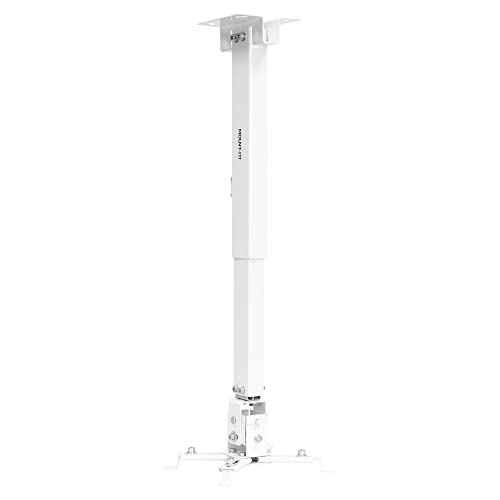
- Wall, flush ceiling, or telescoping ceiling install
- 360° swivel with pitch and roll adjustment
- 44 lb maximum load capacity
Best For: Permanent simulator installs that need multiple mounting options
Ceiling Flex Mount
DYNAVISTA Full Motion Ceiling Projector Mount
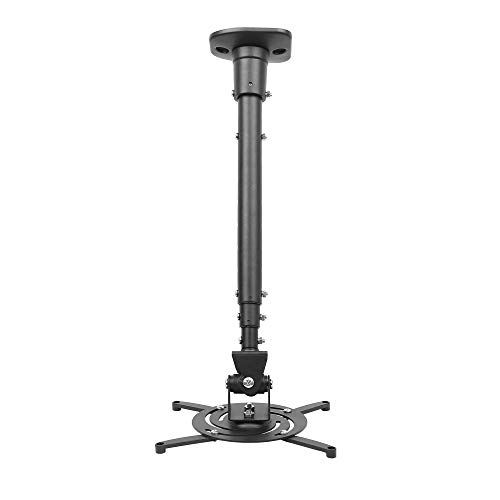
- Tilt, swivel, and 360° rotation
- 43.6" extendable arm for placement flexibility
- Fits most projectors with mounting holes up to 12.1" apart
Best For: Ceiling installs needing long reach and multi-angle adjustment
Compact Ball-Head Mount
Universal Mini Projector Ceiling Mount

- 360-degree adjustable ball head
- 1/4-thread fits many small devices
- Ceiling, desktop, or wall mounting
Best For: Lightweight projectors and compact multi-use mounting needs
Extendable Ceiling Mount
Adjustable Projector Mount with Long Reach
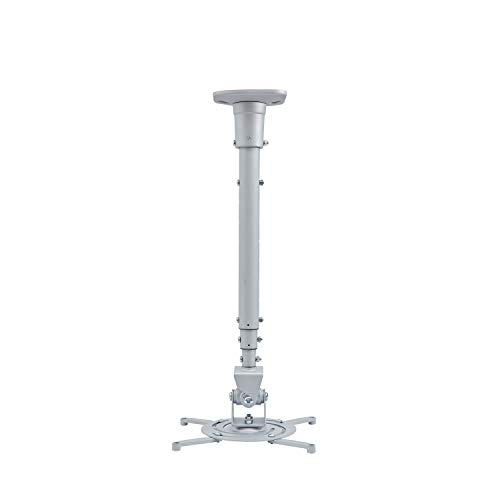
- 43.6-inch extension for flexible placement
- 25° tilt, 90° swivel, 360° rotation
- Supports up to 30 lbs with steel construction
Best For: Golf simulator rooms needing extra ceiling reach
3-in-1 Mount-It!
Universal Projector Ceiling and Wall Mount

- Works as flush, telescoping, or wall mount
- Arm extends to 25.5" on ceiling installs
- Built-in cable management and 40 lb capacity
Best For: Flexible simulator installs needing ceiling or wall mounting
3-in-1 DAWASAPAT
Adjustable Universal Projector Bracket
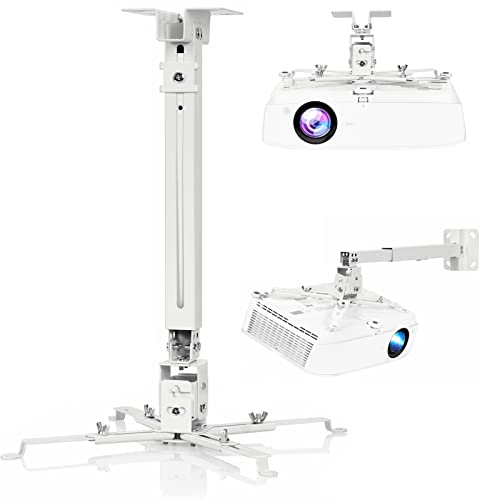
- 3-in-1 ceiling and wall mounting design
- 40 lb capacity with steel construction
- Includes +/-8° tilt and +/-15° swivel
Best For: Simple, sturdy installs on a tighter budget
Versatile 3-In-1 Mount
JOY worker Universal Projector Ceiling Mount

- 3-in-1 ceiling or wall installation
- Adjustable from 5.5 to 25.2 inches
- Supports up to 33 lbs with steel build
Best For: Flexible projector setups that need broad mounting and angle adjustment
Heavy-Duty 3-In-1 Bracket

- Supports up to 44 lbs
- 3 installation modes for wall or ceiling
- Adjustable pole length from 16.9 to 25.6 inches
Best For: Heavier projectors that need a sturdy, adjustable mount
Tray-Style Adjustable Mount
WALI Projector Ceiling Mount Tray PM-005-B

- Tray platform with 13.7 x 8.6-inch size limit
- Supports projectors up to 22 lbs
- Built-in cable management for cleaner installs
Best For: Neat setups where cable management and tray mounting matter
Precision Tripod Stand – Adjustable Projector Tripod for Golf Simulators
If you need adjustable golf simulator projector mounts that can be dialed in quickly, this tripod-style stand is built around flexible positioning and projector-specific alignment. Its 18″ to 45″ height range and 360° rotating gimbal make it easier to match the image to your impact screen, especially in tight indoor simulator spaces.
Best For: Golf sim users with compatible OTM projectors who want a portable, height-adjustable stand with fine angle control.
Pros:
- 18″ to 45″ adjustable height helps place the projector at the right projection level.
- 360° rotating gimbal supports precise image alignment.
- Includes a triangular steel plate and hand screws for secure mounting with supported Optoma models.
- Can support most projectors, cameras, and devices when the gimbal is removed.
Cons:
- Designed specifically for OTM models when using the included steel plate.
- Tripod format may not suit users who want a permanent ceiling or wall install.
- Only a 30-day warranty is listed.
For golfers who want an adjustable setup without committing to a fixed mount, this stand offers strong positioning flexibility and a practical alignment workflow. It is especially appealing when compatibility with the listed Optoma projectors is a priority.
Multi-Install Mount – Mount-It! 3-in-1 Wall or Ceiling Projector Mount
For builders comparing adjustable golf simulator projector mounts, this Mount-It! option stands out for its wall, flush ceiling, and telescoping ceiling configurations. The 360° swivel and pitch/roll adjustment give you room to fine-tune the image, while the cable management system helps keep a simulator bay cleaner.
Best For: Users who want a versatile hard-mounted projector solution with multiple installation styles.
Pros:
- Works as a flush ceiling, telescoping ceiling, or wall mount.
- Full-motion adjustment includes +/- 15° pitch, +/- 8° roll, and 360° swivel.
- Supports up to 44 lb for heavier projector setups.
- Cable management helps organize wires after installation.
Cons:
- Mounting hole spacing must fall between 8.85″ and 12.40″.
- Not as portable as a stand-based solution.
- Installation may be more involved than simpler compact mounts.
This is a strong choice when you want a more permanent, adjustable mount with multiple installation options. The wide compatibility and high weight rating make it especially useful for larger projector installations in simulator rooms.
Ceiling Flex Mount – DYNAVISTA Full Motion Ceiling Projector Mount
If you are shopping adjustable golf simulator projector mounts for a ceiling install, this DYNAVISTA bracket offers a lot of movement for the price. It supports flat ceilings, extends far enough to help with placement, and includes tilt, swivel, and 360° rotation for dialing in the projection angle.
Best For: Ceiling-mounted golf simulator setups that need broad adjustability and a long extension range.
Pros:
- Tilt, swivel, and 360° rotation support flexible aiming.
- Extendable arm reaches 43.6″ and collapses down for tighter spaces.
- Pre-assembled design and quick release hooks simplify setup.
- Supports most major projector brands with mounting holes 12.1″ or less apart.
Cons:
- 30 lb maximum load is lower than some heavier-duty mounts.
- Only intended for flat ceiling installation.
- Requires careful tightening to reduce shaking.
This mount makes sense if you want ceiling placement with enough articulation to fine-tune a simulator image. The long extension and broad compatibility are its biggest strengths, especially in rooms where projector distance matters.
Compact Ball-Head Mount – Universal Mini Projector Ceiling Mount
For smaller setups, this compact option fits the need for adjustable golf simulator projector mounts without taking much space. Its 360-degree ball head and 1/4-thread compatibility make it a flexible choice for lightweight projectors and other small devices in a simulator, office, or home theater.
Best For: Lightweight projector users who want a compact, multi-use mount with simple angle adjustments.
Pros:
- 360-degree ball head makes angle changes quick and easy.
- Standard 1/4″ thread fits many projectors, cameras, and similar devices.
- Can be used as a ceiling mount, desktop stand, or wall mount.
- Includes mounting plate, bracket, screws, and wall anchors.
Cons:
- 4.5 lb maximum weight capacity limits it to lighter equipment.
- Not as robust as larger steel projector mounts.
- Better suited to compact devices than full-size projector builds.
This is a practical pick when you want a small, adaptable mount rather than a heavy-duty simulator bracket. Its low-profile design and included hardware make it useful for light-duty projection where space is tight.
Extendable Ceiling Mount – Adjustable Projector Mount with Long Reach
If you’re shopping for adjustable golf simulator projector mounts, this extendable ceiling bracket is a straightforward option for getting a projector positioned over a hitting bay or screen. It offers a long 43.6-inch extension, broad tilt and swivel movement, and support for projectors with pre-drilled hole patterns up to 12.1 inches apart.
Best For: Golf simulator setups that need a long, adjustable ceiling drop and a simple full-motion mounting solution.
Pros:
- 43.6-inch extension helps place the projector farther from the ceiling.
- Offers 25° tilt, 90° swivel, and 360° rotation for flexible aiming.
- Heavy-duty steel construction supports up to 30 lbs.
- Pre-assembled design with quick-release hooks simplifies installation.
Cons:
- Requires a projector with pre-drilled mounting holes.
- Not intended for vaulted ceilings or non-flat ceiling use.
- Lower weight capacity than some 40 lb alternatives.
This is a good fit if you want an adjustable mount with extra reach and easy angle control, but it works best for projectors that clearly match the hole-spacing requirement and stay within the 30 lb limit.
3-in-1 Mount-It! – Universal Projector Ceiling and Wall Mount
For adjustable golf simulator projector mounts, this Mount-It! model stands out if you want one bracket that can work as a flush ceiling mount, telescoping ceiling mount, or wall mount. Its adjustable arm and full-motion joints make it easier to fine-tune projector placement when aligning to a simulator screen.
Best For: Installers who want a versatile mount with ceiling and wall options plus built-in cable management.
Pros:
- 3-in-1 design supports flush ceiling, telescoping ceiling, and wall mounting.
- Adjustable arm extends from 4.5″ to 25.5″ on ceiling installs.
- Built-in cable management helps keep the setup neat.
- 40 lb weight capacity and lifetime warranty add confidence.
Cons:
- Not for vaulted ceilings or drywall installations.
- Only fits projectors with 3-4 mounting holes and a 8.85″ to 12.44″ pattern.
- Some setups may not need the extra wall-mount versatility.
This is the most flexible option here if you want multiple mounting styles in one product and need room to dial in projector position precisely. Just confirm your projector hole pattern and ceiling/wall structure before buying.
3-in-1 DAWASAPAT – Adjustable Universal Projector Bracket
If you need adjustable golf simulator projector mounts that prioritize a simple universal fit, this DAWASAPAT bracket is built for ceiling or wall use with a steel frame and height-adjustable extension pole. It supports common projector hole patterns between 8.85 inches and 12.44 inches and offers enough adjustability to center the image on a simulator screen.
Best For: Budget-conscious buyers who want a sturdy 3-in-1 mount with basic tilt and swivel adjustment.
Pros:
- 3-in-1 design supports flush ceiling, telescoping ceiling, and wall mounting.
- Solid steel construction supports projectors up to 40 lbs.
- Includes +/-8° tilt and +/-15° swivel for aiming adjustments.
- Quick-release hooks and included hardware simplify setup.
Cons:
- Not compatible with vaulted ceilings or regular drywall.
- Requires projector mounting holes between 8.85″ and 12.44″.
- Less angle range than some full-motion mounts with 360° rotation.
This is a practical option if you want a sturdy, adaptable mount without extra complexity. It covers the basics well, but the smaller adjustment range means it is best for setups that do not require aggressive angle changes.
Versatile 3-In-1 Mount – JOY worker Universal Projector Ceiling Mount
If you need adjustable golf simulator projector mounts that can adapt to different room layouts, this JOY worker model is a flexible pick. It supports ceiling or wall installation, works on flat or sloped ceilings, and offers a long adjustment range for dialing in projector placement.
Best For: Buyers who want a sturdy, highly adjustable mount for ceiling or wall setups.
Pros:
- 3-in-1 installation options: flush ceiling, telescoping arm ceiling, or wall mount
- Adjustable length from 5.5 inches to 25.2 inches for placement flexibility
- Full motion with 30-degree tilt, 30-degree swivel, and 360-degree rotation
- Heavy-duty steel construction supports up to 33 lbs
Cons:
- Support limit is lower than some competing heavy-duty mounts
- Compatibility depends on projector mounting holes spaced 12.5 inches or less apart
- Not every projector will fit, so checking measurements is important
Overall, this is a practical choice if you want broad installation flexibility and strong adjustability for a simulator setup. The combination of motion control and extendable positioning makes it easier to fine-tune alignment.
Heavy-Duty 3-In-1 Bracket – WALI Projector Mount PM-003-W
For adjustable golf simulator projector mounts that need solid support and simple positioning, this WALI bracket is built around a sturdy 3-in-1 design. It handles ceiling or wall installation, offers pole length adjustment, and supports heavier projectors than many basic mounts.
Best For: Users who want a higher-capacity mount for ceiling or wall setups with straightforward adjustability.
Pros:
- Supports up to 44 lbs for heavier projectors
- 3-in-1 mounting: flush ceiling, telescoping arm ceiling, or wall installation
- Pole length adjusts from 16.9 to 25.6 inches for ceiling setups
- Built from high-grade steel for durability
Cons:
- Does not support vaulted ceilings or regular drywall
- Swivel range is limited compared with more fully articulating mounts
- Requires compatible mounting-hole spacing between 8.9 and 12.4 inches
This is a strong pick when weight capacity matters and you want a clean, adjustable installation. Just make sure your ceiling or wall structure matches the listed mounting requirements before buying.
Tray-Style Adjustable Mount – WALI Projector Ceiling Mount Tray PM-005-B
If you want adjustable golf simulator projector mounts with a tray-style platform, this WALI option is designed for practical placement and tidy routing. It fits projectors within its tray size limits, allows multi-dimensional adjustment, and includes hidden cable management to keep the setup cleaner.
Best For: Buyers who prefer a tray platform with cable management for a neat install.
Pros:
- Tray platform measures 13.7 by 8.6 inches
- Supports projectors up to 22 lbs
- Flexible height and angle adjustment for ceiling or wall use
- Built-in cable storage helps reduce clutter
Cons:
- Only fits projectors under the listed tray dimensions
- Lower weight capacity than heavier bracket-style mounts
- Tray design may not suit every projector mounting preference
This model makes sense if you value a tidy, easy-to-manage installation more than maximum load capacity. Its tray format and cable storage are useful for keeping a simulator room organized.
How We Picked the Best Adjustable Golf Simulator Projector Mounts
We prioritized mounts that are practical for simulator setups, with a focus on adjustability, stability, compatibility, and ease of installation. Because golf sim rooms vary in ceiling height, screen position, and projector throw distance, the best options are the ones that make fine-tuning simple without sacrificing security.
We also looked for flexible mounting styles such as ceiling, wall, tray, and tripod designs, since different rooms call for different hardware.
Quick Comparison
Among Adjustable Golf Simulator Projector Mounts, tripod-style stands are often the most flexible for temporary setups, while ceiling and wall mounts usually provide a cleaner, more permanent installation. Tray mounts can help with larger or unconventional projector shapes, and 3-in-1 models are useful if you want to switch between mounting locations.
Key Buying Factors for Adjustable Golf Simulator Projector Mounts
Adjustability and Alignment
Look for tilt, swivel, rotation, and extension features that let you center the image precisely on your impact screen. Small adjustments matter in simulator use, especially when correcting keystone and positioning the lens at the right height.
Mounting Style and Room Layout
Choose a style that matches your space. Ceiling mounts are ideal for permanent rooms, wall mounts work well when ceiling placement is difficult, and tripod or stand options suit renters, portable setups, or multi-use rooms.
Load Capacity and Compatibility
Make sure the mount supports your projector’s weight and mounting pattern. Universal compatibility is helpful, but always verify dimensions, thread types, and bracket spacing before buying.
Cable Management and Clean Installation
For a polished simulator setup, hidden or integrated cable routing reduces clutter and lowers the chance of accidental snags during play.
Who Should Buy Which Adjustable Golf Simulator Projector Mounts?
If you want the cleanest long-term setup, a ceiling or wall mount is usually the best choice. If you need flexibility or plan to move equipment often, a tripod stand or height-adjustable tray mount may be a better fit. For mixed-use spaces, 3-in-1 Adjustable Golf Simulator Projector Mounts offer the most versatility because they can adapt as your room or projector changes.
In short, pick the mount that best matches your room, your projector’s weight, and how often you expect to re-adjust the image.