If you want to control your simulator without walking back to a keyboard, a trackball-equipped control box can make every session smoother. These setups are built for quick navigation, cleaner hitting areas, and less interruption between shots.
In this roundup, we focus on practical options for golfers who want reliable control from the mat, with a mix of wired and wireless choices for different simulator setups.
Best 10 Golf Simulator Control Boxes with Trackball Picks for 2026
Native USB Sim Keyboard
GS Pro Hitting-Mat Control Box

- Native USB keyboard with plug-and-play use
- Includes a 15' USB cable for mat-side placement
- Made in the USA with a 90-day warranty
Best For: GS Pro players who want a simple wired controller at the hitting mat
SkyTrak Course Play Pick
SKT Plug & Play Wired Control Box

- Optimized for SkyTrak Course Play
- Plug-and-play with no software or drivers
- Includes a 15ft cable and 4-year warranty
Best For: SkyTrak players wanting a dedicated wired control box
Wireless Sim Mat Controller

- Wireless setup for less clutter at the mat
- Native USB keyboard with plug-and-play use
- Includes a 3' USB charging cable and 90-day warranty
Best For: GS Pro players who want a wireless controller at the hitting area
Opti-Shot Compatible Pick
USB Golf Simulator Control Box

- Works with TGC, E6, Opti-Shot, GSA, and more
- Commercial-quality buttons tested to 10,000,000 cycles
- Handmade in the USA with a 6 ft cable
Best For: Windows users who need broad simulator compatibility and durable buttons
Wireless GS Pro Control Box
Club Keyboard Pro Series 28-Button Wireless Green

- 28 buttons for broad control
- Wireless Bluetooth connection
- GS Pro ready, plug and play
Best For: GS Pro users who want a wireless, ready-to-use control box
Handmade Wired Control Box
Golf Simulator Control Box with 15 ft USB
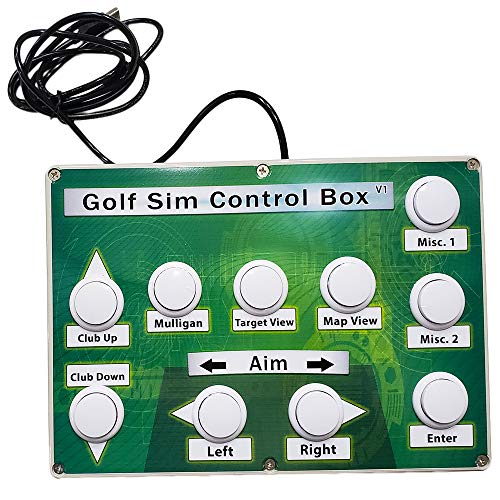
- Works with all golf simulator software
- 15 feet of USB included
- Commercial-quality arcade buttons
Best For: Golfers who want a durable wired box from the hitting area
Compact Wireless Control Box
Club Keyboard Elite Series 20-Button Wireless Green

- 20 programmable buttons
- Wireless Bluetooth connection
- Compact plug-and-play design
Best For: Players who want a smaller wireless control box with simple setup
Premium 14-Button Bluetooth Control
Mag14 14-Button Bluetooth Golf Simulator Control Box

- 14 customizable buttons
- Bluetooth wireless connection
- Rechargeable battery with sleep timer
Best For: PC-based simulator players who want wireless button control
Wireless GS Pro Button Board
Club Keyboard Flex Series 20-Button GS Pro Controller

- 20 programmable buttons
- Bluetooth plug-and-play connection
- GS Pro ready for PC
Best For: GS Pro golfers who want lots of programmable buttons
Native USB Sim Controller
Sim Caddie TGC-18 USB Golf Simulator Control Box
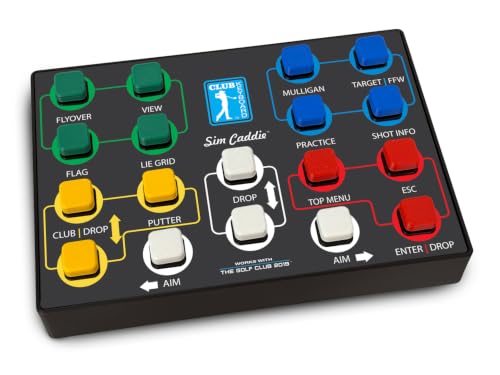
- Native USB keyboard for TGC 2019
- 15-foot USB cable included
- Plug-and-play with no software required
Best For: TGC 2019 players who want a simple wired controller
Native USB Sim Keyboard – GS Pro Hitting-Mat Control Box
If you want golf simulator control boxes with trackball-style convenience from your hitting area, this GS Pro control box keeps the basics simple. It is a native USB keyboard for your sim, so it is designed to work plug and play with no software required, and the included 15′ cable gives you room to place it where you swing.
Best For: GS Pro users who want a straightforward wired control box at the mat.
Pros:
- Native USB keyboard design with no software required
- Includes a 15′ USB cable for flexible placement
- Built to put key simulator controls within reach of the hitting area
- Made in the USA
Cons:
- Wired-only setup may not suit those wanting wireless control
- Focused on basic sim control rather than extra features
This is a practical pick if you value simplicity and a ready-to-use setup over add-on complexity. The 90-day manufacturer warranty is fairly standard, so it makes the most sense for buyers who want a dependable plug-and-play controller for GS Pro.
SkyTrak Course Play Pick – SKT Plug & Play Wired Control Box
Roxor Golf SKT Plug & Play Simulator Control Box for Skytrak Course Play Wired
Check Price On AmazonAmong golf simulator control boxes with trackball-like convenience, this wired SKT unit is built for SkyTrak Course Play. The plug-and-play setup needs no software or drivers, and the 15-foot cable lets you keep the controller at the hitting area while staying connected to your PC.
Best For: SkyTrak users who want a dedicated wired control box for Course Play.
Pros:
- Designed specifically for SkyTrak integration and Course Play
- No software or drivers needed for setup
- 15ft cable supports hitting-area placement
- Wired connection is described as durable and lag-free
Cons:
- Built around SkyTrak use, so it is less universal than generic options
- Does not add wireless flexibility
If SkyTrak Course Play is your main use case, this control box keeps the experience focused and direct. The 4-year warranty also stands out here, making it a strong choice for buyers who want a dedicated wired controller with long-term backing.
Wireless Sim Mat Controller – GS Pro Cable-Free Control Box
If you’re comparing golf simulator control boxes with trackball-style convenience and want fewer cables around the mat, this wireless GS Pro option is worth a look. It is still a native USB keyboard designed for sim use, but it comes with a 3′ USB charging cable and a plug-and-play setup that requires no software.
Best For: GS Pro users who prefer a wireless control box at the hitting area.
Pros:
- Wireless design reduces cable clutter at the hitting area
- Native USB keyboard with no software required
- Includes a USB charging cable for setup and charging
- Made in the USA
Cons:
- Short 3′ charging cable may limit placement during charging
- Still focused on GS Pro-style sim control rather than broader compatibility
This model makes sense if you want the convenience of wireless control without giving up a simple keyboard-style interface. Its 90-day manufacturer warranty is modest, so it is best for buyers prioritizing convenience and a cleaner hitting area.
Opti-Shot Compatible Pick – USB Golf Simulator Control Box
This golf simulator control box is aimed at players who need a Windows-compatible controller for several sim platforms. It supports TGC, TGC 2019, E6, Opti-Shot, GSA, Fitness Golf, and more, and its arcade-style buttons are tested for 10,000,000 cycles for heavy use.
Best For: Windows-based simulator setups that need broad game compatibility.
Pros:
- Compatible with multiple simulator programs including TGC, E6, and Opti-Shot
- Commercial-quality arcade buttons rated for 10,000,000 cycles
- Includes a 6 ft cable
- Handmade in the USA by a veteran-owned business
Cons:
- Only notes Windows compatibility
- Shorter 6 ft cable than some other options
- Design details are more basic than wireless alternatives
For buyers who care more about compatibility and durability than extra features, this model is a solid utility choice. Its long-life buttons and broad software support make it appealing for a range of simulator setups, especially if you want a simple wired control box.
Wireless GS Pro Control Box – Club Keyboard Pro Series 28-Button Wireless Green
Club Keyboard Pro Series Wireless 28 Button GS Pro Golf Simulator Control Box (Green)
Check Price On AmazonIf you want golf simulator control boxes with trackball-style convenience at the hitting area, this wireless option is built for fast access to common simulator functions without leaving your stance. The Club Keyboard Pro Series gives you 28 buttons, eight LED backlit buttons, and a plug-and-play setup designed for GS Pro users who want straightforward control from the bay.
Best For: GS Pro players who want a wireless, ready-to-use control box with lots of programmable-style button access.
Pros:
- 28-button layout for broad simulator control
- 8 LED backlit buttons for easier visibility
- Wireless Bluetooth connection
- Plug and play with no setup required
Cons:
- Designed specifically around PC use
- Green color may not match every setup
This model is a strong fit if you value quick, wireless access and a large button count over minimalist sizing. The GS Pro-ready, no-setup design keeps it simple for golfers who want control at the hitting area.
Handmade Wired Control Box – Golf Simulator Control Box with 15 ft USB
Golf Simulator Control Box - Control Your Simulator Software from Your Hitting Area.
Check Price On AmazonThis is the kind of golf simulator control box with trackball-adjacent convenience that helps keep your keyboard out of the hitting zone and your workflow centered at the mat. It is made to let you control simulator software from your hitting area, and it comes with 15 feet of USB cable so you can place it where it is easiest to reach.
Best For: Golfers who want a durable, wired control box for controlling sim software from the hitting area.
Pros:
- Works with all golf simulator software
- 15 feet of USB included for flexible placement
- Commercial-quality arcade buttons
- Tested for 10,000,000 cycles
Cons:
- Wired setup only
- Not described as wireless or programmable
For buyers focused on durability and universal software compatibility, this is a practical no-frills choice. The veteran-owned, handmade construction and long USB lead make it especially useful if you want a dependable control station near the hitting area.
Compact Wireless Control Box – Club Keyboard Elite Series 20-Button Wireless Green
Club Keyboard Elite Series Wireless 20 Button GS Pro Golf Simulator Control Box (Green)
Check Price On AmazonIf you are comparing golf simulator control boxes with trackball-style ease of use, this compact wireless unit keeps the controls close without adding setup hassle. The Club Keyboard Elite Series offers 20 programmable buttons, Bluetooth connectivity, and a plug-and-play design that lets you control your sim right from the hitting area.
Best For: Players who want a smaller wireless control box with programmable buttons and simple plug-and-play use.
Pros:
- Wireless Bluetooth connection
- 20 programmable buttons
- Plug and play with no software required
- Compact 11.5 x 9 x 2-inch size
Cons:
- Fewer buttons than the 28-button version
- Designed for PC use
This is a sensible pick if you want a lighter button count and a smaller footprint. It still gives you wireless control from the hitting area, which makes it easy to use in a streamlined simulator setup.
Premium 14-Button Bluetooth Control – Mag14 14-Button Bluetooth Golf Simulator Control Box
If you want golf simulator control boxes with trackball alternatives that keep things simple, this Mag14 setup focuses on button-based control from the hitting area. It offers 14 customizable buttons, Bluetooth connectivity, and a rechargeable battery, making it a practical option for PC-based simulator software.
Best For: PC golfers who want a wireless, button-driven control box with plenty of programmable inputs.
Pros:
- 14 customizable buttons for simulator software control
- Bluetooth wireless connection keeps the hitting area cable-free
- Rechargeable battery with a 30-minute inactive sleep timer
- Backed by a 4-year warranty
Cons:
- Works for PC-based software only
- No trackball is included
- Limited to button control rather than a wider input device layout
This is a straightforward choice if your priority is reliable wireless control and a healthy button count. It is less about extra input hardware and more about clean, customizable access to common simulator functions.
Wireless GS Pro Button Board – Club Keyboard Flex Series 20-Button GS Pro Controller
Club Keyboard Flex Series Wireless 20 Button GS Pro Golf Simulator Control Box (Gray)
Check Price On AmazonAmong golf simulator control boxes with trackball-style convenience in mind, this GS Pro-ready board is built for users who want quick input without leaving the hitting area. It uses Bluetooth, offers 20 programmable buttons, and is designed as a plug-and-play PC controller for simulator setups.
Best For: GS Pro users who want a wireless, programmable control box with a high button count.
Pros:
- 20 programmable buttons for flexible control
- Bluetooth wireless connection with plug-and-play setup
- GS Pro ready and compatible with PC
- Buttons can be updated and rearranged to fit your needs
Cons:
- Designed for PC use only
- No trackball function is listed
- May offer more buttons than casual users need
This model stands out if you want a lot of programmable inputs in a wireless package. Its GS Pro focus and rearrangeable buttons make it a strong fit for users who like to tailor simulator controls to their workflow.
Native USB Sim Controller – Sim Caddie TGC-18 USB Golf Simulator Control Box
If you are comparing golf simulator control boxes with trackball alternatives, this Sim Caddie unit is built around simple native USB keyboard control for The Golf Club 2019. It is designed to work right from your hitting mat, includes a 15-foot USB cable, and requires no software setup.
Best For: TGC 2019 players who want a wired, plug-and-play control box with a long cable.
Pros:
- Native USB keyboard design for The Golf Club 2019
- Plug-and-play operation with no software required
- Includes a 15-foot USB cable for hitting-area placement
- Made in the USA
Cons:
- Built specifically for The Golf Club 2019
- Wired USB connection instead of wireless
- No trackball or programmable button count is listed
This is the most direct choice if you want a dedicated controller that simply works with TGC 2019. Its wired, native-keyboard approach keeps setup easy, though it is more specialized than the wireless multi-button options.
How We Picked These Golf Simulator Control Boxes with Trackball
We focused on products that make simulator use easier from the hitting area, with an emphasis on compatibility, button layout, connection type, and overall usability. We also favored controls that suit common golf sim workflows, such as launching course play, navigating menus, and handling software inputs without leaving the mat.
Quick Comparison: What Matters Most
The best choice usually comes down to how you use your simulator. Wireless models offer more placement flexibility, while wired options can be simpler for dependable plug-and-play use. More buttons can help if you switch between multiple commands often, but a cleaner compact layout may be better if you want a minimal footprint near your stance.
Key Buying Factors for Golf Simulator Control Boxes with Trackball
Compatibility
Check that the control box works with your simulator software and operating system before buying. Some models are designed around specific platforms, while others are more general Windows-compatible choices.
Trackball and Button Layout
A good trackball should feel accurate and easy to use with one hand. Button spacing matters too, especially if you want to avoid accidental presses during setup or between shots.
Wired Vs. Wireless
Wireless freedom is convenient when you want a cleaner mat area, but wired units can be easier to set up and may appeal to users who want a straightforward, always-ready connection. Think about battery management if you choose wireless.
Mounting and Reach
The control box should sit within natural reach from your stance without interfering with your swing or footwork. A compact, stable design is usually best for tight simulator rooms.
Who Should Buy Which Golf Simulator Control Boxes with Trackball?
If you want the simplest path and don’t mind a cable, a wired model may be the safest pick. If you prefer a cleaner setup and more placement flexibility, wireless Golf Simulator Control Boxes with Trackball are a strong fit. Heavy course players may value more buttons, while casual users may prefer fewer controls and a streamlined layout. For mixed simulator environments, prioritize broad compatibility and an intuitive trackball feel over extra features you may not use.