If you want faster control without walking back to your computer, a good control box can make a home golf simulator feel much more seamless. The best options let you manage shots, menus, and software settings right from the hitting area.
In this roundup, we focus on portable golf simulator control boxes that are easy to use, practical for home setups, and suited to golfers who want convenience without extra complexity.
Best 10 Portable Golf Simulator Control Boxes Picks for 2026
Wireless RF Control Box
GSPRO Wireless 14-Button Control

- Wireless RF dongle with 30-foot range
- 14 large tactile buttons for sim functions
- Auto-wake, AA battery, and floor/table use
Best For: GS Pro users who want a wireless plug-and-play controller
Wired USB Mat Controller
Sim Caddie USB Keyboard Controller

- Native USB keyboard design
- Includes a 15-foot USB cable
- Plug-and-play with no software required
Best For: Players who want a wired controller beside the hitting mat
Wireless Dark Blue Control Box
GSPRO Wireless Dark Blue 14-Button

- RF dongle wireless control with auto-wake
- 14 tactile buttons in an 11x8-inch panel
- Floor or table placement with AA battery power
Best For: GS Pro users who want a wireless dark blue control box
Wired Green Mat Controller

- Works with GS Pro software
- Native USB keyboard with no software required
- 15-foot cable for mat-side control
Best For: Players who want a green wired controller for GS Pro
Touchless Control
Touchless Golf Simulator Control Box

- Touchless operation for simulator control
- Black plastic construction
- 2-year warranty included
Best For: Golfers seeking a simple touchless control box with warranty support
Wireless Flex
Club Keyboard Flex Series Wireless 20 Button GS Pro Control Box

- Wireless Bluetooth connection
- 20 programmable buttons
- GS Pro ready, plug-and-play
Best For: PC golfers wanting wireless, programmable simulator control
Commercial USB
Golf Simulator Control Box with 15-Foot Cable
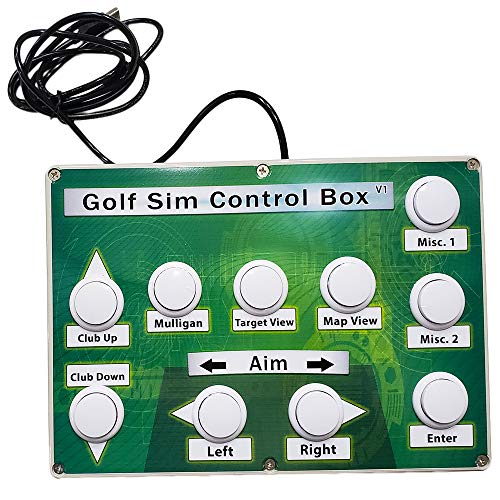
- Works with all golf simulator software
- 15-foot USB cable included
- Commercial-quality arcade buttons
Best For: Buyers wanting a durable wired control box with long cable reach
Wired All-Rounder
Golf Simulator Control Box - Opti-Shot Edition

- USB-compatible wired control box for Windows
- Supports TGC, E6, Opti-Shot, GSA, and more
- Commercial arcade buttons rated for 10,000,000 cycles
Best For: Windows players who want a durable wired controller with broad sim support
Plug-and-Play Wireless Pick

- Native USB keyboard design with no software required
- Built for controls right from the hitting area
- Includes 3' USB charging cable and manual
Best For: Users who want a simple, plug-and-play controller near the hitting mat
Feature-Rich Wireless Option
Premium Mag14 Button Control Box

- 14 customizable buttons for golf simulator control
- Bluetooth wireless with rechargeable battery
- 30-minute sleep timer and 4-year warranty
Best For: PC-based players who want a wireless box with extra control buttons
Wireless RF Control Box – GSPRO Wireless 14-Button Control
If you want one of the more flexible portable golf simulator control boxes for GS Pro, this wireless unit keeps things simple: plug in the RF dongle, and you’re ready to go with no programming required. The 14-button layout gives you quick access to common sim controls, while the 30-foot wireless range and auto-wake behavior make it easy to use from your hitting area or a nearby table.
Best For: Players who want a wireless, plug-and-play GS Pro control panel with lots of tactile buttons.
Pros:
- Wireless RF dongle connection with about 30-foot range
- 14 large 30mm tactile buttons for quick simulator control
- Auto-wake and power-saving design help simplify everyday use
- Can be used on the floor with a club or placed on a table
Cons:
- Requires a single AA battery
- Built specifically around GS Pro software use
This is a practical fit if you want a cleaner setup without a USB cable running to your mat. The button count and flexible placement make it appealing for sim bays where convenience matters as much as control access.
Wired USB Mat Controller – Sim Caddie USB Keyboard Controller
Among portable golf simulator control boxes, this GS Pro-compatible controller stands out for its native USB keyboard design and true plug-and-play operation. The included 15-foot cable lets you keep the controls close to your hitting mat, and the layout is meant to put the essential sim commands within easy reach during a round.
Best For: Golf sim players who prefer a wired, no-hassle controller right from the hitting area.
Pros:
- Native USB keyboard design for simple plug-and-play use
- Includes a 15-foot USB cable for flexible placement
- Made in the USA
- Designed to keep key controls near the hitting area
Cons:
- Wired setup may be less flexible than wireless options
- Manufacturer warranty is limited to 90 days
If you want the most straightforward connection path, this model keeps the setup lean and predictable. It’s a strong choice for golfers who value a cable-based controller that simply works without extra software.
Wireless Dark Blue Control Box – GSPRO Wireless Dark Blue 14-Button
This wireless version of one of the more portable golf simulator control boxes is built for easy GS Pro use with no programming or setup required. It uses an RF dongle, wakes automatically, and gives you 14 large tactile buttons in an 11×8-inch panel that can be used from the floor or on a table.
Best For: GS Pro golfers who want a wireless controller in a dark blue finish with simple operation.
Pros:
- Wireless RF dongle connection with 30-foot range
- 14 large 30mm tactile buttons for common sim actions
- Auto-wake and power-saving features
- Can be used on the floor or on a table
Cons:
- Uses a single AA battery
- Functionally very similar to the other wireless GSPRO model
Choose this version if you like the same plug-and-play wireless layout but want the dark blue colorway. It keeps the setup easy and the controls close at hand without adding software complexity.
Wired Green Mat Controller – Sim Caddie GS Pro Keyboard
If you’re comparing portable golf simulator control boxes for a simple GS Pro setup, this wired Sim Caddie focuses on dependable plug-and-play use from the hitting mat. It functions as a native USB keyboard, includes a 15-foot cable, and is made in the USA, making it a straightforward choice for golfers who want the essentials close by.
Best For: Golfers who want a green, wired GS Pro controller with an easy mat-side setup.
Pros:
- Works with GS Pro golf simulator software
- Native USB keyboard design requires no software
- Includes a 15-foot USB cable for placement flexibility
- Made in the USA
Cons:
- Wired connection may be less convenient than wireless models
- Only a 90-day manufacturer warranty
This model is a good fit if you want the same basic controller concept with a different color option. The long cable and simple keyboard-style operation make it easy to integrate into a compact sim bay.
Touchless Control – Touchless Golf Simulator Control Box
If you want portable golf simulator control boxes that keep you out of the keyboard zone, this touchless option is built for simple simulator-side control. Its black plastic construction and 2-year warranty make it a straightforward pick for golfers who want a dedicated control box without extra setup claims or complicated features.
Best For: Golfers who want a touchless control box with basic, dedicated simulator control and warranty coverage.
Pros:
- Touchless design is the headline feature
- 2-year warranty adds peace of mind
- Black plastic build keeps it simple
- Made specifically for golf simulator use
Cons:
- No compatibility details are listed
- No button count or programming features are provided
- Material is plastic rather than metal
Overall, this is the most basic choice in the group for buyers prioritizing touchless operation and a warranty-backed product. It makes sense if you mainly want a simple control box for golf simulator use and do not need advanced features.
Wireless Flex – Club Keyboard Flex Series Wireless 20 Button GS Pro Control Box
Club Keyboard Flex Series Wireless 20 Button GS Pro Golf Simulator Control Box (Gray)
Check Price On AmazonThis portable golf simulator control box is aimed at users who want wireless control and a lot of button access from the hitting area. It is GS Pro ready, uses Bluetooth, and is designed as a PC keyboard controller with 20 programmable buttons, making it the most feature-rich option in this set.
Best For: PC-based golf simulator users who want wireless Bluetooth control and programmable buttons.
Pros:
- Wireless Bluetooth connection
- 20 programmable buttons for custom control
- GS Pro ready and plug-and-play
- Long battery life and updatable button layout
Cons:
- Designed for PC devices only
- No detailed software compatibility beyond GS Pro readiness
- Wireless setup may not suit users who prefer USB-only control
For buyers comparing portable golf simulator control boxes, this model stands out for flexibility and convenience. If you want wireless operation with enough buttons to map your most-used simulator commands, this is the strongest match here.
Commercial USB – Golf Simulator Control Box with 15-Foot Cable
Among portable golf simulator control boxes, this USB model is built around easy access from the hitting area and a long included cable. It is made for all golf simulator software, uses durable commercial-quality arcade buttons, and is described as handmade in the USA.
Best For: Golfers who want a wired control box with broad software support and a long USB cable.
Pros:
- Works with all golf simulator software
- 15 feet of USB cable included
- Commercial-quality arcade buttons
- Tested for 10,000,000 cycles
Cons:
- Wired USB design instead of wireless
- No programmable button count is listed
- Product details are focused on core control rather than extras
This is a practical pick if you want a dependable wired control box and do not need Bluetooth or advanced customization. The long cable and broad software support make it a strong fit for simulator setups that value simplicity and durability.
Wired All-Rounder – Golf Simulator Control Box – Opti-Shot Edition
If you want a straightforward portable golf simulator control boxes option for a Windows-based setup, this Opti-Shot Edition is built around plug-and-play control from your sim area. It is designed for compatibility with major simulator software like TGC, TGC 2019, E6, Opti-Shot, GSA, and Fitness Golf, and it uses a 6 ft cable for a simple wired connection.
Best For: Windows users who want a wired, durable simulator control box with broad software compatibility.
Pros:
- Works with popular simulator platforms including TGC, TGC 2019, E6, Opti-Shot, GSA, and Fitness Golf
- Commercial-quality arcade buttons are tested for 10,000,000 cycles
- Includes a 6 ft cable for a direct wired setup
- Handmade in the USA by a veteran-owned business
Cons:
- Listed for Windows use, so it is not positioned as a cross-platform controller
- Wired design may be less flexible than wireless options
This is a solid pick if you prioritize reliability, hardware durability, and wide simulator support over extra features. It keeps the control experience simple and focused on the essentials.
Plug-and-Play Wireless Pick – Sim Caddie GS Pro Control Box
For buyers comparing portable golf simulator control boxes, this Sim Caddie model stands out for its native USB keyboard design and no-software-required setup. It is meant to put the most-used simulator controls right at your hitting area, and it includes a 3′ USB charging cable for convenience.
Best For: Golf sim users who want a simple, plug-and-play controller with a wireless-feel setup from the hitting mat.
Pros:
- Native USB keyboard design that works without extra software
- Controls are placed at the hitting area for convenience
- Includes a 3′ USB charging cable and instruction manual
- Made in the USA
Cons:
- Warranty is only 90 days from purchase
- Product details do not specify broad software compatibility beyond the native keyboard approach
If you want the least complicated path to getting controls near your mat, this is a practical choice. Its appeal is simplicity: plug it in, set it up, and start using it.
Feature-Rich Wireless Option – Premium Mag14 Button Control Box
This Premium Mag14 model is a wireless option in the portable golf simulator control boxes category, with 14 customizable buttons for controlling your golf simulator software from the hitting area. It uses Bluetooth, includes a rechargeable battery, and adds a 30-minute inactive sleep timer for power management.
Best For: PC-based sim players who want a wireless controller with lots of customizable buttons.
Pros:
- 14 customizable buttons for simulator control
- Bluetooth wireless operation with rechargeable battery
- 30-minute inactive sleep timer helps conserve power
- Backed by a 4-year warranty
Cons:
- Listed for PC-based software only
- Heavier and larger than the more compact wired options
If you want more direct control inputs and prefer a wireless setup, this model is built for that use case. The bigger button count and long warranty make it a strong fit for dedicated simulator setups.
How We Picked These Portable Golf Simulator Control Boxes
We prioritized models that make simulator operation easier from the hitting mat, with a focus on simple setup, reliable connectivity, and buttons that are easy to use during practice. We also looked for portability, clear compatibility with common simulator software, and features that reduce friction for everyday use.
Quick Comparison
Most Portable Golf Simulator Control Boxes fall into two broad categories: wireless units that use an RF dongle or similar connection, and wired USB models. Wireless versions tend to offer cleaner setup and more freedom around the hitting area, while wired options can appeal to buyers who want straightforward plug-and-play operation. Button count, layout, and build style also matter, especially if you switch between shot selection, menu navigation, and practice modes often.
Key Buying Factors for Portable Golf Simulator Control Boxes
Compatibility
Make sure the control box works with your simulator software and your operating system before buying. Some models are built around GS Pro, while others are more general USB-compatible options for Windows-based setups.
Connection Type
Wireless RF systems are ideal if you want a cleaner setup and more mobility. USB models can be a better fit if you prefer fewer variables and a direct connection.
Button Layout and Count
A larger button layout can speed up operation, especially if you use multiple functions often. If you only need basic controls, a simpler layout may be easier to learn and use quickly.
Build and Portability
Since these devices sit near your hitting area, compact size, stable construction, and responsive tactile buttons are worth paying attention to. A well-built control box should be easy to place, carry, and operate without disrupting your stance or swing routine.
Ease of Use
Look for features such as auto-wake, no-programming setup, or touchless operation if convenience is a top priority. These details can make daily practice smoother and reduce setup time.
Who Should Buy Which Portable Golf Simulator Control Boxes?
If you want the simplest everyday experience, choose a wireless model with tactile buttons and minimal setup. If you value plug-and-play reliability, a USB-compatible control box may be the safer choice. Golfers who want more command options should lean toward larger-button layouts, while those with compact spaces may prefer smaller, lighter designs. In short, the best Portable Golf Simulator Control Boxes are the ones that match your software, your space, and how hands-on you want your practice sessions to be.