Golf ball tracking systems for driving ranges help players and instructors measure ball flight, monitor swing trends, and turn every session into usable data.
From portable launch monitors to smarter range-tracking tools, the right setup depends on accuracy, ease of use, and how you plan to train.
Best 10 Golf Ball Tracking Systems for Driving Ranges Picks for 2026
Premium Range Feedback
Rapsodo MLM2PRO Mobile Launch Monitor

- 15-shot metric tracking with spin and carry data
- Dual-camera video capture with slow motion review
- Bluetooth connection for iOS, Android, and range use
Best For: Golfers who want range-ready shot tracking with simulator features
Smart Scoring System

- Automatic club and shot tracking with 15 sensors
- AI-powered GPS yardages adjusted for conditions
- Strokes gained analytics and smart club distances
Best For: Golfers who want automatic shot tracking and app-based strategy insights
Pro Data with Video

- Tracks 15 metrics including spin, club path, and carry
- Bluetooth setup for iOS and Android
- Includes video swing capture plus 45-day Premium trial
Best For: Golfers who want detailed range data plus video swing review
Portable Flight Analysis

- Photometric tracking for speed, spin, and distance
- Real-time 3D ball-flight visual feedback
- Wireless portable unit with rechargeable battery
Best For: Golfers who want a portable launch monitor with quick visual feedback
Portable Range Feedback
Garmin Approach R10 Renewed Launch Monitor

- Tracks club and ball metrics in the Garmin Golf app
- Adds swing video clips and dispersion charts
- Up to 10 hours of battery life for range sessions
Best For: Golfers who want portable launch-monitor feedback for range practice and home use
iPhone Practice Tracker
Rapsodo MLM Mobile Launch Monitor

- Tracks ball speed, club speed, launch angle, and carry distance
- Includes video replay with shot tracer overlays
- Portable design for range, backyard, or indoor net use
Best For: iPhone and iPad golfers who want portable shot tracking and visual feedback
All-Around Range Analyzer
Garmin Approach R10 Launch Monitor
- Tracks 12+ metrics with the Garmin Golf app
- Includes shot dispersion charts and swing video clips
- Supports virtual rounds on 42,000+ courses
Best For: Golfers seeking a portable monitor with detailed data and training features
Radar Speed Trainer
TheStack Radar Golf Launch Monitor
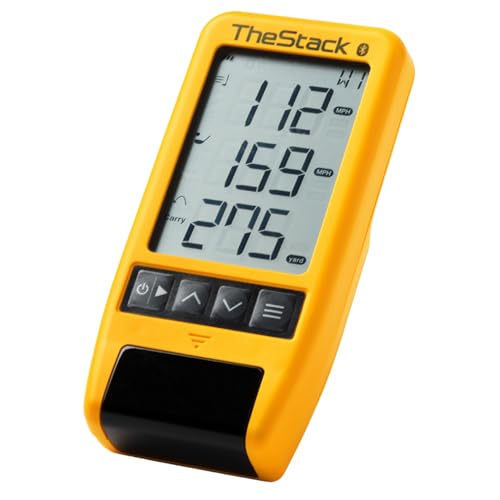
- Measures swing speed and ball speed
- Bluetooth syncs with TheStack app
- Portable for range and course use
Best For: Players focused on speed training and wedge practice
Tour-Grade Range Tracker
SkyTrak+ Golf Launch Monitor Bundle

- Dual Doppler radar plus photometric camera
- Tracks extensive shot and club data
- Includes 1-year Core membership
Best For: Golfers seeking detailed data and simulation-ready practice
Portable Shot Feedback
Voice Caddie SC200Plus Launch Monitor

- Doppler radar with real-time shot data
- Swing speed mode works without a ball
- Stores club stats and average distances
Best For: Range golfers who want simple, portable feedback
Premium Range Feedback – Rapsodo MLM2PRO Mobile Launch Monitor
If you want golf ball tracking systems for driving ranges that do more than just show distance, the Rapsodo MLM2PRO brings launch-monitor detail to practice. With dual-camera capture, Doppler radar, and 15 metrics, it gives you useful shot data whether you’re working indoors or hitting balls at the range.
Best For: Golfers who want range-ready shot tracking with simulator features and detailed swing feedback.
Pros:
- Tracks 15 metrics, including spin rate, spin axis, ball speed, club speed, and launch angle
- Works with iPhone, iPad, or Android over Bluetooth for easy setup
- Includes video swing capture and slow-motion review for form analysis
- Covers indoor and outdoor practice, plus simulator use with supported apps
Cons:
- Premium simulator and app features are part of the MLM2PRO experience, so the best use goes beyond basic tracking
- Designed as a personal launch monitor, not a full-range installed tracking system
Overall, this is a strong pick if your priority is portable, shot-by-shot feedback with more depth than a simple ball tracker. It’s especially useful for players who split time between the driving range and home practice setups.
Smart Scoring System – Arccos Smart Sensors
Among golf ball tracking systems for driving ranges, Arccos takes a different approach by focusing on automatic game tracking and smart distance insights. The sensors attach to your clubs and pair with the app to provide GPS yardages, strokes gained analytics, and club distance data that can guide better practice decisions.
Best For: Golfers who want automatic shot tracking, club distances, and app-based strategy insights.
Pros:
- Includes 15 smart sensors and 1 smart putter sensor
- AI-powered GPS rangefinder adjusts yardages for wind, elevation, temperature, humidity, and altitude
- Strokes gained analytics help identify strengths and weaknesses
- First year membership is included for new members, with a sensor renewal program
Cons:
- Membership is required after the first year
- Focuses on club and shot tracking rather than launch-monitor style ball-flight metrics
This is best if you want a smarter practice routine built around real performance data and not just raw launch numbers. It’s a good fit for golfers who care about course strategy, club gapping, and long-term improvement.
Pro Data with Video – Rapsodo MLM2PRO ProV1 Edition
Rapsodo Golf Launch Monitor - Swing Analyzer, Spin Rate, Indoor/Outdoor, 3 Pro V1 Balls
Check Price On AmazonIf you’re comparing golf ball tracking systems for driving ranges and want a setup that captures both data and swing video, this MLM2PRO package is built for that job. It tracks 15 metrics with Doppler radar and dual-camera capture, while Bluetooth connectivity makes it simple to use with iOS or Android during practice.
Best For: Golfers who want detailed range data plus video swing review in a portable launch monitor.
Pros:
- Measures 15 metrics, including spin, club path, carry distance, and launch angle
- Works with iOS and Android via Bluetooth for quick setup
- Includes video swing capture and slow-motion review
- Comes with a 45-day Premium trial and access to simulator courses and practice tools
Cons:
- Premium simulator features are tied to the app ecosystem
- Best suited for individual practice rather than a shared range installation
This ProV1 edition stands out if you want a practice monitor that can support both technical analysis and simulator-style training. It’s a versatile choice for golfers who want more than basic ball-flight feedback at the range.
Portable Flight Analysis – SkyTrak Golf Launch Monitor
SkyTrak is a strong option if you’re shopping for golf ball tracking systems for driving ranges and want immediate shot feedback in a compact unit. Its photometric technology provides real-time data and 3D ball-flight visual feedback, making it useful for practice sessions where you want to understand launch, spin, and distance.
Best For: Golfers who want a portable launch monitor with quick visual feedback and indoor practice support.
Pros:
- Uses photometric technology for ball speed, carry, total distance, spin rates, and launch data
- Provides real-time visual feedback and 3D ball flight analysis
- Wireless and portable with a built-in rechargeable battery
- Compatible with iOS, Android, and PC
Cons:
- Includes only a 14-day trial membership rather than long-term bundled software
- Best used in controlled practice settings rather than as an installed range system
SkyTrak makes sense for golfers who want a portable, data-focused monitor that shows more than just distance. It’s especially appealing if you value real-time visuals and a flexible setup for home or range practice.
Portable Range Feedback – Garmin Approach R10 Renewed Launch Monitor
If you’re comparing golf ball tracking systems for driving ranges, the Garmin Approach R10 is a portable option built for practice sessions at home, indoors, or on the tee line. Pair it with the Garmin Golf app to review key swing and ball-flight metrics, video clips, and shot dispersion data after each swing.
Best For: Golfers who want a portable launch monitor for driving range practice, home use, and app-based shot analysis.
Pros:
- Tracks key metrics like club head speed, ball speed, swing tempo, ball spin, and launch angle with a compatible smartphone.
- Training mode shows stats for each club plus a shot dispersion chart based on estimated ball flight.
- Automatically records swing video clips with the metrics from that swing.
- Up to 10 hours of battery life helps it last through longer range sessions.
Cons:
- Requires the Garmin Golf app and a compatible smartphone for full feature use.
- Virtual rounds and weekly tournaments need an active subscription.
- Shot flight is estimated through the app rather than presented as direct range hardware tracking.
The Approach R10 is a practical pick if you want a compact way to turn driving range work into measurable practice. Its mix of shot data, video replay, and training tools makes it especially useful for golfers focused on identifying patterns and improving consistency.
IPhone Practice Tracker – Rapsodo MLM Mobile Launch Monitor
For golfers shopping golf ball tracking systems for driving ranges, the Rapsodo MLM focuses on simple shot-by-shot feedback in a compact format. It works with iPhone and iPad only, giving you ball speed, club speed, launch angle, carry distance, and shot shape, along with video replay and shot tracer overlays.
Best For: iPhone and iPad golfers who want portable range feedback with video replay and shot tracing.
Pros:
- Provides shot-by-shot data including ball speed, club speed, launch angle, carry distance, and shot shape.
- Video replay includes an on-screen shot tracer to help you review ball flight.
- Portable design is easy to pack for the driving range, backyard, or indoor net use.
- Free app works on iPhone and iPad, with premium upgrades available for simulator features.
Cons:
- iOS only, so Android users cannot use it.
- Premium simulator courses and game modes are not included by default.
- It is built around the app experience, so phone compatibility matters.
The Rapsodo MLM is a strong choice if you want straightforward range data without a bulky setup. It stands out for golfers who value quick feedback, easy portability, and visual shot review after each swing.
All-Around Range Analyzer – Garmin Approach R10 Launch Monitor
If you’re narrowing down golf ball tracking systems for driving ranges, the Garmin Approach R10 offers a flexible way to measure practice sessions at the range or at home. It pairs with the Garmin Golf app to track 12+ metrics, show shot dispersion, record swing video clips, and support virtual rounds on thousands of courses.
Best For: Golfers who want a portable launch monitor with broad metric tracking and app-based training tools.
Pros:
- Tracks 12+ metrics, including club head speed, ball speed, launch angle, and launch direction.
- Provides shot dispersion charts and training mode stats for each club.
- Automatically captures video clips tied to the metrics of the swing.
- Up to 10 hours of battery life supports longer practice sessions.
Cons:
- Best features depend on the Garmin Golf app and a compatible smartphone.
- Virtual rounds and leaderboard play require an active subscription.
- Uses estimated ball flight in the app for dispersion analysis.
The Approach R10 is a versatile pick if you want one device that covers range practice, swing review, and course simulation. Its app-driven tools make it useful for golfers who want more than basic launch data from a compact monitor.
Radar Speed Trainer – TheStack Radar Golf Launch Monitor
If you’re comparing golf ball tracking systems for driving ranges, TheStack Radar is a compact option built around speed training and simple ball-flight feedback. It measures swing speed and ball speed, estimates carry distance and smash factor, and pairs directly with the TheStack app for range sessions and skill work.
Best For: Golfers who want a portable radar monitor for speed training, wedge practice, and quick range feedback.
Pros:
- Measures swing speed, ball speed, estimated carry distance, and smash factor.
- Connects to TheStack app via Bluetooth for automatic data transfer.
- Includes Stack Wedging sessions plus a bonus putting app.
- Portable design makes it easy to bring to the range or course.
Cons:
- Wedging features require an Apple device with iOS 15.0 or later.
- Android support is limited for the wedge training mode.
- Less focused on full shot data than larger launch monitors.
This is a strong fit if your priority is training feedback rather than a full simulator-style setup. It’s especially appealing for players who want a lightweight monitor that supports structured practice and quick speed checks.
Tour-Grade Range Tracker – SkyTrak+ Golf Launch Monitor Bundle
For golfers looking at golf ball tracking systems for driving ranges, the SkyTrak+ bundle stands out with dual Doppler radar and a photometric camera for detailed shot and club data. It is designed for indoor or outdoor use, and the included Core membership adds course play, driving range tools, and practice modes across multiple devices.
Best For: Golfers who want detailed launch monitor data and simulation-ready practice in a portable bundle.
Pros:
- Uses dual Doppler radar and a photometric camera for ball and club data.
- Tracks carry, ball speed, spin, launch angle, shot shape, club path, and face angle.
- Includes a 1-year Core membership with course play and range features.
- Compact setup with a protected case and portable design.
Cons:
- Premium bundle may be more than casual range users need.
- Requires a very small 2″ x 2″ hitting zone.
- Some features depend on the included membership and supported platforms.
If you want a more complete feedback package for practice sessions, this bundle offers a lot of depth. It’s a good pick for players who want range data that can also support simulation and structured improvement work.
Portable Shot Feedback – Voice Caddie SC200Plus Launch Monitor
Voice Caddie’s SC200Plus is a straightforward option for golfers comparing golf ball tracking systems for driving ranges and home practice. It uses Doppler radar technology to provide real-time shot data, supports swing speed mode without a ball, and stores club statistics for later review.
Best For: Golfers who want an easy-to-use portable monitor for quick range feedback and speed training.
Pros:
- Doppler radar and atmospheric pressure sensors help deliver reliable shot data.
- Real-time LCD display and voice output make feedback easy to follow.
- Swing speed mode works without a ball for practice sessions.
- Stores shot data and club statistics for average distance review.
Cons:
- Data set is more basic than higher-end launch monitors.
- Uses a small, portable format rather than a full simulator system.
- Some users may want more advanced app-based analysis.
This model is a practical pick if you want simple feedback without a complex setup. It offers the essentials for distance tracking and tempo work in a compact package that’s easy to bring to the range.
How We Picked the Best Golf Ball Tracking Systems for Driving Ranges
We focused on Golf Ball Tracking Systems for Driving Ranges that balance reliable data, ease of setup, and real-world usability. Priority went to systems that are portable enough for range sessions, provide useful shot metrics, and offer apps or software that make practice easier to review.
Quick Comparison
In a broad sense, the best options split into a few categories: app-led tracking sensors for everyday game analysis, radar-based launch monitors for portable range use, and camera or photometric systems for deeper shot data and more advanced practice. If you want simple feedback, choose a lighter system. If you want more detailed performance numbers, look for a higher-end monitor with stronger spin and carry measurement.
Key Buying Factors for Golf Ball Tracking Systems for Driving Ranges
Data Accuracy
Look for consistent carry distance, ball speed, launch angle, and spin readings. More advanced systems usually deliver better shot-shape insight, which matters if you are trying to coach or fit clubs.
Portability and Setup
Driving range use favors systems that are easy to carry, quick to align, and dependable in different lighting and spacing conditions. Battery life, app connection quality, and alignment requirements can make a big difference.
Training and Coaching Features
Some systems are built mainly for practice feedback, while others add shot history, club gapping, simulator play, or AI-based analysis. Choose the feature set that matches how you train.
Compatibility
Check whether the unit works with your phone, tablet, or simulator software before buying. For Golf Ball Tracking Systems for Driving Ranges, app support and device compatibility often matter as much as raw data.
Who Should Buy Which Golf Ball Tracking Systems for Driving Ranges?
Beginners and casual golfers should lean toward simple, mobile-friendly systems that make practice more understandable without much setup. Range regulars who want to track progress over time should look for dependable shot logging and club-distance data. More advanced players, coaches, and golfers building a simulator setup should consider higher-end radar or photometric options for fuller ball-flight detail and stronger training value.
If your main goal is better feedback at the range, choose the system that fits your budget, your device ecosystem, and how much data you will actually use.