Golf ball tracking systems with camera sensors can turn practice into measurable improvement, giving you clearer ball flight, better distance insights, and more confidence over every shot.
Below, we focus on the most useful options for golfers who want accurate feedback for training, simulator sessions, and on-course decision-making.
Best 10 Golf Ball Tracking Systems with Camera Sensors Picks for 2026
GOLFTEC-Powered Precision

- Dual Doppler radar plus photometric cameras
- Built-in GOLFTEC Speed Training drills
- SkyTrak practice software and USB-C connectivity
Best For: Golfers who want a camera-based launch monitor with guided training
Camera Rangefinder Pick
Canon PowerShot Golf Rangefinder

- Built-in camera for photos and video
- 6x-12x zoom with image stabilization
- Slope correction and IPX4 water resistance
Best For: Golfers who want a compact rangefinder with camera features
iPhone Shot Tracer

- Shot-by-shot feedback with video replay
- Tracks speed, launch angle, carry, and shape
- Works only with iPhone and iPad
Best For: iPhone and iPad golfers who want portable swing tracking
Automatic Game Tracking

- 16 sensors cover every club in the bag
- Automatic shot tracking and hands-free capture
- A.I. GPS adjusts for weather and elevation
Best For: Golfers who want automatic tracking and smart yardages across the bag
Portable Launch Monitor
FlightScope Mevo Portable Launch Monitor

- 3D Doppler radar tracking
- 8 swing data parameters with spin
- Portable for range, course, or home
Best For: Golfers wanting portable swing and ball-flight data
Smart Game Tracking
Arccos Smart Sensors Automatic Tracking

- 15 sensors plus smart putter sensor
- AI-powered GPS yardages and advice
- Strokes gained and club distance stats
Best For: Golfers who want automatic tracking and AI course insight
Camera-Ready Simulator Monitor
FlightScope Mevo Gen2 with Camera
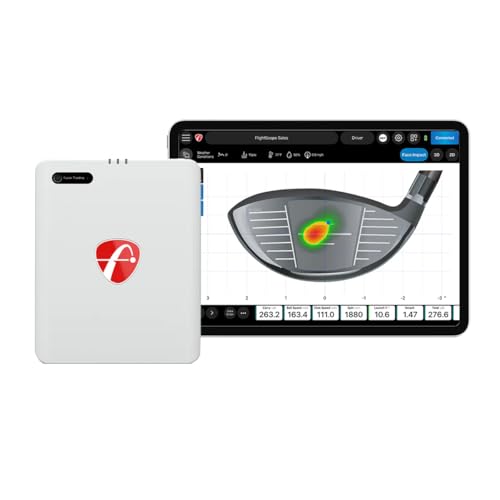
- Built-in front-facing camera
- 18 data parameters with video overlays
- 8 E6 courses plus Shot Tracer
Best For: Golfers wanting a portable monitor with video and simulation
Budget Radar Pick
PRGR HS 130-A Portable Golf Launch Monitor

- Measures club speed, ball speed, smash factor, and distance
- Works without a ball for swing speed training
- No Wi-Fi, Bluetooth, or app required
Best For: Affordable swing-speed training and basic launch data
Premium GPS Handheld
Garmin Approach G82 Launch Monitor

- Radar launch monitor with ball speed, club speed, and tempo data
- 5-inch touchscreen with 43,000+ preloaded courses
- Pairs with CT10 sensors for automatic shot tracking
Best For: Players wanting a GPS handheld with launch-monitor tools
App-Connected Practice Monitor
Voice Caddie SC300i Launch Analyzer

- Measures swing speed, ball speed, distance, smash factor, and launch angle
- Real-time LCD and voice output for instant feedback
- Connects to MySwingCaddie app for deeper analysis
Best For: Portable indoor/outdoor practice with app-based shot data
GOLFTEC-Powered Precision – SKYTRAK ST MAX Launch Monitor
If you’re comparing golf ball tracking systems with camera sensors, the SKYTRAK ST MAX stands out as a practice-focused launch monitor that combines dual Doppler radar with photometric cameras for a detailed read on ball and club data. It also adds GOLFTEC Speed Training, so the device is built not just to measure swings, but to guide improvement through drills and structured practice modes.
Best For: Golfers who want a portable launch monitor with camera-based measurement plus guided speed training.
Pros:
- Dual Doppler radar and photometric cameras capture ball and club data together.
- Built-in GOLFTEC Speed Training adds guided drills and personalized swing insights.
- Includes software tools like Skills Assessments, Bag Mapping, Wedge Matrix, and Randomized Practice.
- Dual USB-C ports support charging and data transfer at the same time.
Cons:
- Focused on serious practice, so it may be more than casual golfers need.
- Requires use of SkyTrak software to get the full training experience.
As a golf ball tracking system with camera sensors, the ST MAX is built for golfers who want more than basic shot feedback. Its mix of radar, cameras, and coaching-oriented software makes it a strong fit when structured improvement is the priority.
Camera Rangefinder Pick – Canon PowerShot Golf Rangefinder
The Canon PowerShot Golf is a practical option if you want golf ball tracking systems with camera sensors in a compact rangefinder format. It pairs a built-in camera with 6x to 12x zoom, image stabilization, and slope correction, making it useful for getting a clear look at the target while also measuring distance on the course.
Best For: Golfers who want a compact rangefinder with built-in photo and video capture.
Pros:
- Built-in camera can capture photos and videos beyond basic ranging.
- 6x to 12x zoom and image stabilization help you find the flag more easily.
- Slope correction shows adjusted yardage based on uphill or downhill shots.
- IPX4 water resistance adds some protection in light rain.
Cons:
- It is a rangefinder, not a full swing-analysis launch monitor.
- Designed around the course experience, so it won’t replace dedicated shot tracking systems.
If you want a camera-equipped golf tool that stays small and easy to carry, this Canon model is a straightforward choice. It offers useful distance features plus image capture without moving into the larger category of launch monitors.
IPhone Shot Tracer – Rapsodo Mobile Launch Monitor
For golfers shopping golf ball tracking systems with camera sensors, the Rapsodo MLM is a portable option built around shot-by-shot feedback and video replay. It works with iPhone and iPad only, and its app shows ball speed, club speed, launch angle, carry distance, shot shape, and a tracer over your recorded swing.
Best For: iPhone and iPad users who want portable swing feedback with video replay.
Pros:
- Records each swing and adds an on-screen shot tracer for review.
- Measures ball speed, club speed, launch angle, carry distance, and shot shape.
- Portable enough for the range, backyard, or an indoor net.
- Pairs with the free Rapsodo app on iPhone and iPad.
Cons:
- iOS only, so Android users cannot use it.
- Some simulator courses and game modes require the premium unlock.
The Rapsodo MLM is a strong fit if you want simple, portable tracking with camera-based video feedback rather than a more complex setup. Its value is in the combination of real numbers and replayable swing footage.
Automatic Game Tracking – Arccos Smart Sensors
Arccos Smart Sensors take a different approach to golf ball tracking systems with camera sensors by focusing on automatic shot capture rather than a launch monitor-style device. The GEN 4 set includes 16 weather-resistant sensors for your clubs, and the app provides A.I.-powered GPS yardages, smart club distances, and hands-free data capture.
Best For: Golfers who want automatic club and shot tracking across an entire bag.
Pros:
- Includes 16 sensors, with one for every club and a dedicated putter sensor.
- Automatic shot tracking and hands-free data capture reduce manual input.
- A.I.-powered GPS rangefinder adjusts for wind, elevation, temperature, humidity, and altitude.
- Designed to track smart club distances over time.
Cons:
- Requires an annual membership after the first year.
- Depends on app-based tracking rather than a camera or launch monitor on the range.
Arccos is best viewed as a game-tracking ecosystem for golfers who want ongoing stats and yardage help, not a range-side swing analyzer. If you value automatic data capture and course management, it offers a very complete system.
Portable Launch Monitor – FlightScope Mevo Portable Launch Monitor
If you want golf ball tracking systems with camera sensors for practice feedback anywhere, the FlightScope Mevo is a compact option built around 3D Doppler radar. It focuses on swing and ball-flight data rather than full camera-based shot capture, so it works best for golfers who want portable numbers they can trust on the range, on the course, or at home.
Best For: Golfers who want a lightweight, portable launch monitor for improving swing data and practicing with purpose.
Pros:
- Portable 3D Doppler radar design for use on the range, course, or at home
- Includes 8 full-swing performance data parameters with direct spin measurements
- Supports video and data on every shot for practice feedback
- Includes PGA, LPGA, long drive, and range challenge modes
Cons:
- Does not list a built-in camera sensor for swing recording
- Focuses on swing/ball-flight metrics rather than advanced simulation features
The Mevo is a practical pick if you care more about reliable portable launch data than a sensor-heavy setup. It is compact, easy to move, and geared toward golfers who want immediate feedback without carrying a larger simulator system.
Smart Game Tracking – Arccos Smart Sensors Automatic Tracking
For golfers comparing golf ball tracking systems with camera sensors, Arccos takes a different approach by using smart sensors and an AI-powered app instead of a camera-based tracking unit. It is designed for automatic game tracking, smart club distances, and real-time yardage adjustments, making it a strong choice if you want shot-by-shot insights without manually logging data.
Best For: Golfers who want automatic shot tracking, smart distances, and AI-driven strategy advice.
Pros:
- Automatic game tracking with 15 smart sensors plus 1 smart putter sensor
- AI-powered GPS rangefinder adjusts yardages for wind, elevation, temperature, humidity, and altitude
- Provides smart club distances and strokes gained analytics
- Includes first-year membership for new members and a 2-year sensor warranty
Cons:
- Requires an app membership after the first year
- Uses sensors and GPS rather than a built-in camera tracking system
Arccos is best for golfers who want an always-on tracking ecosystem more than a camera sensor setup. Its value is in automatic data capture, distance clarity, and analytical feedback that can help you practice and play smarter.
Camera-Ready Simulator Monitor – FlightScope Mevo Gen2 with Camera
The FlightScope Mevo Gen2 is a strong fit if you want golf ball tracking systems with camera sensors in a portable simulator format. It combines 3D Doppler tracking radar with a front-facing camera for recording swings, plus multi-cam support, video overlays, GPS overview, and Shot Tracer for a more complete practice-and-play setup indoors or outdoors.
Best For: Golfers who want a portable launch monitor with built-in camera recording and simulation features.
Pros:
- Built-in front-facing camera for recording swings
- FS Golf software automatically clips, saves, and overlays data on video
- Supports up to three mobile devices plus the internal camera for multi-cam use
- Includes 18 data parameters, 8 E6 simulation courses, and Face Impact software
Cons:
- Simulation bundle is limited to 8 included E6 courses
- Advanced features like Face Impact are add-on dependent
Mevo Gen2 is the most camera-forward option in this group, especially for golfers who want visual feedback alongside launch data. Its mix of portable tracking, video capture, and simulation support makes it well suited to structured practice at home or on the range.
Budget Radar Pick – PRGR HS 130-A Portable Golf Launch Monitor
If you want golf ball tracking systems with camera sensors-style feedback without paying for a premium all-in-one unit, the PRGR HS 130-A is a simple, radar-based option built around core swing and ball data. It measures club head speed, ball speed, smash factor, total distance, and carry distance, and it does not require Wi-Fi, Bluetooth, or an app to operate.
Best For: Golfers who want an affordable portable launch monitor for speed training and basic shot data.
Pros:
- Tracks club head speed, ball speed, smash factor, total distance, and carry distance
- Works without a ball for swing speed training sessions
- No Wi-Fi, Bluetooth, or app setup required
- Stores up to 500 past swings in memory
Cons:
- Radar-based unit, so it is not a camera-sensor system
- More limited than higher-end monitors with app-connected features
- Focused on core metrics rather than deep shot analytics
Overall, the PRGR stands out as a practical value pick for golfers who mainly want reliable speed and distance feedback. It is especially appealing for training because it can measure club speed without a ball, making it useful for repeatable practice sessions.
Premium GPS Handheld – Garmin Approach G82 Launch Monitor
The Garmin Approach G82 is a strong choice for golfers comparing golf ball tracking systems with camera sensors, especially if they want one device that combines launch-monitor feedback with premium course GPS tools. It uses radar to measure ball speed, club speed, smash factor, swing tempo, and putting metrics, while also offering 43,000+ preloaded courses and app connectivity for extra course information.
Best For: Golfers who want a portable radar launch monitor plus a premium GPS handheld for practice and course play.
Pros:
- Combines a launch monitor with a 5″ high-resolution GPS touchscreen
- Measures ball speed, club speed, smash factor, swing tempo, and putting metrics
- Includes 43,000+ preloaded courses and Garmin Golf app pairing
- Can pair with Approach CT10 club tracking sensors for automatic shot tracking
Cons:
- Uses radar, not camera sensors, for launch-monitor measurements
- CT10 club tracking sensors are sold separately
- Active Garmin Golf membership is required for some enhanced course features
This is a versatile option if you want practice data and on-course guidance in one handheld device. The feature set is broader than a basic monitor, but buyers should expect to pay for the added GPS and ecosystem benefits.
App-Connected Practice Monitor – Voice Caddie SC300i Launch Analyzer
The Voice Caddie SC300i is a portable option for golfers who want straightforward shot feedback from a launch monitor rather than a camera-based tracking setup. It measures swing speed, ball speed, carry and total distance, smash factor, launch angle, apex, and spin, with real-time LCD feedback and voice output to help guide range or home practice.
Best For: Golfers who want an easy-to-use portable launch monitor for indoor or outdoor practice.
Pros:
- Tracks a wide set of practice metrics, including launch angle, apex, and spin
- Provides real-time LCD display and voice output
- Connects to the MySwingCaddie app for shot data and performance analysis
- Up to 20 hours of battery life supports longer practice sessions
Cons:
- Uses Doppler radar rather than camera sensors
- Spin numbers are available in the app, not directly on the device
- More practice-focused than full course-management tools
For golfers building a practice routine, the SC300i offers a solid mix of metrics, convenience, and app support. It is best suited to users who want quick feedback and portable training data rather than a full premium GPS experience.
How We Picked the Best Golf Ball Tracking Systems with Camera Sensors
We prioritized systems that deliver reliable ball-flight or shot-tracking data, strong camera or sensor integration, and a good balance of accuracy, portability, and ease of use. We also considered whether each option works well indoors, outdoors, or both, since that matters a lot for Golf Ball Tracking Systems with Camera Sensors.
Quick Comparison
Some models are built for deep simulator-style data and camera-assisted precision, while others focus on portability and fast feedback. If you want full practice-bay analytics, look for more advanced launch monitors. If you mainly want simple shot tracking or swing feedback, lighter handheld options can be a better fit.
Key Buying Factors for Golf Ball Tracking Systems with Camera Sensors
Accuracy and Data Type
Check whether the system measures ball speed, club speed, launch angle, spin, carry distance, and shot shape. More data is helpful, but only if the readings stay consistent.
Camera Vs. Sensor Approach
Camera-based systems often excel at visual ball tracking and simulator use, while radar-based units may track outdoor ball flight more naturally. Many of the best options blend cameras and sensors for broader coverage.
Indoor and Outdoor Use
Make sure the unit fits your practice space. Some products are better in a garage or simulator setup, while others are designed for range sessions and travel.
Setup, Apps, and Compatibility
App quality matters as much as hardware. Look for simple setup, stable device pairing, clear shot history, and compatibility with your phone, tablet, or simulator software.
Portability and Budget
Frequent travelers should favor compact, battery-friendly models. Home users may prefer larger systems with better displays and more detailed feedback.
Who Should Buy Which Golf Ball Tracking Systems with Camera Sensors?
Choose a premium camera-enabled launch monitor if you want the most complete training data and simulator potential. Pick a mobile-friendly tracker if you want convenience, casual practice, and quick distance feedback. If you mainly want to understand patterns over time, a shot-tracking system with connected sensors can be the smartest value.
For most golfers, the best choice is the one that matches where you practice most often and how much detail you actually use. The right Golf Ball Tracking Systems with Camera Sensors should make practice simpler, not more complicated.