If you want better practice sessions, the right launch monitor can turn every swing into usable feedback. The best golf ball tracking systems with launch data help you understand distance, speed, launch, spin, and consistency without guessing.
Below, we focus on portable and simulator-ready options for home, range, and indoor setups, so you can choose the system that matches your budget, space, and training goals.
Best 10 Golf Ball Tracking Systems with Launch Data Picks for 2026
Premium All-in-One Tracker
Rapsodo MLM2PRO Mobile Launch Monitor

- 15-metric radar and dual-camera tracking
- iOS and Android Bluetooth connectivity
- 45-day Premium trial with sim features
Best For: Players wanting deep data and simulator-ready practice
Indoor Accuracy Pick
Bushnell Launch Pro i Circle B Edition
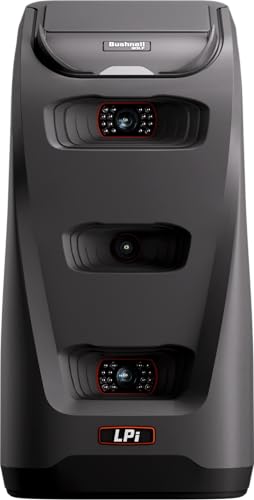
- Three-camera infrared measurement system
- Exact carry, launch, spin, and club speed
- Indoor simulator focus with subscription software
Best For: Indoor simulator golfers prioritizing precision
Portable Range Companion

- Tracks 12+ metrics with Garmin Golf app
- Shot dispersion charts and swing video clips
- Up to 10 hours of battery life
Best For: Portable practice with app-driven analysis
iOS Practice Tracker
Rapsodo MLM Mobile Launch Monitor

- Tracks ball speed, club speed, launch angle, and carry
- Video replay with on-screen shot tracer
- Works with iPhone and iPad only
Best For: iPhone golfers practicing at range or home
Portable Range Trainer
- Tracks club and ball metrics through the Garmin Golf app
- Records swing video clips with matching metrics
- Supports training mode plus virtual course play
Best For: Portable practice with app-based launch data and video review
Data-Driven Simulator

- Dual Doppler radar and photometric cameras capture ball and club data
- Includes built-in GOLFTEC Speed Training drills
- Works with Skills Assessments, Bag Mapping, and Randomized Practice
Best For: Serious golfers who want advanced launch data and training tools
Voice-Output Swing Tracker

- Doppler radar provides real-time shot data tracking
- LCD display and voice output simplify feedback
- Stores shot data and club statistics with up to 20 hours battery life
Best For: Portable practice with quick feedback and stored club stats
Premium Simulator Pick
Garmin Approach R50 Premium Launch Monitor

- 3-camera system for precision launch data
- 10" touchscreen with impact video and virtual play
- Works indoors, outdoors, and via HDMI simulator setup
Best For: Golfers who want a premium all-in-one launch monitor and simulator
Budget Radar Pick
PRGR HS 130-A Portable Launch Monitor

- Doppler radar measures speed, smash factor, and distance
- No Wi-Fi, Bluetooth, or app setup required
- Can track swing speed without a ball for training
Best For: Golfers who want a simple, affordable speed and distance monitor
App-Connected Pick
Rapsodo MLM2Pro Mobile Launch Monitor

- 13 core metrics including spin rate and spin axis
- Pairs with phone or tablet for simulator-style practice
- Dual-camera design and included golf balls
Best For: Golfers who want app-based launch monitoring and portable simulator use
Premium All-in-One Tracker – Rapsodo MLM2PRO Mobile Launch Monitor
If you want golf ball tracking systems with launch data that do more than just show distance, the Rapsodo MLM2PRO is built for detailed practice. Its radar and dual-camera setup captures 15 metrics, including spin rate, club path, launch angle, and carry distance, while the app support lets you review shots on iOS or Android.
Best For: Golfers who want a feature-rich launch monitor for indoor simulation, range sessions, and swing review.
Pros:
- Tracks 15 metrics, including spin, club path, ball speed, and carry distance.
- Works with iOS and Android over Bluetooth for fast setup and shot saving.
- Includes a 45-day free Premium trial with simulator and training features.
- Video swing capture and slow motion help you analyze contact and mechanics.
Cons:
- Full Premium features are limited to the trial unless you continue the subscription.
- Best experience depends on using the companion app and connected device.
For golfers who want a practice tool that combines ball data, video, and simulator options, this is one of the most complete portable picks in the group. It offers a strong mix of feedback and entertainment without losing sight of training value.
Indoor Accuracy Pick – Bushnell Launch Pro i Circle B Edition
If your priority is precise golf ball tracking systems with launch data for indoor simulator use, the Bushnell Launch Pro i is designed around camera-based measurement. Its three-camera infrared system measures impact data for tour-level accuracy, and it focuses on exact ball and club information for golfers who want a cleaner indoor setup.
Best For: Indoor golfers who want camera-based accuracy and are willing to use software subscriptions for full ball and club data.
Pros:
- Three-camera infrared system is built for tour-level impact measurement.
- Provides exact carry distance, launch, spin, and club head speed.
- Designed specifically for indoor simulator use.
- Includes a 14-day free Gold subscription trial and startup accessories.
Cons:
- Ball and club data require an active software subscription.
- Focused on indoor use rather than being the most versatile portable option.
This is a strong fit if you want a more premium simulator-first launch monitor and care most about measured accuracy over extras. It is especially appealing for golfers building a dedicated indoor practice space.
Portable Range Companion – Garmin Approach R10
The Garmin Approach R10 is a practical choice for golfers looking for golf ball tracking systems with launch data that are easy to carry from home to the range. Paired with the Garmin Golf app, it tracks 12+ metrics, shot dispersion, video clips, and virtual rounds, giving you useful feedback without taking up much space.
Best For: Golfers who want a portable launch monitor with broad app features and up to 10 hours of battery life.
Pros:
- Tracks 12+ metrics, including club head speed, ball speed, swing tempo, and spin.
- Works at home, indoors, or on the driving range.
- Includes shot dispersion charts and automatically recorded swing video clips.
- Up to 10 hours of battery life supports longer practice sessions.
Cons:
- Full virtual rounds and leaderboard play require an active subscription.
- Relies on the Garmin Golf app for the main experience.
If you want a portable monitor that balances metrics, video, and practice tools, the R10 is an easy all-around option. It stands out for golfers who want to train with data both indoors and on the course range.
IOS Practice Tracker – Rapsodo MLM Mobile Launch Monitor
For golfers who want straightforward golf ball tracking systems with launch data on an iPhone or iPad, the Rapsodo MLM keeps the focus on practical feedback. It captures ball speed, club speed, launch angle, carry distance, and shot shape, then pairs that data with video replay and shot tracer to help you understand what happened on each swing.
Best For: iPhone and iPad users who want a lightweight, easy-to-use launch monitor for range, backyard, or indoor net practice.
Pros:
- Delivers shot-by-shot feedback with ball speed, club speed, launch angle, carry distance, and shot shape.
- Video replay with shot tracer helps you review ball flight and swing faults.
- Works at the range, in the backyard, or with an indoor net.
- Lightweight and portable for iPhone/iPad users.
Cons:
- Compatible with iOS only, so Android users need a different model.
- Simulator courses and game modes depend on Premium unlocks.
This model makes sense if you want a simple, portable tracker that gives clear shot data without a lot of setup complexity. It is especially useful for golfers who practice often and want immediate visual feedback.
Portable Range Trainer – Garmin Approach R10
If you want golf ball tracking systems with launch data that you can use at home, indoors, or on the driving range, the Garmin Approach R10 is built for flexible practice. Pair it with the Garmin Golf app to track key metrics like club head speed, ball speed, swing tempo, ball spin, and launch angle, then review shot dispersion and recorded swing clips to see what changes are actually working.
Best For: Golfers who want a portable launch monitor with app-based shot data, video review, and virtual course play.
Pros:
- Tracks a wide set of metrics in the Garmin Golf app, including speed, spin, tempo, and launch angle
- Automatically records swing video clips tied to swing metrics when paired with a compatible smartphone
- Supports training mode with club-by-club stats and estimated ball flight dispersion charts
- Includes a phone mount and up to 10 hours of battery life for longer range sessions
Cons:
- Requires a compatible smartphone and the Garmin Golf app for full feature access
- Virtual rounds and leaderboard play require an active subscription
This is a practical choice if you want launch data that helps you work on consistency without committing to a full simulator setup. The mix of app tracking, swing video, and portable design makes it especially useful for repeated practice sessions.
Data-Driven Simulator – SKYTRAK ST MAX
The SKYTRAK ST MAX is aimed at golfers comparing golf ball tracking systems with launch data who want deeper feedback from each swing. Its dual Doppler radar and photometric cameras are designed to capture both ball and club data, while the included GOLFTEC Speed Training system adds guided drills and personalized swing insights for structured practice.
Best For: Golfers who want a more advanced launch monitor with training tools, simulator software, and detailed ball and club data.
Pros:
- Uses dual Doppler radar and photometric cameras for ball and club data capture
- Includes GOLFTEC Speed Training with guided drills and personalized swing insights
- Offers software features such as Skills Assessments, Bag Mapping, Wedge Matrix, and Randomized Practice
- Dual USB-C ports support simultaneous charging and data transfer
Cons:
- More of a serious practice tool than a simple casual range gadget
- Heavier and less pocketable than smaller portable monitors
If your priority is turning launch data into a practice plan, the ST MAX stands out with its built-in training workflow and software tools. It is a strong fit for golfers who want a more complete improvement system rather than basic shot feedback.
Voice-Output Swing Tracker – Voice Caddie SC200Plus
For golfers shopping golf ball tracking systems with launch data in a compact format, the Voice Caddie SC200Plus focuses on quick feedback and easy practice. Its Doppler radar technology and atmospheric pressure sensor help deliver real-time shot data, while the LCD display and voice output make it simple to review performance during indoor or outdoor sessions.
Best For: Golfers who want a portable swing analyzer with instant feedback, stored club stats, and long battery life.
Pros:
- Doppler radar technology provides real-time shot data tracking
- LCD display and voice output make feedback easy to follow during practice
- Stores shot data and club statistics for later review
- Up to 20 hours of battery life supports longer practice sessions
Cons:
- Focuses more on shot tracking and swing feedback than on simulator-style features
- Requires manual review of stored stats rather than app-based course play tools
The SC200Plus is a straightforward practice companion if you want immediate shot feedback without a larger setup. It is especially appealing for golfers who value portability, simple readouts, and data storage for club averages.
Premium Simulator Pick – Garmin Approach R50 Premium Launch Monitor
If you want golf ball tracking systems with launch data that feel closest to a full simulator setup, the Garmin Approach R50 brings a lot to the table. Its 3-camera system, built-in touchscreen, impact video, and on-unit course play make it a strong choice for golfers who want detailed feedback indoors or at the range.
Best For: Golfers who want a premium all-in-one launch monitor and simulator with visual feedback and advanced metrics.
Pros:
- 3-camera system delivers precision metrics and improved spin rate and axis data.
- 10″ touchscreen lets you review stats, impact videos, and virtual rounds without a separate device.
- Tracks ball speed, launch angle, face to path, and shot dispersion for club-by-club analysis.
- Works indoors or outdoors, with HDMI output for a larger simulator display.
Cons:
- Home Tee Hero virtual play requires an active Garmin Golf membership.
- Face-to-path tracking requires the included sticker.
- Premium feature set may be more than casual users need.
Overall, the Approach R50 is built for golfers who want rich launch data plus simulator-style features in one unit. It stands out most when you value detailed feedback, onboard convenience, and a more complete practice experience.
Budget Radar Pick – PRGR HS 130-A Portable Launch Monitor
For golfers comparing golf ball tracking systems with launch data on a budget, the PRGR HS 130-A keeps the focus on the essentials. It uses Doppler radar to measure club head speed, ball speed, smash factor, total distance, and carry distance without needing Wi-Fi, Bluetooth, or an app.
Best For: Golfers who want a simple, affordable speed and distance monitor for practice and training.
Pros:
- Measures club head speed, ball speed, smash factor, total distance, and carry distance.
- Runs on AAA batteries with no Wi-Fi, Bluetooth, or app setup required.
- Can measure club speed without a ball, which is useful for swing speed training.
- Stores up to 500 past swings in memory.
Cons:
- Does not offer the app-connected simulator features of higher-end units.
- Smaller, more basic display than touchscreen-based monitors.
- Focused on core swing and distance data rather than advanced visual feedback.
The PRGR HS 130-A is a straightforward tool for golfers who want dependable launch data without extra complexity. It is especially appealing if your priority is swing-speed work and basic ball-flight feedback at a lower cost.
App-Connected Pick – Rapsodo MLM2Pro Mobile Launch Monitor
The Rapsodo MLM2Pro is a strong option if you want golf ball tracking systems with launch data that also double as a home simulator. It measures 13 core metrics, adds dual-camera support, and pairs with a smartphone or tablet for indoor or outdoor practice.
Best For: Golfers who want app-based launch monitoring, simulator play, and a portable training setup.
Pros:
- Measures 13 core metrics, including spin rate, spin axis, and swing speed.
- Works with smartphone or tablet to create a mobile golf simulator setup.
- Provides real-time data on ball speed, club speed, and launch angle.
- Includes dual-camera support and 3 Callaway RPT Chrome Soft X golf balls.
Cons:
- Depends on a compatible mobile device for the main experience.
- Less self-contained than an all-in-one unit with a large built-in screen.
- Best features are tied to app-based simulator use rather than standalone operation.
For golfers who like a connected training experience, the MLM2Pro offers a useful blend of launch data and simulator capability. It is a practical choice when portability, app integration, and broad metric coverage matter most.
How We Picked These Golf Ball Tracking Systems with Launch Data
We prioritized measurement quality, data depth, setup simplicity, portability, app or simulator compatibility, and value for different golfer types. For buyers comparing Golf Ball Tracking Systems with Launch Data, the most important question is not just whether a unit tracks shots, but how reliably it captures the metrics you will actually use for improvement.
Quick Comparison
Some models are better for fast, portable range practice, while others are built for more complete indoor simulator use. Radar-based units tend to be easier to move and use outdoors, while camera-based systems often deliver stronger short-game and indoor accuracy. Premium touchscreen systems usually offer the most complete all-in-one experience, but they also demand more budget and space.
Key Buying Factors
Data You’ll Use
Look for core numbers such as ball speed, club speed, launch angle, carry distance, spin, and smash factor. More advanced players may also want club path, face angle, and spin axis. The best system is the one that gives you enough information to make better decisions without overwhelming you.
Indoor Vs. Outdoor Use
If you plan to practice in a garage, basement, or simulator room, make sure the unit supports your space constraints and lighting conditions. Outdoor-only range use is more forgiving, but indoor systems often need better setup precision.
Accuracy and Consistency
For Golf Ball Tracking Systems with Launch Data, consistency matters as much as peak accuracy. A monitor that reads every shot in a repeatable way is more useful for training than one with occasional impressive numbers.
App, Software, and Simulator Support
Check whether the device works with iOS, Android, or both, and whether it integrates with simulator platforms you plan to use. Some buyers only need shot feedback, while others want full course play, practice games, and skill challenges.
Who Should Buy Which Golf Ball Tracking Systems with Launch Data?
Beginners and budget-conscious golfers should look for simple, portable monitors that cover the basics and are easy to set up. Mid-handicap players often benefit from a balance of portability and more detailed feedback for practice and gapping. Serious golfers and simulator users should lean toward systems with stronger camera or radar data, wider software compatibility, and better indoor performance.
If you want an all-in-one home setup, consider premium models with displays and deeper analytics. If you mainly want range sessions and swing tracking on the go, a lighter portable unit is usually the smarter buy.