The right practice tool depends on what you want to improve. A simple radar can make speed sessions more measurable, while a launch monitor can add ball-flight data and, in some cases, video or simulated rounds.
These 10 picks span several types of portable golf swing analyzers, including sensor-based feedback and compact launch monitors. Use the guide below to narrow them down by the data you need, where you practice, and the ongoing costs you are willing to take on.
Best 10 Portable Golf Swing Analyzers Picks for 2026
Chrome Tour Bundle
Rapsodo MLM2PRO Launch Monitor

- 15 shot and swing metrics
- Radar and dual-camera feedback
- Three Chrome Tour balls included
Best For: Detailed shot analysis and video review
Pro V1 Bundle
Rapsodo MLM2PRO Launch Monitor

- 15 tracked metrics
- Radar plus dual cameras
- Three Pro V1 balls included
Best For: MLM2PRO buyers who prefer Pro V1 balls
Long-Battery Pick
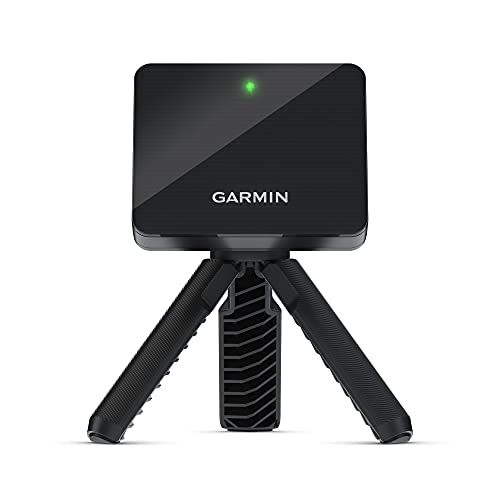
- Up to 10 hours of battery life
- Club stats and estimated dispersion
- Phone-based swing video
Best For: Long range sessions with app-based feedback
Ball-Free Practice Pick
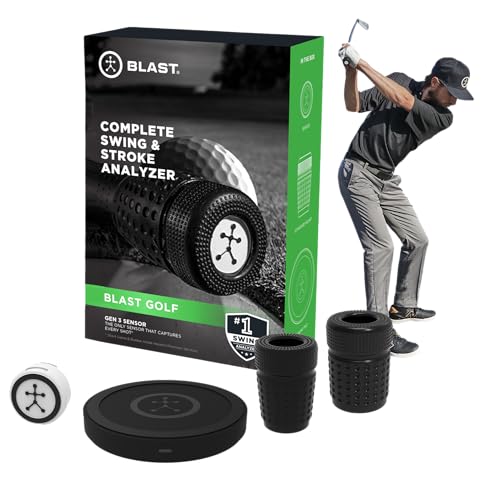
- Swing and putting feedback
- Ball-free Air Swings mode
- Auto-clipped video with metrics
Best For: Swing and stroke practice without hitting balls
Best for Subscription-Free Session Tracking

- Tracks speed, smash factor, and distances
- Free app keeps lifetime shot history
- Speed-training mode; 5+ hour battery
Best For: Golfers tracking range, course, and speed-training sessions without subscription fees
Best App-Free Speed Trainer

- Reads club speed without a ball
- Stores 500 past swings
- Pocket-sized; no app or Wi-Fi needed
Best For: Phone-free swing-speed practice at the range, garage, or gym
Best for App-Based Practice
- Tracks speed, spin, tempo, and launch angle
- App adds club stats, dispersion, and video
- Up to 10-hour battery; IPX7 rated
Best For: Golfers comfortable using a smartphone for detailed practice review
Best for Stack Training
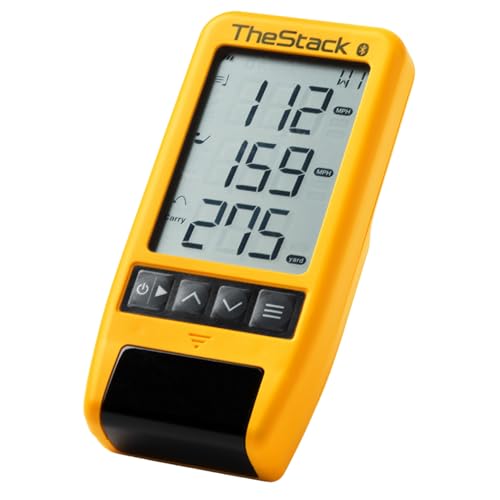
- Measures swing and ball speed
- Bluetooth sync with TheStack app
- Wedge and putting features are iOS-only
Best For: TheStack speed training and iOS wedge practice
Best for No-Ball Speed Practice

- Swing-speed mode needs no ball
- LCD and voice feedback
- Stores club-distance averages
Best For: Indoor speed drills and range distance feedback
Best for Simulator Practice

- Tracks ball and club-head data
- 3D range and five E6 courses included
- Uses standard golf balls
Best For: Indoor and outdoor tracking with virtual practice
Chrome Tour Bundle – Rapsodo MLM2PRO Launch Monitor
Among portable golf swing analyzers, this MLM2PRO bundle suits golfers who want shot data and video feedback for home or range practice. Doppler radar and dual cameras capture 15 metrics, including spin rate, carry distance, club speed, and launch angle.
Best For: Golfers who want detailed launch data and slow-motion contact review, with three Chrome Tour balls included.
Pros:
- Tracks 15 shot and swing metrics.
- Dual cameras support swing review and slow-motion impact footage.
- Includes a tripod, carrying case, charging cable, and 21-day Premium/Core trial.
Cons:
- Access to the advertised simulator courses requires Premium.
- The included premium trial lasts 21 days.
The combination of launch data and video makes it a useful practice tool; check the ongoing membership requirements if simulator play is a priority.
Pro V1 Bundle – Rapsodo MLM2PRO Launch Monitor
This version of the MLM2PRO gives buyers comparing portable golf swing analyzers the same radar-and-dual-camera setup, packaged with three Titleist Pro V1 balls. It captures 15 metrics and supports slow-motion review of club and ball contact.
Best For: Golfers who want MLM2PRO practice features in a bundle with Pro V1 balls.
Pros:
- Measures spin rate, spin axis, carry distance, club speed, and more.
- Video features help reveal swing patterns and impact details.
- Includes a tripod, carrying case, charging cable, and 21-day Premium/Core trial.
Cons:
- Access to the advertised 30,000-plus simulator courses requires Premium.
- The included premium trial is limited to 21 days.
Choose this bundle if the included Pro V1 balls appeal to you; the subscription terms matter more than the ball choice for long-term simulator use.
Long-Battery Pick – Garmin Approach R10
The Garmin Approach R10 is one of the portable golf swing analyzers worth considering for long range sessions: its stated battery life is up to 10 hours. Paired with a compatible smartphone and the Garmin Golf app, it tracks metrics such as club head speed, ball speed, swing tempo, and launch angle.
Best For: Golfers who want extended practice sessions, club-by-club training stats, and phone-based swing video.
Pros:
- Up to 10 hours of battery life and an IPX7 water-resistance rating.
- Training mode shows club stats and a shot dispersion chart based on estimated ball flight.
- Automatically recorded swing clips include metrics when paired with a compatible smartphone.
- Includes a tripod stand, phone mount, and carry case.
Cons:
- Metric viewing and video features depend on a compatible phone and the Garmin Golf app.
- Virtual rounds on more than 42,000 courses require an active subscription.
The R10 offers a practical mix of practice data and portability, especially if you already plan to use your phone at the range.
Ball-Free Practice Pick – Blast Motion Golf GEN3 Sensor
Unlike launch monitors focused on ball flight, the Blast Motion sensor is a choice among portable golf swing analyzers for swing and putting-stroke work. It sends real-time feedback to the Blast app, and its Air Swings mode lets you practice without a ball.
Best For: Golfers who want swing and putting feedback they can use even when they cannot hit balls.
Pros:
- Provides real-time swing and stroke feedback through the smartphone app.
- Air Swings mode supports practice without a ball.
- App video can auto-clip swings and strokes with metrics overlaid.
- Includes one month of membership for new users.
Cons:
- It is a swing-and-stroke sensor, not a ball-flight launch monitor.
- The included membership period for new users is one month.
Its strength is accessible mechanics practice from tee to green; choose a launch monitor instead if carry distance and other ball-flight measurements are your main goal.
Best for Subscription-Free Session Tracking – Shot Scope LM1
Among portable golf swing analyzers, the Shot Scope LM1 suits golfers who want immediate speed and distance numbers plus a lasting practice record. It measures club and ball speed, smash factor, carry distance, and total distance, with session history available in its free app.
Best For: Golfers who want on-course, range, and speed-training sessions without an app subscription.
Pros:
- Displays club speed, ball speed, smash factor, carry, and total distance.
- Speed-training mode works with clubs and speed sticks.
- Free GPS app stores lifetime shot history; no subscription is required.
- IPX3-rated design and 5+ hours of battery life support outdoor sessions.
Cons:
- IPX3 protection is rain-ready, not a waterproof rating.
- Viewing lifetime session history requires the app.
The LM1 is a practical pick if you value a shot-by-shot record alongside straightforward launch-monitor feedback. Its dedicated speed mode also gives it a clear role beyond ordinary range sessions.
Best App-Free Speed Trainer – PRGR HS 130-A
The PRGR HS 130-A is one of the more straightforward portable golf swing analyzers for golfers who prefer a standalone device. Its Doppler radar reports club head speed, ball speed, smash factor, and carry and total distance without Wi-Fi, Bluetooth, or an app.
Best For: Golfers focused on swing-speed training who want pocket-sized feedback without a phone.
Pros:
- Measures club head speed without hitting a ball, including swings with training aids.
- Stores up to 500 past swings on the device.
- Compact design runs on AAA batteries and requires no app connection.
Cons:
- No app connectivity for golfers who want phone-based session analysis.
- AAA batteries must be replaced rather than recharged in the device.
Choose the PRGR if quick speed checks matter more to you than connected features. Its ball-free measurement makes it especially useful for training sessions away from the range.
Best for App-Based Practice – Garmin Approach R10 (Renewed)
For golfers comparing portable golf swing analyzers with richer practice tools, this renewed Garmin Approach R10 pairs with a compatible smartphone and the Garmin Golf app. It tracks metrics including club head speed, ball speed, swing tempo, ball spin, and launch angle, and can pair swing-video clips with shot data.
Best For: Golfers who want app-based club stats, shot dispersion, and swing video at home or on the range.
Pros:
- Training mode shows per-club stats and a shot-dispersion chart based on estimated ball flight.
- Automatically recorded swing clips can include metrics when paired with a compatible smartphone.
- Up to 10 hours of battery life and an IPX7 waterproof rating.
- Includes a tripod stand, bag-mounted phone holder, and carry case.
Cons:
- Key training and video features require a compatible smartphone and the Garmin Golf app.
- Virtual rounds and weekly tournaments require an active subscription.
- This renewed listing specifies a 90-day limited warranty.
The R10 offers more ways to review a practice session than a simple speed display, but its appeal depends on whether you want to use the companion app. Factor in the subscription requirement if virtual golf is a priority.
Best for Stack Training – TheStack Radar
Among portable golf swing analyzers, TheStack Radar is a focused choice for golfers who want swing-speed feedback and wedge practice in TheStack app. It measures swing and ball speed, then estimates carry distance and smash factor.
Best For: Golfers using TheStack for speed training, especially iPhone users who also want guided wedge practice.
Pros:
- Measures swing speed and ball speed, with estimated carry distance and smash factor.
- Automatically sends training speeds to TheStack app over Bluetooth.
- Includes access to Stack Putting and a one-month trial of Stack Wedge Mode.
Cons:
- Stack Wedging and Stack Putting are iOS-only; Android support is limited to speed training.
- Carry distance is an estimate rather than a direct measurement.
Choose this compact radar if structured speed work is your priority. Check device compatibility before buying if its wedge and putting features matter to you.
Best for No-Ball Speed Practice – Voice Caddie SC200Plus
The Voice Caddie SC200Plus stands out among portable golf swing analyzers for its no-ball swing-speed mode, which lets you practice speed indoors without hitting a shot. Its built-in LCD and voice output give immediate feedback without requiring you to check a phone.
Best For: Golfers who want simple speed sessions indoors and shot-distance feedback during range practice.
Pros:
- Swing-speed mode works without a ball.
- LCD and voice output provide real-time feedback.
- Stores shot data and club statistics, including average distances by club.
- Adjustable loft settings support practice with different club conditions.
Cons:
- No-ball mode is for swing-speed practice; shot feedback requires hitting balls.
- Its listed features do not include a 3D simulator or virtual courses.
If you value immediate on-device feedback over simulator features, the SC200Plus is a practical fit for home speed drills and outdoor distance checks.
Best for Simulator Practice – Voice Caddie SC4 Pro
For golfers comparing portable golf swing analyzers with simulator options, the Voice Caddie SC4 Pro combines ball and club-head tracking with a built-in screen and voice output. It supports indoor and outdoor sessions using standard golf balls.
Best For: Golfers who want one portable device for shot tracking, speed training, and virtual-range practice.
Pros:
- Provides ball and club-head data with on-device screen and voice feedback.
- Includes a 3D driving range and E6 Connect access with five included courses.
- Offers simulator, practice/target, and speed-training modes.
- Works with standard golf balls; no specially marked balls are required.
Cons:
- Advanced statistics and distance calibration require the VOICECADDIE S app.
- Weighs 590 g, more than the other two devices listed here.
The SC4 Pro is the most feature-rich option in this group for golfers who will use its virtual practice modes, not just its speed readings.
How We Picked These Portable Golf Swing Analyzers
We considered the different jobs a portable practice device can do: measure swing speed, report launch and distance data, capture swing or stroke motion, and support simulator practice. We also weighed setup demands, indoor and outdoor usability, battery-powered portability, app features, and potential subscription costs. These products do not all measure the same things, so a longer feature list is not automatically a better fit.
Some listings are closely related rather than distinct devices. The two Garmin Approach R10 entries appear to describe the same model, while the two Rapsodo MLM2PRO listings differ in their included golf balls. Check the exact bundle contents before comparing prices.
Quick Comparison: Match the Tool to the Task
Speed and Distance Feedback
Look first at the PRGR HS 130-A, TheStack Radar, or a straightforward launch monitor such as the Shot Scope LM1 if your main goal is repeatable speed or shot-distance practice. Confirm which measurements each device actually displays; club speed, ball speed, carry, and total distance are different metrics.
Ball Flight and Simulator Practice
The Garmin Approach R10, Rapsodo MLM2PRO, and SC4 PRO target golfers who want a broader launch-monitor experience. Compare their supported data, compatible apps, simulation options, and the space required behind and in front of the ball before buying for home use.
Swing and Stroke Feedback
Blast Motion takes a different approach from a radar launch monitor, emphasizing motion and video feedback, including putting. Voice Caddie’s portable monitor combines shot-data tracking with practice feedback. Choose based on whether you need to diagnose a movement or measure the resulting shot.
Key Buying Factors for Portable Golf Swing Analyzers
Measurements You Will Use
Start with one practice question: Are you trying to increase speed, tighten carry-distance gaps, work on launch conditions, or review swing mechanics? A device that reports ball speed cannot, by itself, explain every cause of a missed shot. Check whether figures are measured or estimated and whether your preferred clubs and shot types are supported.
Practice Space and Setup
Radar units may need specific clearance and alignment, particularly indoors. Camera-assisted features can depend on lighting and a clear view of the strike. Check the manufacturer’s stated space requirements against your hitting area, including safe ball flight into a net, before treating any monitor as an indoor solution.
Apps and Total Cost
Verify phone or tablet compatibility, what works without an internet connection, and which features require a subscription. Simulator access, video storage, and advanced analytics may affect long-term value more than the device’s initial price. Bundle extras, including specialty balls, are worth counting only if you will use them.
Who Should Buy Which Portable Golf Swing Analyzers?
Speed-focused golfer: Choose a compact radar that shows the speed metrics you plan to track. Range regular: Prioritize fast setup, readable feedback, and useful carry data. Home simulator buyer: Compare space requirements, software costs, and device compatibility before choosing a launch monitor. Mechanics- or putting-focused golfer: Consider motion and video feedback rather than paying primarily for ball-flight data. The best choice is the one that answers your practice question consistently in the place you actually hit balls.