The best practice tool depends on what you want to improve. A wearable sensor can help you examine swing motion, while a launch monitor can show what happened to the club and ball at impact.
These 10 options span compact swing trainers, speed-focused radar, and launch monitors for the range or a home setup. Before buying, check Android compatibility, required space, and whether the features you want need a subscription.
Best 10 Golf Swing Analyzers for Android Picks for 2026
Best for Detailed Shot Data
Rapsodo MLM2PRO with Pro V1 Balls

- Doppler radar and dual cameras
- Tracks 15 shot metrics
- Includes three Pro V1 balls
Best For: Detailed shot tracking and contact review
Best Chrome Tour Bundle
Rapsodo MLM2PRO with Chrome Tour Balls

- Tracks 15 shot metrics
- Dual cameras capture swing and impact
- Verify conflicting included-ball details
Best For: MLM2PRO tracking with a Callaway ball bundle
Best for Portable Practice
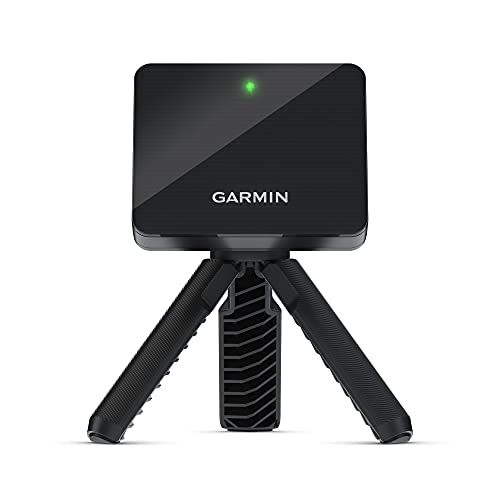
- Up to 10 hours of battery life
- Per-club stats and swing video
- Virtual courses require a subscription
Best For: App-based practice at home or on the range
Best for Swing and Stroke Feedback
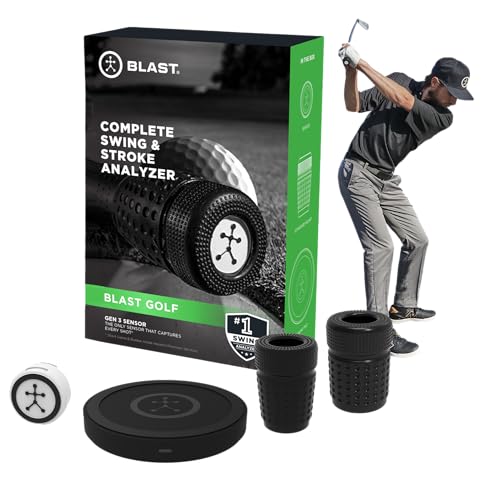
- Full-swing and putting feedback
- Air Swings mode needs no ball
- Confirm Android app compatibility
Best For: Swing and putting-stroke review
Speed Training Pick
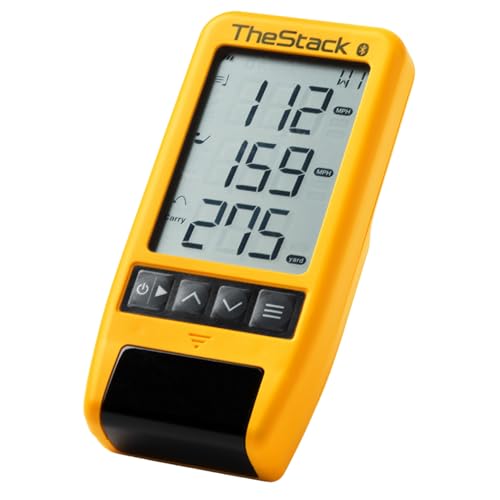
- Tracks swing and ball speed
- Bluetooth syncs speed data to Android
- Wedging and putting features are iOS-only
Best For: Android-based speed training
Body Mechanics Pick
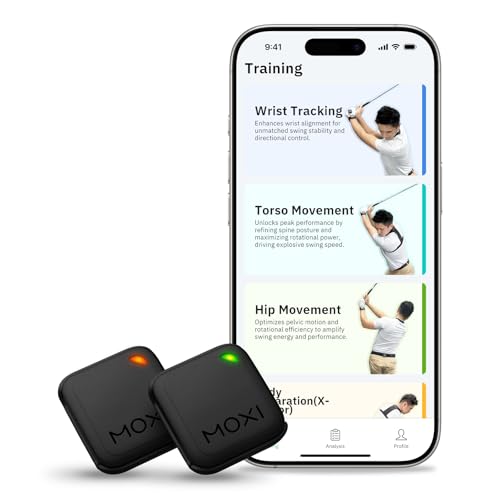
- Two wearable motion sensors
- 3D playback and four training modes
- Free Android app with no subscription
Best For: Reviewing swing mechanics
Simulator Pick
FlightScope Mevo Gen2 Power Bundle

- 18 listed practice data parameters
- Eight E6 Connect courses included
- Confirm Android Shot Tracer support
Best For: Shot tracking and simulator practice
No-Subscription Pick

- 13 tracked metrics
- Environmental sensors
- 15 ft needed indoors
Best For: Fee-free indoor and outdoor practice with room for radar tracking
Best Heavy-Duty Pick

- 3D range and five E6 courses
- Screen and voice output
- Uses standard golf balls
Best For: Simulator practice with target and speed-training modes
Android-Compatible Pick

- Supports Android 11+
- 3D range with two views
- No subscription listed
Best For: Android users seeking app-based metrics and virtual-range views
Best for Detailed Shot Data – Rapsodo MLM2PRO with Pro V1 Balls
For golfers comparing golf swing analyzers for android, this MLM2PRO bundle combines Doppler radar and dual cameras to track 15 shot metrics, including spin rate, club path, and carry distance. It includes a tripod, carrying case, and three Titleist Pro V1 balls.
Best For: Golfers who want detailed shot data and slow-motion contact review at home or on the range.
Pros:
- Tracks 15 metrics, including spin axis and launch angle.
- Dual cameras support swing capture and slow-motion contact review.
- Includes a 21-day Premium/Core trial for additional practice and simulation features.
Cons:
- Access to 30,000+ simulator courses requires Premium.
- The included Premium/Core trial lasts 21 days.
Choose this bundle if the included Pro V1 balls suit your practice setup. Check which features you will use after the trial before committing to it for simulation.
Best Chrome Tour Bundle – Rapsodo MLM2PRO with Chrome Tour Balls
Among golf swing analyzers for android, this MLM2PRO package stands out for combining Doppler radar, dual cameras, and 15 tracked metrics with included Callaway golf balls. It is designed for indoor or outdoor practice and can capture swing footage and slow-motion club-to-ball contact.
Best For: Golfers who want MLM2PRO shot tracking with the included Callaway ball bundle.
Pros:
- Measures spin rate, spin axis, carry distance, club speed, and more.
- Provides swing capture and slow-motion impact review.
- Includes a tripod, carrying case, and 21-day Premium/Core trial.
Cons:
- Access to 30,000+ simulator courses requires Premium.
- The supplied title says Chrome Tour, while the contents list specifies Chrome Soft X; verify the included balls before buying.
The launch-monitor features match the other MLM2PRO bundle listed here, so the ball package is the practical distinction. Confirm the exact balls and post-trial features if either matters to your purchase.
Best for Portable Practice – Garmin Approach R10
The Garmin Approach R10 is a portable option to consider when shopping for golf swing analyzers for android, but confirm that your phone is compatible with the Garmin Golf app before buying. Paired with a compatible smartphone, it tracks metrics such as club head speed, ball speed, swing tempo, and launch angle.
Best For: Golfers who want portable range or home practice with app-based stats and swing video.
Pros:
- Training mode shows per-club stats and a shot dispersion chart based on estimated ball flight.
- Automatically recorded swing clips can display the corresponding metrics.
- Offers up to 10 hours of battery life and includes a tripod and phone mount.
Cons:
- Metrics and video features require pairing with a compatible smartphone and the Garmin Golf app.
- Virtual rounds on 42,000+ courses require an active subscription.
This is a practical choice if you move between home and the driving range. Its app-centered workflow makes phone compatibility worth checking first.
Best for Swing and Stroke Feedback – Blast Motion GEN3
Unlike launch monitors focused on ball flight, the Blast Motion GEN3 sensor centers on swing and putting-stroke feedback. If you are comparing golf swing analyzers for android, verify Android compatibility for the Blast app before choosing it; the supplied product details do not specify supported operating systems.
Best For: Golfers who want to review full swings and putting strokes, including practice without a ball.
Pros:
- Sends real-time feedback to the Blast smartphone app.
- Air Swings mode supports practice without a ball.
- App video can auto-clip swings or strokes and overlay metrics.
Cons:
- Only one month of membership is included for new users.
- The supplied details do not confirm Android compatibility.
Pick this sensor for swing-and-stroke review rather than the shot metrics emphasized by the launch monitors above. Check app compatibility and membership terms before purchasing.
Speed Training Pick – TheStack Radar
Among golf swing analyzers for android, TheStack Radar is a focused choice for golfers tracking swing speed. It measures swing and ball speed, then estimates carry distance and smash factor; Bluetooth sends training speeds to TheStack app on Android.
Best For: Android golfers following TheStack speed-training programs.
Pros:
- Measures swing speed and ball speed.
- Automatically sends training speeds to the app via Bluetooth.
- Estimates carry distance and smash factor.
Cons:
- Stack Wedging and Stack Putting are iOS-only.
- Carry distance is an estimate, not a measured result.
Choose it for straightforward speed tracking rather than Android access to TheStack’s full wedge-practice features.
Body Mechanics Pick – MOXI SwingMotion
If you’re comparing golf swing analyzers for android to work on technique, MOXI SwingMotion takes a wearable approach. Its two sensors can be positioned on the wrist, torso, or hips, while the Android app provides 3D swing playback and metrics for reviewing movement.
Best For: Golfers who want to examine wrist angles, body rotation, and hip–torso separation.
Pros:
- Four modes target wrist, torso, hip, and X-Factor separation.
- 3D playback, graphs, and shot history support swing review.
- Free iOS/Android app has no subscription requirement.
- Listed battery life exceeds four hours.
Cons:
- Requires wearing and positioning two sensors for practice.
- Listed features focus on body mechanics, not ball-flight measurements.
This is the more relevant option when your goal is to identify movement patterns rather than measure where the ball goes.
Simulator Pick – FlightScope Mevo Gen2 Power Bundle
For golfers considering golf swing analyzers for android alongside home simulation, the FlightScope Mevo Gen2 Power Bundle combines a portable radar launch monitor with an eight-course E6 Connect bundle. Its listing names Android as a supported operating system and specifies 18 data parameters across full swings, chipping, and putting.
Best For: Golfers who want shot data and simulator play in one portable setup.
Pros:
- Provides 18 listed practice data parameters.
- Includes eight E6 Connect simulation courses.
- Supports indoor and outdoor use, with up to six hours of battery life.
- Offers video recording with data overlays.
Cons:
- The supplied setup instructions for Shot Tracer specifically reference iOS devices; verify that feature before buying for Android.
- At a listed 1.1 pounds, it is less compact than the wearable MOXI sensors.
It offers the broadest practice setup here, but Android buyers should confirm which video and tracer features work on their device.
No-Subscription Pick – GX-03 Portable Launch Monitor
Among golf swing analyzers for Android, the GX-03 is worth considering if you want detailed launch data without an ongoing app fee. It tracks 13 metrics and uses built-in environmental sensors to adjust shot data for current conditions.
Best For: Golfers who want indoor and outdoor practice data with no subscription fee.
Pros:
- Tracks attack angle, launch angle, spin rate, ball speed, club speed, and carry distance.
- Offers an OLED display, app voice feedback, and 45° and 90° practice views.
- Allows per-club distance compensation from 80% to 120%.
Cons:
- Indoor radar tracking requires 15 feet of total space.
- Does not measure horizontal clubface angle or swing path.
The space requirement is the key buying check. If your practice area can accommodate it, the GX-03 offers a broad set of metrics without recurring app costs; confirm Android compatibility before purchasing, as the supplied specifications do not state it.
For golfers comparing golf swing analyzers for Android, the SC4 PRO adds a built-in screen and voice output to its launch-monitor data. Its 3D Driving Range and included access to five E6 courses make it particularly appealing for simulator-focused practice.
Best For: Golfers seeking a portable monitor with virtual-range and structured training modes.
Pros:
- Offers a 3D simulator, target practice, and speed-training modes.
- Connects to the VOICECADDIE S app for statistics and distance calibration.
- Works indoors or outdoors with standard golf balls.
Cons:
- The supplied specifications do not confirm Android compatibility for the companion app.
- The supplied notes do not list the full set of measured metrics.
Choose the SC4 PRO if simulation and varied practice modes matter more to you than a published metric-by-metric breakdown. Verify phone compatibility before buying for an Android-based setup.
The Pro X1 Plus is one of the golf swing analyzers for Android here with an explicit app requirement: Android 11 or newer. It pairs swing and ball-flight metrics with environmental sensors and a 3D virtual driving range, with no subscription listed.
Best For: Android 11+ users who want app-based swing analysis and virtual-range practice.
Pros:
- Lists attack angle, launch angle, spin rate, spin axis, and swing speed among its insights.
- Uses temperature, humidity, and barometric-pressure sensors to adjust shot data.
- Provides 45° and 90° views of virtual ball flight and supports a swing-only mode.
Cons:
- Requires Android 11 or newer for Android app use.
- The supplied notes do not specify indoor space requirements.
Its stated Android compatibility makes the Pro X1 Plus the clearest phone-match option of these three. Check that your device meets the OS requirement and that your practice space suits the setup before ordering.
How We Picked These Golf Swing Analyzers for Android
We compared the selected products by the feedback they are designed to provide, where they can be used, and the practical costs of using them. The list includes wearable motion sensors, speed-focused radar, and portable launch monitors; those categories solve different problems. We did not treat a higher advertised metric count as proof of better accuracy or assume that every listed feature works the same way on Android. Confirm current device support and feature availability with the manufacturer before ordering.
Quick Comparison: Which Type Fits Your Practice?
Wearable swing sensors, such as Blast Motion and MOXI SwingMotion, are the starting point if you want feedback about motion or video rather than ball flight. Speed-focused radar, such as TheStack Radar, suits golfers working on swing-speed training. Launch monitors, including the Rapsodo MLM2PRO configurations, Garmin Approach R10, FlightScope Mevo Gen2, SC4 PRO, and the other portable monitors here, are better candidates when shot data is the priority. The two MLM2PRO listings differ by bundled ball type; check the full package and price instead of counting them as two different devices.
Key Buying Factors for Golf Swing Analyzers for Android
Start with the Data You Will Use
For tempo, sequencing, or swing-shape work, look at sensor feedback and how easily you can review swings. For distance control and shot patterns, prioritize the launch data you need, such as ball speed, launch angle, carry distance, or spin. Check which numbers a device measures, which it estimates, and whether particular metrics require marked balls or other accessories.
Check Your Phone and Practice Space
Verify your exact Android model, operating-system version, and app requirements. Some products may need a phone or tablet with specific camera or wireless capabilities. For indoor use, check the required distance behind the ball, ball-to-net distance, ceiling height, lighting, and whether the device supports the shots you plan to hit. A monitor that fits your budget but not your room is the wrong purchase.
Calculate the Ongoing Cost
Compare what is included without a paid plan against features that may require a subscription, especially video tools, cloud storage, simulation courses, or advanced reports. Factor in mounts, tripods, hitting mats, nets, special balls, and any software you intend to use. Also check battery life and setup time if you will carry the device to the range.
Who Should Buy Which Golf Swing Analyzers for Android?
Choose a wearable analyzer if your main question is how your body or club moves during a swing. Choose speed radar if you follow a structured speed-training routine. Choose a portable launch monitor if you want to track shots and gapping; compare its indoor requirements carefully if home practice is the goal. If you mainly want simulated rounds, confirm Android compatibility and the exact courses, connections, and fees before paying for a monitor on that basis.