Shopping for launch monitors under 2000 can feel overwhelming fast: some are built for pure portability, others lean into simulator features, and a few focus on better data indoors or outdoors.
This roundup narrows the field to seven strong options for golfers who want better feedback without paying tour-level prices.
Best 7 Launch Monitors Under 2000 Picks for 2026
Best for Swing Speed Training
PRGR HS 130-A Portable Golf Launch Monitor

- Measures club speed without a ball
- Tracks ball speed, smash factor, and distance
- Simple AAA-battery design with no app needed
Best For: Golfers who want a portable, no-frills monitor for speed work and basic shot data.
Best Indoor Simulator Pick
Bushnell Launch Pro i Circle B Edition
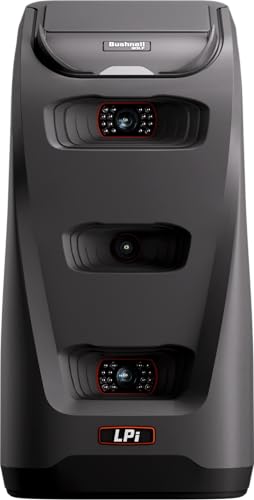
- Three-camera infrared measurement for tour-level accuracy
- Built for indoor simulator setups
- Includes launch, spin, carry, and club speed data with subscription
Best For: Indoor golfers who want accurate simulator data and a more affordable entry into home golf.
Best for Data-Driven Practice
Rapsodo MLM2PRO Launch Monitor

- 15 metrics including spin, club path, and carry distance
- Radar + dual-camera system for shot and swing analysis
- 45-day premium trial with simulator and training features
Best For: Golfers who want detailed shot data, swing video, and simulator-style practice.
Best Portable Home Practice
Garmin Approach R10 Portable Golf Launch Monitor

- Portable design for home, indoor, and range use
- Tracks key swing and ball metrics with the Garmin Golf app
- Up to 10 hours of battery life for longer practice sessions
Best For: Golfers who want a compact, app-connected launch monitor for indoor practice and range training.
Best for iPhone Users

- Tracks ball speed, club speed, launch angle, and distance
- GPS shot mapping and video playback improve practice feedback
- Portable setup works indoors, outdoors, and at the range
Best For: Golfers who want a compact launch monitor with app-based tracking on iPhone or iPad.
Best for Swing Speed Practice
Voice Caddie SC200Plus Launch Monitor

- Swing speed mode for no-ball practice
- Real-time Doppler radar shot feedback
- Stores club averages and shot stats
Best For: Golfers who want a portable training monitor for indoor or outdoor swing practice.
Best for Sim + Free App Features
Voice Caddie SC4 Pro Launch Monitor

- Built-in screen with real-time ball and club data
- Includes 3D Driving Range and E6 Connect access
- No special balls or recurring fees required
Best For: Golfers who want a portable launch monitor with simulator-style practice and no subscription fees.
Best for Swing Speed Training – PRGR HS 130-A Portable Golf Launch Monitor
The PRGR HS 130-A is a smart pick for golfers comparing launch monitors under 2000 who want dependable speed data without paying for extra features they may never use. It uses Doppler radar to measure club speed, ball speed, smash factor, and carry/total distance, while keeping the setup simple with no app, Wi-Fi, or Bluetooth needed.
Best For: Golfers focused on swing speed training, basic shot feedback, and a portable monitor they can use indoors or at the range.
Pros:
- Measures club speed even without a ball, making speed training easy
- Tracks ball speed, smash factor, carry distance, and total distance
- No apps or wireless setup required; runs on AAA batteries
- Stores up to 500 swings for long-term training reference
Cons:
- Doesn’t offer the advanced course/simulation features of pricier units
- Less data-rich than premium launch monitors with app integration
For golfers who mainly want reliable speed and distance basics, the PRGR stands out as one of the most practical launch monitors under 2000. It’s especially appealing if your priority is swing training over full simulator-style analytics.
Best Indoor Simulator Pick – Bushnell Launch Pro i Circle B Edition
If you’re comparing launch monitors under 2000 for an indoor setup, the Bushnell Golf Launch Pro i Circle B Edition stands out for its camera-based accuracy and simulator-friendly design. It’s built to measure at impact rather than estimate ball flight, making it a strong fit for golfers who want dependable data in a home bay or studio.
Best For: Indoor golfers who want tour-level accuracy and a lower-cost path into simulator golf.
Pros:
- Three-camera infrared system for impact-based measurement and strong accuracy
- Designed specifically for indoor simulator use
- Provides carry, launch, spin, and club head speed data with subscription
- Includes cables, alignment stick, club markers, and a 14-day Gold trial
Cons:
- Ball and club data require an active software subscription
- Indoor-focused design is less versatile for outdoor range use
- Simulator features can add ongoing software costs
For buyers focused on launch monitors under 2000, this model makes the most sense if indoor simulation matters more than portability. It’s a practical way to get Bushnell-level measurement without jumping into the highest-priced launch monitor tier.
Best for Data-Driven Practice – Rapsodo MLM2PRO Launch Monitor
If you want one of the more complete launch monitors under 2000, the Rapsodo MLM2PRO is built for golfers who care about measurable improvement, not just basic shot feedback. Its Doppler radar and dual-camera system capture a strong mix of ball and club data, while the included simulator features make it useful at home or on the range.
Best For: Golfers who want detailed shot data, swing video, and simulator-style practice in a portable setup.
Pros:
- Captures 15 key metrics, including spin rate, spin axis, carry distance, and club path.
- Dual-camera and radar setup adds slow-motion impact view and swing analysis.
- Includes a 45-day premium trial with simulator courses, app integrations, and training tools.
- Works for both home practice and driving range sessions.
Cons:
- Full simulator and app features require the premium membership after the trial.
- More advanced than a simple shot tracker, so casual users may not need all the data.
For golfers comparing launch monitors under 2000, the MLM2PRO stands out for combining strong measurement depth with simulator-ready extras. It’s a smart pick if you want actionable feedback and a practice setup that can grow with your game.
Best Portable Home Practice – Garmin Approach R10 Portable Golf Launch Monitor
If you want one of the more versatile launch monitors under 2000 for practice at home or at the range, the Garmin Approach R10 is a strong fit. It pairs with the Garmin Golf app to track key swing and ball data, record video clips, and even play virtual rounds, making it useful for both improvement and entertainment.
Best For: Golfers who want a compact, app-connected launch monitor for indoor practice, driving range sessions, and home training.
Pros:
- Portable design works indoors, at home, or on the driving range
- Tracks useful metrics like club head speed, ball speed, launch angle, and spin
- Supports swing video capture and shot dispersion analysis through the Garmin Golf app
- Up to 10 hours of battery life helps it last through long practice sessions
Cons:
- Full functionality depends on the Garmin Golf app and a compatible smartphone
- Some virtual course and leaderboard features require an active subscription
- Renewed unit may not appeal to buyers who prefer brand-new gear
The Approach R10 is a smart pick if you want a portable, feature-rich practice tool instead of a bulky simulator setup. Among launch monitors under 2000, it stands out for blending portability, app features, and enough data to support serious improvement.
Best for iPhone Users – Rapsodo Mobile Launch Monitor
If you want one of the most portable launch monitors under 2000 with strong shot-tracking features, the Rapsodo Mobile Launch Monitor is built for golfers who practice with an iPhone or iPad. It combines ball and club data, GPS shot mapping, and video playback to make practice sessions more informative without adding bulky hardware.
Best For: Golfers who want a compact, app-based launch monitor for indoor nets, range sessions, and simulator-style practice on iPhone or iPad.
Pros:
- Tracks key metrics like ball speed, club speed, launch angle, and shot distance
- GPS satellite view and shot scatter mapping help you understand dispersion
- Video playback and active shot tracer make swing analysis easier
- Portable setup works well indoors, outdoors, and at the driving range
Cons:
- iPhone and iPad only, so it is not a fit for Android users
- Simulator-style features are useful, but not as advanced as higher-end systems
For golfers comparing launch monitors under 2000, Rapsodo stands out for its easy setup and strong visual feedback rather than the deepest data set. It is a smart choice if you value portability, GPS tracking, and swing video over a fully premium simulator experience.
Best for Swing Speed Practice – Voice Caddie SC200Plus Launch Monitor
If you want one of the more practical launch monitors under 2000 for home practice, the Voice Caddie SC200Plus is built around fast feedback, easy portability, and useful training data. It combines Doppler radar tracking with voice output and an LCD screen, so you can check shots without stopping your session.
Best For: Golfers who want a lightweight launch monitor for indoor or outdoor swing practice, especially if swing speed training matters.
Pros:
- Swing speed mode lets you practice tempo without hitting a ball
- Doppler radar provides real-time shot data tracking
- Voice output and LCD display make feedback easy to read
- Stores club stats and average distances for later review
Cons:
- More training-focused than full simulator-style systems
- Less feature-rich than higher-end launch monitors
- Best results depend on consistent setup and use
Overall, the SC200Plus is a strong fit if you want a simple, portable trainer that helps you build repeatable swings and track progress. Among launch monitors under 2000, it stands out for speed work, quick feedback, and easy carry-anywhere convenience.
Best for Sim + Free App Features – Voice Caddie SC4 Pro Launch Monitor
If you want one of the more feature-rich launch monitors under 2000, the Voice Caddie SC4 Pro stands out with built-in screen feedback, included 3D Driving Range access, and E6 Connect support. It’s geared toward golfers who want indoor-outdoor versatility plus deeper practice data without paying ongoing fees.
Best For: Golfers who want a portable launch monitor for simulator-style practice, swing analysis, and no-fee use at home or on the range.
Pros:
- Prometrics engine provides real-time ball and club data for indoor and outdoor sessions.
- Includes 3D Driving Range and E6 Connect access for a more immersive practice setup.
- VOICECADDIE S app adds stats, calibration tools, and speed training modes.
- No special balls required, making setup simpler for everyday use.
Cons:
- Not the cheapest option in the under-$2,000 category.
- Some advanced features depend on app and simulator ecosystem setup.
- Portable, but still better suited to golfers who will use the extra training tools.
The SC4 Pro is a strong fit if you want a launch monitor that does more than basic distance tracking. Among launch monitors under 2000, it is especially appealing for players who value simulator access, portable convenience, and a no-subscription approach.
How We Picked the Best Launch Monitors Under 2000
For this guide, we focused on Launch Monitors Under 2000 that offer a useful mix of accuracy, portability, setup simplicity, and data quality. We also favored models that make sense for real-world golfers, whether that means practice at the range, home simulator use, or quick swing checks in a garage or backyard.
We paid close attention to the type of measurement each unit uses, battery life, app support, and how much space it needs to work properly.
Quick Comparison
The easiest way to narrow your choice is by use case. Radar-based models are often the most portable and convenient for outdoor sessions, while camera-based and hybrid units typically shine for indoor practice and simulator setups. If you want simple swing and ball data, a basic portable monitor may be enough. If you want more immersive practice, look for stronger simulator compatibility and broader metrics.
Key Buying Factors for Launch Monitors Under 2000
Accuracy and Consistency
At this price point, the goal is not just collecting numbers, but trusting them enough to guide practice. Look for models that measure core metrics such as ball speed, club speed, launch direction, carry distance, and smash factor.
Indoor Vs. Outdoor Use
Some launch monitors need more space behind or in front of the ball, while others are easier to use in tight indoor setups. If you plan to practice mostly indoors, make sure the unit is compatible with your room dimensions and hitting environment.
Simulator and App Features
Many Launch Monitors Under 2000 now pair with apps for shot history, swing analysis, and virtual golf. A better app can add a lot of value, especially if you want to track progress over time or use the device with a simulator.
Portability and Setup
Battery life, size, and alignment matter more than many buyers expect. The best choice is the one you will actually bring to the range or set up at home consistently.
Who Should Buy Which Launch Monitors Under 2000?
If you want the simplest portable option, choose a compact monitor focused on basic speed and distance data. If you want deeper training feedback and simulator support, step up to a model with stronger app integration and more advanced metrics. Golfers who split time between indoors and outdoors should prioritize flexibility and easy setup above all else.
In short, the best Launch Monitors Under 2000 are the ones that match your practice habits. Choose for accuracy, space, and usability first, and the value will show up every time you hit balls.