If you want better feedback from every session, the right launch monitor can turn a simple driving net into a true practice setup. The best options help you track ball flight, swing speed, and contact quality without guessing.
Below, we focus on launch monitors for driving nets that balance accuracy, portability, app support, and value for home practice.
Best 10 Launch Monitors for Driving Nets Picks for 2026
Best Bundle Pick
Garmin Approach R10 + Net Return Pro Net

- Portable Garmin launch monitor with premium return net included
- Tracks 14 metrics, video clips, and virtual rounds
- Good fit for indoor, outdoor, and range practice
Best For: Golfers who want a ready-to-use launch monitor and net package for home practice and swing analysis.
Best for Quiet Indoor Practice
Gagalileo 10x7FT Golf Hitting Net

- Silent velvet target reduces noise for indoor reps.
- Includes mat, balls, tee, and stakes in one kit.
- Quick setup makes backyard or garage practice easy.
Best For: Golfers who want a quiet, ready-to-go practice net for home simulator sessions or backyard training.
Best App-Based Pick

- iPhone/iPad-connected launch monitor with shot tracing
- Tracks ball speed, club speed, launch angle, and distance
- Great for portable driving-net and home simulator practice
Best For: Golfers who want an easy-to-use, app-based launch monitor for net practice and simulator sessions.
Best for Easy Setup
GoSports Golf Practice Hitting Net

- Quick assembly with included carrying case
- Ball return helps streamline practice reps
- Indoor/outdoor design with optional stability stakes
Best For: Golfers who want a portable, easy-to-set-up hitting net for home practice.
Best Budget Radar Monitor
PRGR HS 130-A Portable Golf Launch Monitor

- Measures club speed with or without a ball
- Tracks ball speed, smash factor, carry, and total distance
- No Wi-Fi, Bluetooth, or app required
Best For: Golfers who want an affordable, no-app launch monitor for driving nets and swing speed practice.
Best for Everyday Use
GoSports Golf Practice Hitting Net
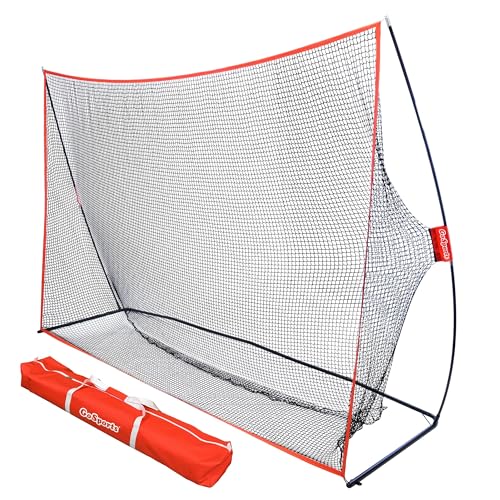
- Built-in ball return speeds up practice
- Quick assembly with compact storage case
- Indoor or outdoor use for flexible reps
Best For: Golfers who want a portable hitting net with fast setup and ball return convenience.
Best for Swing Data Feedback
Voice Caddie SC200Plus Launch Monitor

- Doppler radar shot tracking with real-time feedback
- Voice output plus LCD screen for easy reading
- Swing speed mode and stored club averages
Best For: Golfers who want a portable net-practice monitor with quick, usable feedback.
Best for Data Depth
Golf Launch Monitor & Simulator

- 13 metrics with attack angle, spin rate, and launch data.
- No subscription fees; app access is included.
- 3D trajectory and driving range views for more engaging practice.
Best For: Golfers who want a feature-rich launch monitor for a driving net setup.
Best for Indoor Sim Practice
Voice Caddie SC4 Pro Launch Monitor

- Real-time ball and club data via Prometrics engine
- Built-in screen plus indoor/outdoor portability
- 3D Driving Range and E6 Connect included
Best For: Golfers who want a portable launch monitor for driving nets and simulator practice.
Best for Smart Simulator Practice
Portable Golf Launch Monitor & Simulator

- Environmental sensors help adjust shot data to real conditions.
- Tracks launch angle, spin, attack angle, and swing speed.
- 3D simulator views and video recording support better practice.
Best For: Golfers who want a portable launch monitor for net practice and simulator-style feedback.
Best Bundle Pick – Garmin Approach R10 + Net Return Pro Net
If you want one of the most complete launch monitors for driving nets, this Garmin bundle gives you a portable simulator, a premium return net, and the extras to start practicing right away. It is a practical choice for golfers who want measurable feedback indoors, outdoors, or at the range without piecing together separate gear.
Best For: Golfers who want a ready-to-use launch monitor and net package for home practice and swing analysis.
Pros:
- Includes the Garmin Approach R10, The Net Return Pro Series net, and a duffle bag for easy transport
- Tracks 14 swing data parameters and works with the Garmin Golf app for deeper analysis
- Supports virtual rounds, video recording, and phone mounting for more complete practice sessions
- The net sets up fast and is built to handle high ball speeds
Cons:
- Some core features depend on a compatible smartphone and app setup
- Virtual course access requires an active subscription
- The bundle is more expensive than a standalone launch monitor
This is a strong all-in-one option if you want launch monitors for driving nets that combine data, portability, and a quality impact screen replacement net. It is especially useful for golfers who value convenience and a fuller practice setup over buying components separately.
Best for Quiet Indoor Practice – Gagalileo 10x7FT Golf Hitting Net
If you’re shopping for launch monitors for driving nets, this Gagalileo setup is a practical choice for at-home reps: it gives you a roomy 10x7FT backstop, a silent velvet target, and a complete starter kit so you can practice right away in a backyard, garage, or basement.
Best For: Golfers who want a quiet, all-in-one net for indoor simulator practice or quick backyard sessions without buying extra accessories.
Pros:
- Quiet velvet target helps make indoor practice more manageable.
- Includes hitting mat, balls, tee, and stakes for a ready-to-use setup.
- Fast setup and portable design work well for backyard, garage, or park use.
- Durable netting is built for repeated real-ball practice.
Cons:
- Doesn’t include a launch monitor, so data-tracking users must buy that separately.
- Best suited to practice swings and net work, not full-course simulation on its own.
This is a strong option if you want a quiet, complete practice station that pairs well with launch monitors for driving nets. It’s especially appealing for golfers who value convenience, simple setup, and a gift-ready package over high-end tech features.
Best App-Based Pick – Rapsodo Mobile Launch Monitor
If you want a compact option among launch monitors for driving nets, the Rapsodo Mobile Launch Monitor is built around smartphone-powered shot tracking, GPS mapping, and video feedback. It’s a practical choice for golfers who want accurate swing data at home without committing to a bulky simulator setup.
Best For: Golfers who want a portable, app-driven launch monitor for driving nets, indoor practice, and simple simulator use with an iPhone or iPad.
Pros:
- Measures ball speed, club speed, launch angle, and shot distance.
- GPS satellite view and shot tracer help visualize dispersion and ball flight.
- Video playback adds useful swing review for practice sessions.
- Portable setup works well for indoor and outdoor net practice.
Cons:
- iPhone and iPad only, so Android users can’t use it.
- Less self-contained than standalone launch monitors with built-in displays.
For golfers comparing launch monitors for driving nets, this Rapsodo model stands out for easy setup, strong feedback, and useful visuals rather than raw pro-level hardware. It’s a smart fit if you value portability and video-assisted improvement over a more advanced simulator ecosystem.
Best for Easy Setup – GoSports Golf Practice Hitting Net
If you want a simple practice setup that pairs well with launch monitors for driving nets, the GoSports Golf Practice Hitting Net gives you a portable, at-home target without a complicated build. It works indoors or outdoors, and the included ball return helps keep reps moving so you can focus on swing data and contact quality.
Best For: Golfers who want a quick-to-set-up practice net for home, garage, or backyard sessions.
Pros:
- Fast assembly and breakdown with a carrying case for easy storage or travel
- Ball return design reduces time spent chasing shots
- Portable size works well for indoor and outdoor practice spaces
- Optional ground stakes add stability on grass or dirt
Cons:
- Mat is not included, so you may need extra gear to complete the setup
- Not as large or heavy-duty as a dedicated commercial enclosure
- Best for straight-ahead practice rather than full simulator bay builds
As a practical training net, this GoSports model is a strong fit for golfers who want repetition without fuss. It pairs especially well with launch monitors for driving nets when you want a compact, repeatable hitting station that supports feedback-driven practice.
Best Budget Radar Monitor – PRGR HS 130-A Portable Golf Launch Monitor
The PRGR HS 130-A is a practical pick for golfers who want simple, reliable data from launch monitors for driving nets without paying for a full simulator stack. Its Doppler radar reads club speed, ball speed, smash factor, and estimated carry/total distance, making it useful for everyday range work and speed training.
Best For: Golfers who want an affordable, no-app launch monitor for driving nets and swing speed practice.
Pros:
- Measures club speed with or without a ball for speed training
- Tracks ball speed, smash factor, carry, and total distance
- Very simple setup: no Wi-Fi, Bluetooth, or app required
- Compact, battery-powered design with 500-swing memory
Cons:
- Doppler estimates are useful, but not as detailed as premium radar/camera units
- Display and features are basic compared with higher-end monitors
If you mainly want a straightforward monitor for launch monitors for driving nets, the PRGR stands out for affordability and speed-training flexibility. It won’t replace a top-tier simulator, but it delivers the core numbers most golfers need in a portable, easy-to-use package.
Best for Everyday Use – GoSports Golf Practice Hitting Net
If you want a simple, portable option for practicing with launch monitors for driving nets, the GoSports Golf Practice Hitting Net is built for quick at-home reps indoors or outdoors. Its ball return feature helps keep sessions moving, while the lightweight frame makes it easy to set up, take down, and store between uses.
Best For: Golfers who want a convenient practice net with fast setup and built-in ball return for frequent swing work.
Pros:
- Ball return design reduces time spent chasing shots
- Quick assembly and easy breakdown for portable practice
- Works well indoors or outdoors for flexible training
- Includes a carrying case for compact storage
Cons:
- Golf mat is not included
- Not a permanent heavy-duty enclosure setup
For golfers pairing launch monitors for driving nets with a straightforward practice solution, this GoSports net offers a practical balance of convenience, portability, and repeatable reps. It is a strong choice if you care more about easy setup and storage than a more permanent build.
Best for Swing Data Feedback – Voice Caddie SC200Plus Launch Monitor
If you want one of the more practical launch monitors for driving nets, the Voice Caddie SC200Plus is built around fast shot feedback, simple setup, and useful practice data. It uses Doppler radar to track shots indoors or outdoors, then displays results on the built-in screen and through voice output so you can stay focused on your session.
Best For: Golfers who want a portable trainer for net practice, tempo work, and quick distance feedback without a complicated setup.
Pros:
- Doppler radar tracking provides reliable real-time shot data
- Voice output and LCD display make feedback easy to read during practice
- Swing speed mode lets you train without a ball for tempo and mechanics work
- Stores club stats and average distances for simple progress tracking
Cons:
- Not as feature-rich as higher-end launch monitors with app ecosystems
- Limited to the essentials if you want detailed spin and shot-shape analysis
For golfers building a repeatable practice routine, the SC200Plus covers the basics well and keeps sessions moving. It is a strong fit for launch monitors for driving nets when you want quick numbers, portability, and easy indoor/outdoor use.
Best for Data Depth – Golf Launch Monitor & Simulator
If you want launch monitors for driving nets that go beyond basic carry distance, this unit stands out for its 13 metrics, environmental sensors, and 3D shot visualization. It’s a practical pick for golfers who want app-based feedback, indoor/outdoor flexibility, and no recurring fees.
Best For: Golfers who want a feature-rich launch monitor for a driving net setup, especially if they value spin, launch, and trajectory data.
Pros:
- No annual subscription fees, with full app access included.
- Tracks advanced metrics like attack angle, spin rate, and launch angle.
- 3D driving range and trajectory views make practice sessions more engaging.
- Environmental sensors help adjust readings for indoor or outdoor conditions.
Cons:
- Indoor use needs at least 15 feet of total space to capture ball flight accurately.
- Bluetooth setup works best when your phone is placed in front of the device.
- Shot capture can be limited on mishits, which may reduce data for bad swings.
For launch monitors for driving nets, this is a strong option if you want more than raw yardages and are willing to meet the space requirements. Its mix of advanced metrics, calibration tools, and simulator-style feedback makes it especially useful for serious practice.
Best for Indoor Sim Practice – Voice Caddie SC4 Pro Launch Monitor
Voice Caddie’s SC4 Pro is a strong pick for golfers who want launch monitors for driving nets with simulator-style feedback and no extra subscription fees. It combines portable hardware, a built-in screen, and indoor/outdoor compatibility, making it easy to use at home or on the range.
Best For: Golfers who want a portable launch monitor that works well with a driving net, simulator setup, and practice sessions without marked balls.
Pros:
- Prometrics engine provides detailed ball and club data with real-time feedback
- Includes 3D Driving Range and E6 Connect access for more immersive practice
- Built-in screen and simple setup make it easy to use indoors or outdoors
- No special balls required, which keeps net practice straightforward
Cons:
- App-based advanced features may take time to learn
- Simulator features are useful, but not everyone will need them for basic net work
For golfers comparing launch monitors for driving nets, the SC4 Pro stands out for its balance of portability, no-fee ownership, and simulator-friendly features. It’s a practical choice if you want more than basic shot readings without moving into a bulky home setup.
Best for Smart Simulator Practice – Portable Golf Launch Monitor & Simulator
If you want one of the more feature-rich launch monitors for driving nets, this mobile unit goes beyond basic distance tracking with environmental sensors, spin data, and simulator-style visuals. It is a practical pick for golfers who want to practice at home, on a net, or at the range while getting more context from each swing.
Best For: Golfers who want a portable launch monitor for net practice, simulator use, and deeper swing feedback without a subscription.
Pros:
- Built-in temperature, humidity, and pressure sensors help refine shot data.
- Tracks useful swing and ball metrics like launch angle, attack angle, swing speed, and spin.
- 3D driving range visuals and video recording make practice more engaging.
- No subscription required, with broad iOS and Android support.
Cons:
- App-based setup may feel less straightforward than simpler standalone monitors.
- Best features depend on using a compatible smartphone.
Overall, this is a strong option if you want launch monitors for driving nets that do more than measure carry and club speed. Its simulator tools and expanded metrics make it especially appealing for golfers focused on structured improvement at home or in a garage bay.
How We Picked the Best Launch Monitors for Driving Nets
For Launch Monitors for Driving Nets, we prioritized measurable data, ease of setup, indoor and outdoor usability, and how well each unit fits a home practice space. We also looked for models that are practical for solo training, not just full simulator rooms.
Quick Comparison
Some golfers want simple swing and speed feedback, while others want shot-by-shot metrics, simulator compatibility, or video analysis. The best choice depends on whether you need basic distance estimates, more advanced launch data, or a more immersive practice experience.
Best for Simple Feedback
Choose a straightforward radar-based unit if you mainly want club speed, ball speed, and consistency checks.
Best for Simulator Features
Pick a model with app integration, virtual courses, or 3D driving range tools if you want a more engaging practice setup.
Key Buying Factors for Launch Monitors for Driving Nets
Data accuracy: Look for the metrics you actually use, such as ball speed, club speed, smash factor, carry distance, and launch angle. More numbers are not always better if the readings are inconsistent.
Space and setup: Driving nets usually have limited room, so make sure the monitor works at your net distance and has enough clearance behind and in front of the ball.
Indoors or outdoors: Some monitors perform better with more ball flight, while others are designed to work reliably in tighter indoor spaces. Match the device to your practice location.
App and simulator support: If you want progression tracking or virtual practice rounds, check compatibility with your phone, tablet, or simulator software before buying.
Portability and power: If you plan to move your setup between garage, yard, and range, battery life, size, and carrying convenience matter a lot.
Who Should Buy Which Launch Monitors for Driving Nets?
If you are a beginner, start with an easy-to-use monitor that gives clear basics without a steep learning curve. Mid-handicap golfers often benefit from models that add shot tracking and app insights. Better players and data-focused golfers should look for the most complete metric set and stronger simulator features.
For the most practical home practice setup, pair a reliable launch monitor with a sturdy net and enough space to swing freely. That combination gives you the best feedback loop for improving consistency, distance control, and strike quality.