Choosing the right projector can make a golf simulator feel more responsive, more immersive, and much easier to use in tight indoor spaces.
This roundup focuses on golf simulator projectors with low input lag, strong brightness, and throw options that work well with impact screens and enclosures.
Best 10 Golf Simulator Projectors with Low Input Lag Picks for 2026
Premium Short-Throw Laser Pick
BenQ AH700ST 4000-Lumen Full HD Golf Proj

- 4000 ANSI lumens for bright simulator images
- Short-throw 0.69-0.83 fits tighter golf bays
- Golf mode and 20,000-hour laser light source
Best For: Bright, golf-focused simulator setups with a short-throw laser projector
High-Brightness Gaming Value
BenQ TH575 Low-Latency 1080p Projector
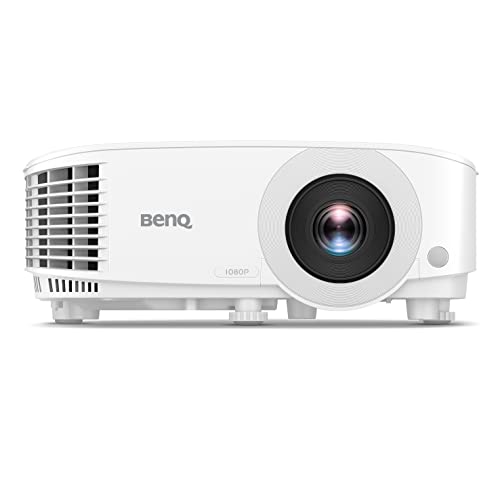
- 16ms input lag at 1080p/60Hz
- 3800 ANSI lumens for brighter rooms
- Short throw, Dual HDMI, enhanced game mode
Best For: Responsive 1080p simulator and gaming setups on a value-focused budget
Durable Screen Upgrade
Premium Triple-Layer Golf Impact Screen

- Triple-layer design with HD outer face
- Sound-damping middle layer helps reduce noise
- Includes grommets and bungee cords
Best For: Indoor simulator bays needing a durable, quiet impact screen
Classic Short-Throw Gamer
BenQ TH671ST Low Input Lag 1080p Projector

- Ultra-fast low input lag for responsive play
- 3000 ANSI lumens with native 1080p
- Short throw projects 100 inches from 5 feet
Best For: Compact simulator setups that prioritize responsiveness and short throw
Premium Laser Golf Sim Pick
BenQ LU710 4000-Lumen WUXGA Laser

- 4000-lumen laser brightness
- 1.13 to 1.46 throw ratio
- WUXGA 1920 x 1200 resolution
Best For: Bright simulator rooms that need flexible placement and easy maintenance
Budget-Friendly Low-Lag Choice
ViewSonic PX703HD 1080p Low-Lag Projector

- Low 16ms input latency
- 3500-lumen 1080p brightness
- 1.3x optical zoom with keystone
Best For: Buyers who want a simple projector with clearly stated low input lag
Short-Throw Auto-Fit Pick
BenQ AH700ST 4000-Lumen Short Throw Laser

- 4000-lumen laser output
- Motorized short throw zoom lens
- Auto screen fit for easier setup
Best For: Golf sim spaces that need short-throw placement and automatic alignment
4K speed for flexible setups

- 4K UHD with 4,000 ANSI lumens
- Rated 4.2ms input lag, up to 240Hz
- 1.3x zoom and keystone tools aid setup
Best For: Golf simulator users who want bright 4K performance and fast gaming response
Short-throw laser pick for simulators

- Short-throw design suits tight simulator spaces
- 4,200 ISO lumens with 1080p resolution
- 30,000-hour laser and IP6X dust protection
Best For: Tight golf simulator setups that need bright short-throw projection
Value gaming classic
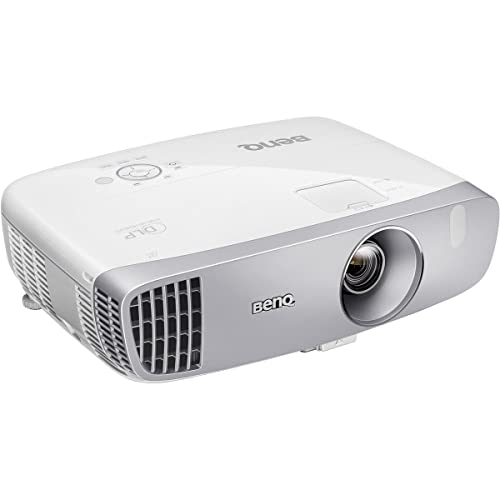
- 16ms low input lag with game modes
- 1080p image and 96% Rec.709 color
- 100-inch image from about 8 feet away
Best For: Budget-minded buyers who want proven low-lag performance for simulators
Premium Short-Throw Laser Pick – BenQ AH700ST 4000-Lumen Full HD Golf Proj
If you want golf simulator projectors with low input lag plus strong room-filling brightness, the BenQ AH700ST is built for that job. Its 4000 ANSI lumens, Full HD image, and short-throw lens make it a practical fit for clear impact-screen projection in a simulator bay, while the dedicated Golf picture mode adds a more tailored viewing setup.
Best For: Golf simulator users who want a bright short-throw laser projector with golf-specific picture tuning.
Pros:
- 4000 ANSI lumens helps keep the image visible in brighter rooms.
- Short-throw ratio of 0.69-0.83 supports simulator setups with limited space.
- Golf mode is specifically designed to improve clarity and realism for simulation use.
- Laser light source is rated for 20,000 hours, reducing maintenance.
Cons:
- No explicit low-input-lag spec is listed in the supplied details.
- Full HD resolution is solid, but it is not a higher-resolution 4K model.
- At 12 pounds, it is not the lightest option for frequent moving.
Overall, this is a strong choice if your priority is a bright short-throw projector with golf-focused features and long laser life. It is best matched to simulator buyers who care more about installation flexibility and image visibility than chasing a gaming-first spec sheet.
High-Brightness Gaming Value – BenQ TH575 Low-Latency 1080p Projector
The BenQ TH575 is a straightforward pick if you are comparing golf simulator projectors with low input lag and want a model that also works well for gaming. It pairs 3800 ANSI lumens with 16ms input lag at 1080p/60Hz, so it has the brightness and responsiveness many simulator setups need for a clean, playable image.
Best For: Buyers who want a bright, responsive 1080p projector for golf simulation and gaming.
Pros:
- 16ms low input lag at 1080p/60Hz is well suited to responsive play.
- 3800 ANSI lumens provides strong brightness for well-lit environments.
- Short-throw projection can create a 100-inch image from 10.8 feet.
- Dual HDMI and enhanced game mode make it easy to integrate into a setup.
Cons:
- It is a lamp-based projector, not a laser model.
- There is no golf-specific mode mentioned in the supplied details.
- Warranty is 3 years, but the lamp life is listed at 15,000 hours rather than longer laser-rated life.
For shoppers who care about low latency first, this projector hits a very practical balance of brightness, speed, and familiar setup features. It is a strong value choice if you want a responsive display for simulator use without stepping into a more expensive laser category.
Durable Screen Upgrade – Premium Triple-Layer Golf Impact Screen
This golf simulator impact screen is the right kind of companion piece when you are building a setup around golf simulator projectors with low input lag. While it is not a projector itself, its triple-layer build, HD outer face, and grommet-and-bungee mounting make it a practical screen choice for a simulator enclosure or net system.
Best For: Golf sim owners who need a durable, quiet impact screen for an indoor practice bay.
Pros:
- Triple-layer construction combines an HD outer layer, sound-damping middle layer, and impact-resistant inner layer.
- Built for thousands of ball impacts, making it suitable for repeated practice.
- Sound-damping layer helps reduce vibration and resonance during use.
- Includes mounting grommets and bungee cords for easier setup.
Cons:
- It is a screen only, so it does not address projector brightness or input lag.
- The 9.8 x 8.5 ft size may not suit every enclosure dimension.
- No projector-specific compatibility details are provided in the supplied notes.
If you already have a projector selected, this screen helps complete the hitting area with a durable, quieter build. It is best viewed as a practical enclosure upgrade rather than a display solution.
Classic Short-Throw Gamer – BenQ TH671ST Low Input Lag 1080p Projector
The BenQ TH671ST remains a practical option for golf simulator projectors with low input lag when you want a short-throw model with proven gaming-friendly specs. It offers native Full HD, 3000 ANSI lumens, and ultra-fast low input lag, making it a solid fit for simulator spaces where responsiveness matters.
Best For: Golf sim buyers who want a compact short-throw projector with a strong gaming focus.
Pros:
- Ultra-fast low input lag is highlighted as a key gaming feature.
- Native 1080p resolution and 3000 ANSI lumens support clear, bright projection.
- Short-throw design can project a 100-inch image from just 5 feet away.
- Includes dual HDMI and a built-in speaker for flexible setup options.
Cons:
- Lamp life is rated at 10,000 hours, shorter than some newer laser models.
- Brightness is good, but lower than the 3800-4000 lumen options in this group.
- No golf-specific picture mode is listed in the supplied details.
This is a dependable choice if your priority is fast response and a compact short-throw layout. It is especially appealing for users who want a gaming-oriented projector that also works well in a simulator enclosure.
Premium Laser Golf Sim Pick – BenQ LU710 4000-Lumen WUXGA Laser
If you want one of the more polished golf simulator projectors with low input lag in a bright, flexible setup, the BenQ LU710 is built around placement ease and image quality. Its 4000-lumen laser engine, 1.13 to 1.46 throw ratio, and WUXGA 16:10 resolution make it a strong fit for simulator bays where you want a clear, stable image and a little extra vertical space.
Best For: Golf sim rooms that need flexible positioning, strong brightness, and a maintenance-light laser light source.
Pros:
- 4000-lumen laser light source is designed for bright simulator environments.
- 1.13 to 1.46 throw ratio helps with easier projector placement.
- WUXGA 1920 x 1200 resolution gives a taller 16:10 image than standard 1080p.
- ±30° 2D keystone and Corner Fit support more precise image alignment.
Cons:
- No specific input-lag figure is listed in the supplied notes.
- Maximum image size is listed at 100 inches in the provided details.
- May be more projector than you need if your setup is simple and budget-focused.
This is a good pick if your priority is a bright, durable laser projector that can be positioned with less hassle. It suits simulator spaces where alignment and everyday reliability matter as much as picture quality.
Budget-Friendly Low-Lag Choice – ViewSonic PX703HD 1080p Low-Lag Projector
The ViewSonic PX703HD is a straightforward option for golfers looking for golf simulator projectors with low input lag without moving into a more specialized laser model. It pairs 3500 lumens with 1080p resolution, and the supplied notes call out a low 16ms input latency, which is useful if you want smoother on-screen response during simulator sessions.
Best For: Golf sim users who want a simple 1080p projector with explicitly listed low input lag.
Pros:
- Low 16ms input latency is clearly listed in the product notes.
- 3500 lumens provides solid brightness for gaming and simulator use.
- 1080p resolution keeps the setup simple and widely compatible.
- 1.3x optical zoom and vertical keystone add setup flexibility.
Cons:
- Not a laser projector, so it lacks the maintenance-light laser engine of some alternatives.
- Color and image features are more basic than higher-end golf sim models.
- Input lag is the main performance highlight rather than advanced simulator-specific features.
If low-latency response is your top requirement, this model stands out because the input lag is actually specified. It makes sense for buyers who want a practical, bright projector with easy compatibility and no extra complexity.
Short-Throw Auto-Fit Pick – BenQ AH700ST 4000-Lumen Short Throw Laser
For golf simulator projectors with low input lag, the BenQ AH700ST is aimed at easy installation and fast setup rather than raw spec overload. It combines a 4000-lumen laser light source with a motorized short throw zoom lens, Auto screen fit, and 1080p resolution, which can be a practical mix for simulator bays where placement and alignment matter.
Best For: Simulator rooms that need short-throw flexibility, auto-fitting, and a laser engine.
Pros:
- 4000 lumens should hold up well in brighter simulator spaces.
- Motorized short throw zoom lens simplifies placement.
- Auto screen fit helps with setup and alignment.
- 1080p resolution and 95% Rec.709 color support clean, familiar image quality.
Cons:
- No input-lag number is provided in the supplied notes.
- Standard 1080p resolution is less detailed than WUXGA options.
- Some buyers may want more manual control if their room layout is fixed.
This projector makes the most sense if you value short-throw convenience and automated alignment in a golf sim build. It is especially appealing for users who want a bright laser unit that reduces setup friction.
4K speed for flexible setups – ViewSonic PX749-4K
If you want golf simulator projectors with low input lag that can also double for gaming, the ViewSonic PX749-4K is a strong all-around option. It combines 4K UHD resolution, 4,000 ANSI lumens, and a rated 4.2ms input lag, so it’s built for sharp image detail and fast response in well-lit indoor setups.
Best For: Golf simulator users who also want a bright 4K projector with very fast response for gaming and entertainment.
Pros:
- 4K UHD resolution with 4,000 ANSI lumens for a bright, detailed image
- Rated 4.2ms input lag and support for 1440p at 120Hz and up to 240Hz
- 1.3x optical zoom, H/V keystone, auto keystone, and 4-corner adjustment for easier placement
- Dual HDMI plus USB-C input for flexible connectivity
Cons:
- Not a dedicated short-throw model, so placement distance matters more in compact simulator spaces
- Native resolution and brightness are excellent, but the setup is more general-purpose than purpose-built for golf simulation
The PX749-4K makes sense if you want one projector that can handle a simulator bay, fast gaming, and movie use without sacrificing brightness. Its low lag is a major plus, but buyers should still confirm throw distance and mounting position for their room.
Short-throw laser pick for simulators – Optoma GT2400HDR
Among golf simulator projectors with low input lag, the Optoma GT2400HDR stands out for its short-throw design and laser light source. With Full HD 1080p resolution, 4,200 ISO lumens, and a 30,000-hour DuraCore laser, it is aimed at bright, low-maintenance simulator and gaming setups where space is tighter.
Best For: Golf simulator rooms that need a short-throw projector with bright output and low-lag gaming support.
Pros:
- Short-throw design helps when the projector must sit close to the impact screen
- 4,200 ISO lumens provide strong brightness for simulator environments
- Laser light source is rated for 30,000 hours for long-term use
- IP6X-rated dust protection adds durability for regular operation
Cons:
- Native resolution is 1080p, so it is not the sharpest option in this group
- Connectivity details are limited in the supplied specs, so setup planning may require extra checking
The GT2400HDR is a practical choice when throw distance is the main constraint and you want a bright projector with gaming-friendly responsiveness. It’s especially appealing for dedicated simulator rooms where short-throw placement and long light-source life matter more than 4K resolution.
Value gaming classic – BenQ HT2050A
The BenQ HT2050A is a straightforward pick if you’re shopping for golf simulator projectors with low input lag and want a proven 1080p model. It offers 2,200 lumens, 96% Rec.709 color accuracy, and a 16ms low-input-lag mode, making it a solid option for home simulator bays where responsiveness matters.
Best For: Buyers who want a reliable, affordable 1080p projector with low input lag for simulator and gaming use.
Pros:
- 16ms input lag and dedicated game modes for smoother play
- 1080p resolution with 96% Rec.709 color accuracy
- Projects a 100-inch image from just 8 feet away
- HDMI, USB, and VGA inputs support common devices
Cons:
- Brightness is lower than the brighter simulator-focused models at 2,200 lumens
- Not a short-throw projector, so room layout needs more distance
The HT2050A remains attractive for users who care more about dependable low lag and accurate color than ultra-high brightness or 4K resolution. It’s a practical match for smaller to mid-size simulator spaces where you can place the projector at the right distance.
How We Picked the Best Golf Simulator Projectors with Low Input Lag
We prioritized models that balance low latency, usable brightness, and throw distances suited to simulator setups. For indoor bays, that means looking for quick response times, enough light output to stay visible in ambient light, and short-throw or zoom flexibility for safer mounting.
We also favored projectors with good color handling, reliable image alignment tools, and features that simplify setup, such as keystone correction, lens shift, or screen-fit tools.
Quick Comparison: What Matters Most
If you want the simplest path to a strong setup, think in this order: input lag first, then throw ratio, then brightness, then resolution. Golf Simulator Projectors with Low Input Lag help preserve the feel of real-time ball flight and club impact feedback. Brightness matters if your room is not fully dark. Throw ratio decides whether the projector can fill your screen from a ceiling mount without casting shadows.
Key Buying Factors for Golf Simulator Projectors with Low Input Lag
Input Lag and Game Modes
Look for a projector that clearly lists low latency or gaming mode performance. For simulator use, lower is better, especially if you want the on-screen response to keep pace with your swing and launch monitor data.
Brightness and Room Lighting
Higher lumen output helps preserve image contrast on large impact screens. In brighter garages or multi-use rooms, a 3,500- to 4,000-lumen projector is often a safer target than a dimmer home-theater model.
Throw Ratio and Mounting
Short-throw and ultra-short-throw designs can reduce shadowing and make indoor installs easier. Check the throw ratio against your bay depth before buying, and confirm the image size at your intended mounting distance.
Resolution and Image Sharpness
1080p is usually the practical baseline for simulator play, while 4K can improve text and course detail if your source device supports it. WUXGA models can also be a smart middle ground for extra vertical clarity.
Alignment and Setup Tools
Features like keystone correction, zoom, and auto screen-fit tools make it easier to align the image to a simulator screen. That matters when you are working around ceilings, beams, or limited mounting positions.
Who Should Buy Which Golf Simulator Projectors with Low Input Lag?
If you want the best all-around setup, choose a bright short-throw model with clearly advertised low input lag. If your room has more ambient light, prioritize brightness first and gaming response second. If you care most about image detail for mixed golf and entertainment use, look at higher-resolution options. Budget-minded buyers can still find strong Golf Simulator Projectors with Low Input Lag in the 1080p class, especially if they already have a dark room and a well-sized screen.
For most buyers, the right choice comes down to bay size, mounting flexibility, and how much light control you have. Match those to your simulator space, and you will get a setup that feels responsive and looks clean from address through impact.