Choosing golf simulator projectors for small rooms is mostly about fit: short throw distance, enough brightness for ambient light, and low lag for a realistic swing experience.
This roundup focuses on options that help you build a clean, usable setup without forcing the projector too far back or compromising image size.
Best 10 Golf Simulator Projectors for Small Rooms Picks for 2026
Compact Golf Simulator Short-Throw Laser
Optoma GT2400HDR 1080p Short-Throw Laser Projector

- 4,200 lumens for bright indoor projection
- Short throw fits setups just 2.6 to 3.7 feet away
- 30,000-hour laser light source for long-term use
Best For: Small rooms needing a bright, low-maintenance golf simulator projector
Heavy-Duty Impact Screen Pick
3-Layer HD Golf Simulator Impact Screen 120 x 96
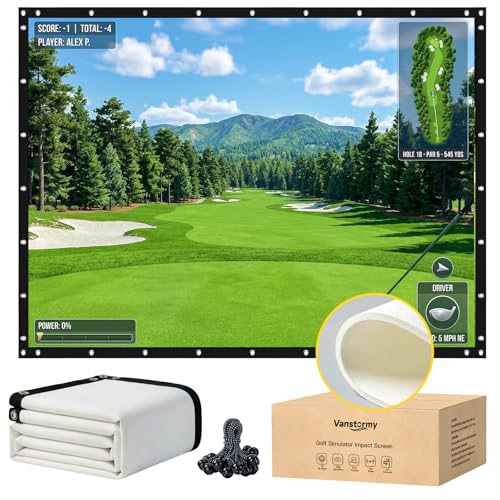
- 3-layer reinforced build for impact resistance
- 98%+ light absorption for sharper projection
- 120" x 96" size with grommets and bungee cords
Best For: Indoor simulator bays that need a durable, high-clarity impact screen
Budget Smart Mini Projector
WiFi 6 Portable 1080P Mini Projector

- Native 1080p with 4K compatibility
- Wi-Fi 6, Bluetooth 5.3, and built-in apps
- Electric focus plus 210-degree rotation
Best For: Casual small-room viewing and flexible portable use
Premium Golf Simulator Laser
BenQ AH700ST 4000-Lumen Short-Throw Laser

- 4000 ANSI lumens with Full HD 1080p
- Short-throw ratio of 0.69-0.83 with 1.2x zoom
- Golf mode and 20,000-hour laser light source
Best For: Dedicated small-room golf simulators needing brightness and color accuracy
Purpose-Built Short Throw

- 0.499 short-throw ratio for small spaces
- 16.7 ms input lag supports responsive play
- Laser light source offers long service life
Best For: Dedicated golf simulators in compact rooms
Bright Budget Simulator Option

- 3300 ANSI lumens for a brighter picture
- Includes HDMI cable, remote, and power cord
- Lower-cost bundle for basic simulator setups
Best For: Small-room buyers seeking an affordable bright bundle
Smart Short-Throw Pick
Daytime Projector 4K with Wifi Bluetooth Google TV

- Short-throw optics suit tighter rooms
- 2200 ANSI lumens with 4K HDR
- Google TV, Wi-Fi 6, and Bluetooth
Best For: Small rooms needing a bright, versatile short-throw projector
Ready-to-Use Enclosure
Golf Simulator Projector Enclosure

- No-assembly one-piece frame
- Built-in fan and vent cooling
- Steel build with acrylic panel
Best For: Users who want a simple floor-mounted enclosure with quick setup
Compact Golf Simulator Short-Throw Laser – Optoma GT2400HDR 1080p Short-Throw Laser Projector
If you need golf simulator projectors for small rooms, the Optoma GT2400HDR is built for tight spaces with a short throw lens, 4,200 ISO lumens, and Full HD 1080p resolution. Its laser light source and low input lag make it a practical pick for golf simulation, especially when you want a bright image without placing the projector far from the screen.
Best For: Small rooms that need a bright short-throw projector for golf simulation and gaming.
Pros:
- 4,200 ISO/ANSI lumens for a bright image in indoor setups
- Short throw design with a 2.6 to 3.7 foot throw range
- 1080p native resolution with up to 4K input support
- Laser light source rated for 30,000 hours
Cons:
- No detailed golf-specific picture mode is listed in the supplied notes
- Uses RCA connectivity in the provided specs, so setup options may be more limited than some HDMI-focused models
- At 9.4 pounds, it is not the lightest option for frequent moving
For a compact simulator bay, the GT2400HDR stands out because it combines brightness, short-throw placement, and laser longevity in one package. It is a strong fit when room depth is limited but you still want a clear, usable impact-screen image.
Heavy-Duty Impact Screen Pick – 3-Layer HD Golf Simulator Impact Screen 120 x 96
Vanstormy Golf Simulator & Launch Monitor Projector Impact Screen, 10'×8'/ 120"×96"
Check Price On AmazonWhen building golf simulator projectors for small rooms, the screen matters just as much as the projector. This heavy-duty 3-layer impact screen is designed for indoor training and simulator enclosures, with a 98%+ light absorption surface that supports sharp projection and reduces glare or ghosting.
Best For: Golf simulator setups that need a durable, high-clarity impact screen for indoor or garage use.
Pros:
- 3-layer reinforced construction for durability and tear resistance
- Over 98% light absorption for clearer projected images
- Grommets spaced around the perimeter for easier installation
- Large 120″ x 96″ size suits simulator enclosures and practice spaces
Cons:
- It is a screen, not a projector, so it must be paired with a separate projector
- Large dimensions may be more than some very tight rooms can comfortably accommodate
- Installation requires bungee cords or similar hanging support
This is a solid choice if you are building out the hitting area first and want a screen that can handle repeated ball impact. The commercial-grade construction and easy hanging setup make it especially useful for garages, basements, and home simulator bays.
Budget Smart Mini Projector – WiFi 6 Portable 1080P Mini Projector
For golf simulator projectors for small rooms on a tighter budget, this mini projector offers native 1080p resolution, Wi-Fi 6, Bluetooth 5.3, and a compact portable design. It is not built specifically for golf simulation, but it can still work for casual indoor setups where flexibility and streaming features matter more than premium brightness.
Best For: Casual small-room users who want a portable smart projector with wireless features.
Pros:
- Native 1080p resolution with compatibility for 4K input
- Wi-Fi 6 and Bluetooth 5.3 for modern wireless connectivity
- Built-in streaming apps like Prime Video, YouTube, and Hulu
- Electric focusing and 210-degree rotation add placement flexibility
Cons:
- 300 ANSI lumens is much lower than the brighter short-throw golf projector options here
- No golf-specific features or dedicated simulator mode are listed
- Best suited to casual viewing, not a purpose-built simulator setup
This model makes sense if you want a small, flexible projector more than a dedicated simulator machine. For serious golf simulation in a small room, its lower brightness is the main tradeoff compared with the short-throw laser options.
Premium Golf Simulator Laser – BenQ AH700ST 4000-Lumen Short-Throw Laser
The BenQ AH700ST is a purpose-built option for golf simulator projectors for small rooms, combining a short-throw lens, 4,000 ANSI lumens, and Full HD resolution. Its dedicated Golf picture mode, 95% Rec.709 color coverage, and laser light source make it a strong match for a simulator bay where image clarity and installation flexibility both matter.
Best For: Dedicated golf simulator rooms that need bright, accurate projection from a short distance.
Pros:
- Short-throw ratio of 0.69-0.83 with 1.2x zoom for flexible placement
- 4,000 ANSI lumens and 1080p resolution for a clear, bright image
- Golf mode is included to enhance simulator visuals
- Laser light source rated for 20,000 hours
Cons:
- Its maximum throw distance is still limited, so room layout matters
- 1-year limited warranty is shorter than some buyers may prefer
- No 4K native resolution is listed in the supplied specs
If you are building a serious simulator setup in a compact room, the AH700ST checks the right boxes: short throw, bright output, and golf-tuned picture settings. It is one of the most focused picks here for getting a large, usable image without requiring a deep room.
Portable 1080p Starter Pick – HAPPRUN Native 1080P Projector
If you’re comparing golf simulator projectors for small rooms, the HAPPRUN Native 1080P Projector is a practical budget-friendly option for casual setups. Its native 1080p resolution, portable body, and 200-inch image support make it workable for a compact simulator space, especially if you want flexible placement with ceiling, desktop, or tripod mounting.
Best For: Small-room buyers who want a portable 1080p projector for casual golf simulation and mixed entertainment use.
Pros:
- Native 1920 x 1080 resolution for sharper image detail
- Portable design with ceiling, desktop, and tripod installation options
- Bluetooth 5.1 support for pairing external speakers or headphones
- Built-in stereo speakers for simple all-in-one use
Cons:
- Requires an HDMI adapter for smartphone connection
- Not a dedicated golf simulation model like short-throw laser options
- Best suited to flexible home use rather than purpose-built simulator installs
For small rooms, this HAPPRUN model is a versatile entry point if you want 1080p clarity without a complex install. It’s more of a general-purpose projector than a specialized simulator unit, but its portability and multiple mounting choices make it easy to fit into tighter spaces.
Purpose-Built Short Throw – AH500ST Full HD HDR
When shopping for golf simulator projectors for small rooms, the AH500ST stands out because it is built around short-throw placement. With a 0.499 throw ratio, Full HD resolution, and 16.7 ms input lag at 1080p 120Hz, it is designed to deliver a responsive image in tight simulator spaces where the projector needs to sit close to the screen.
Best For: Dedicated golf simulator setups in small rooms that need a true short-throw projector.
Pros:
- Short-throw ratio of 0.499 fits tight simulator rooms
- Native 1080p resolution with 3,000,000:1 contrast for detailed image quality
- Low input lag at 16.7 ms for responsive simulator use
- Laser light source rated for up to 20,000 hours, or 38,000 in ECO mode
Cons:
- Wired connectivity only
- Higher-spec design is more specialized than a general home projector
- Floor-mount setup may require more planning in a compact room
This is the most clearly simulator-focused option in the group, and the short-throw design is the key advantage for small rooms. If your priority is getting the projector close to the screen with minimal compromise, this BenQ model is the strongest fit.
Bright Budget Simulator Option – 3300 ANSI 3LCD Projector
For golf simulator projectors for small rooms, this Tekswamp NEC ME331X bundle focuses on brightness and simplicity rather than premium simulator-specific features. Its 3300 ANSI lumens, HDMI connectivity, and included accessories can make it an approachable choice if you need a straightforward projector for a smaller practice space.
Best For: Budget-minded buyers who want a bright projector bundle for casual simulator use in a small room.
Pros:
- 3300 ANSI lumens help the image stand out
- Bundle includes remote control, power cord, and HDMI cable
- Built-in speaker adds basic convenience
- Portable form factor for easier setup changes
Cons:
- Native 1024 x 768 resolution is lower than 1080p options
- Not a short-throw model
- 30-day warranty is limited
This projector is better viewed as a bright, entry-level simulator display than a purpose-built golf solution. If your room is small and your priority is keeping costs down, it may be enough for basic use, but the lower resolution and standard throw make it less refined than the short-throw option above.
Floor-Mounted Shield – Golf Simulator Projector Cover Enclosure with Turf
For golf simulator projectors for small rooms, a floor-mounted enclosure can be a smart alternative to ceiling hardware. This heavy-duty cover keeps the projector low, protected, and easier to place when you want to save installation effort and avoid complex mounting.
Best For: Sim setups that need ground-level projector protection without ceiling mounting.
Pros:
- Floor-mounted design helps avoid costly and complex ceiling installation.
- Steel frame and polycarbonate panels are built for impact protection.
- Cooling fan and ventilation ports help manage heat during long sessions.
- Synthetic turf topper blends into a simulator setup and adds cushioning.
Cons:
- Interior space is limited to 13.7″ x 12.2″ x 6.3″, so fit must be checked carefully.
- Not water resistant.
This is a practical choice if you want a protective, low-profile solution for a compact simulator area. It focuses on durability, airflow, and easier setup rather than mounting complexity.
Smart Short-Throw Pick – Daytime Projector 4K with Wifi Bluetooth Google TV
This is a feature-packed option for golf simulator projectors for small rooms because its shorter-throw optics can create a large image from a relatively short distance. With 2200 ANSI lumens, 4K HDR support, and auto-focus, it is designed to handle bright, versatile indoor setups.
Best For: Small rooms that need a brighter short-throw projector with smart TV features.
Pros:
- Shorter-throw optics can project a 100″ screen from 9.18 feet.
- 2200 ANSI lumens and 4K HDR support improve image punch.
- Auto-focus and keystone correction simplify setup.
- Wi-Fi 6, Google TV, Bluetooth, HDMI 2.1, and voice control add flexibility.
Cons:
- The notes say not to use it outdoors during the day.
- Large feature set may be more than a basic simulator-only setup needs.
Overall, this projector makes sense when space is tight and you want one device for golf simulation plus streaming and gaming. Its short-throw design and smart features are the main reasons it stands out.
Ready-to-Use Enclosure – Golf Simulator Projector Enclosure
For golf simulator projectors for small rooms, a no-assembly enclosure can save time and simplify the layout. This floor-mounted cover combines an integrated frame, built-in cooling, and a compact protective design so you can get a simulator setup running with fewer steps.
Best For: Buyers who want a ready-to-use projector enclosure with minimal setup.
Pros:
- Integrated one-piece frame means no complicated assembly.
- Built-in fan and multi-directional vents support cooling during long sessions.
- Galvanized steel construction adds sturdiness and rust resistance.
- Acrylic panel and artificial turf help preserve image clarity and simulator aesthetics.
Cons:
- Internal size is limited to 13″ x 13″ x 6.22″, so compatibility needs careful checking.
- Warranty is only listed as 30-day refund/replacement.
This enclosure is a strong fit if you value quick setup and built-in protection more than customization. It is especially appealing for a compact simulator space where simplicity matters.
How We Picked the Best Golf Simulator Projectors for Small Rooms
We prioritized projectors and essential setup gear that make sense for compact simulator spaces: short-throw or ultra-short-throw placement, solid brightness for indoor use, native 1080p or better for crisp ball-flight detail, and gaming-friendly latency. We also considered how easily each option fits common garage, spare-room, and basement layouts.
Quick Comparison
When comparing Golf Simulator Projectors for Small Rooms, focus on placement first, then image quality. A projector that can fill your screen from close range is usually more important than chasing the highest resolution on paper. For many buyers, the best balance comes from a short-throw laser model with strong brightness and simple alignment.
Key Buying Factors for Golf Simulator Projectors for Small Rooms
Throw Distance and Screen Size
Measure the space from the intended projector mount to the screen before you shop. In tighter rooms, short-throw models reduce shadowing and help you get a large image without moving the projector into your hitting area.
Brightness and Ambient Light
Choose enough lumens for your lighting conditions. Garages and multi-use rooms often need more brightness than a dedicated dark theater space, especially if you want the image to stay clear during daytime practice.
Resolution and Image Sharpness
Native 1080p is a strong baseline for simulator use. It helps keep the strike zone, course graphics, and UI readable. Higher resolution can be helpful, but placement and contrast usually matter more in compact rooms.
Input Lag and Connectivity
Low input lag matters if you use the same display for gaming or want responsive simulator feedback. Make sure the projector has the right HDMI inputs and that your launch monitor, PC, or console can connect cleanly.
Installation Flexibility
In small rooms, mounting options, keystone control, and lens shift can save a lot of frustration. If your setup is permanent, an enclosure or protective cover may also be worth considering to keep the projector safe from errant shots and dust.
Who Should Buy Which Golf Simulator Projectors for Small Rooms?
If you want the most straightforward simulator setup, look at short-throw laser projectors with strong brightness and easy alignment. If your room doubles as a media space, a versatile smart projector may offer better day-to-day use, though it may not be as optimized for a dedicated golf bay. If protection and durability are top concerns, an enclosure or cover can be a smart add-on for busy garages and home practice areas.
For most buyers, the best choice is the model that fits the room first and the spec sheet second. In small spaces, a projector that installs cleanly and stays out of your swing path will usually deliver the better long-term experience.