Golf simulator enclosures with side nets help keep mishits contained while giving you a cleaner, more realistic indoor practice setup. They’re a smart choice for home golfers who want protection, better screen coverage, and a more focused hitting area.
Below, we’ve narrowed the field to 10 standout options based on safety features, screen quality, frame design, and overall value.
Best 10 Golf Simulator Enclosures with Side Nets Picks for 2026
All-in-One Setup Pick
Complete Golf Simulator Enclosure Package

- Includes side shank nets and projector mount
- 4K-ready screen with tight frame coverage
- Multiple sizes and easy no-tools assembly
Best For: Golfers building a complete home or garage simulator bay
Commercial-Style Enclosure
GoSports Golf Simulator Enclosure Nets

- Heavy-duty multi-layer impact screen
- True blackout design for better projection
- Foam padding helps reduce rebound
Best For: Dedicated indoor simulator rooms that need a durable blackout enclosure
Side-Protection Priority
Upgraded Golf Simulator Enclosure

- Dual side barrier nets and wide catch zone
- Two-layer HD screen rated for long use
- Tool-free setup in about 30 minutes
Best For: Golfers who want strong side containment and quick setup
Portable Cage Choice
Silipull Golf Cage Net with Simulator Impact Screen
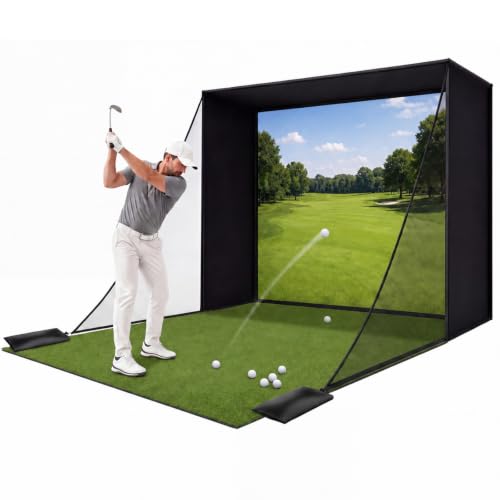
- Includes 2 side barrier nets and a target cloth
- Thick impact screen absorbs shots up to 200 mph
- Can be used indoors or outdoors with carrying bag
Best For: Portable practice with side protection for home or backyard use
Complete Starter Package
10x8ft Simulator Enclosure with Side Nets

- All-in-one kit with frame, screen, and projector mount
- Dual shank nets and blackout panels add safety
- Works with most launch monitors and HD projectors
Best For: Buyers wanting a turnkey simulator enclosure with side-net protection
Compact Cage Setup
Golf Cage Net with Side Enclosure

- Includes side, top, and back net protection
- HD impact screen supports simulator projection
- Tool-free setup and carry bag improve portability
Best For: Golfers needing a portable cage with side-net coverage
Premium Safety-Focused Bay
10x8 ft Home Golf Cage with Shank Nets

- Two side shank nets with sandbags
- Foam-padded steel frame helps reduce rebound
- 500D polyester screen for real ball impact
Best For: Home golfers wanting extra side protection in a garage setup
Tool-Free Blackout Kit
10x8 Enclosure with Side Netting
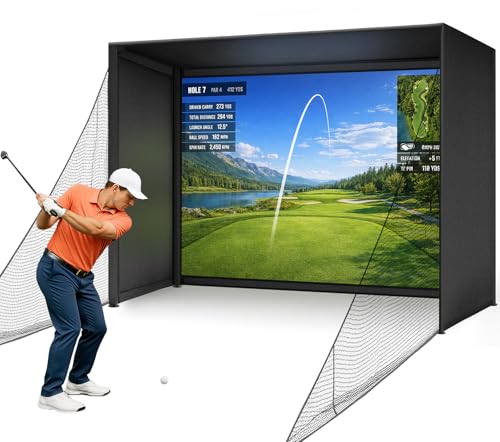
- Tool-free click-lock assembly in about 30 minutes
- Full 600D blackout cover helps block ambient light
- Heavy-duty side nets and foam padding add safety
Best For: Indoor golfers who want quick setup and a darker simulator bay
Complete Practice Bundle
10FT Simulator Enclosure with Side Nets

- Includes batting mat plus enclosure parts
- Two side nets help contain off-center shots
- Black surround cloth improves screen contrast
Best For: Shoppers wanting a fuller enclosure package for home practice
All-in-One Setup Pick – Complete Golf Simulator Enclosure Package
If you want golf simulator enclosures with side nets that feel closer to a full home setup, this package is built to cover the basics in one box. It includes the frame poles, impact screen, blackout cage, projector mount, and side shank nets, which makes it a practical option for golfers who want a cleaner install without piecing together extra parts.
Best For: Golfers who want an all-in-one enclosure package with side nets and a projector mount for garage or home practice.
Pros:
- Includes the poles, hardware, impact screen, blackout cage, projector mount, and side shank nets
- 4K-ready impact screen is sized for near-full frame coverage with minimal light bleed
- Multiple size options make it easier to match different room layouts
- Easy assembly with no special tools required
Cons:
- Turf and projector shown in images are not included
- Heavier 39 kg build may be less convenient to move often
Overall, this is a strong pick if you want a simpler path to a complete simulator bay with side protection already included. The warranty and U.S.-based support add some reassurance for buyers setting up their first dedicated practice space.
Commercial-Style Enclosure – GoSports Golf Simulator Enclosure Nets
GoSports 10 x 8 ft Golf Simulator Enclosure Net - Complete Set with Frame and HD Impact Screen Kit
Check Price On AmazonFor shoppers comparing golf simulator enclosures with side nets, this GoSports system stands out for its heavy-duty screen and blackout enclosure design. It is aimed at home golfers who want a durable bay with reduced rebound, better projector brightness, and a straightforward setup process.
Best For: Home golfers who want a commercial-style enclosure system with a blackout look and a durable impact screen.
Pros:
- Commercial-grade multi-layer impact screen built for high-speed ball strikes
- True blackout enclosure design helps improve projected image brightness
- Reinforced construction with foam padding to help minimize rebound
- Easy installation hardware and instructions included
Cons:
- Warranty coverage is only six months through the dealer
- Listing does not emphasize included side barrier nets as clearly as some competing kits
This is a solid choice if your priority is a polished, durable enclosure with a strong screen and reduced light spill. It feels especially well suited to dedicated indoor simulator rooms where visual quality matters as much as practice safety.
Side-Protection Priority – Upgraded Golf Simulator Enclosure
This upgraded option is a smart look if you want golf simulator enclosures with side nets that prioritize containment. The near-270-degree catch zone, dual side barrier nets, and foam-wrapped steel frame are designed to keep mis-hits controlled while still giving you a full simulator-style hitting area.
Best For: Golfers who want strong side protection and quick setup in a home, garage, or office practice space.
Pros:
- Dual side barrier nets and near-270-degree catch zone help contain slices and hooks
- Two-layer HD screen is designed for durability and 10,000+ hits
- Steel tubes wrapped in EPE foam support higher impact resistance and less rebound
- Tool-free setup reportedly takes about 30 minutes
Cons:
- Projector and launch monitor are not included
- At 10′ x 8′ x 5′, it may still require careful room planning
If side protection is high on your list, this enclosure makes a persuasive case. It offers a practical balance of safety, screen durability, and quick assembly for golfers who want to start practicing without a complicated build.
Portable Cage Choice – Silipull Golf Cage Net with Simulator Impact Screen
Among golf simulator enclosures with side nets, this Silipull cage is built for golfers who want a portable practice space that can work indoors or outdoors. The package combines a heavy steel frame, side barrier netting, an impact screen, and a target cloth, giving you a more complete practice cage without locking you into a permanent room build.
Best For: Golfers who want a portable cage setup with side barriers for garage, basement, backyard, or range practice.
Pros:
- Includes a heavy steel frame with 2 net side barriers for added containment
- 1/6-inch impact screen is designed to absorb shots up to 200 mph
- Spacious 10.5 x 8 ft practice area supports full swing training
- Comes with a carrying bag for easier transport and storage
Cons:
- Heavier 62.7-pound build may be less convenient than lighter nets
- Outdoor use is supported, but weather can still affect convenience and setup
This is a versatile option if you want a cage that can move with you between practice spaces. The side barriers and thick screen make it a strong fit for golfers who need safer shot containment without giving up portability.
Complete Starter Package – 10x8ft Simulator Enclosure with Side Nets
If you want golf simulator enclosures with side nets that cover the essentials in one purchase, this complete package is built as an all-in-one garage or home practice setup. It includes the enclosure, HD impact screen, blackout panels, projector mount, dual shank nets, and a steel frame for a more finished simulator bay.
Best For: Golfers who want a complete indoor simulator enclosure package with added side protection and an included projector mount.
Pros:
- Includes a 10 x 8 ft enclosure with HD impact screen and heavy-duty steel frame
- Blackout side and top panels help reduce ambient light and contain balls
- Dual shank nets add extra protection for mishits
- Compatible with most launch monitors, simulator software, and HD projectors
Cons:
- Projector and launch monitor are not listed as included
- Requires enough room for a full enclosure setup
As a full-featured option, this enclosure makes sense if you want side-net protection plus the main simulator components in one kit. The included mount and blackout panels help it feel more turnkey than a basic hitting cage.
Safety-Focused Build – 10×8 Enclosure with Side Net Barriers
For golfers comparing golf simulator enclosures with side nets, this model stands out for its safety-first design and fast setup. The triple-layer impact screen, foam padding, and side net barriers are aimed at making home garage or indoor practice feel more controlled.
Best For: Golfers who want a quick-assembly enclosure with extra side protection and padded edges.
Pros:
- Triple-layer impact screen is built for durability and projection clarity
- Side netting and foam edge padding help reduce ricochet risk
- Click-lock frame system sets up without tools or screws
- Compatible with major launch monitors and golf simulation software
Cons:
- Projector, launch monitor, and other simulation gear are not included
- Designed for indoor spaces with enough room for a full 10 x 8 ft enclosure
This is a practical pick if safety and convenience matter most. The included side barriers and quick assembly make it appealing for golfers who want a cleaner setup without spending extra time on installation.
Compact Cage Setup – Golf Cage Net with Side Enclosure
This golf simulator enclosure with side nets is aimed at players who want a more compact cage-style practice area with the screen included. It adds side enclosure and top net coverage, making it a strong fit for indoor garage practice where containment matters.
Best For: Golfers who want a portable cage-style enclosure with side and top net protection built in.
Pros:
- Side netting, top net, and reinforced back net create a complete safety enclosure
- Includes a 91 x 86 inch HD impact screen for simulator projection
- Tool-free setup takes about 5 minutes
- Portable design includes a carry bag for storage and transport
Cons:
- Projector and launch monitor are not included
- Recommended for spaces with at least 9 ft ceiling height
- Needs extra clearance behind the cage for safe use
This setup is a good choice if you want the netting structure and screen together without committing to a larger enclosure package. Its fast assembly and portability make it especially useful for golfers who practice in shared or flexible spaces.
Premium Safety-Focused Bay – 10×8 ft Home Golf Cage with Shank Nets
If you want golf simulator enclosures with side nets for a home garage setup, this 10×8 ft cage is built around protection and practical simulator use. It pairs a 4:3 HD impact screen with two 8×8 ft shank nets, foam-padded steel framing, and a blackout-style practice bay to help contain mis-hits and support cleaner projector alignment.
Best For: Home golfers who want a compact enclosure with extra side protection for garage or indoor practice.
Pros:
- Includes two side shank nets with sandbags to catch off-center shots.
- Foam padding on the steel frame is designed to reduce rebound.
- 500D polyester impact screen is made for real golf balls and all swing speeds.
- Guided assembly is advertised at about 30 minutes.
Cons:
- Simulator, hitting mat, and projector are not included.
- Requires a 9 ft ceiling and adequate hitting distance.
- More of a cage-style setup than a fully packaged simulator bundle.
This is a solid option if side containment and bounce-back control matter as much as screen quality. It is especially appealing for family spaces or garages where safety and wall protection are priorities.
Tool-Free Blackout Kit – 10×8 Enclosure with Side Netting
Among golf simulator enclosures with side nets, this Diandian kit stands out for its tool-free assembly and full blackout cover. The 10 x 8 x 5 ft frame, dual-layer 4K-ready impact screen, foam edge padding, and heavy-duty side netting make it a practical pick for indoor practice where safety and screen clarity both matter.
Best For: Golfers who want a fast-assembly indoor enclosure with blackout fabric and safety netting.
Pros:
- Tool-free click-lock setup is advertised at about 30 minutes.
- Includes a full 600D Oxford blackout cover for the top, sides, and back.
- Dual-layer 4K-ready screen is designed to be easy to clean and mark-resistant.
- Foam edge padding and side nets help reduce ricochet and contain misses.
Cons:
- Projector, launch monitor, hitting mat, and software are not included.
- Minimum 9 ft ceiling height is recommended.
- Recommended for indoor use, so it is less flexible for outdoor setups.
This enclosure is a strong fit if you want a cleaner visual environment and a straightforward build. Its mix of blackout coverage and safety netting makes it well suited to dedicated garage or basement simulator spaces.
Complete Practice Bundle – 10FT Simulator Enclosure with Side Nets
If you are comparing golf simulator enclosures with side nets and want more of a bundled package, this 10 ft option adds a batting mat alongside the enclosure parts. It uses a black surround cloth, white double-layer impact screen, two side nets, and sandbags to create a practical indoor practice bay for swings, chips, and putting drills.
Best For: Buyers who want an enclosure package with side nets plus a included mat for a fuller home setup.
Pros:
- Package includes frame poles, surround cloth, impact screen, side nets, and four sandbags.
- Black enclosure cloth helps reduce light interference and improve contrast.
- Two side nets help keep off-center shots within the practice area.
- Includes a batting mat, which many basic enclosures do not.
Cons:
- Golf simulator equipment, projector mount, and large turf are not included.
- Heavier package at 85 pounds, which may affect moving and storage.
- The notes do not specify tool-free assembly or a quick-build design.
This is a useful middle-ground choice if you want more than just a frame and screen. The added mat and side nets make it a convenient starting point for a home garage simulator area.
How We Picked the Best Golf Simulator Enclosures with Side Nets
For Golf Simulator Enclosures with Side Nets, we focused on the features that matter most in real home use: impact-screen durability, side coverage, frame stability, enclosure depth, foam padding, and whether the package is truly ready to set up. We also looked for designs that reduce rebound risk and better contain shanks, toe hits, and off-center strikes.
Quick Comparison
At a glance, the main differences usually come down to screen construction, netting layout, and included accessories. Some setups are more complete with blackout materials, mats, or projector mounts, while others prioritize a stronger frame or upgraded dual-layer screen. If you want the most protection, look for a package that includes full side netting and padded edges rather than a screen-only bundle.
Key Buying Factors for Golf Simulator Enclosures with Side Nets
Safety and Side Coverage
Side nets should extend far enough to catch wide misses without creating gaps near the hitting zone. Extra foam padding at corners and frame contact points is a plus, especially for faster swing speeds or tighter practice spaces.
Screen Quality and Projection Readiness
A good impact screen should balance durability with image quality. If you plan to use a projector, a 4K-ready or HD projection surface can improve visibility and make the simulator feel more realistic.
Frame Strength and Setup
Steel framing generally offers better long-term stability than lighter-duty builds. Also check whether the enclosure is designed for straightforward assembly, since a complicated setup can make routine use frustrating.
Space and Fit
Measure your ceiling height, room width, and depth before buying. Even Golf Simulator Enclosures with Side Nets that are marketed as compact can still require enough clearance for a full swing, projector placement, and safe ball flight.
Included Extras
Packages vary widely. Some include blackout cages, battings mats, projector mounts, or target cloths, while others focus on the core enclosure. Choose based on whether you want a simple practice cage or a more complete simulator room.
Who Should Buy Which Golf Simulator Enclosures with Side Nets?
If you want maximum containment and a more polished simulator experience, choose a fuller package with side shank protection, foam padding, and an upgraded impact screen. If your priority is budget and basic safety, a simpler enclosure with reliable side nets may be enough. Frequent players and households with limited space should lean toward sturdier frames and better padding, while golfers building a dedicated simulator room should look for the most complete setup available.