Golf simulator control boxes with floor buttons make it easier to stay in your hitting stance, manage software, and keep the round moving without walking back to a computer.
Whether you want a simple plug-and-play option or a larger wireless layout with more commands, the right control box can streamline your simulator setup and reduce interruptions.
Best 10 Golf Simulator Control Boxes with Floor Buttons Picks for 2026
Wireless Floor-Ready Control Box
GSPRO Wireless Golf Simulation Control Box

- Wireless RF dongle with 30-foot range
- 14 large tactile buttons
- Works on the floor or a table
Best For: Players who want a wireless plug-and-play controller
SkyTrak Course Play Wired Control
SKT Plug & Play Simulator Control Box

- No software or drivers required
- 15-foot cable for hitting-area placement
- Built for SkyTrak Course Play
Best For: SkyTrak players who want a simple wired controller
Native USB Hitting-Mat Controller
GS Pro Golf Simulator Control Box

- Native USB keyboard design
- 15-foot cable for hitting area use
- Plug-and-play with no software required
Best For: Players who want a simple USB controller from the mat
Arcade-Button Sim Control Box
Opti-Shot Edition USB Control Box

- USB compatible for Windows
- Arcade buttons rated for 10,000,000 cycles
- Works with multiple sim platforms
Best For: Windows simulator users who want durable arcade-style buttons
Mag14 Bluetooth Floor Button Control Box

- 14 customizable buttons
- Bluetooth with rechargeable battery
- 4-year warranty
Best For: PC-based golfers who want wireless control from the hitting area
Sim Caddie Native USB Control Box
Plug-and-Play Hitting Mat Controller

- Native USB keyboard design
- No software required
- Made in the USA
Best For: Golfers who want simple plug-and-play control from the mat
Veteran-Built USB Simulator Control Box
15-Foot Hitting Area Controller
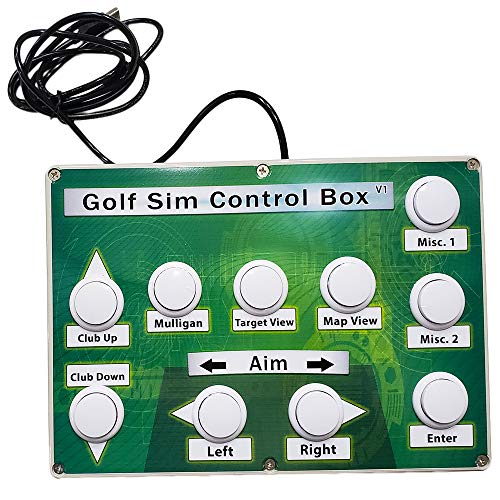
- Works with all golf simulator software
- 15-foot USB cable included
- Arcade buttons rated for 10,000,000 cycles
Best For: Users who want a rugged wired controller with broad software compatibility
Wireless Console Pick
Club Keyboard Elite Series 20-Button Green

- Wireless Bluetooth connection
- Plug and play, no software required
- 20 programmable buttons
Best For: Simple GS Pro control from the hitting area
Flexible Layout Choice
Club Keyboard Flex Series 20-Button Gray

- 20 programmable buttons
- Buttons can be rearranged
- Long battery life
Best For: Customizable GS Pro control with flexible button placement
High-Button Control Option
Club Keyboard Pro Series 28-Button Green

- 28 buttons for complete control
- 8 LED backlit buttons
- Wireless Bluetooth, plug and play
Best For: Maximum button access and backlit controls for GS Pro
Wireless Floor-Ready Control Box – GSPRO Wireless Golf Simulation Control Box
If you want golf simulator control boxes with floor buttons that are easy to drop into a setup, this GSPRO unit is built for simple, hands-on use. The wireless RF dongle connection, large tactile buttons, and auto-wake design make it a practical choice for golfers who want quick control without extra programming.
Best For: Players who want a wireless, plug-and-play control box they can use from the floor or a table.
Pros:
- Wireless RF dongle connection with about a 30-foot range
- 14 large 30mm tactile buttons for easy operation
- Can be used on the floor with a club or placed on a table
- Auto-wake and power-saving features help extend battery life
Cons:
- Requires a single AA battery
- Designed specifically for GSPRO software
- Hand-built 3D-printed plastic construction may not suit everyone
This is a strong fit if you want a simple controller with physical buttons and flexible placement. It emphasizes convenience over customization, which makes it appealing for casual and repeat simulator use.
SkyTrak Course Play Wired Control – SKT Plug & Play Simulator Control Box
Roxor Golf SKT Plug & Play Simulator Control Box for Skytrak Course Play Wired
Check Price On AmazonFor golfers comparing golf simulator control boxes with floor buttons, this wired SKT unit keeps setup straightforward. It is made for SkyTrak Course Play, uses a long 15-foot cable, and is meant to let you control play from the hitting area without reaching for a keyboard or mouse.
Best For: SkyTrak users who want a dependable wired control box with long reach.
Pros:
- Plug-and-play setup with no software or drivers needed
- Designed specifically for SkyTrak Course Play
- 15-foot cable gives flexible placement at the hitting area
- Wired connection supports lag-free, dependable use
Cons:
- Built for SkyTrak integration, so it is more specialized
- Wired design lacks the freedom of a wireless box
If your priority is reliable control rather than extra features, this is a focused solution. The long cable and simple setup make it especially practical for a dedicated SkyTrak simulator space.
Native USB Hitting-Mat Controller – GS Pro Golf Simulator Control Box
This GS Pro option is one of the more straightforward golf simulator control boxes with floor buttons if you want a controller that works right from your hitting mat. It functions as a native USB keyboard, comes with a 15-foot cable, and is designed to be truly plug and play with no software required.
Best For: Sim golfers who want an easy-to-use USB controller from the hitting area.
Pros:
- Native USB keyboard design for direct simulator control
- 15-foot USB cable supports placement near the hitting area
- Plug-and-play operation with no software required
- Made in the USA
Cons:
- Warranty is limited to 90 days
- Wired layout offers less flexibility than wireless options
For users who want a no-fuss controller that behaves like a keyboard, this model keeps things simple. It is best suited to players who value convenience and direct compatibility over extra complexity.
Arcade-Button Sim Control Box – Opti-Shot Edition USB Control Box
If you are shopping for golf simulator control boxes with floor buttons, this Opti-Shot edition is built around durable arcade-style input and broad simulator compatibility. It is USB compatible for Windows, includes a 6-foot cable, and is described as a must-have for several simulator platforms.
Best For: Windows-based simulator users who want a durable, arcade-button control box.
Pros:
- USB compatible for Windows
- Commercial-quality arcade buttons tested for 10,000,000 cycles
- Compatible with TGC, TGC 2019, E6, Opti-Shot, GSA, Fitness Golf, and more
- Handmade in the USA by a veteran-owned business
Cons:
- Only a 6-foot cable is included
- Product notes are more focused on platform compatibility than setup flexibility
This is a good pick if you care most about button durability and broad Windows simulator support. It is less about extra convenience features and more about tough, reliable control for serious sim use.
Mag14 Bluetooth Floor Button Control Box – 14-Button Simulator Control
If you want golf simulator control boxes with floor buttons that keep everything within reach of the hitting area, the Mag14 is built around that exact job. It gives you 14 customizable buttons, Bluetooth connectivity, and a rechargeable battery, so you can manage PC-based simulator software without stepping away from the mat.
Best For: PC users who want a wireless, button-heavy control box for hands-on simulator management.
Pros:
- 14 customizable buttons for controlling simulator software.
- Bluetooth operation keeps the setup wireless.
- Rechargeable battery with a 30-minute inactive sleep timer.
- 4-year warranty adds long-term coverage.
Cons:
- For PC-based software only.
- Battery-powered design may need occasional charging.
This is a strong fit if you want a compact, wireless control box with plenty of direct-access buttons. The Mag14 focuses on convenience and customization rather than broad platform support, so it makes the most sense for PC simulator owners who want to keep every key control in the hitting area.
Sim Caddie Native USB Control Box – Plug-and-Play Hitting Mat Controller
Among golf simulator control boxes with floor buttons, the Sim Caddie stands out for being a native USB keyboard that is designed to work like a simple plug-and-play controller. It includes the must-have controls from your hitting area, uses a 3-foot USB charging cable, and requires no software to get running.
Best For: Sim players who want a straightforward wired controller that works without extra setup.
Pros:
- Native USB keyboard design for direct simulator control.
- True plug-and-play use with no software required.
- Includes a 3-foot USB charging cable.
- Made in the USA.
Cons:
- Warranty is limited to 90 days.
- Wired USB setup may be less flexible than wireless options.
This model is appealing if you want the simplest possible route to control your sim from the mat. Its main advantage is convenience: you connect it, place it where you need it, and start using the built-in controls without additional software or configuration.
Veteran-Built USB Simulator Control Box – 15-Foot Hitting Area Controller
Golf Simulator Control Box - Control Your Simulator Software from Your Hitting Area.
Check Price On AmazonIf you are comparing golf simulator control boxes with floor buttons, this model is all about reach and durability. It works with all golf simulator software, includes 15 feet of USB cable, and uses commercial-quality arcade buttons that are tested for 10,000,000 cycles, making it a practical choice for a busy hitting area.
Best For: Golfers who want a rugged, universal control box with extra USB cable length.
Pros:
- Works with all golf simulator software.
- Includes 15 feet of USB cable for flexible placement.
- Commercial-quality arcade buttons tested for 10,000,000 cycles.
- Handmade in the USA by a veteran-owned business.
Cons:
- No wireless feature listed.
- Basic black design may feel utilitarian.
This is the most universal option in the group if you want a straightforward control box that can sit near the hitting area and handle heavy use. The long cable and durable button design make it especially practical for simulators where reliability matters more than extra features.
Wireless Console Pick – Club Keyboard Elite Series 20-Button Green
Club Keyboard Elite Series Wireless 20 Button GS Pro Golf Simulator Control Box (Green)
Check Price On AmazonIf you want golf simulator control boxes with floor buttons that keep the basics close at hand, this 20-button wireless model is a straightforward option. It uses a Bluetooth connection, works plug and play with no software required, and is designed to let you control your sim right from the hitting area.
Best For: Players who want simple wireless GS Pro control from the hitting area without extra setup.
Pros:
- Wireless Bluetooth connection keeps the control box cable-free.
- Plug and play operation requires no software setup.
- 20 programmable buttons give you flexible in-sim control.
- Designed to be used right from the hitting area.
Cons:
- Button count is lower than the 28-button model.
- Green color may not suit every setup.
This is a practical pick if you want a clean, easy-to-use control box with enough programmable buttons for core simulator functions. It focuses on simple wireless operation rather than extra features.
Flexible Layout Choice – Club Keyboard Flex Series 20-Button Gray
Club Keyboard Flex Series Wireless 20 Button GS Pro Golf Simulator Control Box (Gray)
Check Price On AmazonAmong golf simulator control boxes with floor buttons, this gray Flex Series model stands out for customization. It offers 20 programmable buttons, wireless Bluetooth connection, and updatable buttons that can be rearranged to suit your needs, making it easy to adapt the layout to your sim.
Best For: Buyers who want a customizable wireless GS Pro control box with flexible button placement.
Pros:
- Wireless Bluetooth connection supports a clean setup.
- 20 programmable buttons cover common simulator controls.
- Buttons can be rearranged to suit your needs.
- Long battery life means it does not need charging very often.
Cons:
- Still limited to 20 buttons versus higher-capacity options.
- Gray finish may be less visually distinct in some setups.
This model is a strong fit if you care more about layout flexibility than maximum button count. It keeps the setup simple while giving you room to tailor the controls over time.
High-Button Control Option – Club Keyboard Pro Series 28-Button Green
Club Keyboard Pro Series Wireless 28 Button GS Pro Golf Simulator Control Box (Green)
Check Price On AmazonIf you want golf simulator control boxes with floor buttons that offer more direct access, this Pro Series model is the most feature-packed of the group. It includes 28 buttons, 8 LED backlit buttons, wireless Bluetooth connection, and plug-and-play GS Pro readiness with no setup required.
Best For: Sim users who want the most buttons and backlit controls in a wireless GS Pro box.
Pros:
- 28 buttons provide the most control in this lineup.
- 8 LED backlit buttons help with visibility.
- Wireless Bluetooth connection keeps the setup cable-free.
- Plug and play GS Pro ready with no setup required.
Cons:
- Larger size may take up more space.
- Green color may not match every simulator bay.
This is the best match if you want the broadest control surface and useful backlighting in one wireless box. It favors function and visibility over a compact footprint.
How We Picked the Best Golf Simulator Control Boxes with Floor Buttons
We focused on Golf Simulator Control Boxes with Floor Buttons that offer practical in-bay control, reliable connectivity, and a layout that works well while standing at the hitting area. The best picks balance button count, software compatibility, ease of setup, and durability for regular simulator use.
We also prioritized models that suit different skill levels and room setups, from straightforward wired units to wireless control boxes with more advanced command layouts.
Quick Comparison
If you want the simplest setup, wired plug-and-play boxes are usually the fastest path. If you want more freedom around the mat, wireless models are better, especially in larger simulator bays. For heavy users or golfers who like more shortcuts, higher-button-count options can save time between shots.
Key Buying Factors for Golf Simulator Control Boxes with Floor Buttons
Connection Type
Choose wired if you want maximum simplicity and no battery management. Choose wireless if you want a cleaner setup and more movement around the hitting area. In either case, make sure the connection is stable with your simulator PC and software.
Button Layout and Count
More buttons are not always better, but they can be useful if you regularly switch holes, change clubs, manage menus, or control camera and scoring functions. Fewer buttons may be easier to learn, while larger layouts can reduce keyboard use.
Software Compatibility
Check that the control box supports your simulator platform, whether you use GS Pro, SkyTrak, OptiShot, or Windows-based software. Compatibility matters more than raw button count if you want reliable day-to-day use.
Build Quality and Placement
Floor-button units should feel sturdy enough for repeated foot use and placed where they are easy to reach without interfering with your swing. A low-profile, stable design is especially important in a hitting bay.
Who Should Buy Which Golf Simulator Control Boxes with Floor Buttons?
If you want the easiest setup, go with a wired control box that is clearly plug-and-play. If you want a cleaner simulator space and less cable clutter, a wireless model is the better fit. If you are a frequent player or host sessions often, a larger button layout can make Golf Simulator Control Boxes with Floor Buttons much more efficient. If you only need basic commands, a simpler box is often the best value.
In short, match the control box to your simulator software, your preferred connection type, and how much on-mat control you actually need.