If you’re serious about improving your golf game, selecting the right launch monitor is essential. These devices can provide you with valuable insights like swing speed and launch angle, which are key to enhancing your performance. From the Rapsodo MLM2PRO to the Garmin Approach R10, there are plenty of options tailored to your needs. But how do you choose the best one for your practice routine? Let’s explore the top contenders.
Rapsodo MLM2PRO Golf Launch Monitor for Swing Analysis

If you’re a golfer aiming to elevate your game through precise swing analysis, the Rapsodo MLM2PRO Golf Launch Monitor is a top choice. This advanced device measures 13 core metrics, including spin rate and swing speed, providing pro-level accuracy. You can easily pair it with your smartphone or tablet, turning any space into a golf simulator. With real-time data on ball speed and launch angle, you’ll gain valuable insights to improve your performance. Plus, its versatility allows for use both indoors and outdoors, making it an essential training aid for refining your skills in various settings.
Best For: Golfers looking to enhance their performance with detailed swing analysis and metrics.
Pros:
- Pro-level accuracy with 13 core metrics for comprehensive swing analysis.
- Versatile usage for both indoor and outdoor practice, adaptable to various environments.
- Integration with golf apps provides a realistic full-swing simulator experience.
Cons:
- May require a smartphone or tablet for full functionality, which could be a barrier for some users.
- Initial setup and calibration may take time to ensure accurate readings.
- Price point may be higher compared to basic launch monitors, potentially limiting access for casual golfers.
Garmin Approach R10 Portable Golf Launch Monitor

The Garmin Approach R10 Portable Golf Launch Monitor is an ideal choice for golfers seeking a versatile and user-friendly device that enhances their practice experience. This waterproof monitor fits seamlessly at home, indoors, or on the driving range and boasts up to 10 hours of battery life. It tracks essential metrics like club head speed, ball speed, launch angle, and direction, helping you refine your swing. With its training mode, you can analyze stats for each club and view shot dispersion. Plus, video analysis through the Garmin Golf app allows you to assess your swings while enjoying virtual rounds on thousands of courses.
Best For: Golfers looking for a portable and comprehensive launch monitor to enhance their practice and improve their game.
Pros:
- Waterproof design (IPX7) allows for use in various environments.
- Tracks essential golf metrics to help refine swing consistency.
- Offers virtual play on over 42,000 courses with a subscription.
Cons:
- Requires an active subscription for full virtual play features.
- May not capture metrics as accurately as professional-grade monitors.
- Limited to indoor and driving range use without additional equipment.
Swing Caddie Portable Launch Monitor

For golfers seeking versatility and reliability, the Swing Caddie Portable Launch Monitor (SC200Plus) stands out as an ideal choice. This golf simulator works well at home or outdoors, utilizing Doppler radar technology for accurate data collection. It features calibrating atmospheric pressure sensors, ensuring precise measurements. You’ll appreciate the real-time shot performance assessment and instant feedback through its advanced LCD display and voice output. Plus, the all-new swing speed mode lets you practice without hitting a ball. With adjustable loft angles and easy data storage, you’ll effortlessly track club statistics and average distances, enhancing your training experience.
Best For: Golfers looking for a reliable and versatile training tool for improving their skills both at home and outdoors.
Pros:
- Accurate data collection due to advanced Doppler radar technology.
- Instant feedback through voice output and an advanced LCD display.
- Customizable training options with adjustable loft angles and swing speed mode.
Cons:
- Requires calibration for atmospheric pressure, which may not be convenient for all users.
- Limited functionality without hitting a ball in swing speed mode.
- Portability may be affected by battery life or charging requirements.
Rapsodo Mobile Launch Monitor for Golf (iPhone & iPad Only)

Offering tour-level accuracy and a user-friendly design, the Rapsodo Mobile Launch Monitor is perfect for golfers seeking to improve their game with cutting-edge technology. Compatible with iPhone and iPad, this portable device provides precise shot tracking, including ball speed, club speed, and launch angle. You can easily transform any space into a golf simulator, enjoying real-time swing analysis and interactive games. The swing analyzer records your shots, offering video playback and visual tracers to help refine your technique. With instant feedback and GPS shot scatter mapping, it’s an ideal tool for golfers of all skill levels aiming for improvement.
Best For: Golfers of all skill levels looking for an advanced and portable solution to improve their game through accurate shot tracking and swing analysis.
Pros:
- Tour-level accuracy for key metrics like shot distance, ball speed, and club speed.
- User-friendly design that is easy to set up and compatible with iPhone and iPad.
- Comprehensive swing analysis features including video playback and shot tracers for visual feedback.
Cons:
- Requires iPhone or iPad for operation, limiting compatibility with other devices.
- May need sufficient space for optimal simulation experience, which could be a constraint indoors.
- Initial learning curve for beginners to fully utilize all features effectively.
EYE MINI CORE Golf Launch Monitor & Simulator

Real-time tracking with 15 ball data points makes the EYE MINI CORE Golf Launch Monitor & Simulator an excellent choice for golfers seeking immediate feedback on their performance. Its Dimple Optix technology reads any ball’s dimples without stickers, ensuring accurate data capture. Plus, the Club Optix feature offers visuals of club impact for instant insights. With the VIEW software, you’ll enjoy a month of immersive 4K courses, skills training, and competitive modes. Setting it up is a breeze, and pairing with Swing Optix activates AI Trainer feedback, optimizing your practice sessions from the comfort of home.
Best For: Golfers looking for accurate real-time performance data and immersive simulation experiences from home.
Pros:
- Offers real-time tracking with 15 ball data points for immediate performance feedback.
- Dimple Optix technology allows for accurate data capture without the need for ball stickers.
- VIEW software provides a month of access to 4K courses, skills training, and various competitive modes.
Cons:
- Requires a powerful computer setup to run the software optimally.
- Club Optix feature needs a software upgrade for full functionality.
- Swing Optix, which enhances training feedback, is sold separately.
SC4 PRO Golf Launch Monitor & 3D Driving Range Simulator

The SC4 PRO Golf Launch Monitor & 3D Driving Range Simulator stands out as an ideal choice for golfers seeking both portability and pro-grade accuracy. With the Prometrics Engine, it delivers precise ball and club head data, ensuring you get unmatched real-time insights from swing to impact. You’ll enjoy features like the 3D Driving Range and E6 Connect home simulator, along with access to the VOICECADDIE S app for advanced statistical analysis. Multiple training modes cater to your practice needs, and its user-friendly setup means you can start right away—no special balls required. Perfect for all skill levels, it’s a game-changer.
Best For: Golfers of all skill levels looking for a portable, accurate launch monitor and simulator for practice and improvement.
Pros:
- Pro-grade accuracy with detailed ball and club head data.
- User-friendly interface and simple setup for immediate use.
- Multiple training modes and advanced features through the VOICECADDIE S app.
Cons:
- May require a separate purchase for additional software or features.
- Limited by the need for standard golf balls, which may not suit all practice preferences.
- May not perform optimally in extreme outdoor conditions.
Portable Golf Launch Monitor and Swing Analyzer

If you’re looking to elevate your golf game, a portable golf launch monitor and swing analyzer is a game-changer. Designed for both indoor and outdoor use, it boasts a 12-hour battery life and tracks real-time shot data. You’ll measure essential parameters like swing speed, ball speed, and launch angle with impressive accuracy. Thanks to Doppler radar technology, you can trust the data you receive. The advanced LCD display gives instant feedback, while adjustable loft angles allow for customized practice sessions. Plus, the seamless integration with the MySwingCaddie app provides deeper insights into your performance, helping you refine your swing effectively.
Best For: Golf enthusiasts looking to improve their game through precise data analysis and real-time feedback.
Pros:
- Easy to use for both indoor and outdoor practice sessions.
- Provides accurate measurements using advanced Doppler radar technology.
- Seamless integration with MySwingCaddie app for in-depth performance tracking.
Cons:
- Limited to specific parameters; may not cover all aspects of swing analysis.
- Battery life may vary depending on usage conditions.
- Requires a compatible smartphone for full functionality with the app.
SKYTRAK ST MAX Launch Monitor

Designed for serious golfers and simulator enthusiasts, the SKYTRAK ST MAX Launch Monitor stands out with its dual Doppler radar and photometric cameras, providing precise ball and club data. You’ll appreciate its sleek charcoal grey finish and modular design that enhances stability while maintaining calibration. With dual USB-C ports, you can charge and transfer data simultaneously. The launch monitor offers an impressive suite of tools like Skills Assessments and the Wedge Matrix to elevate your practice sessions. Thanks to its advanced technology, you’ll enjoy a seamless experience that caters to both novice and experienced golfers, ensuring you improve your game efficiently.
Best For: Serious golfers and simulator enthusiasts looking for precise ball and club data to enhance their practice sessions.
Pros:
- Accurate Data: Dual Doppler radar and photometric cameras provide reliable ball and club metrics.
- User-Friendly Design: The sleek finish and modular design enhance stability and ease of use.
- Comprehensive Tools: Includes various game improvement features like Skills Assessments and Wedge Matrix for better practice sessions.
Cons:
- Price Point: May be considered expensive for casual golfers.
- Complex Setup: Initial setup and calibration might be challenging for some users.
- Requires Compatible Devices: Dual USB-C ports necessitate compatible charging and data transfer devices.
Golf Launch Monitor & Simulator for iOS/Android Phones

For golfers looking to elevate their game without the hassle of bulky equipment, the Golf Launch Monitor & Simulator for iOS/Android phones stands out as an excellent choice. This portable swing analyzer is perfect for indoor and outdoor use, featuring advanced sensors that adjust to environmental conditions. You’ll gain insights into your performance with swing metrics like Attack Angle and Launch Angle, along with clubface impact visuals. The immersive 3D simulation offers multiple angles for observing your shot, while personalized training modes help track your progress. Plus, the app requires no subscription and provides real-time voice feedback for an engaging experience.
Best For: Golfers seeking a portable and user-friendly swing analysis tool to enhance their performance both indoors and outdoors.
Pros:
- Offers advanced swing metrics and real-time environmental adjustments for accurate analysis.
- Immersive 3D simulation with multiple viewing angles enhances practice sessions.
- No subscription required, making it a cost-effective solution with engaging real-time voice feedback.
Cons:
- May require a smartphone with specific compatibility for optimal performance.
- Limited to the features available in the app, which may not cater to highly advanced golfers.
- Performance can be affected by varying environmental conditions, potentially leading to inconsistencies.
SkyTrak ST+ Plus Golf Launch Monitor & Simulator Bundle
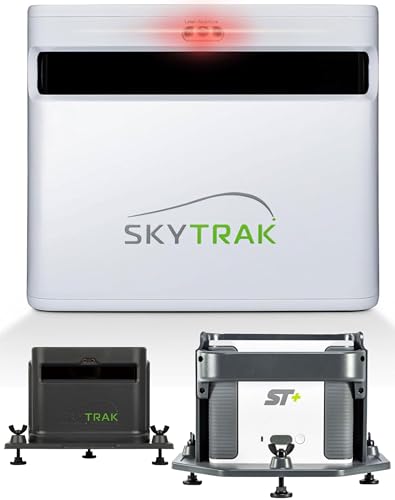
The SkyTrak ST+ Plus Golf Launch Monitor & Simulator Bundle is an ideal choice for golfers seeking a seamless blend of accuracy and convenience. It features indoor and outdoor capabilities, providing essential shot and club data. With dual Doppler radar and an advanced photometric camera, you’ll enjoy tour-level accuracy. You can measure carry distance, ball speed, spin, and more for elite-level feedback. The compact design allows for easy setup anywhere. Plus, you get immersive global course play, transforming your practice sessions into thrilling experiences. The bundle includes everything you need, from USB cables to a protective case, ensuring you’re ready to go.
Best For: Golfers looking for a high-accuracy launch monitor and simulator that can be used both indoors and outdoors for a comprehensive training experience.
Pros:
- Combines dual Doppler radar and advanced photometric camera for tour-level accuracy.
- Compact and lightweight design allows for easy setup in various practice spaces.
- Offers immersive global course play, enhancing practice sessions with real-world scenarios.
Cons:
- May require additional software purchases after the initial 14-day trial.
- Performance may vary based on lighting conditions when used outdoors.
- Price point may be higher compared to simpler launch monitors on the market.
Factors to Consider When Choosing Golf Launch Monitors With Club Data
When choosing a golf launch monitor with club data, you’ll want to reflect on the accuracy of its measurements to guarantee you get reliable feedback. Portability and ease of setup are also essential, especially if you plan to use it on different courses or at home. Additionally, think about the training features available and how well it integrates with apps and devices you already use.
Accuracy of Measurements
As you consider a golf launch monitor, understanding the accuracy of its measurements is essential for improving your game. High accuracy standards generally include variations of ±1 mph for ball speed and ±1 degree for launch angle. Look for models that use Doppler radar technology, which provides reliable data with an accuracy rate of within ±3% for ball speed and carry distance. Advanced monitors may combine radar and photometric cameras, enhancing measurement precision. Additionally, the reliability of club data—like club path and face angle—can greatly impact your swing mechanics. Remember that calibration and environmental factors, such as temperature and humidity, can affect measurements, so choose monitors with built-in sensors for consistent performance.
Portability and Setup
Choosing a golf launch monitor that’s easy to transport and set up can greatly enhance your practice experience. When selecting one, consider its weight and size; a portable device makes moving between indoor and outdoor locations a breeze. Look for models that require minimal setup time, allowing you to shift from storage to use without complex calibration. Evaluate power source options, like battery life and charging ports, to guarantee you can practice for extended periods. A user-friendly interface and intuitive controls are crucial, making it easier for golfers of all skill levels to use. Finally, check compatibility with various surfaces and golf balls to enhance versatility in different practice environments.
Training Features Available
Evaluating the training features of golf launch monitors is essential for enhancing your practice sessions and refining your skills. Look for models that include detailed training modes, like swing speed mode, which allows you to practice without a ball to improve your swing mechanics. Shot dispersion charts and performance stats tracking can help you identify your strengths and areas needing improvement. Video analysis features are invaluable, as they automatically record your swings and performance metrics for effective self-review. Choose monitors that allow customizable training conditions with adjustable loft angles and practice modes tailored to your needs. While considering these features, keep in mind the potential integration with mobile apps for real-time feedback and personalized training options to enrich your learning experience.
Integration With Apps
When considering golf launch monitors, the integration with apps can greatly enhance your practice experience. These apps provide real-time data synchronization, allowing you to analyze your performance with advanced analytics. You’ll access detailed swing analysis and shot metrics directly within the app, helping you pinpoint strengths and areas needing improvement. Some devices even offer virtual play options, letting you simulate rounds on thousands of golf courses worldwide. Additionally, the ability to record swing videos and overlay performance metrics aids in effective self-analysis and training. If you enjoy competition, certain launch monitors support community features through apps, enabling you to participate in challenges and tournaments with global leaderboards, making your practice not only informative but also engaging.
Compatibility With Devices
As you explore golf launch monitors, understanding their compatibility with devices is vital for a seamless experience. Look for models that work with both smartphones and tablets, as many rely on mobile apps for tracking and analyzing your data. It’s essential to confirm that the monitor supports both iOS and Android systems, maximizing accessibility across various devices. Some launch monitors may require specific app subscriptions for advanced features, so check this compatibility before purchasing. Additionally, consider whether the device can integrate with third-party software for enhanced functionality and analysis. Finally, always verify that the monitor’s firmware is updatable, guaranteeing it remains compatible with the latest operating systems and app versions for peak performance.
Battery Life Considerations
Battery life plays a pivotal role in your choice of a golf launch monitor, especially if you want uninterrupted practice sessions. Look for portable models that typically offer battery lives between 8 to 12 hours, which should be enough for multiple rounds. If you opt for a device with a rechargeable battery, check the charging times to guarantee it’s ready when you are. Don’t overlook power management features; some monitors have auto-sleep modes that conserve battery during idle moments. Finally, always read user reviews or specifications to gauge real-world battery performance, as advertised times can differ based on usage and environmental conditions. Choosing wisely here will keep your practice sessions running smoothly.
Price and Value
Steering through the price and value of golf launch monitors can feel overwhelming, especially with options ranging from $300 to over $5,000. When choosing, consider what metrics you need; advanced models track more data points, boosting your training effectiveness. Look for monitors offering real-time feedback and mobile app integration, as these can enhance your experience without extra costs. Don’t forget to check the warranty and customer support—comprehensive plans can guarantee long-term satisfaction and assistance. Finally, assess potential upgrade paths or software subscriptions; some monitors may seem affordable initially but could lead to ongoing costs that impact their overall value. By weighing these factors, you’ll find a launch monitor that fits your needs and budget.