Golf swing analyzer sensors can turn guesswork into measurable practice by showing what your swing, club delivery, and ball flight are actually doing.
Whether you want wearable feedback, automatic shot tracking, or a portable launch monitor, the right system depends on how you practice and what data matters most.
Best 10 Golf Swing Analyzer Sensors Picks for 2026
Best for 3D Feedback
MOXI SwingMotion Dual IMU Swing Analyzer
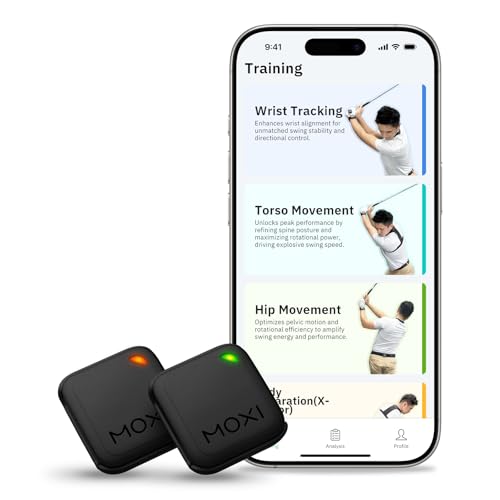
- Dual 9-axis sensors for wrist, torso, hip, and X-Factor tracking
- 3D avatar playback with real-time metrics and graphs
- Free app with no subscription plus 4 training modes
Best For: Golfers who want wearable swing analysis with deeper body-mechanics feedback and no ongoing app fees.
Best for Automatic Tracking

- 16-sensor kit covers every club, including the putter
- Automatic shot tracking with hands-free data capture
- AI rangefinder adjusts for weather and elevation
Best For: Golfers who want full-round tracking and smart yardages with minimal manual input.
Best for Real-Time Coaching
Blast Motion Golf Swing Analyzer

- Instant feedback through the Blast app
- Tracks swings, strokes, and air-swing drills
- Auto-edits video with metric overlays
Best For: Golfers who want quick coaching feedback and app-based practice tracking.
Best for Automatic Club Tracking
Golf Pad TAGS Automatic Swing Trainer

- 15 tags with no batteries to charge or replace
- Automatic club tracking plus distance and dispersion stats
- Android and iPhone support with course strategy insights
Best For: Golfers who want simple automatic shot tracking and round analysis from their phone.
Best for Auto-Adjusted Data
Pro X1 Plus Golf Launch Monitor

- Built-in temp, humidity, and pressure sensors
- Tracks swing speed, spin, launch angle, and attack angle
- Indoor/outdoor use with 3D simulator visuals
Best For: Golfers who want portable launch monitor data that adjusts for real-world conditions.
Best for Real-World Accuracy
Portable Swing Analyzer with 13 Metrics

- No subscription or annual fees
- Built-in environmental sensors for adjusted shot data
- 13 metrics plus 3D simulator and video record
Best For: Golfers who want portable, condition-adjusted swing feedback with simulator features.
Best for Portable Shot Data
Voice Caddie SC300i Launch Monitor

- Tracks swing and ball data with Doppler radar accuracy.
- Works indoors or outdoors with voice and LCD feedback.
- Connects to the MySwingCaddie app for deeper shot analysis.
Best For: Golfers who want a portable launch monitor with real-time shot metrics and app-based analysis.
Best for iPhone Tracking

- Tracks ball speed, club speed, launch angle, and distance
- GPS shot mapping plus video playback improves review
- Portable indoor/outdoor use with iPhone and iPad
Best For: Golfers who want a compact launch monitor for iPhone/iPad-based practice and swing analysis.
Best Entry-Level Radar Monitor
Portable Golf Launch Monitor for Home Use

- Doppler radar tracks ball and club data in real time.
- Training modes cover speed, distance, efficiency, and backspin.
- No subscription required; supports iOS, Android, and HarmonyOS.
Best For: Golfers who want an affordable app-connected radar monitor for casual practice and basic swing analysis.
Best for 3D Feedback – MOXI SwingMotion Dual IMU Swing Analyzer
If you want golf swing analyzer sensors that go beyond simple swing counts, the MOXI SwingMotion focuses on real-time body-mechanics feedback. Its dual wearable IMU sensors track wrist, torso, hip rotation, and X-Factor separation, then turn each swing into 3D visuals and data you can review right away in the free app.
Best For: Golfers who want affordable, app-based swing feedback with sensor placement options for wrist, torso, and hips.
Pros:
- Dual 9-axis sensors capture wrist, torso, hip, and separation metrics
- 3D swing playback and graphs make flaws easier to spot
- Free iOS and Android app with no subscription fees
- Four training modes help isolate specific swing mechanics
Cons:
- Customer review volume is still relatively low
- Battery life is good for practice, but not all-day use
- May feel more advanced than a simple beginner swing aid
For golfers comparing golf swing analyzer sensors, this model stands out for combining wearable motion tracking with coaching-style visuals and targeted training modes. It’s a strong fit if you want to work on mechanics at home or on the range without paying a monthly app fee.
Best for Automatic Tracking – Arccos Smart Sensors
If you want golf swing analyzer sensors that do more than count swings, Arccos Smart Sensors are built for fully automatic shot tracking and on-course yardage help. The GEN 4 kit covers every club in your bag, and the app adds AI-powered distance adjustments for wind, elevation, temperature, humidity, and altitude.
Best For: Golfers who want hands-free game tracking, club-by-club data, and smart GPS yardages without manually entering shots.
Pros:
- 16 weather-resistant sensors cover your entire bag, including a dedicated putter sensor
- Automatic shot tracking reduces manual input during rounds
- AI-powered GPS rangefinder accounts for real-world conditions
- Free first-year app membership for new users
Cons:
- Membership is required after the first year
- Works best for golfers who are willing to use the app ecosystem
- Advanced features may be more than casual players need
For players comparing golf swing analyzer sensors, this set stands out because it combines club tracking, automatic data capture, and smart distance calculations in one system. It is less about swing-mechanics feedback and more about reliable on-course performance tracking.
Best for Real-Time Coaching – Blast Motion Golf Swing Analyzer
If you want golf swing analyzer sensors that do more than just log numbers, Blast Motion stands out for its real-time feedback and swing-to-putting coverage. It pairs with the Blast app to deliver quick metrics, video highlights, and a simple training workflow for golfers who want practical feedback they can use right away.
Best For: Golfers who want instant swing feedback, short-game improvement, and easy app-based tracking.
Pros:
- Real-time feedback sent directly to the Blast app
- Works from tee to green, including putting and air swings
- Auto-clips video highlights with swing metrics overlaid
- Membership setup is included and managed digitally in the app
Cons:
- Requires a smartphone and app workflow to get the full experience
- Ongoing membership may not appeal to buyers who want a one-time purchase
- Best value depends on how often you use the video and metrics features
For golfers comparing golf swing analyzer sensors, this is a strong pick if you care about immediate coaching cues and want a tool that supports both full-swing and short-game practice. It is less about deep hardware complexity and more about making practice sessions easier to review and improve.
Best for Automatic Club Tracking – Golf Pad TAGS Automatic Swing Trainer
If you want golf swing analyzer sensors that focus on on-course data instead of guesswork, Golf Pad TAGS is a practical way to track clubs, distances, and shot trends right from your phone. It’s aimed at golfers who want simple setup, automatic club detection, and useful performance insights without dealing with batteries or complicated hardware.
Best For: Golfers who want an easy-to-use swing and shot tracking system for real round-by-round analysis.
Pros:
- Includes 15 tags for automatic club tracking with no batteries to charge or replace
- Shows club distances, dispersion, fairways hit, greens in regulation, and putting stats
- Works with Android and iPhone for convenient mobile analysis
- Offers intelligent club recommendations and course strategy insights
Cons:
- Requires tag setup on clubs before play
- Best suited to golfers who want tracking data more than swing-plane coaching
- Depends on a compatible phone for the full experience
For players who value round data over practice-range gimmicks, this is one of the more useful golf swing analyzer sensors setups because it turns everyday scoring into actionable feedback. It’s a strong fit if you want automatic tracking that helps you understand what each club really does on the course.
Best for Auto-Adjusted Data – Pro X1 Plus Golf Launch Monitor
If you want golf swing analyzer sensors that do more than just capture raw numbers, the Pro X1 Plus is built to factor in changing conditions automatically. Its built-in temperature, humidity, and barometric pressure sensors help adjust shot data in real time, while the app adds swing speed, spin rate, launch angle, and more for practical practice sessions at home or outdoors.
Best For: Golfers who want a portable launch monitor with environmental sensing and simulator-style feedback for home bays, ranges, or backyard practice.
Pros:
- Built-in environmental sensors help adjust data to real-time conditions.
- Tracks useful swing and shot metrics like attack angle, launch angle, spin axis, and swing speed.
- Works indoors or outdoors with a 3D simulator view and no subscription required.
Cons:
- Customer review count is limited, so long-term reliability is still unclear.
- App setup may matter more here than with simpler launch monitors.
As a portable training tool, this unit stands out for blending simulator-style visuals with golf swing analyzer sensors that automatically account for weather-related variables. That makes it a smart pick for golfers who want more context behind each shot rather than basic distance data alone.
Best for Visual Swing Path Feedback – EyeLine Golf Check Point Laser
If you want a simple practice aid that makes golf swing analyzer sensors feel more tangible, the EyeLine Golf Check Point Swing Laser gives you instant visual feedback without app setup or batteries tied to a full launch system. It is built to help you trace the correct swing path and plane, making it a practical choice for golfers who want a repeatable drill tool at home or on the range.
Best For: Golfers who want a compact, easy-to-use trainer for grooving swing plane, path, and consistency with immediate visual cues.
Pros:
- Dual lasers provide clear feedback for swing path and plane.
- Useful for slow-motion drills that help build muscle memory.
- Compact and portable for indoor or outdoor practice.
- Works with any club, making it versatile for full-swing training.
Cons:
- Gives visual training feedback rather than data-heavy performance metrics.
- Requires consistent setup and attention to the laser line during practice.
For players focused on contact, path, and plane, this trainer is a straightforward alternative to more complex golf swing analyzer sensors. It is strongest as a hands-on practice aid for building a better motion pattern over time.
Best for Real-World Accuracy – Portable Swing Analyzer with 13 Metrics
If you want golf swing analyzer sensors that do more than just count speed, this launch monitor is built for practical practice. It adds built-in temperature, humidity, and barometric pressure sensing, so your shot data is adjusted for current conditions indoors or out, with no subscription fee to worry about.
Best For: Golfers who want a portable launch monitor with environmental sensing, detailed metrics, and app-based simulator features for home or range use.
Pros:
- Zero annual fees with full app access after one download
- Environmental sensors adjust data for temperature, humidity, and pressure
- Tracks 13 metrics, including spin rate, launch angle, and attack angle
- 3D driving range and video record features add useful practice feedback
Cons:
- Indoor use needs at least 15 feet of total space
- Works best when the club is selected correctly before each swing
- Bluetooth and shot capture can be less forgiving on mishits or shanks
For buyers comparing golf swing analyzer sensors, this model stands out because it blends environmental compensation, simulator visuals, and a wider metric set without recurring costs. That makes it a strong pick if you want more realistic numbers and a more complete practice setup.
Best for Portable Shot Data – Voice Caddie SC300i Launch Monitor
If you want golf swing analyzer sensors that give you practical feedback without a full studio setup, the Voice Caddie SC300i is a strong fit. It tracks swing speed, ball speed, carry distance, smash factor, launch angle, apex, and spin, making it useful for both range sessions and indoor practice.
Best For: Golfers who want a portable launch monitor with real-time shot data, voice feedback, and app syncing for structured practice.
Pros:
- Measures a wide range of shot metrics, including carry, smash factor, launch angle, and spin.
- Doppler radar design provides solid accuracy for indoor and outdoor use.
- LCD display, voice output, and MySwingCaddie app support make feedback easy to read and review.
- Up to 20 hours of battery life supports long practice sessions.
Cons:
- More of a launch monitor than a full swing-movement sensor system.
- Spin data is available in the app, which adds an extra step for analysis.
Overall, the SC300i is a practical choice if you want golf swing analyzer sensors focused on ball-flight and launch data rather than raw body-motion tracking. It shines for golfers who value portability, quick setup, and immediate shot feedback.
Best for iPhone Tracking – Rapsodo Mobile Launch Monitor
If you want a portable launch monitor that doubles as one of the more practical golf swing analyzer sensors, the Rapsodo is a strong fit for players who rely on an iPhone or iPad. It combines ball and club data with GPS shot mapping, video replay, and simulator-style feedback so you can practice with real numbers instead of guesswork.
Best For: Golfers who want a compact, iPhone/iPad-based launch monitor for swing analysis, shot tracking, and home practice.
Pros:
- Measures key data like ball speed, club speed, launch angle, and shot distance
- GPS satellite view and shot dispersion mapping help you spot patterns quickly
- Video playback and active shot tracer make swing review more useful
- Portable setup works indoors, outdoors, or at the range
Cons:
- iPhone and iPad only, so Android users are out of luck
- Not the best choice if you want a full standalone touchscreen unit
Overall, the Rapsodo stands out for golfers who want golf swing analyzer sensors with strong tracking features and easy mobile use. It is especially appealing if you value video, GPS mapping, and simulator-style practice in a compact package.
Best Entry-Level Radar Monitor – Portable Golf Launch Monitor for Home Use
If you want a simple way to test golf swing analyzer sensors at home or on the range, this portable launch monitor is built around easy tracking and basic performance feedback. It uses Doppler radar for ball and club data, plus app-based modes for speed, distance, efficiency, and backspin testing.
Best For: Golfers who want an affordable, app-connected radar monitor for casual swing analysis, home practice, and basic progress tracking.
Pros:
- Doppler radar provides real-time swing and ball feedback.
- Training modes include distance, swing speed, efficiency, and backspin tests.
- No subscription required, with iOS, Android, and HarmonyOS support.
- Screen casting makes it easier to view sessions on a TV or projector.
Cons:
- Lite app version is limited and mainly records/counts data.
- Full functionality requires upgrading to the PRO X1 Plus version.
- Screen projection may require extra compatible hardware.
As a budget-friendly option, this unit makes sense if you mainly want straightforward golf swing analyzer sensors rather than advanced simulator features. It’s a practical pick for golfers who value portability, app support, and simple training feedback over a full premium setup.
How We Picked the Best Golf Swing Analyzer Sensors
We focused on systems that provide useful feedback without adding unnecessary complexity. The best options balance data quality, ease of setup, compatibility with common devices, and training value for real-world golfers.
We also considered whether a product is better for full-swing mechanics, on-course tracking, or launch data. That matters because not all Golf Swing Analyzer Sensors solve the same problem.
Quick Comparison: Which Type Fits Your Game?
Wearable swing sensors are best if you want motion feedback, tempo help, and simple app-based training. Automatic club-tracking systems are stronger for players who want shot history and course management. Launch monitors are the best fit if you care about ball speed, club speed, carry distance, and simulator use.
Training aids with laser alignment or swing-path guidance are useful for mechanics work, but they usually do not replace true swing data. For most buyers, the best choice comes down to whether you want to improve your motion, track your rounds, or measure performance numbers.
Key Buying Factors for Golf Swing Analyzer Sensors
Data Type
Decide whether you need swing motion metrics, club and shot tracking, or launch monitor stats. If your main goal is technique improvement, motion-focused Golf Swing Analyzer Sensors are often enough. If you want distance gapping and simulator play, choose a launch monitor.
App Quality and Device Support
Look for a clean app with clear visuals, easy session review, and reliable syncing. iOS and Android compatibility matters, especially if you plan to use the sensor on the range or during travel.
Ease of Setup
Products that take only a few minutes to pair and calibrate are more likely to get used consistently. Overly complicated systems can become practice-room clutter.
Practice Environment
Some sensors are built for indoor use, while others perform better outdoors with enough space for ball flight. If you practice in both settings, make sure the device supports each environment.
Feedback Style
Some golfers prefer instant alerts and simple scores, while others want deeper analytics and video integration. Pick the style you will actually review after each session.
Who Should Buy Which Golf Swing Analyzer Sensors?
Beginners usually benefit from simple swing feedback and alignment tools because they make it easier to build repeatable habits. Mid-handicap golfers often get the most value from motion sensors or automatic tracking that identifies patterns over time.
Low handicappers and data-focused players should lean toward launch monitors and higher-detail Golf Swing Analyzer Sensors, since those provide the most useful numbers for fine-tuning distance, strike, and consistency. If you want a simulator setup or serious home practice station, prioritize devices with strong ball-flight and club-speed metrics.
If you mainly want better practice structure, choose the simplest system that matches your goal. The best sensor is the one you will use regularly and trust enough to guide your next swing.