If you’re dialing in swing direction, face control, and contact quality, the right launch monitor can make practice far more productive. The best models for club path give you reliable data you can trust session after session.
Below, we’ve rounded up 10 strong options for different budgets, practice spaces, and skill levels so you can choose a setup that matches how you actually train.
Best 10 Launch Monitors for Club Path Picks for 2026
Best for Club Path Coaching

- Dual Doppler radar plus photometric cameras for ball and club data
- Built-in GOLFTEC Speed Training for guided drills and swing insights
- SkyTrak practice software supports structured improvement
Best For: Golfers who want guided speed training, accurate club data, and simulator-ready practice.
Best Indoor Simulator Pick
Bushnell Launch Pro i Circle B Edition
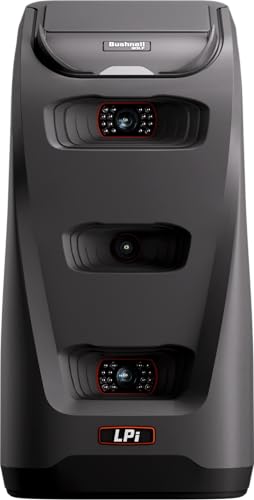
- Camera-based three-camera tracking for impact accuracy
- Indoor simulator-focused design
- Club data available with software subscription
Best For: Indoor simulator golfers who want accurate camera-based ball and club measurements.
Best for Full-Swing Data
Rapsodo MLM2PRO Launch Monitor

- Tracks club path, spin, launch, and carry with strong detail
- Dual-camera + Doppler radar design supports better swing analysis
- Includes simulator tools and a 45-day premium trial
Best For: Golfers who want detailed swing metrics for practice, coaching, and home simulator play.
Best for Tour-Level Data
Bushnell Launch Pro Circle B Edition

- Camera-based 3-system optics for direct shot measurement
- Tracks club and ball data useful for path-focused practice
- Indoor/outdoor ready with simulation software support
Best For: Golfers who want accurate, simulator-ready feedback for serious practice and club path work.
Best for Spin & Club-Path Data
Golf Launch Monitor & Simulator

- No annual fees with lifetime app access
- Tracks attack angle, launch angle, spin rate, and clubface data
- 3D driving range and trajectory views help visualize ball flight
Best For: Golfers who want a portable launch monitor with club-path-relevant metrics and simulator feedback.
Best Budget Radar Pick
PRGR HS 130-A Portable Launch Monitor

- Tracks club speed, ball speed, smash factor, and carry distance
- Works without a ball for swing-speed training
- Simple AAA-battery design with no app required
Best For: Golfers who want an affordable radar launch monitor for speed training and basic distance feedback.
Best for Club-Path Feedback
SkyTrak ST+ Launch Monitor Bundle

- Tracks club path, face angle, and full shot data
- Indoor/outdoor setup with dual Doppler radar + camera
- Includes simulator software, driving range, and trial access
Best For: Golfers who want portable club-path and shot-data feedback with simulation features.
Best for Speed & Wedge Training
TheStack Radar Golf Launch Monitor
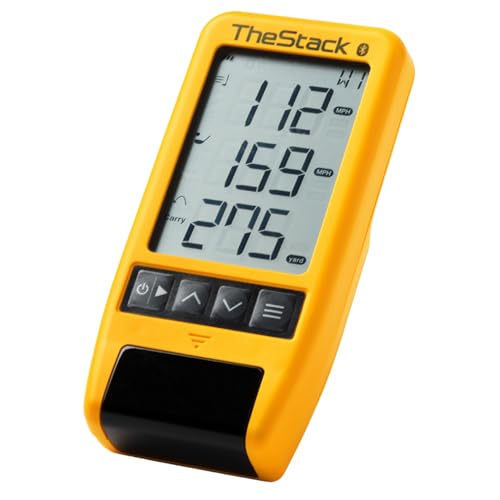
- Measures swing speed, ball speed, carry, and smash factor.
- Bluetooth syncs with TheStack app for automatic training data.
- Includes Stack Wedge Mode and bonus putting practice.
Best For: Golfers who want a portable, app-connected monitor for speed training and wedge practice.
Best for Mobile Shot Tracing

- Tracks ball speed, club speed, launch angle, and shot shape
- GPS mapping and video playback make pattern review simple
- Portable setup works with iPhone/iPad indoors or outdoors
Best For: Golfers who want a portable iPhone/iPad-based monitor for swing feedback, shot tracing, and simulator-style practice.
Best for No-Fee Practice
Voice Caddie SC4 Pro Launch Monitor

- Prometrics engine tracks ball and club data
- Includes 3D Driving Range and E6 Connect
- No subscription fees and standard balls work
Best For: Golfers who want a portable launch monitor with simulator features and no recurring fees.
Best for Club Path Coaching – SKYTRAK ST MAX Launch Monitor
If you want one of the more complete launch monitors for club path work, the SKYTRAK ST MAX stands out for pairing dual Doppler radar with photometric cameras and built-in GOLFTEC Speed Training. It is aimed at golfers who want both ball flight numbers and club data in a structured practice system, not just raw stats.
Best For: Golfers who want guided speed training, accurate club data, and a simulator-ready launch monitor for disciplined practice.
Pros:
- Dual Doppler radar and photometric cameras deliver detailed ball and club data.
- Built-in GOLFTEC Speed Training adds guided drills and personalized swing feedback.
- SkyTrak practice tools like Skills Assessments, Bag Mapping, and Wedge Matrix help structure training.
- Dual USB-C ports make charging and data transfer more convenient.
Cons:
- More expensive than basic launch monitors focused only on ball data.
- Best value comes if you will actually use the training software and drills.
- Still a niche fit for golfers who only want simple casual feedback.
For golfers comparing launch monitors for club path, the ST MAX is appealing because it combines measurement, coaching, and simulator features in one platform. That makes it a stronger long-term practice tool than a unit that only tracks basic launch conditions.
Best Indoor Simulator Pick – Bushnell Launch Pro i Circle B Edition
If you’re comparing launch monitors for club path work and want a camera-based unit built for indoor simulator use, the Bushnell Golf Launch Pro i Circle B Edition is a strong option. It focuses on impact data with tour-level accuracy, making it a practical choice for golfers who care about precise ball flight and club delivery numbers rather than radar-based estimates.
Best For: Indoor golfers and simulator users who want accurate ball-and-club data with a camera-based monitor.
Pros:
- Three-camera infrared system delivers accurate impact measurements.
- Provides carry, launch, spin, and club head speed data with a subscription.
- Designed specifically for indoor simulator setups.
- Includes starter accessories and a 14-day Gold trial.
Cons:
- Full ball and club data require an active software subscription.
- Less appealing if you want a simple outdoor/radar-first setup.
For golfers building a dedicated indoor setup, this is one of the more accessible launch monitors for club path and simulator play because it pairs accurate camera-based tracking with an entry-friendly software model. The tradeoff is subscription dependence, but if precision and indoor compatibility matter most, it fits the job well.
Best for Full-Swing Data – Rapsodo MLM2PRO Launch Monitor
Rapsodo Golf Launch Monitor - Swing Analyzer, Spin Rate, Indoor/Outdoor, 3 Pro V1 Balls
Check Price On AmazonIf you want one of the more capable launch monitors for club path work, the Rapsodo MLM2PRO brings Doppler radar, dual cameras, and a deep stats package into a home-friendly setup. It is built for golfers who want more than basic distance readings and need usable feedback on club path, spin, launch, and impact to guide real practice.
Best For: Golfers who want a feature-rich launch monitor for detailed swing analysis, simulator play, and repeatable practice at home or the range.
Pros:
- Captures club path, spin axis, launch angle, carry distance, and more
- Dual camera and Doppler radar setup adds helpful shot and swing feedback
- Includes a 45-day premium trial with simulator and training features
- Works for both practice sessions and home simulator use
Cons:
- Premium features may require ongoing subscription after the trial
- Not the simplest pick if you only want basic ball-flight numbers
- Best value is strongest for golfers who will use the advanced metrics regularly
The MLM2PRO stands out when club path data matters because it pairs serious measurement depth with simulator extras and swing video. For golfers comparing launch monitors for club path, it makes the most sense if you want one device that can support both improvement and entertainment.
Best for Tour-Level Data – Bushnell Launch Pro Circle B Edition
If you want launch monitors for club path practice that prioritize verified ball data over estimated numbers, the Bushnell Launch Pro Circle B Edition is a strong fit. Its camera-based design, auto-calibration, and indoor/outdoor consistency make it a practical choice for golfers who want serious feedback without guesswork.
Best For: Golfers who want tour-level accuracy, comprehensive club and ball data, and a simulator-ready setup for home or range use.
Pros:
- 3-camera system with infrared sensing captures impact directly for more trustworthy readings
- Tracks a wide range of ball and club data, including metrics useful for club path analysis
- Works reliably indoors and outdoors, with strong compatibility for FSX simulation software
- Bundle includes useful extras like a case, charger, cables, and alignment stick
Cons:
- Requires a software subscription to unlock the full data set
- Higher cost than many entry-level launch monitors
- Best value is tied to golfers who will actually use the simulation ecosystem
For players focused on launch monitors for club path, this model stands out because it measures from direct observation rather than relying on behind-the-bay estimates. That makes it better suited to golfers who want dependable feedback for practice, gapping, and simulator sessions.
Best for Spin & Club-Path Data – Golf Launch Monitor & Simulator
If you’re comparing launch monitors for club path, this model is a strong pick for golfers who want more than basic distance numbers. It adds attack angle, launch angle, spin rate, and vertical clubface data, while the built-in environmental sensors help keep readings more realistic indoors and outdoors.
Best For: Golfers who want a portable launch monitor with club-path-relevant metrics, simulator visuals, and no subscription fees.
Pros:
- No annual fees, with full app access after a one-time download
- Tracks club-path-relevant data like attack angle, launch angle, spin rate, and vertical clubface info
- Includes 3D driving range, trajectory view, and video recording for practice feedback
- Environmental sensors automatically adjust data for temperature, humidity, and pressure
Cons:
- Needs at least 15 feet of indoor space to capture accurate shots
- Misses or shanks can limit data capture to club speed only
- Bluetooth works best when your phone is placed in front of the device
For golfers focused on launch monitors for club path, this unit stands out for combining simulator features with practical swing data and lifetime app access. It’s especially appealing if you want a portable practice setup that can show how the club is delivered, not just how far the ball flies.
Best Budget Radar Pick – PRGR HS 130-A Portable Launch Monitor
The PRGR HS 130-A is a practical choice if you want one of the more affordable launch monitors for club path-style swing work, especially when you care about club speed, ball speed, and carry data without paying for a full simulator setup. Its Doppler radar design keeps setup simple and makes it useful for solo practice, speed training, and quick feedback sessions.
Best For: Golfers who want a low-cost radar monitor for swing speed training and basic performance feedback.
Pros:
- Measures club head speed, ball speed, smash factor, total distance, and carry distance.
- Works without a ball for swing speed training and speed drills.
- No app, Wi-Fi, or Bluetooth needed; runs on AAA batteries.
- Stores up to 500 swings for tracking progress over time.
Cons:
- Not a full-featured launch monitor with advanced shot-shape or spin data.
- Radar units can be less comprehensive than premium camera-based systems.
For golfers comparing launch monitors for club path practice on a budget, the PRGR stands out for simplicity, portability, and speed-focused feedback. It is a strong fit if your priority is basic numbers and repeatable training rather than deep shot-analysis metrics.
Best for Club-Path Feedback – SkyTrak ST+ Launch Monitor Bundle
If you want one of the more complete launch monitors for club path work, the SkyTrak ST+ is built to show both ball flight and club delivery data in a portable package. Its dual Doppler radar and photometric camera setup makes it a strong fit for golfers who practice indoors or outdoors and want detailed feedback without a complicated buildout.
Best For: Golfers who want portable, simulation-ready club-path and shot-data feedback for home practice.
Pros:
- Captures club path, face angle, spin, launch angle, and other key swing metrics
- Works indoors or outdoors with a compact 2″ x 2″ hitting zone
- Includes software access, driving range tools, and a 14-day trial membership
- Supports immersive course play for practice that feels more like golf
Cons:
- Premium pricing may be out of reach for casual users
- Small hitting zone can take some setup precision
- Extra software value depends on whether you plan to use simulation features
For golfers comparing launch monitors for club path, the ST+ stands out because it pairs useful swing data with true simulator capability. It is especially appealing if you want one device that can handle practice, feedback, and home-course play without feeling limited to basic ball-only numbers.
Best for Speed & Wedge Training – TheStack Radar Golf Launch Monitor
TheStack Radar is a practical pick for golfers who want one of the more training-focused launch monitors for club path-style practice, especially if you care more about speed, carry estimates, and structured feedback than full simulator-level data. It pairs with TheStack app over Bluetooth and is built to make speed sessions and wedge work simple to run on the range or at home.
Best For: Golfers who want a portable, app-connected monitor for speed training, wedge practice, and quick on-range feedback.
Pros:
- Measures swing speed, ball speed, estimated carry, and smash factor.
- Connects directly to TheStack app for automatic data capture and guided training.
- Includes Stack Wedge Mode and bonus putting practice for more structured sessions.
- Portable, range-friendly design with use across speed work and everyday practice.
Cons:
- Wedging features are iOS-only, and Android support is limited to speed training.
- Not designed as a full club path or face-angle analysis system.
For players focused on training outcomes rather than deep swing diagnostics, TheStack Radar is a strong match. It fits launch monitors for club path buyers who want a compact, app-driven tool for dialing in speed, wedges, and repeatable practice sessions.
Best for Mobile Shot Tracing – Rapsodo Mobile Launch Monitor
If you want one of the more practical launch monitors for club path practice, the Rapsodo Mobile Launch Monitor stands out for its combo of radar-based shot data, GPS shot mapping, and video playback. It’s a strong fit for golfers who want fast feedback on ball speed, club speed, launch angle, and shot shape without moving to a bulky full-simulator setup.
Best For: Golfers who want a portable iPhone/iPad-based monitor for swing feedback, shot tracing, and simulator-style practice at home or the range.
Pros:
- Tracks ball speed, club speed, launch angle, distance, and shot shape
- GPS satellite view and shot scatter mapping help you see patterns over time
- Video playback with active shot tracer makes swing review easier
- Portable design works indoors, outdoors, and at the driving range
Cons:
- Requires an iPhone or iPad to use
- Not as feature-rich as higher-end dedicated launch monitors
- Path-specific data is helpful, but serious club path work may still need deeper analytics
Overall, the Rapsodo is a smart buy if you want launch monitors for club path practice that also double as a convenient training and simulator tool. It’s especially appealing for golfers who value portability, shot tracing, and an easy setup over advanced tour-level data depth.
Best for No-Fee Practice – Voice Caddie SC4 Pro Launch Monitor
If you want one of the more versatile launch monitors for club path work, the Voice Caddie SC4 Pro gives you portable shot tracking, a built-in screen, and practice modes that work indoors or out. It is aimed at golfers who want useful swing data without paying subscription fees or setting up a complicated simulator.
Best For: Golfers who want a portable launch monitor with simulator features, easy setup, and no recurring fees.
Pros:
- Tracks ball and club data with the Prometrics engine for real-time feedback
- Includes 3D Driving Range and E6 Connect access for simulator-style practice
- Works with standard golf balls and supports indoor or outdoor use
- VOICECADDIE S app adds stats, calibration, and swing speed training tools
Cons:
- Not the cheapest option in the portable launch monitor category
- Simulator features may be more than casual users need
For golfers comparing launch monitors for club path, the SC4 Pro stands out because it blends portability, no-fee ownership, and training modes that make structured practice easier. It is a strong fit if you want more than basic distance numbers and plan to use the unit for repeatable, data-driven sessions.
How We Picked These Launch Monitors for Club Path
We focused on models that provide meaningful swing and ball-flight feedback, especially the measurements golfers need to understand path, speed, and strike quality. Priority went to Launch Monitors for Club Path that are easy to use, portable enough for regular practice, and credible for both indoor and outdoor sessions.
We also considered whether each unit supports simulation, video, app connectivity, and the type of data a golfer can realistically act on without overcomplicating the session.
Quick Comparison: What Matters Most
If you want the simplest setup, radar-based units tend to be fast and portable. If you want deeper indoor analysis, camera-based systems often offer stronger club and ball detail. Simulator-ready options are better for golfers who want practice to feel more like play, while compact trainers are ideal for speed work and basic feedback.
Key Buying Factors for Launch Monitors for Club Path
Accuracy and Data Type
Look for devices that measure club speed, ball speed, carry, and—when available—club path or related shot-shaping data. For path-focused practice, consistency matters as much as raw feature count.
Radar Vs. Camera
Radar units usually shine for portability and outdoor range use. Camera-based units can be especially helpful indoors, where space is limited and detailed impact data is valuable.
Indoor or Outdoor Use
Not every monitor performs equally in every environment. If you’ll practice in a garage or simulator room, confirm space requirements and alignment needs. If you’ll use it at the range, prioritize quick setup and dependable tracking in changing conditions.
App, Simulation, and Feedback Tools
Helpful extras include shot history, swing video, simulation compatibility, and training plans. These features can turn raw numbers into a clearer picture of what your path is doing and why.
Who Should Buy Which Launch Monitors for Club Path?
Beginners and casual golfers should look for straightforward feedback and easy setup. Better players and data-driven golfers may prefer higher-accuracy systems with more club and ball metrics. If your main goal is speed training, a simpler monitor or trainer may be enough. If you want to build a repeatable swing and understand your club path over time, choose a model that balances accuracy, usability, and the environment where you practice most.