If you’re looking to enhance your coaching sessions, investing in a reliable golf swing analyzer can make a significant difference. These devices offer real-time feedback and valuable insights into swing mechanics, helping both you and your players improve. From portable options to advanced launch monitors, there’s a range of tools available. Let’s explore some of the best options that can elevate your training game and transform how you approach coaching.
Rapsodo MLM2PRO Golf Launch Monitor for Swing Analysis

If you’re a coach looking to elevate your golfers’ performance, the Rapsodo MLM2PRO Golf Launch Monitor is an essential tool. This advanced device delivers pro-level accuracy, measuring 13 core metrics like spin rate and swing speed. It pairs seamlessly with smartphones or tablets, transforming any space into a golf simulator, complete with virtual courses. You’ll get real-time data on ball speed, club speed, and launch angle, helping golfers improve their accuracy. Whether indoors or outdoors, the MLM2PRO provides reliable data for skill refinement, making it a versatile training aid that enhances practice sessions and integrates smoothly with leading golf apps.
Best For: Coaches and golfers seeking to enhance performance through advanced swing analysis and accurate metrics.
Pros:
- Pro-level accuracy with 13 core metrics, helping golfers refine their skills effectively.
- Seamless integration with smartphones and tablets, allowing for easy use in various environments.
- Real-time data on critical performance indicators like ball speed and launch angle, facilitating immediate feedback and improvement.
Cons:
- Requires a compatible device for full functionality, which may limit accessibility for some users.
- Could be challenging for beginners to interpret all metrics without proper guidance.
- Price point may be higher than basic launch monitors, making it less accessible for casual golfers.
Garmin Approach R10 Portable Golf Launch Monitor

The Garmin Approach R10 Portable Golf Launch Monitor is an ideal choice for coaches seeking a thorough tool to enhance their players’ performance. This compact device tracks essential metrics like club head speed, ball speed, and launch angles, helping you analyze and improve your players’ swings. With a waterproof design and up to 10 hours of battery life, it’s perfect for use at home or on the range. The training mode enables you to track stats for each club, while the Garmin Golf app records swing videos for detailed analysis. Plus, you can enjoy virtual rounds on thousands of courses worldwide!
Best For: Coaches and golfers looking for a portable and comprehensive tool to enhance swing analysis and performance improvement.
Pros:
- Compact and portable design, suitable for use at home or on the driving range.
- Tracks essential metrics like club head speed, ball speed, and launch angles for detailed analysis.
- Offers virtual play on over 42,000 courses, enhancing practice and engagement.
Cons:
- Requires an active subscription for full access to virtual play and tournaments.
- Limited to performance metrics, may not cover all aspects of golf training.
- Battery life of up to 10 hours may not be sufficient for extended practice sessions.
Portable Golf Launch Monitor and Swing Analyzer

For coaches looking to elevate their players’ game, the Portable Golf Launch Monitor and Swing Analyzer stands out with its real-time shot data tracking. This versatile tool is perfect for both indoor and outdoor use, boasting a 12-hour battery life. It measures essential parameters like swing speed, ball speed, and launch angle, providing significant insights through the My Swing Caddie App. With Doppler radar technology, you can trust its accuracy within a tight margin. The advanced LCD display and voice output deliver instant feedback, while customizable loft angles help tailor practice sessions for ideal performance improvement.
Best For: Coaches and golfers seeking to enhance performance through detailed swing analysis and real-time feedback.
Pros:
- Provides accurate measurements of critical golf parameters using advanced Doppler radar technology.
- Offers instant feedback through an advanced LCD display and voice output, facilitating immediate performance assessment.
- Seamless integration with the My Swing Caddie App allows for detailed performance analysis and statistics tracking.
Cons:
- Accuracy may vary slightly, with a margin of error for carry distance in practice mode.
- Requires a compatible smartphone for full functionality with the My Swing Caddie App.
- The battery life, while robust at 12 hours, may be limiting for extended practice sessions without recharging.
Golf Launch Monitor & Simulator for iOS/Android Phones

Designed specifically for coaches and serious golfers, the Golf Launch Monitor & Simulator for iOS/Android phones offers advanced environmental sensors that adapt to real-time conditions like temperature and humidity. This portable swing analyzer enhances your practice both indoors and outdoors. With expanded swing metrics, including Attack Angle and Launch Angle, you’ll gain professional-level insights into your performance. The immersive 3D simulation allows you to visualize the ball’s flight from various angles, while personalized training modes help track your progress. Plus, the app is easy to use, requires no subscription, and offers real-time voice feedback for an engaging training experience.
Best For: Coaches and serious golfers looking to enhance their practice and gain professional insights into their swing performance.
Pros:
- Offers advanced swing metrics like Attack Angle and Launch Angle for detailed performance analysis.
- Immersive 3D simulation with multiple viewing angles enhances the training experience.
- User-friendly app compatible with both iOS and Android, requiring no subscription and providing real-time voice feedback.
Cons:
- May require a learning curve for users unfamiliar with swing analysis technology.
- Performance can be affected by extreme weather conditions if used outdoors.
- Limited language support beyond the three offered (English, Chinese, Japanese).
Rapsodo Mobile Launch Monitor for Golf (iPhone & iPad Only)

With its professional-level accuracy and user-friendly design, the Rapsodo Mobile Launch Monitor becomes an invaluable tool for both coaches and players looking to elevate their game. This device delivers tour-level precision in shot distance, ball speed, club speed, and launch angle, while its GPS satellite view guarantees accurate shot tracking. Transform any space into a golf simulator with real-time swing analysis, shot shape tracking, and engaging games. You’ll enjoy instant feedback and video playback to visualize ball flight, making it perfect for all skill levels. It’s a portable, easy-to-use tracker that enhances your training experience effortlessly.
Best For: Coaches and players of all skill levels looking to improve their golf game with professional-level accuracy and real-time feedback.
Pros:
- Tour-level accuracy in shot distance, ball speed, club speed, and launch angle enhances training effectiveness.
- Portable and user-friendly design allows for easy setup and use in various environments, from indoor practice to outdoor play.
- Comprehensive swing analysis tools with video playback and shot tracers help visualize ball flight and improve swing technique.
Cons:
- Compatibility limited to iPhone and iPad users, excluding Android devices.
- Requires good lighting for optimal performance, which may limit indoor use in low-light conditions.
- Initial setup and calibration may take some time for new users to fully understand and utilize all features effectively.
Blast Motion Golf Swing & Stroke Analyzer (GEN3 Sensor)

The Blast Motion Golf Swing & Stroke Analyzer (GEN3 Sensor) stands out as an essential tool for coaches aiming to elevate their players’ performance. This device provides real-time feedback, tracking crucial swing metrics and capturing video highlights. You’ll appreciate the focus on the short game, helping players lower scores quickly. With instant feedback sent to the Blast app, analyzing performance becomes easy. New users get a one-month membership, simplifying setup and management. Plus, the Air Swings mode allows practice anytime, anywhere, ensuring skill improvement regardless of conditions. Use the app to visualize data and enhance the learning experience effectively.
Best For: Golf coaches and players looking to improve swing performance and lower their scores quickly.
Pros:
- Provides real-time feedback on swing metrics, enhancing performance analysis.
- Includes a one-month membership for easy setup and management through the app.
- Air Swings mode allows for practice anytime and anywhere, regardless of weather conditions.
Cons:
- May require a learning curve for users unfamiliar with technology or apps.
- The effectiveness of the device could depend on user commitment and practice consistency.
- Initial cost may be a consideration for budget-conscious players.
SC4 PRO Golf Launch Monitor & 3D Driving Range Simulator

For coaches seeking a reliable tool to enhance their players’ performance, the SC4 PRO Golf Launch Monitor & 3D Driving Range Simulator stands out as an exceptional choice. This portable device offers pro-grade accuracy with its Prometrics Engine, providing precise data on every swing. You’ll appreciate the user-friendly setup, making it suitable for golfers of all levels, indoors or outdoors. With features like the 3D Driving Range and integration with the VOICECADDIE S app, you can access advanced statistical analysis and training modes. Plus, there’s no need for specially marked balls—just grab your standard ones and start improving!
Best For: Coaches and golfers of all levels looking for a portable and accurate tool to enhance performance and practice effectively.
Pros:
- Pro-grade accuracy with the Prometrics Engine for precise ball and club head data.
- User-friendly setup and interface, making it accessible for all skill levels.
- Versatile training modes including 3D Simulator and Speed Training for focused practice.
Cons:
- May require a learning curve for those unfamiliar with technology or golf analytics.
- Limited to standard golf balls, which might not suit all training preferences.
- Additional features may require integration with other apps, potentially complicating use.
Swing Caddie Portable Launch Monitor

Golf coaches looking for a reliable tool to enhance their training sessions will find the Swing Caddie Portable Launch Monitor (SC200Plus) invaluable. This versatile device uses Doppler radar technology for accurate data collection, giving you insights into swing speed, shot performance, and more. With real-time assessments and instant feedback through its advanced LCD display and voice output, you can make immediate adjustments. The swing speed mode allows practice without a ball, and adjustable loft angles let you customize your training. Plus, easy data storage helps you track club statistics and average distances, making it a must-have for serious coaches.
Best For: Golf coaches and serious players looking for a reliable tool to enhance their training sessions with accurate performance data.
Pros:
- Accurate data collection using advanced Doppler radar technology.
- Instant feedback provided through an LCD display and voice output for immediate adjustments.
- Customizable training options with adjustable loft angles and a swing speed mode for practice without a ball.
Cons:
- May require calibration for optimal performance in varying atmospheric conditions.
- Portable design might limit some features compared to more comprehensive launch monitors.
- Initial setup and learning curve could be challenging for some users.
PRGR HS 130-A Portable Golf Launch Monitor

With its advanced Doppler radar technology, the PRGR HS 130-A Portable Golf Launch Monitor stands out as an excellent choice for coaches seeking to enhance their players’ performance. It accurately measures club head speed, ball speed, smash factor, total distance, and carry distance, providing data comparable to high-end models. You can track 500 past swings, making it easy to monitor progress over time. Plus, it’s the most affordable option in golf, operating without Wi-Fi or apps and using AAA batteries. Endorsed by Padraig Harrington, it’s reliable for swing speed training and versatile for other sports too.
Best For: Coaches and golfers seeking an affordable and reliable launch monitor to enhance performance and track progress.
Pros:
- Provides accurate swing data comparable to high-end monitors.
- Tracks up to 500 past swings for continuous performance monitoring.
- Portable and easy to use, operating without Wi-Fi or apps.
Cons:
- Limited to basic features compared to more expensive models.
- Requires AAA batteries, which may need frequent replacement.
- May not offer as much data analysis or connectivity options as competitors.
TheStack™ Radar Golf Launch Monitor
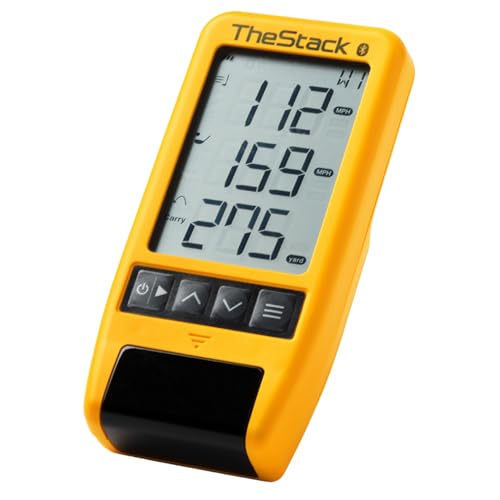
Designed for both coaches and dedicated golfers, TheStack™ Radar Golf Launch Monitor stands out with its ability to deliver precise swing metrics, such as swing speed and estimated carry distance. This portable device seamlessly connects to TheStack App via Bluetooth, supporting both iOS and Android for thorough training. You’ll appreciate the Stack Wedging feature, which offers gamified practice sessions to hone your wedge distances. Plus, with endorsements from professionals like Matt Fitzpatrick, you can trust its quality. Whether you’re practicing on the range or measuring performance on the course, TheStack Radar enhances your training experience effectively.
Best For: Golfers and coaches looking to enhance their swing performance and wedge skills through precise metrics and gamified training sessions.
Pros:
- Portable and user-friendly: Easy to carry and set up for practice on the range or course.
- Comprehensive training features: Includes Stack Wedging and Stack Putting for focused skill improvement.
- Professional endorsement: Trusted by top golfers, ensuring reliability and effectiveness of the training tool.
Cons:
- iOS limitations for some features: Certain functionalities, like Stack Wedging and Stack Putting, are only available on iOS devices.
- Requires app connectivity: Full functionality relies on Bluetooth connection with the app, which may be inconvenient for some users.
- Potential learning curve: New users may need time to familiarize themselves with all the features and metrics provided.
Factors to Consider When Choosing Golf Swing Analyzers for Coaches
When choosing a golf swing analyzer, you need to evaluate several key factors. Accuracy of measurements, portability, and compatibility with your devices can make a big difference in your coaching experience. Plus, real-time data analysis and available training modes will help you tailor your instruction to each player’s needs.
Accuracy of Measurements
Accurate measurements are crucial for coaches aiming to enhance their players’ performance, as even minor discrepancies can lead to misguided training insights. When choosing a golf swing analyzer, consider the claimed precision—many launch monitors offer tolerances of ±1 to ±3 degrees or mph for critical metrics like ball speed and launch angle. Look for devices that utilize Doppler radar technology, which consistently delivers reliable data. Additionally, the ability to analyze data from numerous swings—often up to 500—helps track progress and identify performance trends over time. Finally, verify the system is well-calibrated to adjust for environmental factors such as temperature and humidity, as this can greatly improve the accuracy of your measurements.
Portability and Ease
While precision is key for effective coaching, the practicality of your golf swing analyzer shouldn’t be overlooked. Portability is essential, as you’ll want to easily transport your device between driving ranges, courses, and practice facilities. Many modern analyzers are lightweight and compact, fitting conveniently into your golf bag or backpack. A long battery life is also critical, ensuring you can conduct extended practice sessions without frequent recharging interruptions. Additionally, look for devices that offer quick setup and calibration to minimize downtime during training. Finally, compatibility with smartphones or tablets enhances portability, allowing you to use these devices as displays for real-time data analysis without needing extra equipment. This combination of features makes your coaching more efficient and effective.
Compatibility With Devices
Choosing a golf swing analyzer that’s compatible with your devices is crucial for maximizing its effectiveness. Many models connect to smartphones or tablets, allowing you to display and analyze data easily. Most modern swing analyzers support both iOS and Android operating systems, giving you the flexibility to choose based on your device preference. However, some may require specific operating systems or app versions, which could limit compatibility. Look for analyzers that integrate seamlessly with dedicated golf apps; these can enhance your experience with features like video analysis and performance tracking. Additionally, verify the analyzer has a strong connection method, such as Bluetooth or Wi-Fi, for real-time data transfer, guaranteeing effective training sessions.
Real-Time Data Analysis
Having a compatible device is just the beginning; real-time data analysis takes coaching to the next level. With instant access to key swing metrics like club speed, ball speed, and launch angle, you can provide immediate feedback to your players. Advanced swing analyzers offer visualizations of swing mechanics, helping you pinpoint areas for improvement on the spot. Many devices even feature voice output or visual alerts, conveying important performance data as it happens. Real-time tracking allows you to monitor multiple swings in succession, facilitating comparative analysis and quicker technique adjustments. Some systems use advanced technologies like Doppler radar and environmental sensors, ensuring you get accurate readings for more reliable coaching insights.
Training Modes Available
When selecting a golf swing analyzer, the available training modes can considerably impact your coaching effectiveness. Look for features like distance tests, swing speed tests, and efficiency ratings to track progress and enhance performance. Customizable training modes that let you adjust loft angles or practice without a ball can offer versatility in your sessions. Advanced options may provide shot dispersion charts and statistical analyses, helping you pinpoint strengths and areas needing improvement. Real-time feedback through voice output or visual displays guarantees immediate assessments of swing performance. Additionally, simulation modes create immersive experiences, allowing you to practice in a 3D environment or virtually play various golf courses, which boosts engagement and realism in your training.
Integration With Apps
The integration of golf swing analyzers with mobile apps can greatly elevate your coaching experience. By connecting to these apps, you can access real-time feedback and performance metrics, making practice sessions more efficient. Many analyzers allow you to analyze swing data, track your progress, and tailor training sessions to meet your specific goals.
Additionally, app compatibility enhances functionality with features like video analysis and swing comparisons, offering a more immersive training environment. Some analyzers even include automated recording and video playback, letting you visually assess your swings alongside the relevant metrics. Plus, integration with third-party apps can broaden your analyzer’s capabilities, introducing new training modes and gamified experiences that keep you motivated and engaged in your practice.
User-Friendly Interface
How easily can you navigate a golf swing analyzer’s interface? A user-friendly interface is essential for coaches like you, allowing quick interpretation of data and timely feedback for your students. Look for intuitive navigation and layout that let you access various metrics efficiently, without needing extensive training or technical skills. Clear visual displays of swing data—like launch angles and club speeds—enhance the learning experience for both you and your players. Features like touchscreen functionality and voice output can make real-time assessments more engaging during practice sessions. Additionally, guarantee compatibility with mobile devices and apps, as this simplifies data management and analysis, seamlessly integrating into your coaching practices.
Battery Life Considerations
Battery life is a key factor in choosing a golf swing analyzer, directly impacting your coaching efficiency. Longer battery life, typically around 10 to 12 hours, allows for extended practice sessions without interruptions. Consider models with rechargeable batteries; they’re often more convenient and cost-effective over time. Pay attention to charging times, as quicker charging can minimize downtime between uses—especially during busy coaching schedules. Opt for analyzers designed for energy efficiency, which can greatly prolong battery life and reduce the need for frequent recharges. Finally, assess how battery life varies with different features. Some functions may drain power more quickly, so understanding these dynamics can help you maintain overall usability during practice.