If you want cleaner frame-by-frame swing analysis, the right camera can make a big difference. This roundup focuses on golf swing cameras for slow motion recording that help you capture impact, shaft position, and tempo more clearly.
We prioritized models and accessories that make setup easier, improve motion capture, and fit different practice setups—from indoor simulators to outdoor range work.
Best 10 Golf Swing Cameras for Slow Motion Recording Picks for 2026
High-Speed USB Camera

- 1080p at up to 120fps for slow-motion capture
- 12MP sensor with detailed still resolution
- 3X manual optical zoom for tighter framing
Best For: Golfers who need a plug-and-play USB camera for swing analysis and close-up capture.
Stable Tripod Pick
Golf Tripod Selfie Stick with Stake

- Ground spike design adds stability outdoors
- Extends from 17 to 45 inches for flexible framing
- Supports phones and 1/4-inch screw-mount cameras
Best For: Golfers filming practice sessions who want a stable, adjustable outdoor mount.
Ultra-Fast Vision Pick
Global Shutter 640fps USB Camera

- Up to 640fps for ultra-slow-motion capture
- Global shutter reduces motion distortion
- 10x optical zoom with manual lens control
Best For: Technical users who want the highest frame rates for motion analysis and precise capture.
Simple Phone Mount Pick
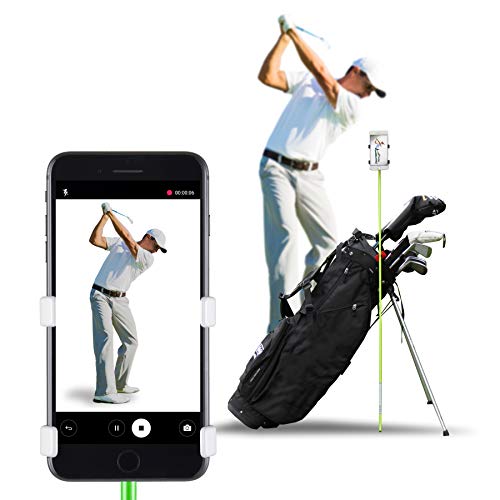
- Fast clip-on setup for quick swing recording
- Stable across different ground surfaces and wind
- Fits all phone sizes with a compact design
Best For: Golfers who already film with a smartphone and want a portable mounting solution.
High-Speed Narrow-Angle Pick
1080P@120fps USB Golf Swing Cam

- 1080P at up to 120fps for slow-motion analysis
- 16-degree narrow view reduces lens distortion
- Plug-and-play USB support for major platforms
Best For: Controlled swing analysis with a tight, detailed frame
Portable Recording Stand
Golf Tripod Monopod with Spike
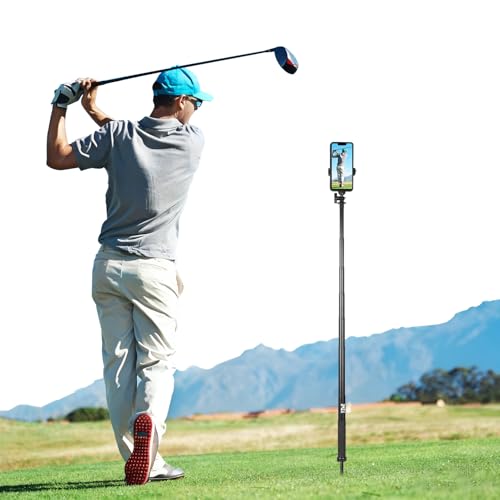
- Ground spike and tripod for different surfaces
- 10-47 inch telescoping design for flexible angles
- Works with phones, cameras, and action cams
Best For: Hands-free swing recording indoors or on turf
Portable Swing Recording Stand
Extra-Height Golf Phone Tripod

- 59-inch adjustable pole for full swing framing
- Tripod legs and ground spike add outdoor stability
- Works with phones and action cameras
Best For: Golfers who need a tall, portable mount for hands-free swing recording
High-FPS Manual Zoom Webcam

- Claims up to 260fps for smoother motion capture
- Manual 2.8-12mm lens adjusts zoom and focus
- USB plug-and-play for Windows, Mac, Linux, and Android
Best For: Golfers and coaches wanting a computer-based slow-motion swing camera
Pro Zoom USB Camera

- Up to 120fps at 1080p for smooth motion capture
- 12MP sensor with 4K still resolution
- 3X manual zoom suits simulator and analysis setups
Best For: Golfers using a computer or simulator for detailed swing analysis
High-Speed USB Camera – 4K 12MP USB Golf Swing Cam
If you want golf swing cameras for slow motion recording on a PC or compatible device, this USB model is built around speed and detail. It combines a 12MP sensor, 1080p capture at up to 120fps, and a manual 3X optical zoom lens, making it a flexible choice for swing analysis, streaming, or close-up technical work.
Best For: Golfers who want a high-frame-rate USB camera with manual zoom and broad device compatibility.
Pros:
- 1080p recording at up to 120fps for smoother slow-motion playback
- 12MP sensor with up to 3840×3040 still resolution for detailed image capture
- 3X manual optical zoom helps frame the swing or zoom in on impact details
- UVC plug-and-play compatibility with Windows, Mac, Linux, Android, and Raspberry Pi
Cons:
- Some software may limit the full frame rate, especially at higher settings
- Manual focus and zoom require hands-on setup
- Not image-stabilized or water resistant
This is a practical pick if your priority is capturing fast motion with a USB camera that can also handle detailed stills. It is especially appealing for users who want a wired, device-friendly setup rather than a camera built specifically around a tripod mount.
Stable Tripod Pick – Golf Tripod Selfie Stick with Stake
For golfers filming practice sessions, this tripod-style option is a simple way to mount a phone or compatible camera for golf swing cameras for slow motion recording. The ground spike, extendable height, and 360-degree head make it easier to position your device and keep it steady outdoors.
Best For: Golfers who want a stable phone or camera stand for outdoor swing filming.
Pros:
- Ground spike design is meant to stay stable on slopes or in windy conditions
- Extends from 17 to 45 inches for flexible recording angles
- Works with magnetic phones, standard phone clamps, and 1/4-inch screw mounts
- 360-degree rotation and tilt support multiple swing viewpoints
Cons:
- Not water resistant
- Best suited to phones and lightweight camera setups under its 2 kg limit
- Height and angle adjustments still require manual setup
This is a versatile training accessory if you want a secure outdoor filming setup without a complicated rig. Its biggest advantage is stability, which matters when you are trying to keep slow-motion swing footage consistent across repeated practice reps.
Ultra-Fast Vision Pick – Global Shutter 640fps USB Camera
If your priority is extreme slow motion, this USB camera pushes far beyond typical golf swing cameras for slow motion recording. It offers selectable high-speed modes up to 640fps, plus a global shutter design that reduces rolling-shutter distortion, which is useful when capturing rapid motion accurately.
Best For: Users who need very high frame rates and precise motion capture for technical analysis.
Pros:
- Ultra-high-speed recording modes up to 640fps at lower resolutions
- Global shutter helps eliminate rolling-shutter artifacts
- Manual 5-50mm CS lens provides 10x optical zoom and adjustable focus
- UVC plug-and-play compatibility with Windows, Linux, macOS, Android, and Raspberry Pi
Cons:
- Higher frame rates require much lower resolutions
- Monochrome output only, so there is no color image capture
- Best results may require manual tuning of exposure and image settings
This is the most specialized option in the group and is better suited to users who care more about motion analysis than general-purpose video. For swing breakdowns where timing and distortion control matter, the global shutter and high frame rate support are the main reasons to consider it.
Simple Phone Mount Pick – SelfieGOLF Record Golf Swing
This is a straightforward accessory for golfers who want a fast way to record swings with a phone. Instead of adding a camera, it gives you a stable clip-on mount that works with alignment rods and golf bags, making it a practical companion for golf swing cameras for slow motion recording when you want an easy setup.
Best For: Golfers who want a quick, portable phone mount for swing recording and practice.
Pros:
- Easy clip system sets up and adjusts height in seconds
- Stable design is intended for use on different ground surfaces and in wind
- Fits all cell phone sizes with its clip-on design
- Compact and lightweight for easy transport in a golf bag
Cons:
- Requires an alignment stick or compatible support setup
- Phone-focused accessory, so it is not a standalone camera
- Alignment stick is not included
This is the simplest option here and makes sense if you already record swings on a smartphone. It is less about camera specs and more about making phone-based slow-motion practice faster, steadier, and easier to repeat.
High-Speed Narrow-Angle Pick – 1080P@120fps USB Golf Swing Cam
If you want golf swing cameras for slow motion recording, this USB model stands out for its 1080P capture at up to 120fps and its narrow 16-degree field of view. That combination is useful when you want a tighter view of the club and body positions without the distortion common on wider lenses.
Best For: Golfers, coaches, or tinkerers who want a compact plug-and-play camera for swing analysis on a PC, Mac, Linux, Raspberry Pi, or Jetson setup.
Pros:
- 1920×1080 recording at up to 120fps for smoother slow-motion playback.
- 16-degree narrow field of view helps reduce wide-angle distortion.
- Low-light capable IMX577 sensor with claimed 0.1 lux performance.
- Plug-and-play USB2.0 design with broad platform support.
Cons:
- Fixed narrow field of view is less flexible for wide-course shots.
- Needs a computer or compatible host device to use.
- Best results will depend on lighting and mounting setup.
This is a strong option if your priority is clean, detailed swing capture rather than general-purpose video. The narrow lens and high frame rate make it better suited to controlled practice setups than to broad scenic filming.
Portable Recording Stand – Golf Tripod Monopod with Spike
When you’re pairing golf swing cameras for slow motion recording with a stable mount, this tripod-monopod kit is built to make setup easier on the course or at the range. The combination of a ground spike, tabletop-style tripod, and adjustable 10-47 inch extension gives you multiple ways to position a phone or camera for repeatable swing video.
Best For: Golfers who want a flexible, portable mount for hands-free swing recording in both outdoor turf and indoor practice settings.
Pros:
- Includes both a ground spike and a metal tripod for different surfaces.
- Extends from 10 inches to 47 inches for varied filming angles.
- Supports phones, cameras, and 360° action cameras via 1/4-inch thread.
- Magnetic phone mount and carry bag add convenience for travel.
Cons:
- Not water resistant.
- Phone holder is sized for 4 to 6.5-inch devices.
- Primarily a support accessory, so it does not improve image quality on its own.
This is a practical choice if you already have a camera or phone and need a stable, adaptable way to record swings. Its real strength is setup versatility, especially if you move between turf, sand, and indoor practice areas.
Zoom Detail Choice – 4K 120fps USB Golf Swing Camera
For golf swing cameras for slow motion recording, this USB webcam combines 1080P at up to 120fps with a manual 3X optical zoom lens, which is useful when you want both speed and framing control. It is aimed at motion analysis and sports applications, so it fits well in a practice setup where you want to inspect swing details more closely.
Best For: Golfers and coaches who want a high-frame-rate USB camera with manual zoom for more precise swing framing and analysis.
Pros:
- 1920×1080 at up to 120fps supports smoother slow-motion review.
- 3X manual optical zoom adds framing flexibility.
- 12MP sensor captures up to 3840×3040 stills.
- Compatible with Windows, Linux, Android, Mac OS, Ubuntu, and Raspberry Pi.
Cons:
- Maximum high-frame-rate mode is at 1080P, not 4K.
- Manual zoom and focus require hands-on adjustment.
- More of a specialized USB camera than a simple consumer webcam.
This model is a strong fit if you want more control over what gets framed during swing analysis. The manual zoom lens helps dial in the subject, while the high-frame-rate 1080P mode keeps motion capture fluid enough for review.
Portable Swing Recording Stand – Extra-Height Golf Phone Tripod
If you want golf swing cameras for slow motion recording without carrying a bulky rig, this adjustable tripod-style phone stand is built for easy outdoor capture. The 59-inch pole helps you frame full swing motion at the range, course, simulator, or backyard, while the tripod legs and ground spike add stability on hard surfaces, grass, or turf.
Best For: Golfers who want a tall, portable setup for hands-free swing recording and practice analysis outdoors.
Pros:
- 59-inch extra-height pole helps capture full swing movement.
- Tripod legs plus stainless steel ground spike improve stability outdoors.
- Works with iPhone, Android phones, GoPro, and other action cameras.
- Portable monopod/tripod design includes a carrying pouch for travel.
Cons:
- Designed for recording support, not for built-in video speed or slow motion processing.
- No audio recording feature.
- Best results depend on setting it up on the right surface for the session.
This is a practical choice if your main goal is stable, full-body swing filming in different practice environments. It is more about positioning your camera well than upgrading camera quality, so it pairs best with a phone or action camera you already trust.
High-FPS Manual Zoom Webcam – 260fps Golf Swing Camera
For golfers comparing golf swing cameras for slow motion recording, this USB webcam stands out for its very high frame-rate claims and manual zoom lens. It is designed to capture fast motion more smoothly, and the varifocal 2.8-12mm lens lets you adjust zoom and focus for different filming distances on a computer-based setup.
Best For: Golfers and coaches who want a USB camera for slow-motion swing review on a PC, Mac, or Raspberry Pi setup.
Pros:
- Claims up to 260fps at 640×360, with 120fps at 720p and 60fps at 1080p.
- Manual 2.8-12mm varifocal lens gives adjustable zoom and focus.
- USB UVC plug-and-play compatibility with Windows, Mac, Linux, and Android.
- 1/4-inch mount makes it easier to place on tripods or webcam holders.
Cons:
- Focus is manual, so setup takes more tuning than an auto-focus webcam.
- Best performance depends on bright lighting.
- High frame rate is resolution-dependent, so the fastest mode is not at full HD.
This is a strong option if you want a dedicated USB camera for analyzing swing speed and motion on a computer. The tradeoff is that it is more technical than a simple phone mount, but the adjustable lens and high-frame-rate support make it appealing for swing review.
Pro Zoom USB Camera – 120fps Swing Analysis Cam
If you want golf swing cameras for slow motion recording with a little more image quality and zoom flexibility, this USB model is a solid pick. It is rated for up to 120fps at 1080p, uses a 12MP sensor, and adds a 3X manual zoom lens so you can frame swing details more precisely at different distances.
Best For: Golfers using a simulator or computer setup who want detailed swing analysis with manual zoom control.
Pros:
- Up to 120fps at 1080p for smoother swing capture.
- 12MP sensor and 4K still capability add extra image detail.
- 3.6-10mm manual zoom lens provides 3X optical zoom control.
- USB plug-and-play support works with Windows, Linux, MacOS, Android, and Raspberry Pi.
Cons:
- Manual focus, zoom, and aperture require setup time.
- Frame-rate performance depends on software support.
- It is a wired computer camera rather than a standalone recording device.
For golfers who want a more detailed swing-analysis camera than a basic webcam, this model offers a useful balance of frame rate, sensor quality, and zoom control. It makes the most sense when paired with a laptop, PC, or simulator workflow where you can control the camera position and recording software.
How We Picked the Best Golf Swing Cameras for Slow Motion Recording
We focused on frame rate, image clarity, lens flexibility, and ease of use. For Golf Swing Cameras for Slow Motion Recording, higher frame rates and stable mounting matter more than flashy extras. We also considered whether a model is practical for real practice sessions, not just spec sheets.
Quick Comparison
Some options are best as dedicated USB cameras for laptops and simulators, while others are phone-friendly tripod setups for easier on-range recording. If you want detailed swing breakdowns, prioritize cameras with higher fps and manual focus or zoom. If you want convenience, a stable tripod or magnetic phone holder may be the better fit.
Key Buying Factors for Golf Swing Cameras for Slow Motion Recording
Frame Rate and Resolution
Higher frame rates capture more of the swing between positions, which helps with tempo and impact analysis. Resolution matters too, but for slow motion recording, smooth motion often beats ultra-high pixel counts.
Lens Control and Focus
Manual focus, optical zoom, and narrow field-of-view options can make it easier to isolate the club and body positions. That is especially useful when the camera stays fixed during practice.
Mounting and Stability
A camera is only as useful as its setup. Tripods, spikes, magnetic mounts, and stable phone holders reduce shake and make repeatable swing sessions much easier.
Compatibility
Check whether the camera works with your PC, simulator software, or phone workflow. USB plug-and-play models are often the simplest for computer-based review, while phone accessories are better for quick capture.
Who Should Buy Which Golf Swing Cameras for Slow Motion Recording?
If you want the most serious swing analysis, choose a higher-speed USB camera with manual control and a stable tripod or monitor mount. If you mainly want easy recording at the driving range, a magnetic phone stand or selfie-stick style golf tripod is more practical. For simulator users, compatibility and consistent framing should come before anything else.
In short, the best Golf Swing Cameras for Slow Motion Recording are the ones that match your practice environment, give you enough speed to see motion clearly, and stay steady every time you swing.