Choosing golf swing cameras for driving range practice is about more than just recording video. The right setup can help you capture swing path, frame-by-frame positions, and ball flight while also fitting easily into a range session.
Below, we focus on portable options that make practice more productive, whether you want simple swing recording, launch-monitor data, or a full simulator-ready training setup.
Best 10 Golf Swing Cameras for Driving Range Picks for 2026
Video + launch data combo
Garmin Approach R10 Portable Launch Monitor

- Auto-records swing video clips with metrics
- Tracks club speed, ball speed, spin, and launch angle
- Portable for home, indoor, and range use
Best For: Golfers who want video swing review plus launch data during range practice
Apple-only video trainer
Rapsodo MLM Mobile Launch Monitor

- Video playback with active shot tracers
- Tracks ball speed, club speed, launch angle, and distance
- GPS satellite view supports shot mapping
Best For: iPhone and iPad users who want video playback, shot tracers, and GPS-based range feedback
Range filming stand
OMOTON CV08-B1 Golf Tripod and Monopod

- Ground spike and tripod base for stable setup
- 59-inch pole supports multiple recording angles
- Bluetooth remote enables hands-free filming
Best For: Golfers who want a stable, portable camera stand for swing recording and posture review on the range
Portable feedback monitor
Voice Caddie SC200Plus Swing Analyzer

- Doppler radar delivers shot data and feedback
- Voice output and LCD show results in real time
- Swing speed mode works without a ball
Best For: Golfers who want quick, portable swing feedback and distance tracking during range sessions
Quavix recording stand
Golf Tripod Phone Stand for Swing Recording
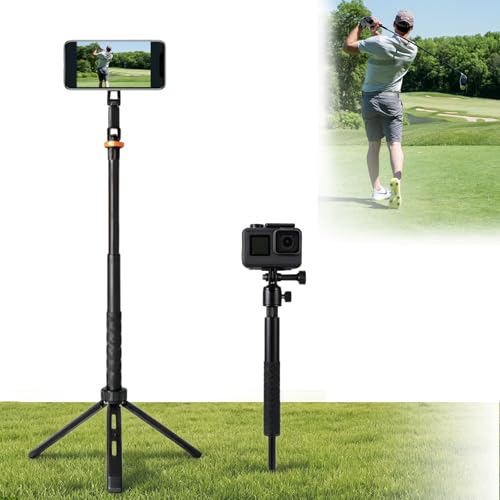
- Tripod and ground spike bases
- MagSafe mount plus adapter rings
- Works with phones, cameras, and action cams
Best For: portable swing video setup at the range
Rapsodo launch monitor
MLM2PRO Dual-Camera Golf Launch Monitor

- Dual camera plus Doppler radar
- Tracks 15 swing and ball metrics
- Includes simulator features with premium trial
Best For: range sessions with video and shot data
PRGR speed monitor
Portable Golf Launch Monitor for Speed Training

- Tracks club speed, ball speed, and smash factor
- Works without apps, Wi-Fi, or Bluetooth
- Measures swing speed without a ball
Best For: budget swing-speed training at the range
Premium Dual-Camera Launch Monitor
Rapsodo MLM2Pro for Range Practice

- Dual-camera swing analysis
- Tracks 13 golf metrics
- Works indoors and outdoors
Best For: Golfers wanting swing video plus launch data at the range
Smart 3D Driving Range Monitor
Portable Swing Analyzer with Video

- No subscription required
- 3D driving range visuals
- Environmental sensors adjust data
Best For: Golfers wanting portable video-backed range feedback without fees
Portable Range Feedback Monitor
GX-10 Swing Analyzer with 3D View

- Environmental sensors for shot data
- 3D driving range with views
- No subscription required
Best For: Golfers seeking portable swing analysis for range and simulator use
Video + launch data combo – Garmin Approach R10 Portable Launch Monitor
If you want golf swing cameras for driving range sessions that also give you launch-monitor data, the Garmin Approach R10 is built for that hybrid use. It tracks key swing and ball metrics, works at home or outdoors, and can automatically record video clips tied to the swing data when paired with a compatible smartphone and the Garmin Golf app.
Best For: Golfers who want video swing review plus launch data during range practice, home setups, or indoor sessions.
Pros:
- Automatically records swing video clips with linked metrics in the Garmin Golf app
- Tracks club head speed, ball speed, swing tempo, spin, launch angle, and more
- Works at home, indoors, or on the driving range
- Includes tripod, phone mount, and carry case for portability
Cons:
- Requires a compatible smartphone and Garmin Golf app for full feature use
- Virtual rounds and leaderboard features need an active subscription
The R10 is a strong pick if you want one portable device that combines swing camera-style video feedback with practical shot-tracking data. Its range-friendly battery life and included accessories make it easy to bring to practice sessions.
Apple-only video trainer – Rapsodo MLM Mobile Launch Monitor
The Rapsodo MLM is a practical choice if you’re shopping for golf swing cameras for driving range practice and want shot tracking in the same unit. It pairs with iPhone or iPad, records video playback with active tracers, and adds GPS satellite view plus real-time swing analysis for indoor or outdoor sessions.
Best For: iPhone and iPad users who want video playback, shot tracers, and GPS-based range feedback.
Pros:
- Records every shot with video playback and active shot tracers
- Provides ball speed, club speed, launch angle, and shot distance data
- Uses GPS satellite view for shot tracking and scatter mapping
- Designed for indoor and outdoor use with interactive games
Cons:
- Compatible with iPhone and iPad only
- Depends on a mobile device for operation and viewing
For Apple users, the MLM is an easy way to turn range work into a more visual training session. It blends launch data with video feedback, which makes it useful for spotting pattern changes from one swing to the next.
Range filming stand – OMOTON CV08-B1 Golf Tripod and Monopod
If your priority is a reliable setup for golf swing cameras for driving range filming, the OMOTON CV08-B1 is a flexible recording stand rather than a launch monitor. It includes a ground spike for turf, a tripod base for hard surfaces, and a 59-inch extendable pole so you can capture different swing angles with a phone, GoPro, or compatible camera.
Best For: Golfers who want a stable, portable camera stand for swing recording and posture review on the range.
Pros:
- Ground spike and tripod base work on both turf and hard surfaces
- 59-inch extendable pole helps capture side-on, front-on, behind, and vertical views
- Includes a Bluetooth remote for hands-free recording up to 30 feet away
- Fits smartphones, GoPro, and cameras with standard interfaces
Cons:
- Does not provide shot data or launch-monitor metrics
- Focused on filming support rather than swing analytics
This is the right choice if you mainly need clean swing footage from the driving range. It gives you the mounting flexibility and stability needed to review your mechanics without adding extra training-tech complexity.
Portable feedback monitor – Voice Caddie SC200Plus Swing Analyzer
The Voice Caddie SC200Plus is a compact training aid for golfers who want useful feedback on the driving range without relying on a full camera setup. It uses Doppler radar technology, gives instant shot data with voice output and an LCD display, and even includes a swing speed mode for practice without a ball.
Best For: Golfers who want quick, portable swing feedback and distance tracking during range sessions.
Pros:
- Doppler radar technology supports reliable shot data collection
- Voice output and LCD display provide instant feedback
- Swing speed mode lets you practice tempo without a ball
- Stores shot data and club statistics for later review
Cons:
- Does not record swing video
- Less focused on visual analysis than camera-based training tools
The SC200Plus is best when you want straightforward feedback instead of video review. It’s portable, simple to use, and useful for building speed, tempo, and distance awareness at the range.
Quavix recording stand – Golf Tripod Phone Stand for Swing Recording
If you want golf swing cameras for driving range sessions, this Quavix stand is built for easy filming and analysis. It combines a tripod base and a ground spike, so you can set it up on mats, grass, sand, or at the range, while the telescopic pole and multi-device mount make it flexible for phones, cameras, and action cameras.
Best For: Golfers, coaches, and creators who want a simple, portable setup for recording swing videos at the driving range or outdoors.
Pros:
- Dual base design switches between tripod and ground spike for different practice surfaces.
- MagSafe magnetic mount makes phone setup fast, and includes adhesive rings for non-MagSafe phones.
- Supports phones, cameras, and action cameras with a mini ball head and action camera adapter.
- Cold-shoe mounts add options for lights or microphones during golf filming.
Cons:
- Audio recording is not built in.
- Maximum height is 46 inches, which may be limiting for some overhead angles.
- Best suited to recording and filming rather than launch-monitor style shot data.
For practical swing capture at the driving range, this is a versatile grab-and-go stand with the right mix of stability and device compatibility. It’s a strong choice if your main goal is clean video recording rather than advanced swing metrics.
Rapsodo launch monitor – MLM2PRO Dual-Camera Golf Launch Monitor
Rapsodo Golf Launch Monitor - Swing Analyzer, Spin Rate, Indoor/Outdoor, 3 Pro V1 Balls
Check Price On AmazonFor golf swing cameras for driving range practice, the Rapsodo MLM2PRO adds both video and data to your session. Its dual camera and Doppler radar setup is designed to track shots reliably, while the 15 captured metrics help you connect what your swing looks like with what the ball is doing.
Best For: Golfers who want driving-range feedback with launch data, swing video, and simulator features in one device.
Pros:
- Dual camera and Doppler radar work together for shot tracking and swing capture.
- Captures 15 metrics, including spin rate, spin axis, carry distance, club speed, club path, and launch angle.
- Includes a 45-day premium trial with simulator courses, target range, and third-party app integration.
- Useful indoors or outdoors, including home practice and driving range sessions.
Cons:
- Some features depend on the premium membership after the trial ends.
- More expensive and feature-heavy than a basic camera stand.
- Built for data and simulation, so it may be more than casual video-only users need.
If you want swing analysis plus performance numbers, the MLM2PRO is the most complete option here. It is especially appealing for golfers who want range practice, slow-motion review, and simulator-style feedback in the same system.
PRGR speed monitor – Portable Golf Launch Monitor for Speed Training
If your priority is swing speed training rather than video, the PRGR is a straightforward tool for golf swing cameras for driving range-style practice sessions where measurement matters most. It uses Doppler radar to track club head speed, ball speed, smash factor, and distance, and it works without Wi-Fi, Bluetooth, or apps.
Best For: Golfers focused on affordable swing speed training and simple launch data without app-dependent setup.
Pros:
- Measures club head speed, ball speed, smash factor, total distance, and carry distance.
- Works without Wi-Fi, Bluetooth, or apps, and runs on AAA batteries.
- Can measure club head speed without a ball, which is useful for speed training.
- Stores up to 500 past swings in memory.
Cons:
- Does not include camera/video capture features.
- Uses a basic standalone design, so it is less feature-rich than dual-camera launch monitors.
- Range is focused on launch data rather than a full simulator or coaching experience.
The PRGR is the simplest and most budget-friendly option of the three if you mainly want feedback on speed and strike quality. It’s a solid fit for golfers who value portability and no-fuss operation over visual swing analysis.
Premium Dual-Camera Launch Monitor – Rapsodo MLM2Pro for Range Practice
If you’re shopping for golf swing cameras for driving range practice, the Rapsodo MLM2Pro combines dual-camera swing analysis with launch monitor data to give you a fuller picture of each shot. It’s built for indoor or outdoor use, and the app-driven setup can turn a phone or tablet into a more detailed training station.
Best For: Golfers who want dual-camera swing feedback plus detailed launch data at the driving range or at home.
Pros:
- Dual-camera setup for swing analysis alongside launch monitor metrics
- Tracks 13 core golf metrics, including spin rate, spin axis, and swing speed
- Works for both driving range sessions and home simulator use
- Includes 3 Chrome Tour balls, tripod, carrying case, and charging cable
Cons:
- Requires a smartphone or tablet for the full experience
- More of a feature-rich training tool than a simple camera-only device
The MLM2Pro stands out if you want practice feedback that goes beyond basic video. For golfers focused on swing camera analysis and shot data together, it offers a strong all-in-one training package.
Smart 3D Driving Range Monitor – Portable Swing Analyzer with Video
This portable monitor is a practical pick if you want golf swing cameras for driving range sessions with app-based feedback and 3D ball-flight visualization. It adds environmental sensors, video record support, and a straightforward no-subscription setup, making it geared toward regular practice rather than complicated setup.
Best For: Golfers who want a portable swing analyzer with 3D driving range visuals and no annual fees.
Pros:
- No annual fees or subscription required
- Built-in environmental sensors adjust shot data for temperature, humidity, and pressure
- 3D driving range with 45° and 90° viewing options
- Includes video record support and 13 metrics for practice feedback
Cons:
- Indoor use needs at least 15 feet of total space
- Works best when the correct club is selected in the app
- Mis-hits may only capture club speed, per the device alerts
For golfers who want visual shot tracking and useful swing data without a subscription, this model is appealing. It’s especially practical for range work where you want both trajectory feedback and condition-aware measurements.
Portable Range Feedback Monitor – GX-10 Swing Analyzer with 3D View
For buyers comparing golf swing cameras for driving range practice, this portable GX-10 monitor focuses on shot analysis, 3D simulation, and video-record support through its app. It’s designed for use at home or outdoors, and the built-in environmental sensors help keep the numbers aligned with real conditions.
Best For: Golfers who want a portable, app-based swing analyzer for range practice and home simulation.
Pros:
- Built-in temperature, humidity, and barometric pressure sensors
- Includes attack angle, launch angle, swing-only mode, and clubface impact visuals
- 3D virtual driving range with multiple viewing options
- No subscription required and supports multiple mobile platforms
Cons:
- App support is limited to specific operating systems listed in the notes
- Package includes support charging line, but no extra accessories are listed
The GX-10 is a good fit if you want a compact practice aid with visual feedback and environmental compensation. It’s aimed at golfers who want to study swing data and ball flight without adding recurring fees.
How We Picked These Golf Swing Cameras for Driving Range Use
We prioritized portability, ease of setup, video reliability, and the type of feedback each option provides. For driving range use, the best choices are the ones you can deploy quickly, trust in outdoor light, and pack away without slowing down practice.
We also considered whether a product is better for video-first swing review, launch data tracking, or a mixed approach. That matters because not every golfer needs the same level of tech.
Quick Comparison
If you want the simplest setup, a phone stand or tripod-mounted camera system is the fastest way to start filming swings at the range. If you want measurable performance feedback, a launch monitor adds useful data such as club speed, ball speed, carry distance, and smash factor. Hybrid products can do both, but they usually cost more and require a little more setup time.
Key Buying Factors for Golf Swing Cameras for Driving Range
Video Quality and Angle Control
Look for stable mounting, adjustable height, and the ability to place your camera behind or down-the-line of the ball. A clear angle is often more useful than ultra-high resolution if your goal is swing diagnosis.
Portability and Setup Speed
Driving range sessions are usually short. Lightweight tripods, magnetic mounts, and compact launch monitors are easier to use consistently than bulky gear.
Data Versus Video
If you mainly want to see your swing positions, a camera-based setup may be enough. If you want numbers to track progress over time, choose a device with launch data and shot metrics.
Compatibility
Check whether the product works with your phone, tablet, or preferred app ecosystem. Some systems are iOS-only, while others support both major mobile platforms.
Range Conditions
Outdoor light, uneven turf, and limited space can affect usability. A stable base or ground spike is especially helpful when filming or measuring at the range.
Who Should Buy Which Golf Swing Cameras for Driving Range?
Beginners who want better form feedback should start with a simple phone mount or tripod system. Golfers focused on performance tracking should look at launch monitors with shot data and practice metrics. Players who want an all-in-one training setup for both video and analytics should consider a more advanced simulator-capable unit.
In short, the best Golf Swing Cameras for Driving Range practice are the ones that match your habits. If you’ll use it every session, choose the most convenient option you can trust to set up fast and deliver clear feedback.