If you’re building a home setup, the right camera can make practice feel much more like a real lesson. The best options capture crisp swing footage, work reliably indoors, and help you connect what you see with measurable ball-flight data.
This roundup focuses on golf swing cameras for home simulators that are practical for screen golf, indoor bays, and swing analysis, with choices ranging from simple high-speed USB cameras to premium launch monitors with built-in video tools.
Best 10 Golf Swing Cameras for Home Simulators Picks for 2026
Pro-Grade All-in-One
Full Swing KIT for Indoor/Outdoor Practice

- Built-in 4K swing camera with 1080p output
- Tracks 16 club and ball metrics
- Portable setup with iOS and Android app support
Best For: Premium home-simulator golfers wanting video and launch data in one device
High-Speed Budget Camera

- Up to 1080p 120fps capture for fast swings
- 3X manual optical zoom lens
- USB plug-and-play across major operating systems
Best For: PC simulator users needing a simple high-speed swing camera
Training-Focused Premium
SkyTrak ST MAX with Photometric Cameras

- Dual Doppler radar plus photometric cameras
- Built-in GOLFTEC Speed Training drills
- Practice tools for skills, mapping, and wedge work
Best For: Serious golfers wanting camera-assisted launch data and guided practice
Compact Swing Recorder
SVPRO 1080P 120fps Zoom Camera

- Up to 1080p 120fps swing capture
- 12MP sensor with good low-light performance
- Manual 3X optical zoom and plug-and-play USB
Best For: Compact home-simulator setups that need a flexible USB swing camera
Radar + Video Training Bundle

- Front-facing camera with auto video capture
- 3D Doppler radar plus shot tracer overlays
- Up to 3 mobile devices for multi-cam coaching
Best For: Golfers who want a portable home-simulator setup with video and launch data
Compact Swing Analyzer

- No annual fees after one-time app download
- Video record support with 3D trajectory views
- Tracks 13 metrics with environmental sensor adjustments
Best For: Budget-minded golfers who want a compact indoor/outdoor monitor with video support
Pro Camera Simulator Pack
- Built-in camera recording with auto clipping
- Pro Package adds club path and face angle data
- Multi-cam support with up to three mobile devices
Best For: Serious home-simulator users who want camera recording and expanded swing data
Tour-Grade Dual-Camera Pick
Rapsodo MLM2PRO with 15 Metrics

- Dual camera plus Doppler radar for swing review
- Tracks 15 metrics including spin and carry distance
- Includes 45-day premium trial and simulator courses
Best For: Golfers who want dual-camera swing review and detailed launch data for home simulator practice
Portable Video + Tracer Bundle
FlightScope Mevo Gen2 Ultimate Bundle

- Front-facing camera with automatic video recording
- Shot Tracer and GPS overview for visual feedback
- 18 data parameters plus 8 E6 Connect courses
Best For: Home sim golfers who want portable video recording and shot-tracer feedback
Value Dual-Camera Simulator
Rapsodo MLM2PRO with Chrome Tour Balls

- Dual camera setup for swing capture and review
- Measures 13 core metrics for training feedback
- Includes tripod, case, cable, and 3 Chrome Tour balls
Best For: Golfers who want a mobile dual-camera monitor for home simulator and range practice
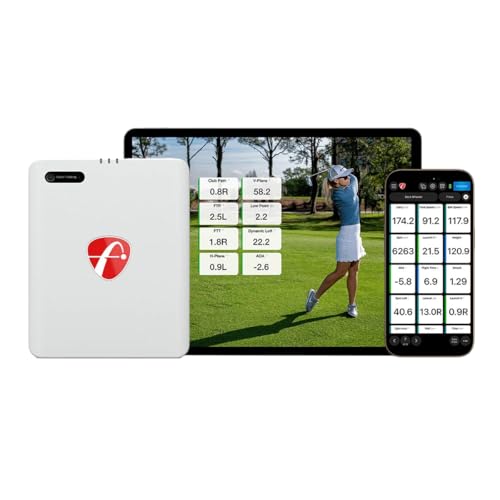
Pro-Grade All-in-One – Full Swing KIT for Indoor/Outdoor Practice
If you’re comparing golf swing cameras for home simulators, the Full Swing KIT stands out because it combines launch monitor data with a built-in 4K swing camera in one portable unit. It is designed for golfers who want a fast setup, clear video review, and detailed ball-and-club metrics without a complicated calibration process.
Best For: Golfers who want a premium simulator-friendly monitor with built-in swing video and broad app connectivity.
Pros:
- Integrated 4K camera with 1080p output for swing review and playback.
- Measures 16 key club and ball metrics, including carry, spin, face angle, and club path.
- Portable design with protective travel case and no alignment sticks or stickers required.
- Works with iOS and Android via Wi-Fi and Bluetooth, plus app session history and video storage.
Cons:
- Primarily a launch monitor system, so the camera is built in rather than being a separate multi-camera setup.
- May be more than a basic video-only home simulator user needs.
For golfers who want one compact device to handle both swing video and performance data, this is a strong premium option. The combination of fast setup, detailed metrics, and app-based session review makes it especially useful for structured home practice.
High-Speed Budget Camera – 4K 120fps USB Golf Swing Cam
For golfers building golf swing cameras for home simulators around a PC, this USB camera focuses on high frame rate capture and manual zoom rather than simulator software features. It supports up to 1080p at 120fps and uses a 12MP sensor, which makes it a practical choice for recording faster swing motion with a simple plug-and-play setup.
Best For: PC-based home simulator users who want a compact USB swing camera with manual zoom and high frame rates.
Pros:
- Supports 1080p at up to 120fps for smoother swing capture.
- 12MP sensor with maximum still resolution of 3840×3040.
- 3X manual optical zoom lens for closer framing.
- USB plug-and-play compatibility across Windows, Mac OS, Linux, Android, and Raspberry Pi.
Cons:
- Frame-rate limits in some software may require professional video tools for 120fps use.
- No built-in stabilization.
This is a straightforward camera-first option for golfers who already have simulator software and just need sharp, high-speed video. Its strength is flexibility: it can work across several operating systems and offers zoom control for tighter swing framing.
Training-Focused Premium – SkyTrak ST MAX with Photometric Cameras
Among golf swing cameras for home simulators, the SkyTrak ST MAX is aimed at players who want camera-based precision plus structured practice tools. It combines dual Doppler radar and photometric cameras with GOLFTEC Speed Training, so the focus is not just on recording swings but on improving them through guided drills and software modes.
Best For: Serious golfers who want a premium launch monitor with camera-assisted measurement and built-in training tools.
Pros:
- Dual Doppler radar and photometric cameras for detailed ball and club data.
- Built-in GOLFTEC Speed Training with guided drills and personalized swing insights.
- Access to practice modes like Skills Assessments, Bag Mapping, Wedge Matrix, and Randomized Practice.
- Dual USB-C ports support simultaneous charging and data transfer.
Cons:
- More of a full launch-monitor system than a standalone swing camera.
- Likely overkill if you only want basic video recording for a home setup.
If your home simulator needs a serious improvement system instead of a simple camera, the ST MAX brings a lot to the table. Its mix of measurement tech, training content, and structured practice modes makes it a strong fit for dedicated golfers.
Compact Swing Recorder – SVPRO 1080P 120fps Zoom Camera
If you’re shopping for golf swing cameras for home simulators and want a compact USB option, this SVPRO model is built around high-speed recording and manual zoom. It supports up to 1080p at 120fps, uses a 12MP sensor, and connects by USB with no driver installation, making it a practical pick for a PC or laptop setup.
Best For: Home simulator users who want a small, plug-and-play swing camera with good low-light performance.
Pros:
- High-speed capture up to 1080p 120fps for swing analysis.
- 12MP sensor with 4K still resolution and good low-light performance.
- 3X optical zoom with manual focus and aperture control.
- USB plug-and-play support for Windows, Linux, MacOS, Android, and Raspberry Pi.
Cons:
- Some software may limit 120fps operation.
- Manual lens controls may take extra setup compared with fixed-focus webcams.
This is a useful camera if you want a compact recording tool rather than a full simulator system. The manual zoom and broad compatibility make it flexible for different indoor setups, especially where low light is a concern.
Radar + Video Training Bundle – Mevo Gen2 Power Bundle
If you want golf swing cameras for home simulators that also give you launch data, the FlightScope Mevo Gen2 Power Bundle is built for a practical indoor setup. It combines 3D Doppler radar tracking with front-facing camera recording, so you can review swing video and see shot overlays in the FS Golf app.
Best For: Golfers who want a portable home-simulator setup with built-in video capture, shot tracing, and broad practice data.
Pros:
- Includes a front-facing camera workflow with automatic video recording, clipping, and saving.
- Supports up to three mobile devices plus the internal camera for multi-cam coaching.
- Displays shot tracer and overlays for clubhead speed, ball speed, and carry distance.
- Portable design works indoors, outdoors, and at the range with up to 6 hours of battery life.
Cons:
- Indoor simulator use still depends on setting up compatible mobile devices and the FS Golf app.
- The notes emphasize video and radar features more than a dedicated projector-style simulator package.
This bundle stands out if you want both swing video and launch-monitor data in one portable system. It is a strong fit for golfers building a home practice area around coaching feedback and shot visualization.
Compact Swing Analyzer – GX-03 Portable Launch Monitor
For golfers comparing golf swing cameras for home simulators, this portable launch monitor leans on app-based video recording and 3D trajectory views rather than a large hardware system. It gives you 13 metrics, environmental sensor adjustments, and an indoor-friendly setup requirement that helps you plan your practice space.
Best For: Budget-minded golfers who want a compact indoor/outdoor monitor with video recording support and no annual fees.
Pros:
- No annual fees, with full features available after a one-time download.
- Records video and pairs it with a smart app for 3D driving range and trajectory views.
- Includes environmental sensors for temperature, humidity, and barometric pressure adjustments.
- Tracks key data such as attack angle, launch angle, spin rate, and vertical clubface data.
Cons:
- Indoor use requires at least 15 feet of total space, including 5 feet behind the ball.
- The notes emphasize app-based video and simulation more than a built-in camera system.
This model is appealing if you want a simpler, lower-commitment simulator setup with video recording and strong shot data. It is especially useful when you want a compact monitor that still supports indoor practice and trajectory visualization.
Pro Camera Simulator Pack – Mevo Gen2 Pro Package
If you are shopping golf swing cameras for home simulators and want a more complete practice package, the FlightScope Mevo Gen2 Pro Package adds built-in camera recording plus extra swing-data depth. It uses the same portable radar-based simulator platform but layers in Pro Package software for more advanced swing measurements and coaching feedback.
Best For: Serious home-simulator users who want camera recording, tracer visuals, and expanded swing data in one portable setup.
Pros:
- Built-in camera recording with automatic video clipping and saving in FS Golf software.
- Supports multi-cam use with up to three mobile devices plus the internal camera.
- Includes Pro Package software for club path, face angle, swing plane, low point, and more.
- Offers 18 data parameters, shot tracer, GPS overview, and 8 E6 courses.
Cons:
- Advanced data requires the Pro Package software add-on that comes with this version.
- Indoor simulator use still depends on using compatible devices and the FS Golf app workflow.
This is the most feature-rich option in the group for golfers who want both video review and deeper swing analysis. It is a strong pick if you are building a home simulator around coaching, tracing, and data-driven practice.
Tour-Grade Dual-Camera Pick – Rapsodo MLM2PRO with 15 Metrics
Rapsodo Golf Launch Monitor - Swing Analyzer, Spin Rate, Indoor/Outdoor, 3 Pro V1 Balls
Check Price On AmazonIf you want golf swing cameras for home simulators with a strong mix of video feedback and shot data, the Rapsodo MLM2PRO is built for exactly that use case. Its dual camera setup and Doppler radar combine to track your swing from different angles while capturing 15 key metrics for a more complete practice session at home or at the range.
Best For: Golfers who want dual-camera swing review plus detailed launch-monitor data for a home simulator setup.
Pros:
- Dual camera setup helps capture your swing from any angle.
- 15 metrics include spin rate, spin axis, carry distance, club speed, and launch angle.
- Includes a 45-day premium trial with simulator courses, app integration, and training tools.
- Comes with 3 ProV1 balls, tripod, carrying case, and charging cable.
Cons:
- Premium simulator content and extra features depend on the trial/membership.
- Designed around mobile use, so it is not a built-in fixed camera system.
This is a strong all-around option if you want video replay plus measurable shot feedback in one portable unit. For home simulator practice, it offers a good balance of coaching tools, course access, and launch data.
Portable Video + Tracer Bundle – FlightScope Mevo Gen2 Ultimate Bundle
If you’re comparing golf swing cameras for home simulators and want a portable setup with built-in video capture, the FlightScope Mevo Gen2 is a compelling option. It pairs 3D Doppler tracking with a front-facing camera, while the FS Golf software records, clips, and overlays data so you can review both ball flight and swing video together.
Best For: Home sim golfers who want video recording, shot tracer visuals, and portable launch-monitor data in one bundle.
Pros:
- Front-facing camera and multi-cam support with automatic video recording.
- Shot Tracer and GPS overview provide clear visual ball-flight feedback.
- 18 swing data parameters cover full swing, chipping, and putting.
- Includes 8 E6 Connect courses and up to 6 hours of battery life.
Cons:
- Some of the most useful features rely on the FS Golf app and E6 bundle.
- Setup is portable and app-driven, not a permanently mounted simulator camera system.
This bundle stands out for golfers who want an easy-to-move simulator companion with built-in video and clear shot visuals. It is especially practical if you value recording swings and seeing data overlays without committing to a fixed installation.
Value Dual-Camera Simulator – Rapsodo MLM2PRO with Chrome Tour Balls
For golfers shopping golf swing cameras for home simulators, this Rapsodo MLM2PRO bundle gives you the same dual-camera swing-analysis approach in a slightly more value-focused package. It is designed to pair with a smartphone or tablet for home simulator use, while still delivering shot and swing data you can use to practice with purpose.
Best For: Golfers who want a dual-camera mobile launch monitor for home simulator practice and range sessions.
Pros:
- Dual camera setup supports swing capture and analysis.
- Measures 13 core metrics, including spin rate, spin axis, and swing speed.
- Works with smartphones or tablets for a portable home simulator setup.
- Includes 3 Chrome Tour balls, tripod, carrying case, and charging cable.
Cons:
- Some feature access depends on app integration and compatible devices.
- Data set is strong, but the bundle is still centered on mobile-based use.
This version is a practical choice if you want the MLM2PRO’s camera-driven practice experience without extra frills. It suits golfers who need portable simulator feedback first and foremost, with enough included accessories to get started quickly.
How We Picked the Best Golf Swing Cameras for Home Simulators
We looked for models that offer clear motion capture, easy indoor setup, and useful data for improving your swing. For this category, that means balancing video quality, frame rate, compatibility, and how well the camera or launch monitor fits a simulator bay.
We also favored products that are straightforward to use at home, whether you want a dedicated swing camera, a portable launch monitor, or a hybrid system that does both.
Quick Comparison
Dedicated USB swing cameras are usually the simplest path if your main goal is to record and review mechanics. Launch monitors with cameras are better if you want ball data, shot tracking, and simulator software in one package. Premium models generally deliver stronger metrics and more polished app experiences, while budget options can still be very effective for basic face-on and down-the-line video.
Key Buying Factors for Golf Swing Cameras for Home Simulators
Frame Rate and Image Clarity
For swing analysis, frame rate matters as much as resolution. A sharp 1080p camera with high-speed capture can be more useful than a higher-resolution camera that blurs impact frames. Look for smooth video, accurate focus, and good low-light performance if your simulator bay is indoors.
Field of View and Zoom
A wider view helps capture setup and full motion, while optical zoom can make it easier to isolate the clubhead, hands, or impact zone. If your bay is tight, choose a camera that can still frame the entire swing without awkward placement.
Software and Compatibility
Some Golf Swing Cameras for Home Simulators work as plug-and-play webcams, while others rely on companion apps or simulator platforms. Check whether the unit supports your device, operating system, and preferred simulator software before buying.
Ball and Club Data
If you care about more than video, consider a launch monitor with integrated camera support. Metrics like carry distance, club speed, spin, and shot shape can turn visual feedback into a more complete practice session.
Who Should Buy Which Golf Swing Cameras for Home Simulators?
If you mainly want affordable swing review, a USB high-speed camera is usually the best value. If you want a more complete training station, choose a launch monitor with video capture and strong simulator support. Serious golfers who practice often should prioritize accuracy, app stability, and seamless indoor setup over raw megapixels alone.
For most home users, the best choice is the one that fits your space, budget, and training goals. A simple camera can be enough for mechanics; a premium launch monitor is better if you want one system for practice, feedback, and virtual golf.