If you want more consistent practice without relying on a partner, table tennis robots can turn a spare hour into a focused training session. The best models help you work on timing, footwork, placement, and repeatable stroke mechanics.
This roundup of 10 picks is built for buyers who want a practical way to train solo, whether you need simple feed settings, app-based drills, or a full setup with recycling nets and larger ball capacity.
Best 10 Table Tennis Robots Picks for 2026
Recycling Net Trainer
Suz S201 Table Tennis Robot with Machine Recycling net and 200 Balls

- Includes a recycling net to reduce ball pickup.
- Offers spin, speed, and oscillation options.
- Comes with 200 balls for solo training sessions.
Best For: Solo players who want a recycling-net robot with a larger ball supply
Solo Basics Pick
Suz S101 Ping Pong Machine with 100balls for Solo Training & Coaching

- Made for solo training when you lack a practice partner.
- Lets you adjust spin and speed for drills.
- Includes 100 balls for immediate use.
Best For: Beginners or solo players wanting a simple practice machine
Remote-Control Trainer
Suz S102 Table Tennis Robot Wireless Remote Trainer

- Wireless remote control for easier adjustment.
- Supports direct and indirect serve setup.
- Uses oscillation and spin settings for varied drills.
Best For: Players who want wireless control and adjustable serve patterns
Smart App Drill Coach

- App and remote control with detailed customization.
- Includes 264 built-in drills and custom drill programming.
- 150-ball capacity supports longer training sessions.
Best For: Serious players and coaches who want advanced app-controlled drills
Budget Solo Trainer
iPong V300 Table Tennis Training Robot

- Feeds up to 70 balls per minute.
- Remote adjusts speed, spin, and direction.
- Fast assembly with no app required.
Best For: Simple solo practice and quick setup
App-Ready Drill Machine
PONGBOT Table Tennis Robot with Net

- Includes a net for simpler setup.
- Remote and app control add flexibility.
- 264 pre-saved drills plus custom drills.
Best For: Structured training with guided and custom drills
Spin Variety Pick
Ping Pong Robot Machine with 36 Spin Balls

- Offers 36 spin combinations.
- Compact, portable, and easy to install.
- Needs more than 15 standard 40mm balls.
Best For: Spin-focused practice with a compact setup
Economy Solo Trainer
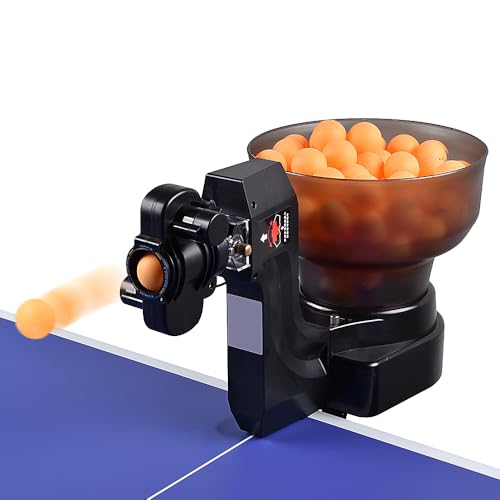
- 9 spin options with adjustable frequency and speed
- 8.9 to 76 mph serving range for mixed-level drills
- Left- or right-side control panel mounting
Best For: Beginners and casual players practicing solo
Auto-Recycling Practice Station
WAYMARK S6-PRO Table Tennis Robot

- Integrated netting returns balls to the 200-ball hopper
- Includes 100 balls for a ready-to-use setup
- 9 spin options and 8.9 to 76 mph speed range
Best For: Long solo training sessions with less ball pickup
Complete Recycling Trainer
WAYMARK JT-A Ping Pong Machine

- Recycling net system collects about 200 balls
- 9 spins and adjustable 8.9 to 76 mph speed
- Includes 100 balls plus an English manual
Best For: Players wanting a full solo drill setup with recycling
Recycling Net Trainer – Suz S201 Table Tennis Robot with Machine Recycling net and 200 Balls
If you want table tennis robots that can support longer solo sessions, the Suz S201 is built around convenience and repetition. Its recycling net helps keep balls in play, while the included 200 balls make it easier to maintain the minimum ball supply the machine needs to serve properly.
Best For: Players who want a solo training setup with ball recycling and a large starter ball supply.
Pros:
- Includes a machine recycling net, so you do not need to pick up balls as often.
- Supports lots of spin, speed, and oscillation options for varied drills.
- Comes with 200 balls, which helps meet the machine’s recommended ball quantity.
- Designed for straightforward assembly and solo practice.
Cons:
- Needs at least 20 balls available below the feeding tube to serve properly.
- Only fits table tennis tables under 2.5 inches thick.
- May require setup adjustments to get direct or indirect serves working smoothly.
Overall, the S201 is a practical pick if you want table tennis robots that reduce ball pickup and support repeatable training. It is best suited to players who are willing to follow the setup guidance and keep enough balls near the feed area.
Solo Basics Pick – Suz S101 Ping Pong Machine with 100balls for Solo Training & Coaching
The Suz S101 is a straightforward option among table tennis robots for players focused on practicing alone. It is positioned as a simple training aid for solo sessions and coaching-style drills, with adjustable spin and speed to help you work on different parts of your game.
Best For: Players who want an uncomplicated solo trainer for basic practice and drill work.
Pros:
- Helps solve the lack of a practice partner for anytime solo training.
- Adjustable spin and speed support skill-building drills.
- Includes 100 balls for getting started with practice.
Cons:
- Less feature detail is provided than on more advanced models.
- Does not list a recycling net in the supplied notes.
If you want a no-fuss entry point into table tennis robots, the S101 focuses on the essentials: solo repetition and basic drill control. It is a sensible choice when you care more about practice access than advanced automation.
Remote-Control Trainer – Suz S102 Table Tennis Robot Wireless Remote Trainer
The Suz S102 is built for players who want wireless control and a more adjustable practice experience from table tennis robots. It includes remote-based settings for ball frequency, spin, and oscillation, plus guidance for both direct and indirect serves to help you tune the drill to your table.
Best For: Players who want remote-controlled training with adjustable serve style and oscillation.
Pros:
- Wireless remote control makes it easier to adjust practice settings.
- Supports direct and indirect serve setups with head adjustment guidance.
- Uses oscillation and spin adjustments to shape drill variety.
- Works with solo training and skill improvement.
Cons:
- Only fits table tennis tables under 2.5 inches thick.
- Needs at least 20 balls in the storage tube to serve properly.
- May require troubleshooting if balls come out weak or oscillation stalls.
The S102 is a useful choice if you want more hands-on control over your practice without leaving the table. It suits players who are comfortable following setup steps and adjusting settings to keep the machine serving consistently.
Smart App Drill Coach – PONGBOT Table Tennis Robot: APP Control 264 Drills, Portable Ping Pong Machine with Spin/Speed Customization, 150-Ball Capacity for Solo Training & Coaching
Among table tennis robots, the PONGBOT NOVA S Pro stands out for app-based control and a large library of drills. It offers detailed customization of spin, speed, landing point, height, and frequency, making it a strong option for players who want a more structured training plan.
Best For: Players, coaches, and serious trainees who want app-driven drills and deep customization.
Pros:
- App and remote control provide flexible setup options.
- Includes 264 built-in drills plus custom drill programming.
- Offers multiple spin, speed, rotation, and landing-point adjustments.
- 150-ball capacity supports longer solo training sessions.
Cons:
- 40mm+ balls are not included.
- 2 AAA batteries are not included.
- Installation depends on the user manual and APP videos.
This is the most feature-rich option in the group for players who want detailed practice control. If your priority is building repeatable drills and tuning ball placement with app guidance, the PONGBOT is the strongest fit here.
Budget Solo Trainer – iPong V300 Table Tennis Training Robot
If you want one of the simplest table tennis robots for solo practice, the iPong V300 keeps the focus on repetition and control. It automatically feeds 40mm regulation balls, offers adjustable speed and ball frequency, and is built for players who want quick setup without app complexity.
Best For: Players who want a straightforward, fast-to-set-up training robot for consistent solo drills.
Pros:
- Shoots up to 70 balls per minute, with slower settings down to 30.
- Adjusts ball speed, direction, oscillation, topspin, and backspin.
- Wireless remote includes a memory button for easier practice changes.
- Super-fast assembly with no app downloads or complicated instructions.
Cons:
- Does not include playback mode for solo practice variety.
- Focused on core training features rather than advanced drill programming.
Overall, the iPong V300 is a practical pick if you value simplicity and repeatable feeding over extra software or drill libraries. It suits beginners and professionals who mainly want a reliable multi-ball coach.
App-Ready Drill Machine – PONGBOT Table Tennis Robot with Net
This PONGBOT table tennis robot is geared toward players who want structured practice without a complicated setup. It includes a net, remote and app control, and a large library of pre-saved drills, plus custom drill creation for more targeted training sessions.
Best For: Players who want guided drills, app control, and a setup that is easier to get running.
Pros:
- Includes a net to simplify setup.
- Offers remote and smartphone app control.
- Comes with 264 pre-saved drills for varied practice.
- Custom drill creation adds flexibility for different training goals.
Cons:
- Plastic construction throughout may feel less premium than metal alternatives.
- At 4 kg, it is not the lightest option for frequent moving.
For players who want table tennis robots with more built-in structure, this model stands out for its drill count and control options. It is a solid choice when you want training guidance plus room to customize.
Spin Variety Pick – Ping Pong Robot Machine with 36 Spin Balls
If spin variety matters most, this table tennis robot focuses on delivering a wide range of ball types for practice. It offers 36 spin combinations, allows double-end or single serve, and is designed to be compact and easy to install for home training.
Best For: Players who want a compact machine that can practice a wide range of spins.
Pros:
- Delivers 36 kinds of spinning balls.
- Supports top spin, backspin, sidespin, and combinations.
- Compact and convenient to carry.
- Simple installation with no extra equipment required.
Cons:
- Requires more than 15 balls to operate properly.
- Uses standard 40mm balls only.
- Balls are not included.
This is a strong option if your training goal is spin recognition and response rather than app-based drill planning. Its compact design and broad spin range make it appealing for focused practice at home.
Economy Solo Trainer – WAYMARK HP-07 Ping Pong Robot
If you want a straightforward entry into table tennis robots, the WAYMARK HP-07 focuses on the essentials for solo practice. It offers adjustable spin types, a wide serving speed range, and an ambidextrous control panel, making it a practical pick for working on fundamentals at home.
Best For: Beginners and casual players who want an affordable solo trainer with adjustable spins and speed.
Pros:
- Serves 9 spin options, including topspin, backspin, no-spin, left-spin, right-spin, and mixed-spin.
- Speed range of 8.9 to 76 mph supports both novice drills and faster practice sessions.
- Control panel can be mounted on the left or right side for different-handed players.
- Includes 50 balls and supports about 120 balls in the hopper.
Cons:
- Only works on table tennis tables up to 2.5 inches thick.
- Does not include an integrated net/recycling system.
Overall, the HP-07 is a simple, flexible table tennis robot for players who want spin variety and adjustable pace without moving into a more complex net-based setup.
Auto-Recycling Practice Station – WAYMARK S6-PRO Table Tennis Robot
The WAYMARK S6-PRO is built for uninterrupted table tennis robot practice, thanks to its integrated netting system that sends balls back into the 200-ball hopper. If you want a setup that reduces ball pickup and keeps drills flowing, this model is geared toward long solo sessions with adjustable spins and speed.
Best For: Players who want a recycling net system for longer, lower-interruption solo training.
Pros:
- Integrated netting system recycles balls directly into the 200-ball hopper.
- Includes 100 balls for a more complete training setup out of the box.
- Offers 9 spin options and an 8.9 to 76 mph speed range.
- Control panel can be mounted on either side for left- or right-handed users.
Cons:
- Only fits standard ping pong tables up to 2.5 inches thick.
- More involved setup than a basic ball machine because of the net system.
For home practice where efficiency matters, the S6-PRO stands out by combining a recycling net, large hopper capacity, and broad shot settings into one solo training station.
Complete Recycling Trainer – WAYMARK JT-A Ping Pong Machine
The WAYMARK JT-A is a table tennis robot with net designed to streamline solo training by collecting balls back into its recycling system. With adjustable spin, speed, and landing points, it gives players a flexible way to practice repeatable drills without stopping to gather balls.
Best For: Solo players who want a complete ball-recycling training system with adjustable shot settings.
Pros:
- Ball recycling net collection system holds about 200 table tennis balls.
- 9 spin types and adjustable speed from 8.9 to 76 mph support varied drills.
- Control panel can be placed on the left or right side for easier access.
- Includes 100 balls and an English instruction manual for setup.
Cons:
- Only suitable for table tennis tables less than 2.5 inches thick.
- Requires the added net system, so it is less compact than a basic machine.
The JT-A is a strong fit if you want a more complete table tennis robot setup for realistic solo practice, especially when ball recovery and adjustable shot patterns are top priorities.
How We Picked Table Tennis Robots
We focused on the features that matter most for real training: ball capacity, feed consistency, spin and speed variety, control options, portability, and whether the setup supports extended solo practice. For Table Tennis Robots, a good buying decision usually comes down to how well the machine matches your training goals, not just how many presets it advertises.
Quick Comparison
At a high level, the lineup breaks into three buyer types: simple entry-level machines for basic repetition, midrange models with better control over pace and spin, and advanced options with app or remote control plus pre-saved or custom drills. If you want longer sessions, look for a recycling net and higher ball capacity. If you want structured training, drill libraries and programmable settings matter more than raw ball count.
Key Buying Factors for Table Tennis Robots
Spin, Speed, and Placement
The most useful Table Tennis Robots let you adjust topspin, backspin, sidespin, feed speed, and landing zones. If you are training match play, placement variety is just as important as pace.
Capacity and Recycling
Higher ball capacity reduces interruptions, while recycling nets keep practice flowing. If you plan long solo sessions, this feature can be a major convenience.
Controls and Drills
Remote control is good for quick adjustments. App control is better if you want more drill variety or customized sequences. Beginners may prefer straightforward controls, while advanced players often benefit from repeatable programmed routines.
Compatibility and Setup
Check whether the machine fits your table size, net setup, and ball type. Easy assembly and stable mounting can save time and make practice more enjoyable.
Who Should Buy Which Table Tennis Robots?
Choose a basic machine if you mainly want reliable solo reps and simple timing practice. Choose a midrange robot if you want more spin options and better control over training intensity. Choose a feature-rich model if you want drill variety, app control, or the most realistic solo practice setup. Among Table Tennis Robots, the best choice is usually the one that matches your current skill level and the kind of repetition you will actually use every week.