A radar launch monitor can make practice more useful by showing how fast you swing, how far the ball travels, and, on some models, how a shot flies. But a compact speed tracker and a home-simulator setup serve very different needs.
These nine options span straightforward swing-speed monitors and app-connected systems. Use the comparisons below to narrow your choice by the data you need, where you practice, and the total cost of using it.
Best 9 Radar Based Golf Launch Monitors Picks for 2026
Best for Simulator Practice

- Radar and dual-camera tracking
- 15 metrics, including spin and club path
- 21-day Premium/Core trial included
Best For: Detailed practice and home simulation
Best for iPhone Range Sessions

- Carry, speed, launch, and shot-shape data
- Video replay with shot tracer
- iPhone and iPad only
Best For: Portable shot feedback for iOS users
Best for Speed Training

- Measures speed without a ball
- Stores 500 past swings
- No app or subscription required
Best For: Simple, portable swing-speed training
Best for Virtual Rounds
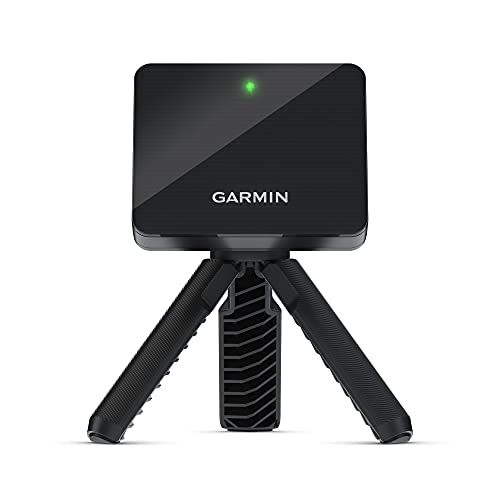
- Tracks shot and swing metrics through the Garmin Golf app
- Adds swing video and club-by-club training
- Up to 10 hours of battery life
Best For: Portable practice with optional virtual golf
Best for Easy Setup
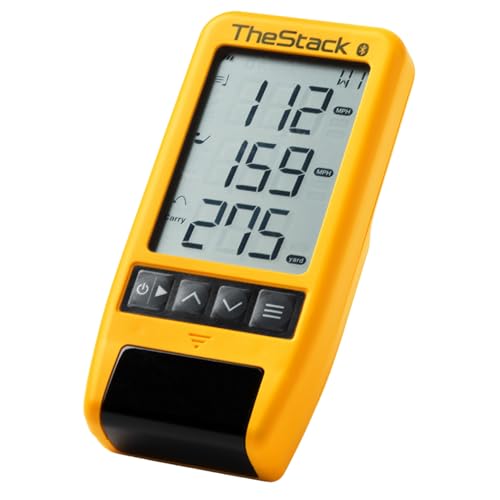
- Measures swing speed and ball speed
- Syncs speed data to TheStack app
- iOS-only wedging and putting features
Best For: Structured swing-speed practice
Best for Screen-Free Feedback

- Built-in LCD and voice feedback
- No-ball Swing Speed Mode
- Stores club statistics and average distances
Best For: On-device feedback and speed practice
Best for Simulator Flexibility

- Nine metrics on its 4.3-inch display
- 21-plus metrics available through the app
- Compatible with E6 Connect and GSPro
Best For: Standalone practice and home simulator setups
Best for Structured Training

- Built-in screen and voice output
- Target and speed training modes
- Standard balls work indoors and outdoors
Best For: Varied practice sessions with simulator access
Best for Simple Shot Tracking

- Shows four core shot metrics
- Stores up to 1,000 shots
- Up to 10 hours of battery life
Best For: Portable feedback and shot-history review
Best for Simulator Practice – Rapsodo MLM2PRO
Among radar based golf launch monitors, the Rapsodo MLM2PRO stands out for pairing Doppler radar with dual cameras. It tracks 15 metrics, including spin rate, spin axis, carry distance, club speed, club path, and launch angle, for indoor or outdoor practice.
Best For: Golfers who want detailed shot data and video feedback alongside home simulator options.
Pros:
- Combines radar and dual cameras for shot tracking.
- Provides 15 metrics and slow-motion impact footage.
- Includes a tripod, carrying case, and three Titleist Pro V1 balls.
Cons:
- Simulator courses and several training features require Premium access after the included 21-day trial.
This is the most feature-rich practice option here if you will use the video and simulation tools. Factor the Premium membership into your decision if course play is a priority.
Best for iPhone Range Sessions – Rapsodo Mobile Launch Monitor
The original Rapsodo MLM is a portable choice among radar based golf launch monitors for golfers who practice with an iPhone or iPad. It reports ball speed, club speed, launch angle, carry distance, and shot shape, then adds video replay with a shot tracer.
Best For: iPhone or iPad users who want shot-by-shot feedback at the range, in the backyard, or into an indoor net.
Pros:
- Shows key speed, launch, distance, and shot-shape data.
- Records swings with video replay and a shot tracer.
- Portable unit includes a carrying case and charging cord.
Cons:
- Works with iPhone and iPad only, not Android.
- Simulator courses and game modes require Premium access.
Choose this MLM if straightforward yardage feedback and swing video matter more to you than the MLM2PRO’s expanded metrics. Check device compatibility before buying.
Best for Speed Training – PRGR HS 130-A
The PRGR HS 130-A keeps things simple for golfers shopping radar based golf launch monitors. Its pocket-sized Doppler radar measures club head speed with or without a ball, making it especially useful for speed-training swings.
Best For: Golfers who want portable swing-speed feedback without an app or subscription.
Pros:
- Measures club head speed even when you swing without a ball.
- Reports ball speed and smash factor, plus estimated carry and total distance.
- Stores 500 past swings and runs on AAA batteries.
Cons:
- Does not offer the video replay or simulator features described for the Rapsodo models.
- Carry and total distances are estimates.
If your main goal is tracking speed-training progress, the PRGR avoids app setup and recurring access requirements. Golfers seeking swing video or simulated rounds should consider a different model.
Best for Virtual Rounds – Garmin Approach R10
Among radar based golf launch monitors, the portable Garmin Approach R10 is a practical choice if you want shot metrics at home or on the range plus app-based practice. Pair it with a compatible smartphone and the Garmin Golf app to review ball speed, clubhead speed, launch angle, swing tempo, and more.
Best For: Golfers who want portable practice data, swing video, and optional virtual rounds.
Pros:
- Training mode tracks club statistics and shows an estimated shot-dispersion chart.
- Automatically recorded swing clips can include shot metrics when paired with the app.
- Up to 10 hours of battery life; a tripod, phone mount, and carry case are included.
Cons:
- Viewing and analyzing metrics requires a compatible smartphone and the Garmin Golf app.
- Virtual rounds on over 42,000 courses require an active subscription.
The R10 offers a broad practice toolkit, but account for the phone setup and subscription if virtual golf is a priority.
Best for Easy Setup – TheStack Radar
TheStack Radar is a focused option among radar based golf launch monitors: it measures swing speed and ball speed, then calculates estimated carry distance and smash factor. Its Bluetooth connection sends training speeds to TheStack app, making it especially suited to structured speed work.
Best For: Golfers prioritizing swing-speed training and, on iOS, guided wedge practice.
Pros:
- Measures swing and ball speed and calculates estimated carry and smash factor.
- Automatically transmits training speeds to TheStack app via Bluetooth.
- Includes access to Stack Wedging practice features and the Stack Putting app on iOS.
Cons:
- Stack Wedging and Stack Putting are iOS-only; speed training supports iOS and Android.
- The included Stack Wedge Mode trial lasts one month.
Choose this model for speed-focused feedback rather than a broad list of shot metrics, and check app availability for the practice modes you plan to use.
Best for Screen-Free Feedback – Voice Caddie SC200Plus
The Voice Caddie SC200Plus stands out among radar based golf launch monitors for its built-in LCD and voice output, which provide immediate shot feedback. Its Doppler radar and atmospheric-pressure calibration support practice indoors or outdoors, while Swing Speed Mode lets you work on speed and tempo without hitting a ball.
Best For: Golfers who want on-device feedback and no-ball swing-speed practice.
Pros:
- LCD display and voice output deliver real-time feedback.
- Swing Speed Mode works without a ball.
- Stores shot data and club statistics, including average distances by club.
- Adjustable loft angles allow different club settings.
Cons:
- Supplied details do not specify app connectivity or virtual-course features.
For straightforward feedback and stored club averages, the SC200Plus is worth considering; shoppers seeking connected simulation should verify those features separately.
Best for Simulator Flexibility – Blue Tees Rainmaker
Among radar based golf launch monitors, the Blue Tees Rainmaker is a practical pick if you want on-device feedback at the range and simulator options at home. Its 4.3-inch display shows nine real-time metrics, while the app provides access to more than 21.
Best For: Golfers who want standalone practice plus E6 Connect or GSPro compatibility.
Pros:
- Three standalone training modes work without a phone or subscription.
- Supports E6 Connect and GSPro for simulator play.
- Includes a carrying case, IPX4 water resistance, and more than six hours of battery life.
Cons:
- The full set of 21-plus metrics requires the app; the display shows nine.
- Simulator use depends on compatible software.
Choose the Rainmaker if you value a built-in screen but also plan to expand into app-based analysis or virtual courses. Its RCT ball compatibility offers another option for enhanced spin accuracy.
Best for Structured Training – Voice Caddie SC4 PRO
The Voice Caddie SC4 PRO stands out among radar based golf launch monitors for golfers who want several ways to practice without switching devices. It pairs a built-in screen and voice output with a 3D driving range, target practice, and speed training.
Best For: Golfers who want guided practice modes and simulator features for indoor or outdoor sessions.
Pros:
- Works with standard golf balls indoors and outdoors.
- Includes access to a 3D driving range and five free E6 courses.
- Connects to the VOICECADDIE S app for statistics and distance calibration.
Cons:
- Advanced analysis requires the companion app.
- The included HomeGolf access lasts one year.
The SC4 PRO makes sense if target and speed sessions matter as much as shot data. Check which simulator features you expect to use after the included access periods.
Best for Simple Shot Tracking – GOLFBUDDY Shot Mate
If you prefer radar based golf launch monitors focused on core numbers, the GOLFBUDDY Shot Mate keeps the approach straightforward. Its color LCD displays club speed, ball speed, smash factor, and carry distance for quick review during practice.
Best For: Golfers who want portable, screen-based feedback and a record of their shots.
Pros:
- Stores up to 1,000 shots and automatically saves the last 10 swings.
- Practice and target modes support different training sessions.
- Rated for up to 10 hours of battery use and weighs 191 g.
Cons:
- The listed metrics are limited to core speed, smash factor, and carry data.
- No simulator compatibility is specified in the supplied details.
The Shot Mate is a good fit when quick on-screen numbers and shot history matter more than simulator features or a broad metric list.
How We Picked the Best Radar Based Golf Launch Monitors
We focused on the practical differences shoppers can check before buying: stated shot and swing metrics, portability, display or app requirements, indoor and outdoor use, simulator compatibility, and likely ongoing costs. A longer feature list does not automatically mean better measurements for your setup. Product claims, supported devices, software tiers, and included accessories can change, so confirm the current listing before ordering.
Quick Comparison: Match the Monitor to the Job
For speed-focused sessions, the PRGR HS 130-A and TheStack Radar are worth a closer look. The GOLFBUDDY Shot Mate and Voice Caddie portable models suit buyers who want readily accessible practice numbers; check each model’s exact metric list. For app-led range practice and simulation, compare the Garmin Approach R10, Rapsodo MLM2PRO, Blue Tees Rainmaker, and Voice Caddie SC4 PRO. The older Rapsodo MLM deserves special attention if phone compatibility is a concern: its listing specifies iPhone and iPad use.
Check which features work without a phone, which need a paid plan, and whether your preferred simulator software is supported by the exact model and subscription tier.
Key Buying Factors for Radar-Based Golf Launch Monitors
Space and Ball Flight
Radar units generally sit behind the ball and need clear space to observe the swing and ball flight. Indoor hitting requires room behind the hitting area as well as enough ball travel toward a net or screen. Compare each manufacturer’s placement instructions with your available dimensions before buying. Outdoor range use is often simpler, but nearby golfers, metal objects, alignment, and lighting for any companion camera can affect your setup.
Metrics You Will Actually Use
Club speed, ball speed, smash factor, and carry distance are useful for speed work and basic gapping. If you want to assess curvature, dispersion, or club delivery, verify exactly which metrics the device reports and whether they are directly measured or estimated. Not every monitor provides the same data for short shots, and indoor estimates may differ from outdoor results.
True Cost and Compatibility
Budget for any required subscription, compatible phone or tablet, simulator software, special balls, and an indoor net or impact screen. Check whether third-party simulation, saved sessions, and advanced data remain available without a paid plan. Battery life and an onboard display matter most when you want quick range sessions without managing another device.
Who Should Buy Which Radar Based Golf Launch Monitors?
Choose a simple speed-oriented unit if your main goal is faster swings or checking basic distance trends. Pick an app-connected monitor if you want session history, more shot context, or simulated rounds—and are comfortable verifying software costs. For a home simulator, prioritize documented indoor-space requirements and confirmed compatibility over headline metric counts. If you practice in several locations, favor a setup you can position consistently and start quickly; repeatable sessions are more valuable than features you rarely use.