If you’re looking to enhance your indoor golfing experience, premium golf simulators might be just what you need. These setups not only provide realistic gameplay but also offer advanced features that can improve your skills. With so many options available, it’s essential to know what to take into account when making your choice. Let’s explore the top models that could transform your practice sessions and game nights into something truly exceptional.
Garmin Approach R50 Golf Launch Monitor and Simulator

The Garmin Approach R50 Golf Launch Monitor and Simulator is an excellent choice for serious golfers seeking precision and performance in their practice sessions. With its 10″ built-in touchscreen and advanced 3-camera system, you’ll get accurate performance metrics like ball speed and launch angle. Whether you’re indoors or out, it tracks your stats for each club and offers a shot dispersion chart. Plus, you can play virtual rounds on over 43,000 courses with friends. The portability and HDMI connectivity let you set up easily, ensuring you can practice anywhere while receiving instant feedback on your shots.
Best For: Serious golfers looking for precision and performance in their practice sessions with advanced metrics and virtual play options.
Pros:
- High accuracy with advanced metrics like ball speed and launch angle using a 3-camera system.
- Ability to play virtual rounds on over 43,000 courses with friends and participate in global tournaments.
- Portable design with a built-in battery life of up to 4 hours and HDMI connectivity for customizable viewing.
Cons:
- Requires an active Garmin Golf membership for access to virtual play features.
- The price point may be high for casual golfers or beginners.
- Tracking sticker is needed for face to path measurements, which may add complexity to setup.
GoSports Golf Simulator Enclosure Nets (Complete Set with Frame and HD Impact Screen Kit)

For golfers seeking a professional indoor experience without breaking the bank, the GoSports Golf Simulator Enclosure Nets offer a complete solution. Available in sizes from 10 x 8 ft to 14 x 8 ft, this set includes a sturdy steel frame and an HD impact screen kit. With dimensions of 10 ft 7 inches wide and 8 ft high, it features a 4:3 aspect ratio, side, and top enclosures for a realistic setup. Compatible with all major launch monitors, it’s easy to set up in under 30 minutes. Enjoy a commercial-grade experience at home, enhancing your practice and play.
Best For: Golf enthusiasts looking for a cost-effective way to create a professional indoor golf practice environment.
Pros:
- Universal compatibility with all major launch monitors and projectors.
- Quick and easy assembly in under 30 minutes, making it user-friendly for all skill levels.
- Durable construction with a sturdy steel frame and reinforced HD impact screen, suitable for real golf balls.
Cons:
- Room size requirement of a 9 ft tall ceiling may limit installation options for some users.
- Launch monitor and projector not included, requiring additional investment for full setup.
- Limited size options may not accommodate all preferences for larger setups.
Complete Golf Simulator Enclosure Package with 4K-Ready Impact Screen

Serious golfers and beginners alike will find the Complete Golf Simulator Enclosure Package with a 4K-ready impact screen to be an ideal choice for honing their skills at home. This all-in-one setup offers a professional-grade practice space, ensuring durability and safety. The precision-sized impact screen delivers crisp visuals, allowing for a tight hitting area with minimal light bleed. You’ll appreciate the easy assembly, taking under an hour with no special tools required. Plus, multiple size options fit any space, from garages to dedicated studios. With a 12-month warranty and responsive support, you’re covered for all your golfing needs.
Best For: Serious golfers and beginners looking for a professional-grade at-home practice space.
Pros:
- Provides a professional-grade setup that enhances practice and skill development.
- Easy assembly in under an hour with no special tools required.
- Multiple size options available to accommodate various spaces without overwhelming the room.
Cons:
- Initial investment may be higher compared to basic setups.
- Requires adequate space for optimal installation and use.
- Limited to indoor use, which may not appeal to all golfers.
PHIGOLF Home Golf Game Simulator with Motion Sensor & Swing Stick

Experience golf like never before with the PHIGOLF Home Golf Game Simulator, perfect for tech-savvy players seeking an interactive experience. This simulator uses a motion sensor and swing stick, giving you access to over 38,000 golf courses worldwide. Set up is easy—just download the app and pair via Bluetooth. Lightweight and portable, the Phigolf2 Flex fits in your suitcase, making it ideal for travel. Enjoy multiplayer matches with up to four players, and customize your gameplay by inserting the sensor into your personal clubs. With the upgraded swing stick, you’ll feel like you’re on the course, even indoors.
Best For: Tech-savvy golf enthusiasts seeking an interactive and portable golfing experience.
Pros:
- Access to over 38,000 golf courses worldwide, providing endless variety for players.
- Lightweight and portable design, making it easy to travel with and use in small spaces.
- Multiplayer capability for up to four players, enhancing social interaction and competition.
Cons:
- Requires a smartphone or tablet for app functionality, which may not be ideal for all users.
- Initial setup may be challenging for those unfamiliar with technology or Bluetooth pairing.
- Swing stick weight (500g) might not suit everyone’s preference, potentially affecting gameplay experience.
GoSports Golf Simulator Enclosure Nets – Complete Set with Frame and HD Impact Screen Kit

The GoSports Golf Simulator Enclosure Nets offer a complete solution for golf enthusiasts looking to elevate their indoor practice sessions. Available in sizes 10 x 8 ft, 12 x 9 ft, or 14 x 8 ft, this set includes a sturdy steel frame and a high-definition impact screen. Designed for use with real golf balls, its foam padding minimizes rebound. The professional 4:3 aspect ratio and side/top enclosures guarantee an immersive experience. Setup is quick and easy, taking just 30 minutes with detailed instructions. Plus, its commercial-grade quality comes at a great value, making it an excellent addition to your indoor setup.
Best For: Golf enthusiasts seeking a high-quality indoor simulator setup for realistic practice sessions.
Pros:
- Durable construction: Sturdy steel frame and reinforced HD impact screen suitable for real golf balls and all swing speeds.
- Quick installation: Set up in 30 minutes or less with detailed assembly instructions provided.
- Great value: Offers commercial-grade quality at a competitive price, ideal for both casual players and serious golfers.
Cons:
- Space requirements: Requires a minimum ceiling height of 9 ft, which may not be feasible for all indoor spaces.
- Projector and launch monitor not included: Users must purchase compatible equipment separately for full functionality.
- Limited size options: Available in only three sizes, which may not fit every user’s specific needs or room dimensions.
Golf Simulator Enclosure Kit with HD Impact Screen and Safety Padding
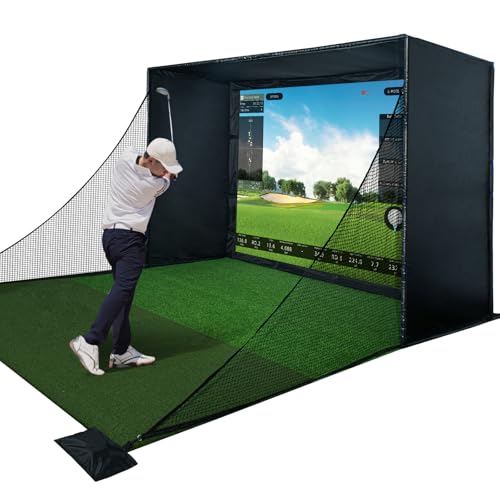
For golf enthusiasts looking to elevate their game at home, the Golf Simulator Enclosure Kit with HD Impact Screen and Safety Padding stands out as an essential investment. This complete kit includes a sturdy steel frame, blackout curtains, and a premium impact screen designed for high ball speeds. The triple-layer material absorbs shock and reduces sound, delivering crisp HD visuals. With safety padding that cuts ricochets by over 50%, you can train intensely without worry. Plus, it’s user-friendly—tool-free assembly means you can set it up in your garage or man cave without hassle, making it the perfect addition to any golfer’s setup.
Best For: Golf enthusiasts looking for a complete and safe at-home training solution to practice their game with high-quality visuals and user-friendly setup.
Pros:
- High-quality impact screen provides crisp HD visuals and absorbs shock, enhancing the golfing experience.
- Safety padding significantly reduces ricochets, ensuring a safer training environment.
- Tool-free assembly allows for easy setup in various spaces without the need for additional tools.
Cons:
- Space requirement may be significant, making it less suitable for smaller rooms or apartments.
- Initial investment cost could be high for casual golfers not committed to regular practice.
- Compatibility issues may arise with certain launch monitors or projectors not included in the kit.
Golf Simulator Enclosure Net Kit (10 X 8 Ft)

With a spacious 10 × 8 ft design, the Golf Simulator Enclosure Net Kit is perfect for golfers who crave a realistic practice environment at home. This kit features a premium triple-layer HD impact screen that absorbs ball speed and minimizes rebound, giving you clear visuals. The foam padding frame pipes and 6-ply side barrier netting enhance safety, while lightproof Oxford fabric keeps distractions at bay. Setup is a breeze with heavy-duty frame and secure connectors, making it compatible with most simulators. Sandbags provide added stability, ensuring your practice sessions are safe and enjoyable. Get ready to swing confidently!
Best For: Golfers seeking a realistic indoor practice environment with ample space and safety features.
Pros:
- High-quality triple-layer impact screen for clear visuals and reduced ball rebound.
- Spacious design allows for confident swings and comfortable movement during practice.
- Easy setup with heavy-duty frame and compatibility with most golf simulators.
Cons:
- Large footprint may require significant space in a garage or indoor area.
- Initial setup might need two people for optimal assembly due to size.
- Sandbags for stability are necessary and may add extra weight to the setup.
GoSports Golf Simulator Turf – 15 mm Elite Golf Mat for Indoor Home Setups

Designed for golf enthusiasts seeking a realistic practice experience at home, the GoSports Golf Simulator Turf features a premium 15 mm elite mat that closely mimics the look and feel of real grass. Available in widths of 10, 12, or 15 feet, this commercial-grade turf enhances your indoor setup. It dampens impact, minimizing ricochets for safer practice. Installation is a breeze with included carpet tape, allowing secure placement on various surfaces. You can hit directly off the turf or use a hitting mat to prolong its life. Customize your setup to fit your simulator enclosure perfectly, ensuring an unmatched indoor experience.
Best For: Golf enthusiasts looking for a realistic indoor practice experience with customizable setups.
Pros:
- Premium, commercial-grade turf that mimics real grass for an authentic feel.
- Dampen impact to minimize ricochets, promoting a safer practice environment.
- Easy installation with included carpet tape, adaptable to various surfaces.
Cons:
- Hitting mat sold separately, which may add to overall costs.
- Requires some setup customization to fit specific simulator enclosures.
- Limited to indoor use, which may not suit all golfers’ preferences.
Golf Simulator Enclosure 10 x 8 ft with Dual-Layer Impact Screen Kit
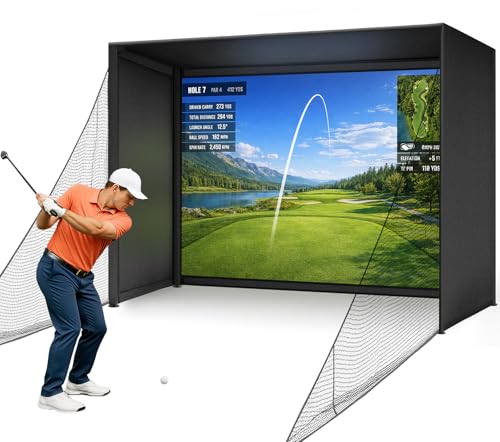
Transform any space into your personal driving range with the Golf Simulator Enclosure 10 x 8 ft featuring an upgraded dual-layer impact screen kit. This setup boasts sturdy poles and tension fabric, making it perfect for indoor use. The HD impact screen delivers sharp visuals while resisting wear from golf balls, ensuring an authentic experience. With its quick, tool-free assembly, you can easily install it in garages, basements, or dedicated rooms. Plus, thick foam edge padding and protective side netting enhance safety, minimizing ball ricochet and injury risks. It’s ideal for both beginners and pros seeking a versatile indoor golf solution.
Best For: Golfers seeking a portable indoor golf enclosure that fits in garages, basements, or dedicated simulator rooms.
Pros:
- Quick and easy assembly with a click-lock frame system, requiring no tools or screws.
- Durable HD impact screen offers sharp visuals while withstanding wear from golf ball strikes.
- Enhanced safety features, including thick foam edge padding and protective side netting, minimize injury risks.
Cons:
- Limited to indoor use, which may not suit golfers who prefer outdoor practice.
- The 10 x 8 ft size may not accommodate larger swings or players needing more space.
- Initial setup may require ample room to maneuver the enclosure before installation.
Golf Simulator Impact Screen with HD Visuals

If you’re serious about improving your golf game, the Golf Simulator Impact Screen with HD visuals is a game changer. Its triple-layer design combines an HD outer layer with an ultra sound-damping middle layer and an impact-resistant inner layer, ensuring maximum durability. Built to withstand thousands of impacts, it’s perfect for both home practice and commercial use. The sound damping technology minimizes vibrations, allowing for quiet training sessions that enhance your focus. Plus, the extensive setup kit makes installation a breeze. With smooth HD visuals, you’ll enjoy precise ball-to-screen visibility for accurate performance analysis and improvement.
Best For: Golf enthusiasts and professionals seeking a reliable and high-quality simulator screen for home practice or commercial use.
Pros:
- Durable Construction: Triple-layer design ensures longevity and can withstand thousands of ball impacts.
- Quiet Training Sessions: Sound damping technology minimizes vibrations, allowing for a focused practice environment.
- Easy Setup: Comes with a comprehensive setup kit, making installation quick and hassle-free.
Cons:
- Higher Price Point: Premium features may come at a higher cost compared to basic simulator screens.
- Requires Adequate Space: A dedicated area is needed for installation, which may not be suitable for smaller homes.
- Limited Portability: Once installed, it may be cumbersome to relocate or take down frequently.
Factors to Consider When Choosing Premium Golf Simulators
When choosing a premium golf simulator, you should consider several key factors. You’ll want to look at the accuracy of performance metrics, compatibility with launch monitors, and how easy it is to set up and move. Don’t forget to evaluate the visual quality of screens and the durability of construction materials, as these will impact your overall experience.
Accuracy of Performance Metrics
Accuracy in performance metrics is essential for golfers looking to enhance their training. You need precise measurements like ball speed, launch angle, and spin rate to understand shot outcomes effectively. Advanced launch monitors equipped with multi-camera systems capture detailed data, offering reliable insights into your performance and swing mechanics. Metrics such as face angle and path tracking play an important role in analyzing shot dispersion, enabling you to refine your swing with real-time feedback. Additionally, accurate carry distances benefit from devices that account for atmospheric conditions, providing context-sensitive data. Regular calibration and verification of these metrics guarantee you receive consistent, trustworthy data, which is critical for tracking your improvements over time.
Compatibility With Launch Monitors
Understanding the accuracy of performance metrics sets a solid foundation for selecting a premium golf simulator. You’ll want to verify it’s universally compatible with major launch monitors to guarantee seamless integration. Check that the simulator enclosure fits your launch monitor’s specific dimensions and requirements, as this is essential for ideal performance. Look for enclosures made from reinforced materials to handle high-speed impacts from real golf balls, assuring durability. A user-friendly setup process can make a significant difference, allowing for quick assembly and compatibility with various accessories. Finally, assess the availability of support and warranty options for both the simulator and launch monitor; this can give you peace of mind in case of any compatibility issues that arise.
Setup and Portability Ease
A premium golf simulator should prioritize setup and portability to enhance your practice experience. Look for models that assemble quickly, ideally under an hour, without needing special tools or technical know-how. Portability features like lightweight components and carrying cases make it easy to transport your simulator for practice sessions wherever you go. Make sure the simulator fits your space constraints, providing a spacious hitting area while requiring minimal room. Durability is also key; a sturdy frame and reinforced impact screens will withstand repeated ball strikes. Finally, consider the power source and battery life—longer durations mean you can focus on practicing without interruptions. These factors will greatly improve your indoor golfing experience.
Visual Quality of Screens
When choosing a premium golf simulator, the visual quality of the screen plays an essential role in creating an immersive experience. HD screens deliver clearer images and improved detail, making your gameplay more engaging. Look for triple-layer impact screens that not only absorb shock but also maintain clarity, ensuring accurate shot representation. The aspect ratio, whether 4:3 or 16:9, influences how well the visuals fit within the enclosure and affect your overall viewing experience. High-definition visuals are crucial for capturing precise shot data, allowing you to analyze and enhance your performance during practice sessions. Prioritize screens that combine high quality with durability to withstand repeated impacts without compromising visual integrity.
Durability and Construction Materials
Choosing a premium golf simulator means prioritizing durability and construction materials to confirm it can handle intense practice sessions. Look for a sturdy steel frame, as this enhances stability and longevity. Triple-layer impact screens are crucial; they absorb shock, dampen sound, and provide clear visuals, all while withstanding high ball speeds. Safety padding and foam coverage are essential for reducing ricochets and minimizing injury risks during play. Opt for simulators made with commercial-grade materials to guarantee they endure thousands of impacts, making them perfect for home use or professional settings. Additionally, enclosures should be designed for easy assembly and disassembly, often featuring tool-free setups for your convenience. Investing in these features will enhance your overall experience.
Cost vs. Features Offered
Investing in a premium golf simulator involves weighing the cost against the features it offers, as this balance can greatly impact your overall experience. Premium simulators can range from a few hundred to several thousand dollars, with higher-priced models providing advanced features like high-speed cameras and accurate ball tracking. These enhancements create a more immersive experience on the virtual course. You’ll also find that options with built-in touchscreen displays and interactive software are typically in the higher price range, boosting user engagement. If you’re on a budget, cost-effective models might sacrifice some advanced features but still deliver essential functionalities. Don’t forget to check warranty and customer support, as premium models usually offer better service and longer protection periods.