If you want faster, more useful swing feedback, golf swing analyzers with dual cameras can show both your motion and your results in far greater detail than basic sensors alone.
This roundup focuses on 10 options that help golfers practice with more confidence indoors or outdoors, whether you care most about video feedback, launch data, or simulator-ready performance.
Best 10 Golf Swing Analyzers with Dual Cameras Picks for 2026
Premium Dual-Sensor Bundle

- Dual Doppler radar and photometric camera
- Tracks club path, face angle, spin, and launch data
- Includes 1-year Core membership and course play
Best For: Golfers who want a portable, simulation-ready launch monitor
No-Fee Practice Analyzer
GX-03 Multi-Angle Swing Analyzer

- No subscription and lifetime app use
- 45°/90° practice views with video recording
- Tracks attack angle, launch angle, and spin rate
Best For: Golfers who want app-based swing analysis with multi-angle viewing
Home Simulator Pick
SkyTrak+ Previous Gen Simulator

- Doppler radar and improved photometric camera
- Club head speed, smash factor, club path, and face angle
- Access to 100,000+ courses and practice tools
Best For: Golfers who want a simulation-focused launch monitor with strong club data
Portable App Trainer

- No subscription with iOS, Android, and HarmonyOS support
- Environmental sensors adjust shot data automatically
- Up to 12 hours of battery life with 3D simulation views
Best For: Golfers who want a portable launch monitor with app-based analysis
Sensor-based swing feedback
Blast Motion Golf Swing & Stroke Analyzer

- Real-time feedback through the app
- Auto-clips swing and stroke video
- Air Swings mode for anytime practice
Best For: golfers who want compact swing and stroke feedback with video highlights
Portable launch monitor with video
FlightScope Mevo Gen2 Portable Golf Launch Monitor
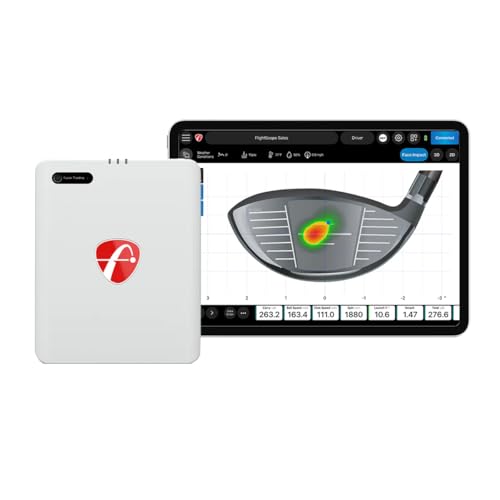
- 18 data parameters for full-swing and short game
- Built-in front camera with auto-clipping
- Supports up to three mobile devices
Best For: golfers who want portable launch-monitor data plus video analysis and coaching
Dual-sensor body-mechanics trainer
MOXI SwingMotion Golf Swing Trainer & Analyzer
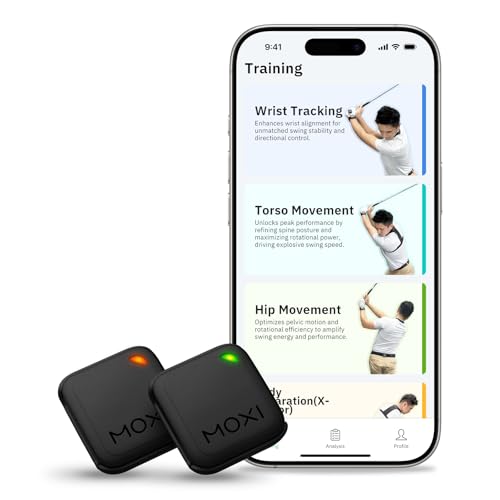
- Dual IMU sensors track wrist, torso, and hips
- 3D avatar playback with graphs
- Free lifetime app access, no subscription
Best For: golfers who want detailed body-movement analysis without subscription fees
Pro-Grade Dual-View Launch Monitor
Full Swing KIT Golf Portable Outdoor & Indoor Launch Monitor

- 5D radar system with 16 club and ball metrics
- Integrated 4K camera for swing review
- Fast portable setup with iOS/Android app support
Best For: Golfers who want tour-level radar data and built-in video review
Portable Feedback Trainer
Voice Caddie SC200Plus Swing Analyzer

- Doppler radar with real-time shot data
- Voice output plus LCD display for quick checks
- Swing speed mode works without a ball
Best For: Golfers who want simple portable practice feedback
Simple No-App Distance Tracker
BLACK T SHOT5 Golf Launch Monitor

- Five core metrics including carry and smash factor
- Large 5-inch built-in display
- No app or Bluetooth setup required
Best For: Golfers who want a quick, portable monitor with only the essentials
Premium Dual-Sensor Bundle – SkyTrak+ Dual Doppler Bundle
If you want golf swing analyzers with dual cameras that also deliver tour-style ball and club data, the SkyTrak+ bundle is built for serious practice at home or on the range. Its dual Doppler radar and photometric camera setup is designed to capture detailed shot information indoors or outdoors, while the included course-play membership adds a strong simulation angle.
Best For: Golfers who want a portable, simulation-ready launch monitor with detailed shot and club data.
Pros:
- Dual Doppler radar plus photometric camera for detailed indoor/outdoor measurement
- Tracks carry distance, ball speed, spin, launch angle, shot shape, club path, and face angle
- Includes 1-year Foresight Core membership with 35+ courses and practice modes
- Compact build with a protected bundle and 2″ x 2″ hitting zone
Cons:
- Premium bundle may be more than casual golfers need
- Focuses on launch-monitor data rather than built-in video swing recording
- Requires enough setup discipline to use the small hitting zone well
The SkyTrak+ stands out if you want a proven practice tool that blends measurement, simulation, and portability. It is a strong pick for golfers who care more about reliable shot data and course play than basic swing-only feedback.
No-Fee Practice Analyzer – GX-03 Multi-Angle Swing Analyzer
For golfers comparing golf swing analyzers with dual cameras or multi-angle feedback, the GX-03 offers a practical training setup without a subscription. It combines launch and swing metrics with fixed 45° and 90° practice views, plus video recording and shot-trajectory display, so you can review swings from more than one angle.
Best For: Golfers who want app-based swing analysis with multi-angle viewing and no annual fees.
Pros:
- No subscription required, with lifetime app use
- Multi-angle practice views at 45° and 90° plus video recording
- Tracks attack angle, launch angle, spin rate, and vertical clubface data
- Environmental sensors adjust data for temperature, humidity, and pressure
Cons:
- Indoor use requires at least 15 ft of total space
- Best Bluetooth results depend on phone placement in front of the device
- Missed shots are limited to club-speed-only readings to avoid bad data
This is a smart value choice if you want a compact analyzer with more than basic radar feedback. The GX-03 is especially appealing for golfers who want straightforward app access, helpful practice views, and no recurring fees.
Home Simulator Pick – SkyTrak+ Previous Gen Simulator
If your priority is golf swing analyzers with dual cameras for home simulation and detailed club data, this previous-generation SkyTrak+ is still a compelling option. It pairs a new Doppler radar system with an improved photometric camera and is built to support real-time simulation, practice tools, and course play from home.
Best For: Golfers who want a simulation-focused launch monitor with strong club data and course access.
Pros:
- Doppler radar plus improved photometric camera for precise measurement
- Delivers club head speed, smash factor, club path, and face angle
- Supports 100,000+ global courses through Play & Improve plans
- Includes practice tools like Wedge Matrix, Shot Optimizer, and Skill Assessment
Cons:
- Previous-generation model, not the newest SkyTrak+ bundle
- Simulation features depend on compatible play and improve plans
- Less portable than some compact swing-only trainers
This model makes the most sense for golfers building a serious simulator setup. It offers the kind of detailed launch and club feedback that helps turn practice sessions into measurable improvement.
Portable App Trainer – Pro X1 Plus Portable Analyzer
The Pro X1 Plus is aimed at golfers who want golf swing analyzers with dual cameras or at least multi-view practice feedback without a subscription barrier. It combines environmental sensing, swing metrics, and a 3D virtual driving range, making it useful for indoor simulator sessions or outdoor range work.
Best For: Golfers who want a portable launch monitor with app-based analysis, no subscription, and long battery life.
Pros:
- No subscription required and supports iOS, Android, and HarmonyOS
- Built-in sensors adjust data for temperature, humidity, and barometric pressure
- 3D simulation views at 45° and 90° with swing- and ball-flight feedback
- Up to 12 hours of battery life for longer practice sessions
Cons:
- Product notes emphasize app use rather than dedicated camera hardware
- Best for users comfortable managing setup through a smartphone
- Requires compatible device and app workflow for full functionality
The Pro X1 Plus is a practical pick if you want portable swing analysis with modern app features and flexible training modes. It is especially appealing for golfers who value battery life, data adjustment, and easy home-or-range use.
Sensor-based swing feedback – Blast Motion Golf Swing & Stroke Analyzer
If you’re comparing golf swing analyzers with dual cameras, the Blast Motion sensor is a simpler fit focused on real-time metrics and video capture rather than a full two-camera setup. It works from tee to green, offers Air Swings mode for practice anywhere, and uses the Blast app to auto-clip swing or stroke videos with metrics overlaid for easy review.
Best For: golfers who want compact swing and stroke feedback, short-game practice, and app-based video highlights.
Pros:
- Real-time feedback sent to the Blast app
- Auto-clips putting or full-swing video with metrics overlaid
- Air Swings mode lets you train without a ball
- Included starter membership for new users
Cons:
- Not a dual-camera system
- Requires setup and management through the app
- Focuses more on swing/stroke metrics than advanced launch-monitor data
Overall, Blast Motion is a practical option if you want a lightweight analyzer that combines feedback and video review in one app-driven package. It’s especially appealing for golfers who value convenience and short-game improvement over more elaborate camera-based systems.
Portable launch monitor with video – FlightScope Mevo Gen2 Portable Golf Launch Monitor
Among golf swing analyzers with dual cameras, the FlightScope Mevo Gen2 stands out for its camera-assisted video workflow and multi-cam coaching setup. It combines 3D Doppler radar data with an internal front-facing camera, automatic video clipping, data overlays, and support for up to three mobile devices, making it a strong choice for golfers who want both shot data and visual review.
Best For: golfers who want portable launch-monitor data, video overlays, and a flexible multi-device practice setup.
Pros:
- 18 swing, chipping, and putting data parameters
- Internal front-facing camera with automatic recording and clipping
- Supports up to three mobile devices for multi-cam coaching
- Includes E6 Connect courses and shot tracer features
Cons:
- Camera features depend on the FS Golf app workflow
- More complex than a basic swing sensor
- Face Impact software is an add-on, not standard
Mevo Gen2 is a strong fit if you want a portable monitor that blends detailed ball-flight data with video analysis. Its built-in camera and multi-cam support make it especially useful for structured practice sessions and coaching review.
Dual-sensor body-mechanics trainer – MOXI SwingMotion Golf Swing Trainer & Analyzer
If you’re looking for golf swing analyzers with dual cameras, the MOXI SwingMotion takes a different approach by using dual wearable IMU sensors instead. It tracks wrist, torso, and hip movement in real time, then shows your swing in a 3D avatar with graphs and playback so you can study mechanics without needing video hardware.
Best For: golfers who want detailed body-movement analysis and a no-subscription training app.
Pros:
- Two 9-axis sensors capture wrist, torso, hips, and X-Factor separation
- 3D avatar playback with detailed metrics and graphs
- Free lifetime app access with no subscription
- Four training modes for targeted practice
Cons:
- Does not use cameras for swing capture
- Requires wearing sensors and accessories during practice
- Battery life is limited to 4+ hours
MOXI SwingMotion is best viewed as a movement-analysis tool rather than a camera-based swing coach. It’s a compelling pick for golfers who want to isolate body mechanics, compare progress over time, and avoid recurring app fees.
Pro-Grade Dual-View Launch Monitor – Full Swing KIT Golf Portable Outdoor & Indoor Launch Monitor
If you want golf swing analyzers with dual cameras-style feedback plus serious ball-flight data, the Full Swing KIT is built for golfers who value both numbers and video review. Its 5D radar system delivers 16 club and ball metrics, while the integrated 4K camera helps you review your swing on connected devices for a more complete practice session indoors or outdoors.
Best For: Golfers who want tour-level radar data, a built-in swing camera, and easy portable setup for practice at the range, home, or simulator.
Pros:
- Measures 16 metrics, including carry, spin rate, attack angle, club path, and smash factor.
- Integrated 4K camera supports clear swing video review and analysis.
- No complicated calibration; compact design is quick to set up and travel-friendly.
- Syncs with iOS and Android devices and stores session history in the app.
Cons:
- Premium feature set may be more than casual golfers need.
- Video analysis depends on connected devices for playback and review.
This is a strong choice if you want one device that combines advanced shot data with swing video in a compact package. It leans heavily into precision and convenience, making it a practical option for focused improvement.
Portable Feedback Trainer – Voice Caddie SC200Plus Swing Analyzer
For golfers comparing golf swing analyzers with dual cameras, the Voice Caddie SC200Plus stands out less for video and more for fast, practical shot feedback. It uses Doppler radar to track real-time shot data, adds voice output and an LCD display, and even includes a swing speed mode for working on tempo without needing a ball.
Best For: Golfers who want a compact, easy-to-use swing analyzer for indoor or outdoor practice with quick shot feedback.
Pros:
- Doppler radar technology provides real-time shot data tracking.
- Voice output and LCD display make feedback easy to check during practice.
- Swing speed mode lets you train tempo without a ball.
- Stores shot data and club statistics for later review.
Cons:
- Does not include a camera for swing video analysis.
- Feature set is more focused on data than advanced visualization.
This model is best for golfers who care about fast, repeatable practice feedback more than video capture. If you want a simple portable trainer that helps you track performance and club distances, it fits that role well.
Simple No-App Distance Tracker – BLACK T SHOT5 Golf Launch Monitor
If you’re shopping golf swing analyzers with dual cameras-style convenience but prefer a stripped-down device, the BLACK T SHOT5 focuses on the essentials. It gives you real carry distance, ball speed, club head speed, smash factor, and total distance, all shown on a large 5-inch display with no app, Bluetooth, or setup delay.
Best For: Golfers who want a fast, portable launch monitor with only the core shot metrics and a built-in screen.
Pros:
- Shows five essential data points for practical improvement.
- Large 5-inch display makes shot data easy to read at a glance.
- Ready to use in about 3 seconds with no app or Bluetooth setup.
- Lightweight, portable design fits easily in a golf bag.
Cons:
- Does not include camera-based swing video analysis.
- Limited metric set compared with more advanced launch monitors.
This is a straightforward option for golfers who want reliable basics without extra complexity. It’s especially appealing if you value speed, portability, and a clean built-in display over advanced coaching tools.
How We Picked These Golf Swing Analyzers with Dual Cameras
We prioritized devices and bundles that offer strong video or camera-based feedback alongside launch or swing data, because that combination is what makes Golf Swing Analyzers with Dual Cameras especially useful for self-coaching. We also looked at ease of setup, portability, app support, simulator compatibility, and how well each option suits home practice versus full training setups.
Quick Comparison: What Matters Most
Not every model is built for the same golfer. Some are best for indoor simulator sessions and detailed ball-flight feedback, while others emphasize portability, simple swing tracking, or immediate metrics on the range. If you want the most complete training experience, look for a unit that combines camera-based visual feedback with consistent shot data and a usable training app.
Key Buying Factors for Golf Swing Analyzers with Dual Cameras
Camera Quality and Angle Coverage
Dual cameras are valuable when they capture both face-on and down-the-line views, or when video overlays help you connect swing changes to shot results. Better angle coverage makes it easier to spot sequencing issues, posture faults, and club path changes.
Data Depth and Accuracy
Check the metrics that matter to your game, such as club speed, ball speed, smash factor, launch angle, spin, carry distance, and impact location. More numbers are not always better, but you do want the core data to be repeatable enough for real practice decisions.
Indoor and Outdoor Use
If you practice in a garage, net bay, or simulator room, make sure the device works reliably at shorter distances and in tighter spaces. For range use, prioritize portability, battery life, and visibility in changing light conditions.
Software, Video, and Simulator Support
The best Golf Swing Analyzers with Dual Cameras make it easy to review swings, save sessions, and compare trends over time. If you plan to play simulated courses, verify course library access, compatibility, and any subscription costs before you buy.
Who Should Buy Which Golf Swing Analyzers with Dual Cameras?
Choose a camera-driven launch monitor if you want the most complete picture of your swing and ball flight. Choose a simpler portable analyzer if your main goal is tempo, speed, or quick feedback on the range. Golfers building a home practice setup should favor models with strong app ecosystems and video review tools, while players who travel often may prefer lighter devices with fast setup and dependable core metrics.
In short, the best choice depends on whether you value visual coaching, launch data, or all-in-one simulator performance. Match the device to your practice routine, and you will get much more value from every session.