If you want better ball flight, more consistent contact, and a repeatable swing, swing-plane feedback matters. The right tool can show what your eyes miss and help you practice with purpose.
Below, we break down the best options for golfers who want clearer feedback on plane, path, posture, and swing habits in 2026.
Best 10 Golf Swing Analyzers for Swing Plane Picks for 2026
Data-Rich Launch Monitor
Portable Swing Analyzer with 13 Metrics

- Zero annual fees and full app access.
- Tracks 13 metrics with environmental adjustment.
- Multi-angle views, trajectory display, and video recording.
Best For: Golfers who want detailed swing data without subscription fees.
Swing Plane Trainer
Magnetic Swing Plane Training Aid

- Instant feedback on swing path and plane.
- Alignment markers help reinforce setup and ball position.
- Magnet and bungie system keeps guides in place.
Best For: Golfers who want a simple physical trainer for plane and setup work.
App-Driven Swing Sensor
Golf Swing & Stroke Analyzer Sensor

- Real-time feedback flows into the Blast app.
- Air Swings mode supports practice without a ball.
- Video highlights include metrics overlaid for review.
Best For: Golfers who want app-based swing feedback and flexible practice.
Swing Video Mount
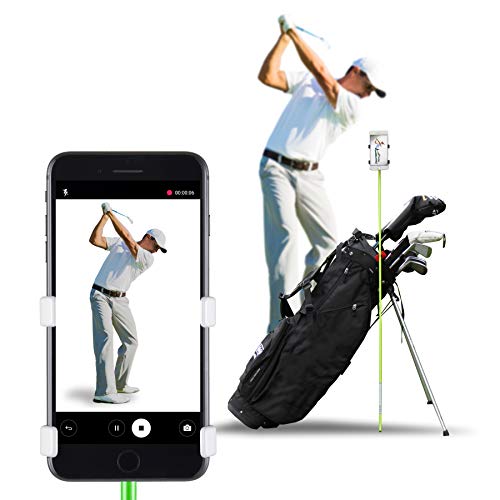
- Sets up and adjusts height in seconds.
- Stable design works with many bags and surfaces.
- Captures 1080p video on any smartphone.
Best For: Golfers who want a simple, stable phone mount for swing video.
Voice Caddie SC300i
Portable Launch Monitor Analyzer

- Tracks swing speed, ball speed, carry, and more.
- Real-time LCD and voice feedback during practice.
- App integration adds club stats and analysis.
Best For: Golfers who want portable shot data and app-based analysis for indoor or outdoor practice.
Zunate Club Swing Trainer

- Supports posture and proper arm position.
- Aims to improve swing arc, power, and accuracy.
- Portable and built from sturdy plastic.
Best For: Golfers seeking a simple, portable trainer to reinforce swing plane basics and consistent form.
Portable Feedback Monitor
Voice Caddie SC200Plus Swing Analyzer

- Doppler radar shot tracking
- LCD display with voice output
- Swing speed mode without a ball
Best For: Golfers who want portable, data-driven swing feedback for indoor or outdoor practice.
Visual Plane Trainer Kit
Swing Doctor Adjustable Alignment System

- Adjustable alignment stick holder for plane drills
- Weighted metal base for stable feedback
- Includes foam tube, tees, and carry bag
Best For: Beginners, high-handicappers, and coaches who want a simple visual swing plane training setup.
Stable Alignment Trainer
Adjustable Swing Plane Practice Aid
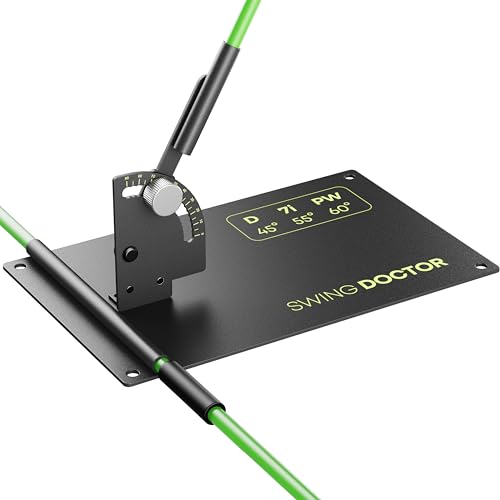
- Adjustable angles for driver, irons, and wedges
- Weighted metal base for stability
- Portable with foldable sticks and carry bag
Best For: Golfers who want a durable, beginner-friendly visual trainer for at-home or range practice.
Data-Rich Launch Monitor – Portable Swing Analyzer with 13 Metrics
If you want golf swing analyzers for swing plane that also measure ball flight, this portable launch monitor gives you a broader practice picture. It adds swing-plane-adjacent feedback like attack angle, launch angle, spin rate, and vertical clubface data, while the app overlays shot trajectory and multi-angle views for easier review.
Best For: Golfers who want a radar-based analyzer with detailed metrics, video recording, and no subscription fees.
Pros:
- Zero annual fees with full app access after a one-time download.
- Tracks 13 metrics, including attack angle, launch angle, spin rate, and vertical clubface data.
- Multi-angle practice views, shot trajectory display, and video recording help with swing review.
- Environmental sensors automatically adjust shot data for temperature, humidity, and pressure.
Cons:
- Indoor use needs at least 15 feet of total space.
- You must place the device exactly 5 feet behind the ball indoors.
- Works best when you select the correct club before each swing.
This is a strong pick if you want a more data-heavy training setup rather than a simple plane guide. It is best for golfers who can meet the space requirements and want measured feedback plus visual review in one unit.
Swing Plane Trainer – Magnetic Swing Plane Training Aid
For golfers focused on golf swing analyzers for swing plane, this magnetic trainer is built to give instant visual feedback on path and setup. The composite guides and alignment markers are designed to reinforce a repeatable swing plane, whether you practice indoors or outside.
Best For: Players who want a simple swing plane trainer for repetition, setup checks, and path feedback.
Pros:
- Composite guides provide instant feedback on swing path and plane.
- Alignment markers help build proper setup and ball position.
- Bungie and magnet system helps keep guides from flying away after missed shots.
- High-performance polycarbonate base adds a sturdy training platform.
Cons:
- It is a training aid, not a digital analyzer with shot metrics.
- Plastic and fiberglass construction may feel less premium than metal units.
- 30-day warranty is shorter than some other golf training products.
This is a straightforward option if your main goal is to groove swing path and plane through repetition. It suits golfers who value immediate physical feedback more than app-based data.
App-Driven Swing Sensor – Golf Swing & Stroke Analyzer Sensor
If you’re comparing golf swing analyzers for swing plane, this sensor is more about real-time swing feedback and performance review than a fixed plane guide. It works with the Blast app to capture metrics, overlay video highlights, and support practice anywhere through Air Swings mode.
Best For: Golfers who want app-based swing feedback, video highlights, and an easy way to practice without a ball.
Pros:
- Real-time feedback is sent automatically to the Blast app.
- Air Swings mode lets you train anywhere, anytime.
- Video capture auto-clips highlights with metrics overlaid for review.
- Membership is included for new users with one month provided.
Cons:
- Setup and membership management are handled through the app.
- Focuses more on feedback and review than on a physical plane guide.
- Best results depend on using the smartphone app for tracking and analysis.
This is a practical choice for golfers who want immediate feedback plus video-based analysis. It fits players who practice in different places and prefer a sensor-driven workflow over a stand-alone training aid.
Swing Video Mount – Clip-On Golf Swing Recorder
For golfers using golf swing analyzers for swing plane, this clip-on phone holder is a simple way to record from a stable angle and review your motion. It does not measure swing data itself, but it helps you capture repeatable video so you can study setup, alignment, and plane changes more clearly.
Best For: Golfers who want an easy phone mount for swing video capture and self-review.
Pros:
- Easy clip system sets up and adjusts height in seconds.
- Sturdy design is tested and approved by professional golfers.
- Fits standard alignment rods, golf clubs, and all golf bags.
- Compatible with all cell phone sizes through an innovative clip-on design.
Cons:
- Requires an alignment stick for full setup, and it is not included.
- Does not provide swing metrics or automatic analyzer feedback.
- Not water resistant.
This is a smart support tool if your main goal is clean swing video for later analysis. It works best as a companion to either a digital analyzer or a mirror-and-drill practice routine.
Visual Lock Head Stability Trainer – Swing Plane Focus Aid
If you want golf swing analyzers for swing plane work, this Visual Lock training aid is aimed at a very specific problem: head movement that throws off your pivot and path. The visual ring gives immediate feedback on head position, so you can work on reducing sway and reverse pivoting without guessing. It is a simple on-course or range-friendly aid for players who want a clearer feel for a repeatable swing plane.
Best For: Golfers who want a visual, setup-friendly trainer to help steady the head and reinforce a more consistent swing path.
Pros:
- Visual-Lock ring provides instant feedback on head position.
- Designed to help reduce swaying, reverse pivoting, and over-the-top motion.
- Soft foam rod is made to protect the club if contact happens.
- Portable and usable at the driving range or in the backyard.
Cons:
- Focuses on head stability rather than providing shot-data metrics.
- Works as a training aid, so it does not replace full swing analysis technology.
Overall, this is a practical plane-and-path trainer for golfers who learn best from simple visual cues. It is especially appealing if your misses are tied to excess head movement and you want a lightweight tool that is easy to bring to practice.
Voice Caddie SC300i – Portable Launch Monitor Analyzer
For golfers comparing golf swing analyzers for swing plane and overall shot tracking, the Voice Caddie SC300i stands out because it measures the numbers around each swing, not just the motion itself. It tracks swing speed, ball speed, carry, total distance, smash factor, launch angle, apex, and spin through the MySwingCaddie app. If you want practice sessions built around real-time feedback and data, this monitor is a strong fit.
Best For: Golfers who want portable launch-monitor data and app-based feedback for indoor or outdoor practice.
Pros:
- Measures key shot data including speed, carry, smash factor, launch angle, apex, and spin.
- Doppler radar technology is built for real-time shot analysis.
- LCD display and voice output deliver immediate feedback during practice.
- Works with the MySwingCaddie app for club stats and performance analysis.
Cons:
- It is a launch monitor, so it does not physically guide your swing plane like a trainer does.
- Accuracy figures vary by target mode and practice mode.
In practice, this is the most data-heavy option in the group and is best for players who want to measure results after each swing. It is less about shaping the motion and more about confirming whether the swing is producing the ball flight you want.
Zunate Club Swing Trainer – Plane Corrector Aid
If you are shopping for golf swing analyzers for swing plane practice, this Zunate plane corrector is a straightforward training aid built to improve body position and club control. The design is meant to help maintain proper arm position and posture while increasing swing arc for better power, accuracy, and distance. It is a simple option for golfers who want an inexpensive, portable way to work on form anywhere.
Best For: Golfers who want a basic swing-plane trainer to reinforce posture, arm position, and consistent contact.
Pros:
- Helps maintain proper arm position and posture.
- Designed to improve swing arc, power, accuracy, and driving distance.
- Portable for use at home, the gym, or the driving range.
- Built from sturdy plastic for repeated practice.
Cons:
- Does not provide digital swing data or shot metrics.
- Basic construction and no included accessories listed.
This is a no-frills option for golfers who want a simple plane corrector rather than a tech-heavy analyzer. It is best viewed as a form-building aid for repetition and muscle memory.
Portable Feedback Monitor – Voice Caddie SC200Plus Swing Analyzer
If you want golf swing analyzers for swing plane practice with immediate shot feedback, the Voice Caddie SC200Plus is built more like a portable launch monitor than a simple alignment aid. It uses Doppler radar technology, offers real-time feedback with voice output and an LCD display, and includes a swing speed mode that lets you work on tempo even without a ball.
Best For: Golfers who want portable, data-driven swing feedback for indoor or outdoor practice.
Pros:
- Doppler radar technology for shot data tracking
- Real-time LCD display and voice output for instant feedback
- Swing speed mode lets you practice without a ball
- Stores shot data and club statistics for review
Cons:
- Not a dedicated physical swing plane trainer
- Requires interpreting data rather than using a visual guide
- Best suited to golfers who want measurable feedback, not just alignment
The SC200Plus is a good fit if you prefer numbers and shot tracking over a simple stick-and-base trainer. It is practical for golfers who want to monitor performance while still working on swing speed, tempo, and consistency in a flexible home or range setup.
Visual Plane Trainer Kit – Swing Doctor Adjustable Alignment System
For golfers searching for golf swing analyzers for swing plane work without apps or sensors, this Swing Doctor trainer gives you a straightforward visual setup. The adjustable alignment stick holder, weighted metal base, foam tube, and included tees create a simple structure for practicing swing plane, club path, alignment, and setup with clear physical feedback.
Best For: Beginners, high-handicappers, and coaches who want a simple visual swing plane training setup.
Pros:
- Clear visual reference for swing plane, alignment, and club path
- Weighted metal base adds stability on mats, turf, grass, and simulator surfaces
- 1m EPE foam tube helps protect the club and alignment stick during drills
- Includes 10 wooden tees for extra checkpoints and practice stations
Cons:
- No app, sensor, or digital data tracking
- Requires careful setup and proper use to avoid striking the sticks
- More of a training aid than a performance analyzer
This kit is strongest when you want repeatable reps and visible feedback rather than technology-heavy analysis. It suits golfers building path awareness and improving mechanics in a home, garage, range, or indoor studio setting.
Stable Alignment Trainer – Adjustable Swing Plane Practice Aid
If your priority is swing plane practice with a simple visual aid, this golf swing plane trainer keeps the focus on alignment, club path, and repeatable setup. It uses a weighted metal base and adjustable stick angles to support driver, iron, and wedge work without adding sensors or digital complexity.
Best For: Golfers who want a durable, beginner-friendly visual trainer for at-home or range practice.
Pros:
- Adjustable for driver, irons, and wedges
- Weighted metal base stays stable on multiple surfaces
- Foldable alignment sticks and carry bag make transport easy
- Simple setup for golfers who want visual feedback only
Cons:
- No electronic measurement or swing data
- Less informative than a launch monitor for shot analysis
- Requires proper use and careful handling of the alignment sticks
This is a practical option if you want a long-term training aid that emphasizes consistency and swing path awareness. It is especially useful for golfers working on over-the-top tendencies or trying to build more inside-out mechanics.
How We Picked These Golf Swing Analyzers for Swing Plane
We focused on tools that help golfers understand and improve swing plane, not just collect data. That means prioritizing clear feedback, practical setup, training value, portability, and ease of use for home or range practice. We also considered whether each product is better for visual swing checks, shot-measurement feedback, or plane-training drills.
Quick Comparison
Some Golf Swing Analyzers for Swing Plane are built for measurement, while others are training aids that guide your motion physically. Launch monitors and swing analyzers are best if you want numbers, video, and shot feedback. Alignment-based trainers and plane correctors are better if you want to groove a better motion through repetition. If you want both, look for a setup that combines video capture with a physical training aid.
Key Buying Factors for Golf Swing Analyzers for Swing Plane
Feedback Type
Decide whether you want visual feedback, audio cues, shot data, or direct physical guidance. Video-based tools help with setup and sequencing, while sensors and monitors help quantify what happens at impact. Plane trainers are best for building muscle memory.
Portability and Practice Space
Think about where you will use it. Compact analyzers and phone-holder tools suit indoor practice and the driving range. Larger bases and stick-holder systems are better for a dedicated practice area.
Accuracy and Ease of Setup
The best tools are the ones you will actually use often. A simple, stable setup is especially important if you practice alone. If a product takes too long to align or calibrate, it can slow down training.
Compatibility with Your Goals
For players working on slices, swaying, steepness, or inconsistent contact, a plane trainer can provide immediate guidance. For golfers chasing distance, strike quality, and dispersion trends, a launch monitor or sensor-based analyzer is usually the better fit.
Who Should Buy Which Golf Swing Analyzers for Swing Plane?
If you are a beginner, start with a visual or physical trainer that makes swing plane easier to feel and repeat. Mid-handicap golfers often benefit from a mix of video feedback and alignment tools. Better players who want measurable performance gains should lean toward launch monitors and sensor-based analyzers. If you mainly practice indoors, choose compact, stable tools that work well in tight spaces.
In short, the best choice depends on whether you want to see your swing, measure your swing, or train your swing. The strongest results usually come from matching the tool to your practice style and the specific swing-plane issue you want to fix.