If you’re a left-handed golfer, finding the right simulator can make all the difference in your practice routine. These top 10 golf simulators cater specifically to your needs, offering features that enhance your performance and fit your unique swing mechanics. From advanced feedback systems to realistic course simulations, there’s something for everyone. Curious about which options stand out and how they can elevate your game? Let’s explore the best choices available.
PHIGOLF Home Golf Game Simulator with Motion Sensor & Swing Stick

The PHIGOLF Home Golf Game Simulator is an excellent choice for left-handed players seeking an interactive and immersive golfing experience. With its motion sensor and swing stick, you can enjoy over 38,000 golf courses worldwide, all from the comfort of your home. Setting it up is a breeze; just follow the user manual for app downloads and Bluetooth pairing. Plus, the lightweight USB-C sensor pairs effortlessly with your swing stick or personal club. Whether you’re playing solo or in multiplayer mode with friends, this simulator offers endless variety and authentic gameplay, perfect for honing your skills indoors or outdoors.
Best For: Left-handed players looking for an immersive and interactive golfing experience at home.
Pros:
- Wide variety of courses: Access to over 38,000 golf courses worldwide, ensuring endless gameplay options.
- Easy setup: Quick and straightforward installation process with user-friendly app instructions.
- Portable design: Lightweight and compact, making it ideal for travel and indoor play without the need for a net or ball.
Cons:
- Limited multiplayer capacity: Can only accommodate up to 4 players at a time, which may not suit larger groups.
- Dependence on technology: Requires a compatible device and Bluetooth connection for operation, which could be problematic for some users.
- Swing stick weight: The swing stick, while designed for an authentic experience, may feel heavier than a traditional golf club for some players.
Retractable Golf Swing Trainer with Grip Trainer

Designed specifically for left-handed golfers, the Retractable Golf Swing Trainer with Grip Trainer is your go-to tool for refining swing mechanics and enhancing tempo. It’s perfect for both beginners and advanced players, focusing on grip correction and posture. With its adjustable design, you’ll receive immediate feedback through a satisfying click, ensuring you’re executing your downswing correctly. This trainer builds muscle memory, improving swing power and accuracy with regular use. Plus, its compact size means you can practice anywhere—at home, in the office, or on the go. Get ready to elevate your game and enjoy consistent practice sessions!
Best For: Left-handed golfers seeking to improve their swing mechanics and consistency, suitable for all skill levels.
Pros:
- Immediate feedback with a click sound to ensure correct downswing execution.
- Compact and portable design allows for practice anywhere, anytime.
- Enhances muscle memory, swing power, and accuracy through regular use.
Cons:
- Designed specifically for left-handed players, limiting use for right-handed golfers.
- May require adjustment period for beginners to fully utilize its features.
- Limited training focus primarily on swing mechanics and grip correction, lacking broader training aspects.
Links Golf Grip Trainer for Improved Hand Positioning on Golf Club

For left-handed golfers looking to enhance their swing, the Links Golf Grip Trainer is a game-changer. This innovative attachment improves your hand positioning on any standard golf club, helping you achieve grip accuracy and consistency. With its ergonomic, molded design, it guarantees proper hand placement, making it a versatile tool for your irons, drivers, and wedges. Lightweight and durable, you can practice anywhere, anytime. Plus, it provides instant feedback, aiding in muscle memory development for better swings and straighter shots. Rated 4.1 out of 5 stars, it’s a smart addition to your golf training arsenal.
Best For: Left-handed golfers seeking to enhance their grip accuracy and improve their swing consistency.
Pros:
- Ergonomic design promotes proper hand placement for all golf club types.
- Lightweight and portable, making it easy to practice anywhere.
- Provides instant feedback to help develop muscle memory for better performance.
Cons:
- Limited to left-handed golfers, which may not cater to all players.
- May require an adjustment period for those unfamiliar with grip trainers.
- Some users may find it less effective if not used consistently.
Golf Swing Trainer Aid for Right-Handed Practice

Left-handed golfers looking to refine their swing technique will find the Golf Swing Trainer Aid to be an invaluable tool. Designed specifically for right-handed golfers, this 25.5-inch aid features a unique hand-shaped design that corrects hand and finger positions. Its quality rubber material guarantees a non-slip grip, while adjustable weight options—ranging from 0.95 lb to 2.1 lb—accommodate various training needs. Using the trainer 10-20 times daily improves swing power, flexibility, and tempo. It’s perfect for busy urban golfers, allowing practice at home regardless of outdoor conditions, helping you maintain your swing technique year-round.
Best For: Right-handed golfers looking to improve their swing technique and maintain practice at home.
Pros:
- Improves Swing Technique: Helps refine hand and finger positions, enhancing overall swing performance.
- Adjustable Weight Options: Offers flexibility for various training preferences, suitable for different skill levels.
- Convenient for Home Practice: Allows golfers to train indoors regardless of weather conditions, ensuring consistent practice.
Cons:
- Not Suitable for Left-Handed Golfers: Specifically designed for right-handed users, limiting accessibility for left-handed players.
- Requires Daily Commitment: Optimal results depend on consistent practice of 10-20 times daily, which may not fit everyone’s schedule.
- Limited Weight Range: The available weight options may not meet the needs of all golfers, particularly those seeking heavier training aids.
Golf Grip Swing Training Aid – Retractable Click Club Trainer

If you’re a left-handed golfer looking to enhance your swing mechanics, the Golf Grip Swing Training Aid – Retractable Click Club Trainer is an excellent choice. Its retractable design makes it easy to transport, fitting snugly in your golf bag. The click sound helps you gauge swing correctness while the ergonomic, non-slip grip guarantees comfort and stability. This tool improves your swing rhythm, balance, and power, while also developing muscle memory. Whether at the range or practicing indoors, it’s perfect for golfers of all skill levels. Elevate your performance and master your swing with this thorough training aid.
Best For: Left-handed golfers seeking to improve their swing mechanics and overall performance.
Pros:
- Ergonomic, non-slip grip ensures comfort and stability during practice.
- Retractable design allows for easy transport and storage in golf bags.
- Click sound mechanism provides immediate feedback on swing correctness.
Cons:
- May not be suitable for advanced golfers looking for more complex training aids.
- Limited to swing training; does not address other aspects of the game such as putting.
- Requires user commitment to practice regularly for optimal results.
Left or Right Handed Golf Grip Trainer

Finding the right grip is essential for any golfer, and the Left or Right Handed Golf Grip Trainer stands out as a perfect tool for improving your swing. This trainer corrects hand placement, helping you shift from a baseball grip to the professional interlock grip. It fits any standard size grip, making it ideal for both right-handed and left-handed players. Using it during practice sessions builds muscle memory, reinforcing correct grip techniques anytime. A proper grip is vital; perfecting it can greatly enhance your performance and lower your scores. With a 30-day warranty, it’s a valuable investment for your golf game.
Best For: Golfers of all skill levels looking to improve their grip and swing consistency, whether right-handed or left-handed.
Pros:
- Encourages proper hand placement, transitioning from a baseball grip to a professional interlock grip.
- Suitable for any standard size grip, making it versatile for various clubs.
- Helps develop muscle memory, allowing for practice anytime and anywhere.
Cons:
- Some users may find it takes time to adjust to the new grip technique.
- Limited to correcting grip only; does not address other swing mechanics.
- May not fit all non-standard grip sizes perfectly.
High-Precision Golf Hitting Mat for Indoor/Outdoor Use

For left-handed golfers seeking a versatile training tool, the High-Precision Golf Hitting Mat stands out with its 3-in-1 functionality. It features a strike-feedback pad, dual turf zones, and three adjustable rubber tees, making it perfect for all skill levels. You’ll benefit from instant strike feedback that helps analyze your swing path and impact. The realistic turf conditions allow for full swings and chipping drills. Compact at 13 × 17 inches, it fits under most simulator setups and guarantees stability on any surface. Ideal for winter training, it transforms your indoor space into a golfer’s paradise, no matter the season.
Best For: Left-handed golfers of all skill levels looking for a versatile and compact training tool for indoor and outdoor practice.
Pros:
- 3-in-1 functionality with strike-feedback pad, dual turf zones, and adjustable tees enhances training flexibility.
- Compact design (13 × 17 inches) fits conveniently under simulator setups and provides stability on various surfaces.
- Instant strike feedback aids in detailed swing analysis, helping golfers improve their technique effectively.
Cons:
- Limited size may not be suitable for those who prefer larger hitting surfaces.
- Some users may require additional space for complete practice setups with nets or simulators.
- The feedback pad may not be as effective for advanced players seeking more detailed metrics.
Golf Grip Trainer & Swing Training Aid
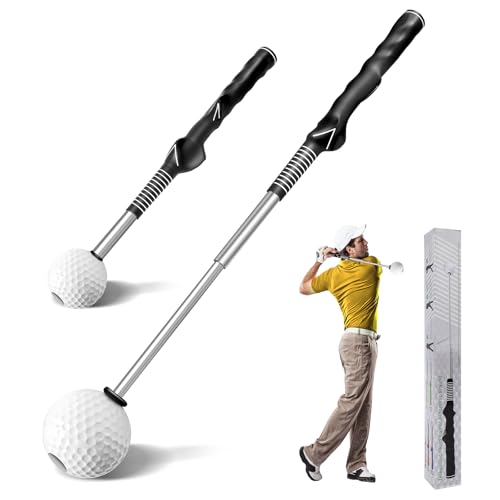
The Golf Grip Trainer & Swing Training Aid is an essential tool for left-handed players looking to refine their technique. With its ergonomic design, it guarantees correct hand placement for consistent swings and offers a non-slip grip for stability. You’ll appreciate the retractable design that provides real-time feedback with a satisfying click, enhancing rhythm and power by up to 20%. Made from durable materials, it mimics the feel of real clubs, making practice effective. Plus, its portability allows you to use it indoors or outdoors, making it a fantastic gift for any golf enthusiast aiming to improve their game.
Best For: Golf enthusiasts, both beginners and experienced players, who want to enhance their swing technique and precision.
Pros:
- Ergonomic design ensures correct hand and finger placement, promoting consistent swings.
- Real-time feedback with a click sound helps improve rhythm, balance, speed, and power.
- Portable and versatile, suitable for indoor and outdoor practice, fitting easily in golf bags.
Cons:
- May require initial adjustment for players not used to the click feedback.
- Size may be too compact for players who prefer a more traditional training aid.
- Limited to swing practice; does not address other aspects of the game like putting or chipping.
No-Residue Golf Impact Tape – High-Resolution Strike Stickers for Instant Swing Feedback
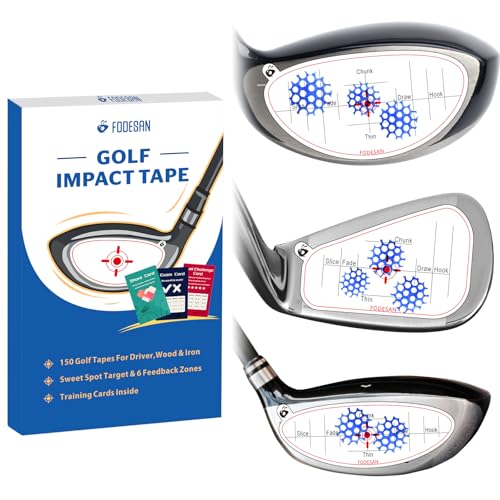
Left-handed golfers can greatly benefit from the FODESAN No-Residue Golf Impact Tape, as it offers instant feedback on swing strikes, helping to identify off-center hits. With 150 high-resolution strike stickers designed for drivers, irons, and woods, you can easily track your progress. The durable, tear-resistant design guarantees consistent performance, while the no-residue feature allows for mess-free removal. Perfect for practice at home or at the range, the included training sheets make sessions engaging and fun. Compact enough to fit in your golf bag, this tape is a must-have tool to refine your swing and enhance your game.
Best For: Left-handed golfers seeking instant feedback to improve their swing accuracy and consistency.
Pros:
- Instant feedback with clear imprints to identify off-center hits.
- Durable design ensures consistent performance during practice sessions.
- No-residue removal allows for easy application and cleanup.
Cons:
- Limited to 150 stickers, which may not last long for frequent practice.
- Requires specific hand orientation (left or right), which may restrict availability for some players.
- The paper material may not withstand extreme weather conditions during outdoor practice.
SLX MicroSim Indoor Mobile Golf Simulator

Offering versatility for left-handed golfers, the SLX MicroSim Indoor Mobile Golf Simulator stands out with its patented below-the-grip sensor placement, delivering exceptional accuracy. You’ll enjoy a full 4K experience using E6 CONNECT software, with access to interactive games like Battle Ship and Closest to the Pin. This simulator works indoors and outdoors, making it perfect for chilly days. Plus, it’s easy to set up and suitable for all ages, allowing use while seated or in a wheelchair. With continual firmware updates and real golf club compatibility, you’ll improve your game efficiently and effectively.
Best For: The SLX MicroSim Indoor Mobile Golf Simulator is best for golfers of all skill levels seeking an interactive and accurate indoor and outdoor golfing experience.
Pros:
- High accuracy due to patented below-the-grip sensor placement, making it one of the best in its price range.
- Versatile use for both indoor and outdoor settings, perfect for all weather conditions.
- User-friendly setup suitable for all ages and abilities, including options for seated play.
Cons:
- Requires a subscription for expanded content after the initial 6-month access period.
- Initial setup may take some time for complete calibration and familiarization with the software.
- Limited advanced features compared to more expensive simulators, which may not satisfy professional golfers.
Factors to Consider When Choosing Golf Simulators for Left Handed Players
When choosing a golf simulator as a left-handed player, you should consider several key factors. Look for compatibility with left-handed equipment and a user-friendly interface that makes setup a breeze. Additionally, adjustable settings and realistic swing simulation features can enhance your practice experience, while portability adds convenience for transport.
Compatibility With Left-Handed Equipment
Choosing the right golf simulator means ensuring it works well with your left-handed clubs and equipment. Not all simulators accommodate lefties, so check compatibility before you buy. Look for options that allow for customizable settings tailored to your unique swing mechanics, which can greatly enhance your training experience. Make sure the simulator’s software offers features like swing analysis and feedback specifically for left-handed players. Additionally, consider simulators that come with attachments or accessories designed to improve grip and swing accuracy for left-handers. Finally, don’t forget to read user reviews from left-handed golfers to gauge the simulator’s effectiveness and usability. This way, you can confidently choose a simulator that meets your needs.
User-Friendly Interface Design
Selecting a golf simulator that accommodates your left-handed needs goes beyond just compatibility with your equipment. A user-friendly interface is crucial, offering intuitive navigation and clear instructions tailored for you. Look for customizable settings that let you adjust club options and swing mechanics, creating a personalized experience that enhances your gameplay. Visual aids and interactive tutorials can facilitate learning, helping improve your swing technique while keeping the experience engaging. It’s also essential to have clear feedback mechanisms, like instant swing analysis and performance metrics, so you can track your progress effectively. Finally, make sure the simulator seamlessly switches between left and right-handed modes, enhancing usability and catering to diverse player preferences.
Adjustable Settings for Precision
To enhance your golf practice experience, adjustable settings in simulators are essential for left-handed players. These features allow you to customize swing mechanics, catering specifically to your unique needs. Precision calibration options guarantee you receive accurate shot feedback, improving your technique and consistency. Many simulators let you switch between left and right-handed modes, making it easy to adjust settings for your preferred grip and stance. Additionally, customizable swing paths and club selection settings help you refine your skills in a realistic environment tailored to you. Advanced simulators may even provide data analytics focusing on left-handed swings, giving you insights to identify and improve specific areas in your game. Embrace these options for a more effective practice session.
Realistic Swing Simulation Features
When looking for a golf simulator that caters to left-handed players, realistic swing simulation features are key. You should seek simulators equipped with motion sensors and swing sticks that provide accurate feedback on your swing mechanics and tempo. It’s essential that the simulator supports a variety of golf clubs, allowing you to practice with your preferred equipment. Calibration options are also important for fine-tuning accuracy, especially for putting and shot feedback. Instant feedback mechanisms, like click sounds or impact markers, help you develop muscle memory and correct grip techniques. Finally, evaluate the range of golf courses and play scenarios available, as diverse options will enhance your practice experience in various settings and conditions.
Portability for Easy Transport
Finding a golf simulator that’s easy to transport can make a big difference for left-handed players who want to practice on the go. Look for lightweight and compact models that fit easily in a suitcase or golf bag. A collapsible design enhances convenience, especially if you travel frequently or switch practice locations. Choose simulators that require minimal setup—those that don’t need nets or specific ball types allow for quick shifts between indoor and outdoor use. Additionally, consider portable accessories like swing sticks or sensors that can boost your practice experience while being easy to carry. With lightweight materials, you’ll find it easier to manage and transport your equipment without added strain.
Range of Courses Available
A wide range of courses can greatly enhance your golf simulation experience as a left-handed player. When choosing a simulator, look for options that offer access to over 38,000 courses worldwide, catering to various skill levels. It’s beneficial to have a mix of classic and modern courses, providing both familiarity and challenge. Opt for simulators featuring HD courses for a more immersive and visually appealing experience. Regular updates to the course library keep things fresh and engaging, allowing you to explore new terrains. Finally, consider compatibility with different devices and software, as this can expand your options and guarantee you have access to reputable course databases. Enjoy the variety and challenge that a diverse course selection brings!
Training Aids and Features
Exploring the right training aids and features can greatly enhance your experience with golf simulators as a left-handed player. Look for simulators that offer adjustable settings tailored to your unique swing mechanics, ensuring accurate feedback during practice. Real-time feedback tools—like click sounds or visual indicators—can help you refine your grip and swing technique effectively. Choose simulators that provide a variety of courses and training options, allowing you to practice on different terrains and conditions. Check for compatibility with left-handed specific training devices, such as swing trainers and grip aids, to maximize your training experience. Finally, consider portable, easy-to-set-up simulators so you can practice at home, in the office, or outdoors whenever you want.
Price and Value Considerations
When considering a golf simulator as a left-handed player, it’s important to weigh both price and value carefully. Prices can vary widely, from budget-friendly options to high-end systems costing thousands. Evaluate what features you need, like the number of courses, swing detection accuracy, and extras such as multiplayer support. Look for simulators that offer long-term value with software updates and new content access, minimizing ongoing costs. Also, think about the initial investment compared to the savings on driving range fees or course access. Finally, check customer reviews to verify the simulator’s price matches user satisfaction and performance, helping you make a worthwhile investment that enhances your game.