If you’re looking to improve your golf game without stepping outside, home golf simulators offer a convenient solution. With options ranging from motion sensor systems to advanced launch monitors, you can find the right fit for your needs. These devices not only simulate real courses but also provide valuable feedback on your swing. Curious about which simulators stand out in the market? Let’s explore the top choices that can transform your practice routine.
PHIGOLF Home Golf Game Simulator with Motion Sensor & Swing Stick

If you’re looking for an engaging way to improve your golf game at home, the PHIGOLF Home Golf Game Simulator is perfect for you. This innovative simulator uses a motion sensor and swing stick, giving you access to over 38,000 golf courses worldwide right from your living room. It’s lightweight and portable, fitting easily in your suitcase for travel. With no need for a net or ball, you can play indoors in minimal space. Plus, you can compete with up to four players, making it a fantastic option for friendly matches or serious practice. Elevate your game effortlessly!
Best For: Golf enthusiasts looking for a convenient and fun way to practice and play golf indoors or while traveling.
Pros:
- Access to Over 38,000 Courses: Offers a vast selection of global golf courses for varied gameplay experiences.
- Portable Design: Lightweight and compact, making it easy to take on trips without requiring additional equipment.
- Multiplayer Capability: Allows up to four players to compete, enhancing social interaction and friendly competition.
Cons:
- Requires Smartphone Compatibility: Must be paired with a smartphone or tablet for full functionality.
- Limited Realism: While it mimics the golf experience, it may not fully replicate the feel of playing on an actual course.
- Battery Dependency: The motion sensor requires charging, which could interrupt playtime if not managed properly.
Rapsodo MLM2PRO Golf Launch Monitor

The Rapsodo MLM2PRO Golf Launch Monitor is ideal for golfers seeking pro-level accuracy in their practice sessions. This advanced device measures 13 core metrics, including spin rate and swing speed, providing you with extensive data to refine your game. Pair it with your smartphone or tablet to transform any space into a golf simulator, complete with virtual courses and precise swing analysis. Whether you’re indoors or outdoors, the MLM2PRO delivers reliable data to enhance your skills. Plus, it integrates with leading golf apps, making your practice sessions feel even more realistic and enjoyable. Elevate your game today!
Best For: Golfers seeking pro-level accuracy and detailed metrics to enhance their practice sessions.
Pros:
- Provides comprehensive data on 13 core golf metrics, helping golfers refine their skills.
- Easily pairs with smartphones or tablets to create a portable golf simulator experience.
- Integrates with leading golf apps for a more realistic and enjoyable practice session.
Cons:
- May require a smartphone or tablet for full functionality, limiting use for those without these devices.
- Higher price point compared to basic launch monitors, which might not be suitable for all budgets.
- Indoor use may require adequate space and lighting for optimal performance.
Complete Golf Simulator Enclosure Package with 4K-Ready Impact Screen

For golfers who want a professional-grade practice space right at home, the Complete Golf Simulator Enclosure Package with a 4K-ready impact screen is an ideal choice. This all-in-one setup offers durability and safety while delivering stunning visuals during your practice sessions. The precision-sized screen minimizes light bleed, creating an immersive experience. Available in various sizes, it fits perfectly in garages, basements, or dedicated golf studios. Plus, you’ll appreciate the easy assembly—just under an hour without any special tools. With a 12-month warranty and responsive U.S.-based support, you’re covered for any questions that arise after your purchase.
Best For: Serious golfers and beginners looking for a professional-grade practice space at home.
Pros:
- All-in-one setup provides durability and safety for consistent practice.
- 4K-ready impact screen ensures crisp visuals and minimizes light bleed for an immersive experience.
- Easy assembly takes under an hour without the need for special tools.
Cons:
- May require sufficient space, limiting options for smaller rooms.
- Higher initial investment compared to basic simulators or practice nets.
- Limited to the specific sizes offered, which may not fit all unique setups.
GoSports Golf Simulator Enclosure Nets – Complete Set with Frame and HD Impact Screen Kit

Designed with avid golfers in mind, the GoSports Golf Simulator Enclosure Nets offer a complete solution for creating a professional indoor golf experience. Available in sizes 10 x 8 ft, 12 x 9 ft, or 14 x 8 ft, this set includes a sturdy steel frame and a reinforced HD impact screen. The enclosure’s dimensions support a 4:3 aspect ratio, maximizing your practice space. Plus, it’s compatible with all major launch monitors. You can set it up in 30 minutes or less, making it an easy addition to your home. Elevate your game without stepping outside!
Best For: Avid golfers looking to create a professional indoor golfing experience at home.
Pros:
- Universal compatibility with all major launch monitors and projectors.
- Sturdy construction with a reinforced HD impact screen designed for real golf balls and various swing speeds.
- Quick and easy setup, allowing installation in 30 minutes or less.
Cons:
- Requires adequate room size with a minimum 9 ft tall ceiling for optimal use.
- Projectors and launch monitors not included, necessitating additional purchases.
- Limited size options may not accommodate all space requirements for every user.
Golf Net with Practice Mat for Backyard Training

Looking to elevate your golf game right in your backyard? The Golf Net with Practice Mat is your ideal training partner. Measuring 10x7FT, it’s perfect for driving, chipping, and swing practice, whether indoors or outdoors. With a central bullseye and target pockets, you’ll sharpen your skills from beginner to pro. It’s built to last, featuring durable materials like 600D Oxford cloth and reinforced fiberglass. Plus, its portable design comes with a turf mat and carry bag for easy transport. Enjoy simplified assembly and 24-hour customer support, making it a great gift for any golf enthusiast. Get practicing today!
Best For: Golf enthusiasts, from beginners to experienced players, looking to practice their skills in the comfort of their own backyard.
Pros:
- Durable materials ensure long-lasting use and withstand high-intensity practice.
- Portable design allows for easy transport and setup anywhere, making it convenient for on-the-go practice.
- Includes accessories like a turf mat and golf balls, providing everything needed for a comprehensive training session.
Cons:
- Requires space for setup, which may not be suitable for smaller backyards or indoor areas.
- Assembly needed, which could be cumbersome for some users.
- Limited to specific practice types, primarily focused on driving, chipping, and swinging, which may not cater to all golfing needs.
SkyTrak ST MAX Golf Simulator Ultimate Studio Package

The SkyTrak ST MAX Golf Simulator Ultimate Studio Package stands out for golf enthusiasts seeking unparalleled accuracy in their game. With tour-level precision from dual Doppler radar and photometric cameras, you’ll see your performance improve. The package includes GOLFTEC Speed Training to boost your swing speed and distance. Its sturdy enclosure and high-impact screen guarantee durability, while the 5×5 hitting mat and embedded putting turf provide a realistic feel. Plus, the GT2000HDR Projector delivers brilliant visuals with ultra-low latency. With protective accessories and a ball tray for convenience, you’re set for uninterrupted practice without leaving home.
Best For: Golf enthusiasts looking for a high-quality simulator experience with advanced accuracy and training features.
Pros:
- Tour-level accuracy with dual Doppler radar and photometric cameras for improved performance.
- Durable design including a sturdy enclosure, high-impact screen, and comfortable hitting mat.
- Enhanced training capabilities with GOLFTEC Speed Training included for optimizing swing speed and distance.
Cons:
- High initial investment may be a barrier for casual golfers.
- Requires sufficient space for setup, including room for projector and hitting area.
- Technical setup may be challenging for users unfamiliar with golf simulators.
Golf Net with Practice Mat for Backyard Training
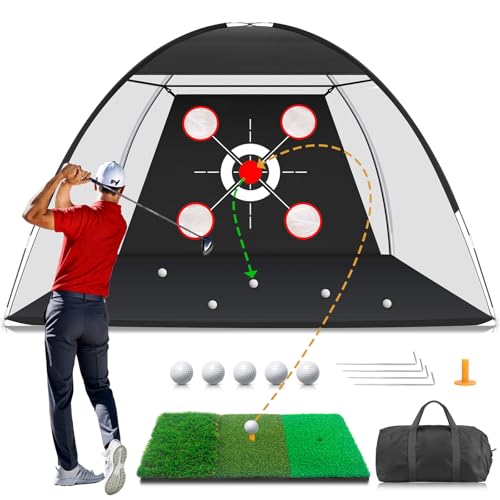
For golfers who want to refine their skills without leaving home, a golf net with a practice mat offers an ideal solution. This 10x7FT setup is perfect for backyard driving, chipping, and swinging practice. It combines a durable hitting net with a functional mat, allowing you to work on everything from long drives to precise chips. Constructed with high-quality materials, it withstands repeated hits, while the mat mimics real fairway conditions. With quick assembly and compact storage, you can easily set it up and pack it away. It’s a thoughtful gift for dads or any golfer looking to stay sharp.
Best For: Golfers looking to practice their skills in the comfort of their own backyard.
Pros:
- Durable construction ensures the net can withstand repeated hits, making it suitable for frequent use.
- Realistic practice mat mimics fairway conditions, helping golfers improve their technique effectively.
- Easy assembly and compact storage allow for convenient setup in any outdoor space.
Cons:
- Size may be limited for those looking for a larger practice area.
- May require additional space in the backyard for optimal use and safety.
- Transporting can be cumbersome due to its size, despite being compact for storage.
GoSports Golf Simulator Enclosure Nets (Complete Set with Frame and HD Impact Screen Kit)

Transform your home into a golfer’s paradise with the GoSports Golf Simulator Enclosure Nets, designed specifically for avid players seeking a realistic practice environment. Available in sizes 10 x 8 ft, 12 x 9 ft, or 14 x 8 ft, this complete set includes a sturdy steel frame and an HD impact screen kit. Its professional design features a 4:3 aspect ratio and accommodates real golf balls at all swing speeds. With simple installation instructions, you can set it up in just 30 minutes. Compatible with major launch monitors, this enclosure offers commercial-grade quality at an affordable price, making it an excellent investment for your game.
Best For: Avid golfers looking for a realistic indoor practice environment with the convenience of a home setup.
Pros:
- Durable construction with a sturdy steel frame and reinforced HD impact screen suitable for real golf balls.
- Quick installation process with detailed instructions allows for setup in 30 minutes or less.
- Universal compatibility with major launch monitors and projectors enhances versatility.
Cons:
- Requires adequate space with a recommended 9 ft tall ceiling and sufficient hitting distance.
- Not included: launch monitors and projectors, which are necessary for full functionality.
- Limited size options may not accommodate all room dimensions or personal preferences.
Garmin Approach R50 Golf Launch Monitor and Simulator

Elevate your golf game with the Garmin Approach® R50, a standout choice for both avid golfers and serious enthusiasts looking to practice at home. This premium launch monitor features a 10″ touchscreen and a 3-camera system that delivers precise metrics like ball speed and launch angle. You can play virtual rounds on over 43,000 courses with friends, plus track your stats in training mode. Immediate feedback comes from high-speed impact videos, while a built-in barometer guarantees accurate carry distances. Lightweight and portable, it connects easily to monitors or projectors for an enhanced experience. Enjoy up to four hours of battery life!
Best For: Avid golfers and serious enthusiasts looking to practice at home with advanced metrics and virtual play options.
Pros:
- High precision metrics provided by a 3-camera system for improved performance analysis.
- Access to over 43,000 virtual courses and the ability to engage in global tournaments.
- Lightweight and portable design with a built-in barometer for accurate distance measurement.
Cons:
- Requires an active Garmin Golf membership for full virtual play features.
- The tracking sticker is necessary for face to path measurement, which may be an additional expense.
- Limited battery life of up to 4 hours may necessitate frequent charging during extended practice sessions.
Garmin Approach R10 Portable Golf Launch Monitor

The Garmin Approach R10 Portable Golf Launch Monitor is a game-changer for golfers seeking to refine their skills from the comfort of home or the driving range. Its waterproof design and 10-hour battery life make it incredibly convenient. You’ll track essential metrics like club head speed, ball speed, launch angle, and direction, allowing you to analyze and enhance your shot consistency. The training mode offers a shot dispersion chart, pinpointing your strengths and weaknesses. Plus, with the Garmin Golf app, you can record swing videos and play virtual rounds on over 42,000 courses, bringing your golf game to the next level.
Best For: Golfers looking to improve their skills with a portable and versatile launch monitor that can be used at home or on the driving range.
Pros:
- Waterproof design (IPX7) ensures durability in various weather conditions.
- Tracks essential metrics like club head speed and ball speed for comprehensive performance analysis.
- Offers virtual play on over 42,000 courses, enhancing practice with a competitive edge.
Cons:
- Requires an active subscription for full access to virtual play and tournaments.
- Accuracy may vary slightly based on environmental conditions and setup.
- Initial setup and integration with the Garmin Golf app may require a learning curve for some users.
Factors to Consider When Choosing Golf Simulators for Home
When choosing a golf simulator for your home, you need to evaluate several key factors. Think about your available space, budget, and what accessories you’ll want to use with it. Also, keep in mind whether you’re looking for indoor or outdoor use and the accuracy of the measurements provided.
Space Requirements and Setup
Choosing the right golf simulator for your home hinges on understanding your space requirements and setup. First, measure your available space to guarantee you have enough room for swinging and movement; a ceiling height of at least 9 feet is typically necessary. Next, consider the dimensions of the enclosure, which can range from 10 x 8 feet to larger setups, impacting your overall space. Don’t forget the distance from the hitting area to the screen, as most simulators recommend a minimum distance for accurate shot readings. Installation varies, with some simulators easy to set up in under an hour, while others may need more effort. Finally, check if the simulator is portable for smaller or multi-use spaces.
Budget and Pricing Options
Budgeting for a golf simulator can be a game-changer in your home setup. You’ll want to start by considering the initial purchase price, which can range from a few hundred to several thousand dollars based on features and technology. Don’t forget to factor in ongoing costs, like subscription fees for software updates and access to virtual courses. Look for bundled packages that include essential components such as impact screens and launch monitors, as these can save you money. Also, think about potential maintenance costs for items like hitting mats and screens that wear out. Finally, explore financing options or payment plans offered by retailers to help manage the cost of a high-end system over time.
Compatibility With Accessories
Understanding compatibility with accessories is essential for maximizing your golf simulator’s potential. When choosing a simulator, verify it has universal compatibility with major launch monitors and projectors. This guarantees seamless integration with your existing equipment. Look for options that allow you to use your personal clubs by inserting sensors, enhancing your golfing experience. Additionally, consider simulators that support mobile app integration for extra gameplay features and real-time performance tracking. Make sure the enclosure can accommodate various screen sizes and aspect ratios for a perfect fit in your setup. Finally, evaluate the ease of assembly; systems that require no special tools are user-friendly and ideal for home use. This way, you can focus on improving your game without hassle.
Measurement Accuracy and Metrics
When it comes to golf simulators, measurement accuracy and metrics are essential for enhancing your practice sessions. You’ll want a simulator that tracks core metrics like ball speed, launch angle, spin rate, and swing speed—ideally up to 13 different data points. Consistency is key; look for accuracy within ±1 degree for launch angle and ±3 mph for club speed. This precision guarantees you can effectively analyze your performance and identify areas needing improvement. Advanced simulators with dual Doppler radar and photometric cameras offer enhanced measurement capabilities, capturing detailed ball flight characteristics. Real-time data feedback is a game-changer, allowing you to make immediate adjustments and refine your technique as you practice. Choose wisely to elevate your game!
Indoor vs. Outdoor Use
Choosing between indoor and outdoor golf simulators depends on your available space and personal preferences. Indoor simulators are great for year-round practice, fitting easily into basements or garages, regardless of weather. They often include features like impact screens and enclosures, making them safe and efficient for hitting balls. On the other hand, outdoor simulators offer a more authentic feel, allowing you to practice in natural light and open spaces, which can enhance your overall experience. While indoor setups typically focus on advanced technology for metrics and analysis, outdoor simulators emphasize the physical aspects of hitting real golf balls. Consider your space and what type of experience you value most when making your decision.
Portability and Storage Needs
Portability and storage are essential factors to take into account when selecting a golf simulator for your home. Look for lightweight sensors or compact designs that fit easily into a suitcase, making travel hassle-free. Choose simulators that require minimal setup space, allowing for indoor play without bulky nets or large balls, which saves valuable room. Assess how easy it is to transport your simulator; some come with carrying cases or can be quickly disassembled for convenient storage. Evaluate the overall dimensions to guarantee it fits comfortably in your practice area without overwhelming the space. Don’t forget to take into account included accessories, like carrying bags or modular components, that enhance portability and simplify storage after use.
Course Variety and Features
Having access to a diverse selection of golf courses can greatly enhance your home simulator experience. Look for simulators that offer over 38,000 courses worldwide, providing varied gameplay that keeps things fresh. You’ll want a mix of classic and HD courses to suit your skill level and preferences. Multiplayer features are also important; they let you challenge friends or family on different courses, making practice more enjoyable. Additionally, check if the simulator provides real-time data and analytics on your performance, helping you improve as you play. Finally, consider simulators that allow you to switch between indoor and outdoor courses, maximizing usability and enhancing your overall experience. Choose wisely, and elevate your game without leaving home!