Golf launch monitors with built in camera technology can give you more than raw numbers: they help you see the swing, verify impact, and practice with more confidence.
In this roundup, we focused on models that balance accuracy, usability, and simulator features so you can choose the right setup for home, the range, or serious training.
Best 10 Golf Launch Monitors with Built in Camera Picks for 2026
Premium Sim Setup

- 3-camera system with impact video review
- 10-inch touchscreen with simulator controls
- Over 15 metrics plus 43,000+ courses
Best For: Premium indoor golfers who want camera-based feedback and simulator play
Indoor Accuracy Pick
Bushnell Launch Pro i Circle B
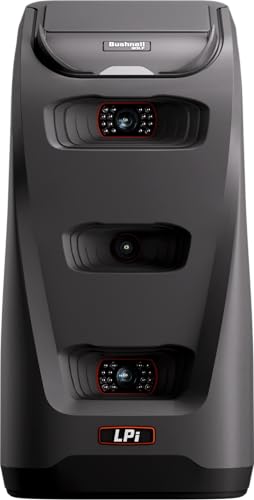
- Three-camera infrared measurement system
- Indoor simulator-focused design
- Carry, launch, spin, and club speed data
Best For: Indoor players who want camera-based precision and upgradeable software
Range-and-Sim Hybrid

- 3-camera system with impact footage
- Works indoors or on the driving range
- 10-inch touchscreen with virtual rounds
Best For: Golfers who want one portable camera-based monitor for home and range
Portable Video Trainer
FlightScope Mevo Gen2 Ultimate Bundle

- Internal camera with multi-cam video support
- 18 data parameters for full-swing and short game
- Includes E6 Connect and GPS overview
Best For: Golfers who want a portable monitor with video coaching and simulation
Premium Practice System

- Dual Doppler radar plus photometric cameras
- Built-in GOLFTEC Speed Training drills
- SkyTrak practice modes and software tools
Best For: Golfers who want a data-rich monitor with guided training
Portable Swing Analyzer

- Tracks 12+ metrics through the Garmin Golf app
- Automatically recorded video clips for swing review
- Portable design for home, indoor, or range use
Best For: Golfers who want compact app-based feedback and video review
Tour-Trusted Camera Monitor

- 5D radar technology with 16 metrics
- Integrated 4K camera for swing review
- Fast setup with OLED display and app syncing
Best For: Serious golfers who want pro-level data and built-in swing video
Portable Radar + Built-In Camera Simulator
FlightScope Mevo Gen2 with Pro Package
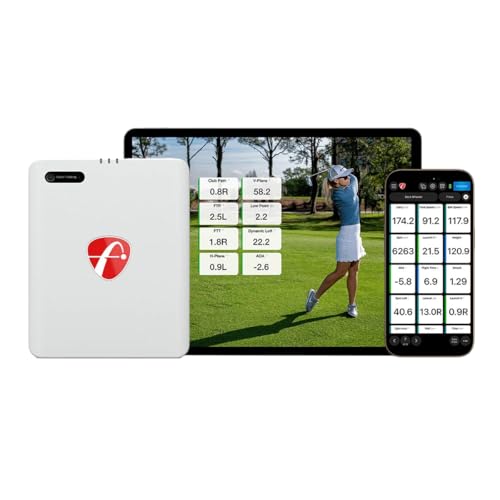
- Built-in front-facing camera with multi-cam support
- 18 swing data parameters plus Pro Package metrics
- Includes 8 E6 Connect courses and Shot Tracer
Best For: Golfers who want portable radar tracking with video recording and simulator play
App-Based Trajectory Tracker
Portable Golf Launch Monitor for iOS/Android

- Built-in environment sensors adjust shot data
- 3D simulation view with 45° and 90° options
- No subscription and supports iOS, Android, HarmonyOS
Best For: Golfers who want app-based practice data and simulator views with environmental adjustments
Dual Camera Smart Simulator
Rapsodo MLM2Pro with 15 Metrics

- Dual camera setup for swing and shot feedback
- Measures 15 metrics including spin and speed
- Includes tripod, case, and three Chrome Tour balls
Best For: Golfers who want dual-camera feedback with portable simulator compatibility
Premium Sim Setup – Garmin Approach R50 Bundle
If you want golf launch monitors with built in camera support and a true simulator-first design, the Garmin Approach R50 stands out. It combines a 3-camera system, a 10-inch color touchscreen, and built-in impact video review so you can check your numbers and your strike right on the unit.
Best For: Golfers building a premium indoor setup who want camera-based data, on-device video review, and full simulator play.
Pros:
- 3-camera system for precision swing metrics and impact videos
- 10-inch built-in color touchscreen for viewing insights and virtual rounds
- Tracks over 15 metrics, including ball speed, launch angle, and spin data
- Supports Home Tee Hero virtual rounds on more than 43,000 courses
Cons:
- Home Tee Hero and some features require an active Garmin Golf membership
- Face-to-path tracking needs the included tracking sticker
- Battery life is listed at up to 4 hours
The R50 is a strong fit if you want a launch monitor that doubles as a simulator hub. Its built-in cameras and touchscreen make it especially useful for golfers who want immediate feedback without piecing together a more complex setup.
Indoor Accuracy Pick – Bushnell Launch Pro i Circle B
Among golf launch monitors with built in camera tech, the Bushnell Launch Pro i is geared toward golfers who care most about measurement accuracy indoors. Its proprietary three-camera infrared system is designed to capture impact performance directly, rather than leaning on radar estimates.
Best For: Indoor simulator golfers who want camera-based precision and an affordable path into higher-end launch monitor data.
Pros:
- Three-camera imaging system with infrared for tour-level accuracy
- Designed specifically for indoor simulator use
- Provides carry distance, launch, spin, and club head speed data
- Includes USB-C, Ethernet, alignment stick, power cord, and club markers
Cons:
- Ball and club data require an active software subscription
- Expanded gameplay depends on optional FSX Silver or Gold packages
- Primarily positioned for indoor use
If your priority is getting dependable indoor numbers from a camera-based unit, the Launch Pro i is a practical choice. It offers a solid starter package and leaves room to expand through software as your simulator setup grows.
Range-and-Sim Hybrid – Garmin Approach R50
The Garmin Approach R50 is built for golfers who want golf launch monitors with built in camera features that work both at home and on the range. Its 3-camera system, 10-inch touchscreen, and immediate impact video review make it easy to understand each swing without extra equipment.
Best For: Golfers who want one camera-based launch monitor for indoor practice, range sessions, and simulator use.
Pros:
- 3-camera system for precision metrics and high-speed impact footage
- Works indoors or on the driving range
- 10-inch touchscreen with virtual round and insight access
- Includes barometer, carrying case, and up to 4 hours of battery life
Cons:
- Home Tee Hero and weekly tournaments require a Garmin Golf membership
- Face-to-path tracking needs the included sticker
- HDMI viewing requires connection to a monitor or projector
This model is a good fit if you want a flexible setup instead of a dedicated indoor-only unit. It blends camera-based feedback with portability, so you can keep the same monitor in your home studio and your practice sessions outdoors.
Portable Video Trainer – FlightScope Mevo Gen2 Ultimate Bundle
If you want golf launch monitors with built in camera support in a lighter, more portable package, the FlightScope Mevo Gen2 is worth a look. It pairs its internal camera with FS Golf multi-cam video recording, so you can capture swing footage and overlay data while practicing indoors or outdoors.
Best For: Golfers who want a portable monitor with video capture, shot tracing, and strong practice tools.
Pros:
- Internal camera plus FS Golf multi-cam support for swing video review
- 18 full-swing, chipping, and putting data parameters
- Includes E6 Connect with 8 simulation courses and GPS overview
- Lightweight design with up to 6 hours of battery life
Cons:
- Uses radar tracking rather than a dedicated multi-camera optical system
- Some advanced data requires the Pro Package software
- Video coaching features rely on connected mobile devices
The Mevo Gen2 is a strong choice for golfers who value portability and swing video as much as launch data. It is especially appealing if you want a compact practice tool that still includes simulator content and video overlays.
Premium Practice System – SKYTRAK ST MAX Launch Monitor
If you want golf launch monitors with built in camera features and a more structured practice experience, the SKYTRAK ST MAX stands out with dual Doppler radar plus photometric cameras. It’s built around accurate ball and club data, but it also adds GOLFTEC Speed Training and SkyTrak’s practice tools so your sessions feel more guided and actionable.
Best For: Golfers who want a data-rich launch monitor with camera-based measurement and built-in speed training.
Pros:
- Dual Doppler radar and photometric cameras for detailed ball and club data
- Built-in GOLFTEC Speed Training with guided drills and personalized swing insights
- Access to Skills Assessments, Bag Mapping, Wedge Matrix, and Randomized Practice modes
- Modular internal architecture and dual USB-C ports for stable use and easy connectivity
Cons:
- More of an investment-focused practice system than a simple basic monitor
- Designed for serious practice, so casual users may not use every training feature
The ST MAX is a strong fit if you want a launch monitor that combines camera-based measurement with a true improvement system. It’s especially appealing for golfers who value guided training and a complete practice workflow.
Portable Swing Analyzer – Garmin Approach R10
The Garmin Approach R10 is a portable option for golfers looking at golf launch monitors with built in camera-style swing capture through automatically recorded video clips. It’s designed for home, indoor, and range use, while pairing with the Garmin Golf app to show key metrics, shot dispersion, and swing video you can review after each session.
Best For: Golfers who want a compact launch monitor with app-based video clips and practice feedback.
Pros:
- Tracks 12+ metrics including club head speed, ball speed, swing tempo, spin, and launch angle
- Automatically recorded video clips help you see and analyze your swing
- Works indoors, at home, or on the driving range with a portable design
- Up to 10 hours of battery life for longer practice sessions
Cons:
- Requires a compatible smartphone and Garmin Golf app for full use
- Video clip and training features depend on app pairing and subscription access for virtual rounds
The R10 is a practical pick if you want portability and app-connected feedback in a compact monitor. It gives you enough data and video review tools to make range sessions more productive without a bulky setup.
Tour-Trusted Camera Monitor – Full Swing KIT Launch Monitor
Among golf launch monitors with built in camera features, the Full Swing KIT stands out for pairing 5D radar technology with an integrated 4K camera. It’s built for golfers who want detailed club and ball metrics plus clear swing video in a compact unit that works indoors or outdoors.
Best For: Serious golfers who want pro-level data, built-in swing video, and fast setup.
Pros:
- 5D radar technology captures 16 club and ball metrics
- Integrated 4K camera with 1080p output for swing review and playback
- Full-color customizable display shows key data on the unit
- Fast setup with no alignment sticks or stickers required
Cons:
- Premium feature set is geared toward committed golfers and instructors
- Full app and video workflow may be more than casual users need
The Full Swing KIT is a strong choice if you want a portable monitor that combines camera review with a deep metrics package. Its quick setup and integrated display make it especially useful for focused practice sessions and teaching environments.
Portable Radar + Built-In Camera Simulator – FlightScope Mevo Gen2 with Pro Package
If you want golf launch monitors with built in camera support for both practice and replay, the FlightScope Mevo Gen2 stands out as a portable option that combines radar tracking with internal video capture. It uses FlightScope Fusion Tracking technology, includes 18 swing data parameters with the Pro Package, and adds FS Golf software tools like video overlays, shot tracing, and multi-cam support for a more complete practice session indoors or outdoors.
Best For: Golfers who want a portable launch monitor with built-in video recording, simulator play, and deeper swing data.
Pros:
- Built-in front-facing camera and multi-cam support for recording swings
- 18 data parameters, plus Pro Package additions like club path and face angle
- E6 Connect bundle includes 8 simulation courses with GPS overview and Shot Tracer
- Portable design with up to 6 hours of battery life
Cons:
- Some advanced data requires the Pro Package software add-on
- Best suited to users who will also use the FS Golf app and video tools
This is a strong choice if you want a launch monitor that does more than measure shots. The combination of radar data, built-in camera recording, and simulator content makes it a flexible practice tool for range sessions and home setups.
App-Based Trajectory Tracker – Portable Golf Launch Monitor for iOS/Android
For golfers comparing golf launch monitors with built in camera features, this mobile unit focuses more on smartphone-based video and 3D feedback than on a dedicated internal camera. It pairs with iOS or Android to turn a practice space into a simulator, while built-in environmental sensors adjust data for temperature, humidity, and barometric pressure so your numbers reflect real conditions.
Best For: Golfers who want a portable, app-driven launch monitor for indoor or outdoor practice with environmental adjustments.
Pros:
- Built-in temperature, humidity, and barometric pressure sensors
- 3D driving range view with 45° and 90° viewing options
- Tracks swing speed, launch angle, spin rate, and spin axis
- No subscription required and supports major mobile platforms
Cons:
- Uses smartphone recording rather than a dedicated built-in camera system
- Less focused on hardware video features than camera-first competitors
This is a practical pick if you value flexible simulator use and environmental compensation over an integrated camera setup. It is built for golfers who want straightforward app-based training data at home or on the range.
Dual Camera Smart Simulator – Rapsodo MLM2Pro with 15 Metrics
The Rapsodo MLM2Pro is one of the most compelling golf launch monitors with built in camera-style training feedback thanks to its dual-camera setup. Designed for home and range use, it combines shot tracking, simulator support, and 15 metrics so golfers can review swings and ball flight with more detail while practicing indoors or outdoors.
Best For: Golfers who want a dual-camera launch monitor with simulator compatibility and strong all-around metrics.
Pros:
- Dual camera system for more complete swing and shot feedback
- 15 metrics including spin rate, spin axis, and swing speed
- Works as a mobile simulator with compatible golf apps
- Includes three Chrome Tour balls, tripod, case, and charging cable
Cons:
- Relies on a phone or tablet for the full simulator experience
- Camera-focused features may be more than casual users need
If you want a feature-rich training aid that blends camera feedback with launch data, this model is easy to recommend. It has enough metric depth for serious practice while still being portable for the range or home setup.
How We Picked These Golf Launch Monitors with Built in Camera
We prioritized devices that combine camera-based swing capture with meaningful ball and club data, reliable indoor performance, and practical app or simulator support. We also weighed setup simplicity, portability, battery life, and whether the unit makes sense for golfers who want both practice feedback and entertainment value.
Quick Comparison
Some golfers need a premium all-in-one simulator with a large display and multiple cameras, while others want a portable monitor they can take to the range. The best camera-equipped units usually fall into three groups: premium indoor simulators, midrange launch monitors with strong shot-tracking apps, and portable options that emphasize convenience over deep hardware integration.
Key Buying Factors for Golf Launch Monitors with Built in Camera
Accuracy and Data Depth
Look for metrics that match your practice goals. Ball speed, launch angle, carry distance, spin, club path, and face angle are especially useful if you are working on real improvement. More data is not always better unless it is consistent and easy to understand.
Camera Quality and Use
The camera should do more than record a clip. On the best Golf Launch Monitors with Built in Camera, it helps confirm impact position, improve swing sequencing, and support simulator play. Higher-resolution video and better frame capture make feedback more actionable.
Indoor Vs. Outdoor Use
If you plan to practice in a garage or simulator bay, check space requirements, lighting needs, and whether the unit performs well without perfect conditions. If you will also use it on the driving range, portability and battery life matter more.
Software and Simulator Compatibility
App quality can make or break the experience. Look for clear shot history, easy club gapping, and compatibility with the simulator software you actually plan to use. Subscription costs can also change the long-term value.
Who Should Buy Which Golf Launch Monitors with Built in Camera?
Choose a premium all-in-one model if you want the simplest path to a full simulator setup with advanced visual feedback. Pick a portable camera-based launch monitor if you need something easy to move between home and the range. Budget-conscious golfers should focus on the core data they will use most, while serious players and coaches should lean toward systems with stronger club and swing analysis.
If you are upgrading from a basic monitor, a camera-equipped model is often the most noticeable step forward because it turns numbers into visual feedback you can actually use.