If you’re serious about improving your golf game, having the right launch monitor can make all the difference. These devices provide critical metrics that help analyze your swing and performance. With seamless app integration, you can access real-time feedback and track your progress easily. Curious about which models stand out and how they can elevate your game? Let’s explore the top options available today.
TheStack™ Radar Golf Launch Monitor
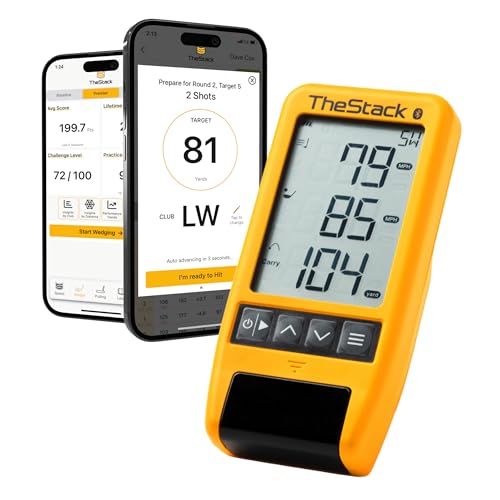
If you’re looking to elevate your golf game, TheStack™ Radar Golf Launch Monitor is an excellent choice for both serious golfers and casual players alike. This portable device measures swing speed, ball speed, estimated carry distance, and smash factor, making it perfect for speed training. It seamlessly connects to TheStack App via Bluetooth, supporting both iOS and Android devices. You’ll enjoy access to the gamified Stack Wedging app and a month-long free trial, helping you refine your wedge performance. Trusted by pros like Matt Fitzpatrick, TheStack Radar enhances your practice sessions and overall golfing experience.
Best For: TheStack™ Radar Golf Launch Monitor is best for golfers of all skill levels looking to improve their swing speed and wedge performance through advanced data analysis.
Pros:
- Portable and easy to use, making it convenient for practice on the course or at home.
- Supports both iOS and Android devices through TheStack App, allowing for flexibility in device choice.
- Trusted by professional golfers, providing credibility and assurance of quality in training enhancement.
Cons:
- Limited features on Android devices compared to iOS, particularly for some training apps.
- Requires an active Bluetooth connection, which may lead to connection issues in certain environments.
- The full potential of the app’s features may be underutilized by casual players who do not engage in regular practice.
Garmin Approach R10 Portable Golf Launch Monitor

The Garmin Approach R10 Portable Golf Launch Monitor stands out as an ideal choice for golf enthusiasts seeking a versatile training tool that can be used at home, indoors, or on the driving range. With its waterproof design and impressive 10-hour battery life, you’ll enjoy uninterrupted practice sessions. This device tracks essential metrics like club head speed, ball speed, launch angle, and direction to help you refine your game. Its training mode provides detailed stats and shot dispersion charts, while the Garmin Golf app records swing videos for easy analysis. Plus, you can play virtual rounds on over 42,000 courses worldwide!
Best For: Golf enthusiasts looking for a portable and versatile training tool to enhance their skills both at home and on the driving range.
Pros:
- Waterproof design (IPX7) ensures durability in various conditions.
- Tracks essential metrics (club head speed, ball speed, launch angle, launch direction) for effective performance analysis.
- Offers virtual play on over 42,000 courses and tournaments for an engaging practice experience.
Cons:
- Requires an active subscription for access to virtual play and additional features.
- Accuracy may vary based on environmental conditions and setup.
- May require a learning curve to fully utilize all features and metrics effectively.
Rapsodo MLM2PRO Golf Launch Monitor

For golfers seeking professional-level insights into their game, the Rapsodo MLM2PRO Golf Launch Monitor stands out with its ability to deliver 13 core metrics, including spin rate and swing speed. This advanced device pairs seamlessly with your smartphone or tablet, turning any setting into a golf simulator. You’ll appreciate the real-time data on ball speed, club speed, and launch angle, helping you refine your skills effectively. Whether you’re practicing indoors or outdoors, the MLM2PRO provides reliable data. Plus, its integration with popular golf apps enhances your practice sessions, making it an invaluable tool for elevating your game.
Best For: Golfers looking for pro-level insights and real-time data to enhance their training and improve their game.
Pros:
- Comprehensive Metrics: Measures 13 core golf metrics, providing in-depth analysis for skill improvement.
- Versatile Use: Suitable for both indoor and outdoor practice, allowing flexibility in training environments.
- App Integration: Seamlessly connects with popular golf apps for an enhanced and realistic simulator experience.
Cons:
- Device Dependency: Requires a smartphone or tablet for full functionality, which may be a drawback for some users.
- Price Point: May be considered expensive compared to basic launch monitors, limiting accessibility for casual golfers.
- Calibration Needs: May require calibration and adjustments for optimal accuracy, which can be time-consuming.
SC4 PRO Golf Launch Monitor & 3D Driving Range Simulator

Looking for a golf launch monitor that combines pro-grade accuracy with user-friendly features? The SC4 PRO Golf Launch Monitor & 3D Driving Range Simulator delivers just that, whether you’re indoors or outdoors. With its Prometrics Engine, you’ll enjoy precise tracking from swing to impact, ensuring unmatched real-time accuracy. The system includes access to a 3D Driving Range and E6 Connect home golf simulator, all without any fees. Plus, connect to the VOICECADDIE S app for advanced statistical analysis and swing speed radar. With multiple training modes and an easy setup, it’s perfect for golfers of all skill levels.
Best For: Golfers of all skill levels seeking a portable and accurate launch monitor for both indoor and outdoor practice.
Pros:
- Pro-grade accuracy with the Prometrics Engine for precise ball and club head data.
- Includes access to a 3D Driving Range and E6 Connect home golf simulator without any fees.
- User-friendly interface and simple setup, making it accessible for everyone.
Cons:
- May not have as many advanced features as some higher-end models.
- Requires a compatible device for full functionality with the VOICECADDIE S app.
- Performance may vary in extreme weather conditions when used outdoors.
Golf Launch Monitor & Simulator for iOS/Android Phones

Portable and powerful, the Golf Launch Monitor & Simulator for iOS/Android phones is perfect for golfers seeking to enhance their skills anywhere. This portable swing analyzer adapts to indoor and outdoor conditions with advanced sensors that account for temperature, humidity, and barometric pressure. You’ll gain insights into your performance with expanded metrics like Attack Angle and Launch Angle, including visuals of clubface impact. The 3D simulator offers a realistic driving range experience, while personalized training modes help track your progress. With an easy-to-use app that requires no subscription, you’ll enjoy real-time feedback in multiple languages, making practice engaging and effective.
Best For: Golfers looking to improve their game through advanced swing analysis and real-time feedback, whether practicing indoors or outdoors.
Pros:
- Offers a comprehensive set of swing metrics, including Attack Angle and Launch Angle, for detailed performance insights.
- Provides an immersive 3D simulation experience with multiple viewing angles to enhance practice sessions.
- User-friendly app requires no subscription and supports multiple languages, making it accessible and engaging.
Cons:
- May require a learning curve for users unfamiliar with swing analysis technology.
- Performance can be affected by extreme environmental conditions despite advanced sensors.
- Limited compatibility with certain phone models or operating systems may restrict usability for some users.
Garmin Approach R50 Golf Launch Monitor and Simulator

The Garmin Approach R50 Golf Launch Monitor and Simulator stands out with its impressive 10″ built-in color touchscreen, making it an ideal choice for golfers seeking precise metrics and real-time feedback. Utilizing a 3-camera system, it delivers advanced measurements like ball speed, launch angle, and spin rate, enhancing your practice sessions. You can play virtual rounds on over 43,000 courses with friends through Home Tee Hero, provided you have an active Garmin Golf membership. Plus, view high-speed impact videos for immediate feedback, and easily transport the device in the included carrying case for on-the-go training.
Best For: Golfers looking for a comprehensive launch monitor and simulator that offers precise metrics, virtual play, and real-time feedback.
Pros:
- Advanced Metrics: Provides detailed measurements such as ball speed, launch angle, and spin rate for improved performance.
- Virtual Play Options: Access to over 43,000 courses and the ability to engage in tournaments with friends enhances the golfing experience.
- Portable and User-Friendly: Features a built-in touchscreen and includes a carrying case for easy transport, along with a 4-hour battery life.
Cons:
- Membership Requirement: Requires an active Garmin Golf membership for access to virtual courses and features.
- Price Point: As a premium device, it may be more expensive compared to basic launch monitors.
- Tracking Sticker Needed: Accurate face-to-path measurements require the use of a tracking sticker, which may be an added hassle for users.
EYE MINI CORE Golf Launch Monitor & Simulator

With real-time tracking and 15 ball data points, the EYE MINI CORE Golf Launch Monitor & Simulator stands out as an ideal choice for golfers who crave instant feedback and detailed swing analysis. Its Dimple Optix technology captures any ball’s dimple pattern without stickers, while Club Optix provides visuals of your club at impact. You’ll enjoy immersive gameplay with the VIEW software, featuring a month-long trial of the Ultimate Package, complete with 4K courses and competitive modes. Plus, setup is a breeze, allowing you to practice or play full courses right from home. Discover even more insights with Swing Optix.
Best For: Golfers seeking real-time feedback and detailed swing analysis in a home simulation environment.
Pros:
- Real-time tracking with 15 ball data points for instant feedback on performance.
- Easy setup allows users to play full courses, mini-games, and practice modes at home.
- Compatible with third-party software for enhanced gameplay experience.
Cons:
- Requires a high-performance computer setup to run VIEW software effectively.
- Additional costs for software upgrades and accessories like Swing Optix.
- Limited to users with access to specific hardware and internet requirements.
Bushnell Golf Launch Pro – Circle B Edition

Designed for serious golfers and enthusiasts alike, the Bushnell Golf Launch Pro – Circle B Edition stands out with its advanced three-camera imaging system that guarantees Tour-level accuracy. This innovative technology eliminates the guesswork of radar-based monitors, giving you precise ball and club data like carry distance, launch, spin, and club head speed. You can practice with unmatched precision indoors or outdoors, whether at the range, on the course, or in your garage. Plus, with LINK-enabled club recommendations from Foresight Sports, you’ll enhance your shot decision-making. The package comes complete with everything you need to get started right away.
Best For: Serious golfers and enthusiasts looking for Tour-level accuracy in their practice sessions.
Pros:
- Provides precise measurement of ball and club data, enhancing performance.
- Versatile usage for practice in various environments, both indoors and outdoors.
- Includes LINK-enabled club recommendations for improved shot decision-making.
Cons:
- The rangefinder is sold separately, which may increase overall costs.
- Initial setup may require some technical knowledge or assistance.
- The advanced features might be overwhelming for casual golfers.
Rapsodo Mobile Launch Monitor for Golf (iPhone & iPad Only)

For golfers seeking a portable and user-friendly solution, the Rapsodo Mobile Launch Monitor stands out as an essential tool, compatible exclusively with iPhone and iPad. This device offers tour-level accuracy for shot distance, ball speed, club speed, and launch angle, all while utilizing GPS satellite view for precise shot tracking. You can transform any space into a golf simulator with real-time swing analysis and interactive games. Plus, its swing analyzer records your shots, providing video playback and active shot tracers to help refine your technique. Whether you’re a beginner or a pro, this monitor delivers instant feedback for effective training.
Best For: Golfers of all skill levels seeking a portable and user-friendly solution for swing analysis and training.
Pros:
- Offers tour-level accuracy for shot distance, ball speed, club speed, and launch angle.
- Transforms any space into a golf simulator with interactive games and real-time analysis.
- Portable design pairs easily with iPhone and iPad, providing instant feedback and training tools.
Cons:
- Compatibility is limited to iPhone and iPad users only.
- May require a learning curve for beginners to utilize all features effectively.
- Performance may vary based on environmental conditions and lighting.
Garmin Approach R10 Portable Golf Launch Monitor (Renewed)
If you’re looking to elevate your game, the Garmin Approach R10 Portable Golf Launch Monitor (Renewed) is an excellent choice for golfers of all skill levels. This compact device tracks essential metrics like club head speed, ball speed, and launch angle, giving you insights into your performance. With up to 10 hours of battery life and an IPX7 waterproof rating, it’s perfect for use at home or the range. The Garmin Golf app enhances your experience, allowing you to analyze swings, play virtual rounds on over 42,000 courses, and join global tournaments—all while capturing video clips of your swings for further evaluation.
Best For: Golfers of all skill levels looking to improve their game through detailed performance analysis and virtual play.
Pros:
- Tracks essential metrics such as club head speed, ball speed, and launch angle for comprehensive performance insights.
- Compatible with the Garmin Golf app, providing access to virtual rounds and global tournaments on over 42,000 courses.
- Features a long battery life of up to 10 hours and an IPX7 waterproof rating, making it suitable for various environments.
Cons:
- Requires a compatible smartphone for video recording and swing analysis features.
- Subscription to the Garmin Golf app is needed for full access to virtual play and tournament features.
- The compact size may limit the screen visibility for some users during analysis.
Factors to Consider When Choosing Golf Launch Monitors With App
When choosing a golf launch monitor with an app, you should focus on measurement accuracy and precision to guarantee reliable data. It’s also important to check compatibility with your devices and the user-friendly interface for easy navigation. Don’t overlook the training features and virtual play options that can enhance your practice experience.
Measurement Accuracy and Precision
While choosing a golf launch monitor, measurement accuracy and precision are key factors that can greatly impact your performance analysis. Look for devices that offer ball speed accuracy within ±1 mph and club head speed within ±3 mph. Advanced tracking systems, like those using multiple cameras or infrared technology, enhance precision in measuring launch angles and spin rates. Real-time data on swing speed, ball speed, and launch direction is essential for effective swing analysis and improvement. Consistent accuracy across indoor and outdoor conditions guarantees you can trust the data during practice and play. Plus, launch monitors that integrate with mobile apps provide enhanced analytics, helping you track performance trends and make data-driven improvements to your game.
Compatibility With Devices
Choosing the right golf launch monitor involves more than just its features; you also need to verify it’s compatible with your devices. First, check if the monitor supports your device’s operating system, like iOS or Android. Some apps may require specific versions, so make certain your device is updated to access all features. Additionally, look for enhanced functionalities, such as video analysis or advanced swing metrics, which can depend on device compatibility. Make sure the launch monitor connects seamlessly via Bluetooth or Wi-Fi for real-time feedback. Finally, review user experiences regarding app performance and connectivity issues with various devices to confirm its reliability. This way, you can maximize your swing analysis and improve your game effectively.
Training Features Available
To truly enhance your golf game, consider the training features offered by various launch monitors. Many devices include specialized training modes like speed training and wedge distance refinement, helping you focus on specific areas. You’ll find gamified practice sessions and skill-specific drills that make training more engaging and effective. Some launch monitors even provide video analysis capabilities, allowing you to record your swings and review performance metrics for real-time feedback. Additionally, advanced statistical analysis features let you track your performance over time, so you can identify strengths and target areas for improvement. Finally, virtual play options let you simulate rounds on various courses and participate in global tournaments through the app, adding fun and competitiveness to your practice.
User-Friendly Interface
A user-friendly interface is key when selecting a golf launch monitor, especially if you want to maximize your training experience. An intuitive design guarantees you can navigate easily, accessing performance metrics and training features without confusion. Look for clear visual representations of data, like charts and graphs, which help you understand your swing performance and pinpoint areas for improvement. Compatibility with mobile devices enhances the experience, making synchronization and data sharing seamless. Features such as voice feedback and guided tutorials engage you, catering to golfers of all skill levels. Ultimately, a user-friendly interface not only simplifies your training but also encourages consistent practice, making it an essential factor in your decision-making process.
Virtual Play Options
While many golfers focus on swing mechanics and data analysis, the virtual play options offered by golf launch monitors can greatly enhance your practice experience. These devices allow you to play simulated rounds on thousands of courses worldwide, making practice sessions more engaging. With subscriptions to launch monitor apps, you can enter weekly tournaments, posting scores on global leaderboards and connecting with a community of golfers. Some monitors even come with built-in screens, so you can track your performance without extra gear. Additionally, interactive games and skills challenges add variety to your practice, improving specific aspects of your game. If compatibility with third-party simulation software is available, you can access even more courses tailored to your skill level.
Data Analysis Capabilities
When you’re choosing a golf launch monitor, considering its data analysis capabilities is essential for improving your game. Look for metrics like swing speed, ball speed, launch angle, and spin rate to get a thorough evaluation of your performance. Advanced models offer shot dispersion charts and club statistics, helping you identify your strengths and weaknesses. Video analysis tools can record your swings alongside performance metrics, giving you valuable visual feedback. Additionally, integration with mobile apps enhances your experience by providing real-time adjustments and personalized training sessions based on your historical performance. Some devices even gamify practice sessions, using data analysis to create engaging training experiences, which can help you refine specific skills and elevate your game.
Battery Life and Portability
Selecting the right golf launch monitor means considering battery life and portability, two key factors that can enhance your practice experience. You’ll want a model that offers up to 10 hours of usage on a single charge, allowing for uninterrupted practice sessions. Portability is just as important; lightweight and compact designs make it easy to transport your monitor to driving ranges or set it up at home. Look for waterproof ratings like IPX7, ensuring durability in various weather conditions. Features like phone mounts can enhance your interaction with the device and app, improving your training experience on the go. Also, consider whether the monitor needs additional power sources or operates independently, impacting usability during outdoor practices.