If you want to take your golf game to the next level without stepping outside, investing in a golf launch monitor can make a significant difference. These devices provide precise metrics to analyze your swing and improve your performance. With so many options available, it can be tough to choose the right one. Let’s explore the top 10 golf launch monitors that can transform your home practice sessions and enhance your skills.
Rapsodo MLM2PRO Golf Launch Monitor for Swing Analysis

If you’re serious about improving your golf game, the Rapsodo MLM2PRO Golf Launch Monitor is perfect for you. This advanced device measures 13 core metrics, including spin rate and swing speed, providing pro-level accuracy for your swing analysis. It seamlessly pairs with your smartphone or tablet, turning any space into a golf simulator. You’ll appreciate the real-time data on ball speed and launch angle, which helps you refine your technique. Whether you’re indoors or outdoors, the MLM2PRO delivers reliable insights, making it an essential training aid for golfers enthusiastic to elevate their skills and performance on the course.
Best For: Serious golfers looking to enhance their skills and performance through accurate swing analysis and data-driven insights.
Pros:
- Pro-level accuracy with 13 core metrics for comprehensive swing analysis.
- Mobile compatibility allows for easy pairing with smartphones or tablets, enabling practice anywhere.
- Real-time data on ball speed, launch angle, and other metrics aids in refining technique effectively.
Cons:
- May require a learning curve for those unfamiliar with using launch monitors.
- Initial setup and integration with apps might be challenging for some users.
- Price point may be higher compared to basic golf training aids.
Garmin Approach R10 Portable Golf Launch Monitor

The Garmin Approach R10 Portable Golf Launch Monitor is perfect for golfers seeking an all-encompassing analysis of their game in the comfort of their own home or at an indoor facility. This portable device tracks essential metrics like club head speed, ball speed, and launch angles, helping you refine your skills. With a waterproof design and up to 10 hours of battery life, it’s built for convenience. The training mode enables you to analyze stats for each club, while the Garmin Golf app records your swings, making it easy to spot improvements. Plus, play virtual rounds on thousands of courses worldwide!
Best For: Golfers looking for a comprehensive and portable solution to analyze their game and improve their skills from home or on the driving range.
Pros:
- Waterproof design (IPX7) makes it suitable for various weather conditions.
- Up to 10 hours of battery life ensures extended use without frequent recharging.
- The Garmin Golf app provides video analysis and access to virtual rounds on thousands of courses.
Cons:
- Requires an active subscription for full access to virtual play features.
- Performance metrics may have a slight margin of error (e.g., club head speed ±3 mph).
- Limited to use with compatible devices for optimal functionality.
Bushnell Golf Launch Pro – Circle B Edition

For serious golfers seeking precision in their indoor practice, the Bushnell Golf Launch Pro – Circle B Edition stands out with its proprietary three-camera imaging system. This advanced technology delivers Tour-level accuracy, eliminating the guesswork common with radar-based monitors. You’ll gain complete ball and club data, including carry distance, launch angle, spin, and club head speed, which enhances both practice sessions and on-course performance. Versatile enough for indoor or outdoor use, it’s perfect for any venue, whether it’s the range or your garage. Plus, you’ll receive smart club recommendations via LINK for informed shot decision-making. Everything you need is included in the box.
Best For: Serious golfers seeking precision and advanced performance metrics for both indoor and outdoor practice sessions.
Pros:
- Delivers Tour-level accuracy with a proprietary three-camera imaging system.
- Provides comprehensive ball and club data to enhance practice and on-course performance.
- Versatile for use in various settings, including driving ranges, courses, garages, or simulator rooms.
Cons:
- Higher price point compared to basic launch monitors.
- Requires a LINK-enabled rangefinder for smart club recommendations, which is sold separately.
- May require an initial learning curve to fully utilize all features and settings.
Bushnell Golf LPi – Circle B Edition
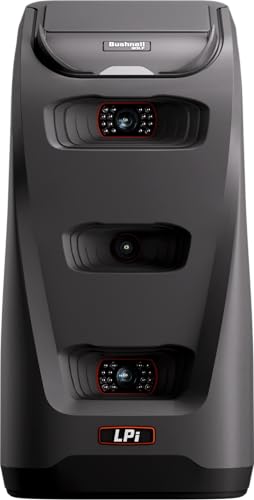
Looking for an affordable way to elevate your indoor golf practice? The Bushnell Golf LPi – Circle B Edition is your solution. This launch monitor delivers tour-level accuracy, ensuring you get precise ball and club data, even in challenging lighting conditions. Practice anytime, regardless of the weather, with the freedom to train 24/7. You’ll receive essential metrics like swing speed, ball speed, and launch angle, all in a user-friendly format. Designed to enhance your journey toward lower scores, the LPi provides reliable performance for every swing, helping you improve your game from the comfort of home.
Best For: Golfers seeking an affordable and accurate indoor launch monitor to enhance their practice sessions.
Pros:
- Tour-level accuracy provides reliable ball and club data for serious practice.
- Weather-independent training allows for 24/7 practice opportunities indoors.
- User-friendly format delivers essential metrics, making it easy to track progress.
Cons:
- May not be suitable for outdoor use due to its design focus on indoor simulation.
- Limited advanced features compared to higher-end launch monitors.
- Initial setup may require calibration to ensure optimal performance.
Garmin Approach R50 Golf Launch Monitor and Simulator

Experience precision like never before with the Garmin Approach R50 Golf Launch Monitor and Simulator, designed for golfers who crave detailed performance metrics both indoors and outdoors. Its 10″ built-in touchscreen displays advanced metrics like ball speed, launch angle, and spin rate. You can track your stats in training mode and visualize your shot dispersion. Enjoy virtual rounds on over 43,000 courses with friends through Home Tee Hero, while competing in global tournaments. Plus, the portability and HDMI connectivity make it easy to set up anywhere, ensuring you get real-time feedback and accurate distances for every shot.
Best For: Golfers seeking an advanced launch monitor and simulator that provides detailed performance metrics for both practice and virtual play.
Pros:
- High Precision: Utilizes a 3-camera system for accurate measurements and metrics.
- Virtual Play: Access to over 43,000 courses and the ability to compete in global tournaments with friends.
- Portability: Lightweight design with a built-in battery and carrying case for easy transport.
Cons:
- Membership Required: Access to virtual play features requires an active Garmin Golf membership.
- Cost: Premium pricing may not be suitable for all budgets.
- Setup Complexity: May require some technical knowledge for optimal setup and connectivity.
Rapsodo Mobile Launch Monitor for Golf

The Rapsodo Mobile Launch Monitor is the ideal choice for golfers seeking professional-level accuracy and instant feedback in both indoor and outdoor settings. With tour-level precision, you’ll get detailed metrics on shot distance, ball speed, club speed, and launch angle. Its GPS satellite view enhances shot tracking, making every swing count. Plus, it easily transforms any space into a golf simulator, offering real-time swing analysis and interactive games. The user-friendly design pairs seamlessly with your iPhone or iPad, providing instant feedback and video playback to refine your swing, making it perfect for golfers of all skill levels.
Best For: Golfers of all skill levels looking for a portable and accurate launch monitor that provides instant feedback and swing analysis.
Pros:
- Tour-level accuracy for shot distance, ball speed, club speed, and launch angle.
- Transforms any space into a golf simulator with real-time swing analysis and interactive games.
- User-friendly design compatible with iPhone and iPad, offering instant feedback and video playback.
Cons:
- May require a compatible iOS device, limiting use for Android users.
- Performance can be affected by environmental conditions when used outdoors.
- Initial setup and calibration may take some time for optimal accuracy.
Golf Launch Monitor & Simulator for iOS/Android Phones

For golf enthusiasts seeking a portable solution to improve their game, the Golf Launch Monitor & Simulator for iOS/Android phones stands out with its advanced environmental sensors. This device offers real-time adjustments based on temperature and humidity, enhancing your practice experience. You’ll gain insights into key swing metrics like Attack Angle and Launch Angle, along with visual impact feedback. The immersive 3D simulation lets you analyze your shots from multiple angles, ensuring smarter practice sessions. Plus, the user-friendly app requires no subscription and provides personalized training modes, making it easy to track progress and boost your consistency on the course.
Best For: Golf enthusiasts looking for a portable and comprehensive tool to analyze and improve their swing performance.
Pros:
- Advanced environmental sensors provide real-time adjustments for optimal practice conditions.
- Immersive 3D simulation with multiple viewing angles enhances shot analysis and understanding.
- User-friendly app with no subscription fees and personalized training modes encourages consistent improvement.
Cons:
- May require a learning curve for new users to fully utilize all features.
- Performance accuracy can vary depending on the environmental conditions and setup.
- Limited to smartphone compatibility, which may not suit all users’ preferences for larger screens.
Garmin Approach R10 Portable Golf Launch Monitor
With its ability to track essential metrics like club head speed and ball spin, the Garmin Approach R10 Portable Golf Launch Monitor is perfect for golfers looking to refine their skills indoors or at the driving range. It features a waterproof design and offers up to 10 hours of battery life, making it highly convenient. You can analyze your swing with automatic video recordings paired with your smartphone. Plus, the Garmin Golf app enhances your experience with training modes and access to virtual rounds on over 42,000 courses. A handy phone mount guarantees easy interaction while you play and practice.
Best For: Golfers looking to improve their skills through detailed swing analysis and virtual play options.
Pros:
- Tracks key metrics such as club head speed, ball speed, and launch angle for comprehensive performance analysis.
- Waterproof design and long battery life (up to 10 hours) make it suitable for various environments, including outdoor use.
- Compatible with the Garmin Golf app for enhanced training modes and access to thousands of virtual golf courses.
Cons:
- Requires a subscription to fully utilize virtual play features and access the global leaderboard.
- Dependent on smartphone pairing for video recording and swing analysis, which may not be ideal for all users.
- Limited to golf-specific metrics, which may not appeal to multi-sport athletes or those looking for broader training data.
SC4 PRO Golf Launch Monitor & 3D Driving Range Simulator

Offering pro-grade accuracy and a portable design, the SC4 PRO Golf Launch Monitor & 3D Driving Range Simulator is perfect for golfers who want to elevate their game indoors. This user-friendly device provides precise ball and club head data, ensuring unmatched real-time accuracy during your practice sessions. With access to the 3D Driving Range and E6 Connect home simulator, you can analyze your stats and calibrate distances easily through the VOICECADDIE S app. Multiple training modes, like Practice/Target Mode and Swing Speed Mode, help you focus on your specific needs, making it suitable for golfers of all skill levels.
Best For: The SC4 PRO Golf Launch Monitor & 3D Driving Range Simulator is best for golfers of all skill levels looking to enhance their practice sessions with pro-grade accuracy and advanced training features.
Pros:
- Pro-grade accuracy with precise ball and club head data for improved performance.
- User-friendly interface and simple setup, making it accessible for all golfers.
- Multiple training modes available, allowing for targeted practice and skill development.
Cons:
- Requires a smartphone or tablet for full functionality with the VOICECADDIE S app.
- While portable, it may still be cumbersome to transport for some users.
- Limited to indoor and outdoor use only; not suitable for use on a golf course.
EYE MINI CORE Golf Launch Monitor & Simulator

The EYE MINI CORE Golf Launch Monitor & Simulator is ideal for golfers who crave precise data and instant feedback while practicing indoors. With real-time tracking of 15 ball data points and near-zero latency, this device enhances your training experience. Its Dimple Optix technology captures any dimple pattern, eliminating the need for stickers. You’ll love the VIEW software, featuring immersive 4K courses and skills training. Plus, its easy setup lets you play full courses and tournaments from home. Pair it with Swing Optix for advanced AI Trainer insights and elevate your game even further. Enjoy your indoor practice sessions like never before!
Best For: Golfers seeking precise data and instant feedback during indoor practice sessions.
Pros:
- Real-time tracking with 15 ball data points for enhanced training accuracy.
- Easy setup allows for immersive play on full golf courses and engaging mini-games.
- Compatibility with third-party software provides additional features and flexibility.
Cons:
- Requires specific hardware and software specifications, which may limit compatibility with some systems.
- The advanced features, such as AI Trainer feedback, require additional purchases (e.g., Swing Optix).
- Some users may find the initial setup and configuration complex if not tech-savvy.
Factors to Consider When Choosing Golf Launch Monitors for Indoor Use
When you’re choosing a golf launch monitor for indoor use, a few key factors can make all the difference. You’ll want to take into account accuracy of measurements, portability, and how easy it is to set up. Additionally, think about software compatibility and the training features that suit your needs.
Accuracy of Measurements
Choosing a golf launch monitor for indoor use hinges greatly on the accuracy of its measurements, as this directly impacts your ability to analyze and refine your game. Look for monitors that provide key metrics like ball speed, club speed, launch angle, and spin rate, ideally with tour-level precision. High-quality devices often use advanced technologies such as infrared sensors and multiple camera systems to minimize errors. Check for accuracy margins, like ±1 degree for launch angle and ±3 mph for clubhead speed, to guarantee reliable performance tracking. Real-time data is essential, allowing you to make immediate adjustments. Remember, consistent testing and calibration of your monitor are vital to maintaining its accuracy over time, especially under varying indoor lighting conditions.
Portability and Setup
Accurate measurements are just one part of selecting the right golf launch monitor for indoor use; portability and setup play a significant role too. You’ll want a model that’s lightweight and compact, making it easy to move and set up in various locations. A quick and straightforward setup process enhances your experience, letting you start practicing without delays. Look for launch monitors with rechargeable batteries that provide several hours of operation, perfect for those extended indoor sessions. Additionally, compatibility with smartphones or tablets can simplify monitoring, while built-in screens or easy connection options to larger displays improve visibility of your metrics, making your training more effective even in confined spaces. Choose wisely, and elevate your game effortlessly!
Software Compatibility
While selecting a golf launch monitor for indoor use, ensuring it’s compatible with popular golf simulation software can greatly enhance your training experience. Look for monitors that offer proprietary software featuring swing analysis, shot tracking, and virtual courses to make your practice sessions more engaging. Additionally, consider devices that support third-party software; this will expand functionality and give you access to a wider range of features and courses. Ease of integration with mobile apps is also essential, as many monitors provide connectivity for real-time performance analysis and video recording. Finally, check if the launch monitor includes a trial or subscription for premium software features, as this can markedly impact your overall training effectiveness.
Training Features Offered
When selecting a golf launch monitor for indoor use, it’s vital to evaluate the training features it offers to maximize your practice sessions. Look for monitors that provide multiple training modes, like swing speed training and shot dispersion analysis, to enhance your skill development. Video analysis features are also beneficial, allowing you to record and review your swings alongside performance metrics for more effective learning. Choose devices with immersive simulation capabilities, enabling you to practice on virtual courses for a more engaging experience. Confirm the monitor delivers thorough metrics, including ball speed, launch angle, and swing tempo, to help you identify areas for improvement. Compatibility with golf training apps can further enhance your experience by offering additional statistics and community engagement.
Indoor vs. Outdoor Use
Understanding the differences between indoor and outdoor golf launch monitors is key to making the right choice for your practice environment. Indoor models often use advanced tracking technology to deliver accurate swing metrics, even in tight spaces. They’re designed to handle ambient light issues, ensuring reliable data regardless of your lighting conditions. Many come equipped with simulation features, letting you practice on virtual courses and analyze your swings in real-time. Their portability allows for easy setup in various locations, enhancing versatility. Additionally, you can boost accuracy with specific software that offers detailed insights into your swing performance and shot data, making these monitors ideal for focused indoor training sessions. Choose wisely to elevate your game from home!
Battery Life Duration
Battery life is a key factor to contemplate when choosing a golf launch monitor for indoor use, as it directly impacts your practice sessions. If you’re planning to practice outdoors or in different locations, a monitor with a battery life of 4 to 10 hours can make a big difference. Longer battery life means you can enjoy extended sessions without constantly recharging, which is perfect for those longer practice routines or tournaments. Some models even come with fast-charging capabilities, minimizing downtime when your battery runs low. Just remember that factors like continuous data tracking and video recording can affect battery duration, so consider how you’ll be using the monitor to guarantee it meets your needs effectively.
User Interface Design
A well-designed user interface is crucial for maximizing your experience with a golf launch monitor indoors. A user-friendly interface lets you navigate features and access performance metrics effortlessly, minimizing confusion. Look for clear visual feedback, like graphs and charts, which help you analyze your swings and pinpoint areas for improvement. Touchscreen functionality enhances usability, making it intuitive to select modes and view stats. Customization options are also essential; adjustable settings for different skill levels make the device more accommodating. Finally, consider monitors that integrate with mobile apps for real-time data tracking and video analysis, providing seamless connectivity and additional training tools that enrich your overall experience. Choose wisely to elevate your game from home!
Price and Value
Selecting the right golf launch monitor for indoor use involves more than just a sleek user interface. You need to evaluate the price against the features offered to guarantee it meets your training needs. High-quality monitors often justify their higher price tags with advanced metrics like swing speed, launch angle, and ball spin, which can greatly boost your performance. On the other hand, budget-friendly options might lack accuracy or essential features. Don’t forget to factor in additional costs for software subscriptions that could arise later. Finally, consider the warranty and customer support; a longer warranty and responsive service can enhance the overall value, especially for pricier models. Balancing these factors will help you make a wise investment.
