If you’re looking to improve your golf game, choosing the right launch monitor can make all the difference. These devices offer valuable insights into your swing, helping you pinpoint areas for improvement. From portable options to advanced simulators, there’s a monitor to fit your needs and budget. But with so many choices available, how do you know which one is right for you? Let’s explore the top options that can elevate your performance on the course.
Rapsodo MLM2PRO Golf Launch Monitor for Swing Analysis

The Rapsodo MLM2PRO Golf Launch Monitor is perfect for beginners who want to elevate their game with professional-level insights. This advanced device measures 13 key metrics, like spin rate and swing speed, providing you with thorough data for swing analysis. It connects to your smartphone or tablet, letting you practice anywhere—from your living room to the driving range. With real-time feedback on ball speed, club speed, and launch angles, you can refine your skills effectively. Plus, its integration with popular golf apps enhances your practice experience, making it an essential tool for improving your accuracy and overall performance.
Best For: The Rapsodo MLM2PRO Golf Launch Monitor is best for golfers of all skill levels seeking to improve their game through detailed swing analysis and real-time feedback.
Pros:
- Provides comprehensive data on 13 key golf metrics, enhancing swing analysis.
- Portable and easy to set up with smartphone or tablet integration for practice anywhere.
- Real-time feedback facilitates effective skill refinement and improvement.
Cons:
- May require a smartphone or tablet for full functionality, which could be a limitation for some users.
- The price point may be higher compared to basic launch monitors, potentially deterring budget-conscious golfers.
- Some users may find the learning curve steep when interpreting advanced metrics.
Garmin Approach R10 Portable Golf Launch Monitor

For beginners looking to elevate their game, the Garmin Approach R10 Portable Golf Launch Monitor stands out with its impressive ability to track essential performance metrics. This portable device monitors club head speed, ball speed, launch angle, and launch direction, helping you enhance shot consistency. Its waterproof design and long battery life make it perfect for use at home or on the driving range. The training mode provides a shot dispersion chart, allowing you to identify strengths and weaknesses. Plus, with the Garmin Golf app, you can analyze swing videos and play virtual rounds on thousands of courses worldwide.
Best For: Beginners and amateur golfers looking to improve their game through detailed performance analysis and training features.
Pros:
- Portable and Waterproof: Designed for use at home, indoors, or on the driving range with an IPX7 waterproof rating.
- Comprehensive Performance Metrics: Tracks essential metrics like club head speed, ball speed, launch angle, and direction for improved shot consistency.
- Interactive Training Features: Offers shot dispersion charts and swing video analysis through the Garmin Golf app for targeted improvement.
Cons:
- Subscription Required for Full Features: Access to virtual play on thousands of courses and tournaments requires an active subscription.
- Accuracy Limitations: Performance metrics have a margin of error (±3 mph for club head speed and ±1 mph for ball speed, launch angle, and direction).
- Smartphone Dependency: Requires a smartphone for app connectivity, which may not be ideal for all users.
Rapsodo Mobile Launch Monitor for Golf

Rapsodo Mobile Launch Monitor stands out as an ideal choice for beginners looking to enhance their golf game. It offers professional-level accuracy for shot distance, ball speed, club speed, and launch angle, ensuring you get precise data every time you swing. With GPS satellite view, you can track your shots effortlessly. This portable monitor transforms any space into a golf simulator, providing real-time swing analysis and interactive games. Plus, its user-friendly design pairs seamlessly with your iPhone or iPad, giving you instant feedback and video playback to refine your technique. It’s perfect for both beginners and seasoned players alike!
Best For: Beginners and seasoned golfers looking to improve their game with professional-level accuracy and real-time feedback.
Pros:
- Tour-level accuracy for shot distance, ball speed, club speed, and launch angle.
- Portable and user-friendly design that pairs with iPhone and iPad for instant feedback.
- Transforms any space into a golf simulator with real-time swing analysis and interactive games.
Cons:
- Requires a compatible device (iPhone or iPad) for full functionality.
- May have a learning curve for users unfamiliar with golf technology.
- Limited offline capabilities, as it relies on GPS and app connectivity for features.
Garmin Approach R50 Golf Launch Monitor and Simulator

Garmin Approach R50 stands out as an excellent choice for beginners seeking a user-friendly golf launch monitor and simulator. With its 10″ built-in color touchscreen and a 3-camera system, you’ll get precise metrics like ball speed and launch angle. The training mode tracks your stats and generates helpful dispersion charts. You can enjoy virtual rounds on over 43,000 courses with friends, and participate in tournaments via a global leaderboard. Plus, you’ll receive instant feedback through high-speed impact videos. Its portability and battery life make it easy to take anywhere, ensuring you can practice whenever you want!
Best For: Beginners looking for a user-friendly golf launch monitor and simulator to improve their game.
Pros:
- User-friendly interface with a 10″ built-in color touchscreen for easy navigation.
- Comprehensive performance metrics including ball speed, launch angle, and a training mode to track stats and improve skills.
- Portability with a carrying case and up to 4 hours of battery life, allowing for practice anywhere.
Cons:
- Requires an active Garmin Golf membership for access to virtual rounds and tournaments.
- Tracking sticker is necessary for accurate face to path measurements, which may be an additional cost.
- Limited battery life of only 4 hours may require frequent recharging during extended practice sessions.
Bushnell Golf Launch Pro – Circle B Edition

The Bushnell Golf Launch Pro – Circle B Edition stands out as an ideal choice for beginners seeking reliable performance and accuracy in their golf practice. With its proprietary three-camera imaging system and infrared technology, you’ll experience Tour-level accuracy, eliminating the guesswork often found in radar-based monitors. The Launch Pro provides extensive data on carry distance, launch, spin, and club head speed, enhancing both your practice sessions and on-course performance. Whether you’re at the range, course, or home, it offers unmatched precision. Plus, the smart recommendations from Foresight Sports help you make better shot decisions, elevating your game even further.
Best For: Beginners seeking reliable performance and accuracy in their golf practice.
Pros:
- Tour-level accuracy with proprietary three-camera imaging system and infrared technology.
- Provides comprehensive data on carry distance, launch, spin, and club head speed to enhance performance.
- Versatile usage for practice in various environments, including indoor and outdoor settings.
Cons:
- Higher price point compared to basic launch monitors.
- Requires space for setup, especially for indoor use.
- LINK-enabled club recommendations require additional purchase of a rangefinder.
Garmin Approach R10 Portable Golf Launch Monitor
For beginners looking to elevate their game, the Garmin Approach R10 Portable Golf Launch Monitor offers an impressive combination of features and ease of use. This lightweight device tracks essential metrics like club head speed, ball speed, and launch angle, helping you refine your swing. With a waterproof rating of IPX7 and up to 10 hours of battery life, it’s perfect for indoor or outdoor sessions. By connecting to the Garmin Golf app, you can analyze your performance, record swing videos, and even play virtual rounds on over 42,000 courses. The included phone mount enhances your interaction and viewing experience.
Best For: The Garmin Approach R10 is best for beginner golfers seeking to improve their skills with a user-friendly launch monitor that tracks essential swing metrics.
Pros:
- Tracks multiple performance metrics, aiding in swing refinement.
- Waterproof design and long battery life make it versatile for various environments.
- Integration with the Garmin Golf app enhances performance analysis and offers virtual play options.
Cons:
- Requires a subscription for full access to virtual play and tournaments.
- May have a learning curve for users unfamiliar with technology.
- Limited advanced features compared to higher-end launch monitors.
Bushnell Golf LPi – Circle B Edition
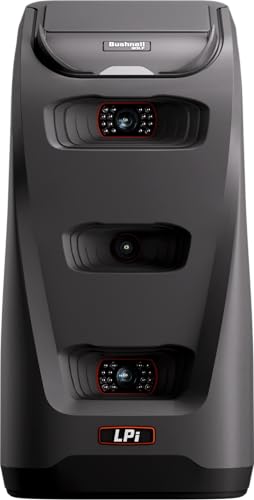
If you’re looking for an affordable way to improve your golf game indoors, the Bushnell Golf LPi – Circle B Edition is an excellent choice. This launch monitor delivers tour-level accuracy for ball and club data, ensuring consistent performance no matter the lighting conditions. You can practice anytime, regardless of weather, allowing you to train 24/7 with indoor precision. It provides essential metrics like swing speed, ball speed, and launch angle in a streamlined format, making it easy to track your progress. With the LPi, you’ll gain reliable insights to enhance your journey towards lower scores.
Best For: The Bushnell Golf LPi – Circle B Edition is best for golfers seeking an affordable and accurate indoor training solution to enhance their game.
Pros:
- Provides tour-level accuracy for ball and club data, ensuring reliable performance.
- Allows for practice anytime, regardless of weather conditions, enabling year-round training.
- Delivers essential metrics like swing speed, ball speed, and launch angle in an easy-to-understand format.
Cons:
- Designed primarily for indoor use, limiting outdoor practice opportunities.
- May require additional setup for optimal performance in various indoor environments.
- Not as feature-rich as some high-end launch monitors, which could limit advanced analysis for professional players.
EYE MINI CORE Golf Launch Monitor & Simulator

Offering real-time tracking with 15 critical ball data points, the EYE MINI CORE Golf Launch Monitor & Simulator is perfect for beginners keen to enhance their game. Its Dimple Optix technology captures any dimple pattern without stickers, providing near-zero latency. You’ll love the VIEW software, which comes with a month-long trial of the Ultimate Package, featuring immersive courses and skills training. Setup is a breeze, letting you play full courses or mini-games right at home. Pair it with Swing Optix for AI Trainer feedback, giving you instant insights to refine your swing and improve your performance on the course.
Best For: Beginners looking to enhance their golf game through real-time tracking and analysis.
Pros:
- Offers real-time tracking with 15 ball data points for accurate performance feedback.
- Easy setup allows for playing full golf courses and mini-games from home.
- VIEW software includes a month-long trial of the Ultimate Package with immersive features and skills training.
Cons:
- Requires a powerful computer setup to run the software effectively.
- Swing Optix, needed for AI Trainer feedback, is sold separately.
- Limited to Windows operating systems, excluding other platforms.
Golf Launch Monitor & Simulator for iOS/Android Phones

The Golf Launch Monitor & Simulator is perfect for beginners looking to enhance their game with a user-friendly tool that fits right in your pocket. This portable swing analyzer works seamlessly with iOS and Android phones, whether you’re practicing indoors or outdoors. With advanced sensors, it adjusts to environmental factors like temperature and humidity. You’ll gain insights on swing metrics like Attack Angle and Launch Angle, while enjoying an immersive 3D virtual driving range. Plus, the app offers personalized training modes and real-time voice feedback, ensuring your practice sessions are both engaging and effective without any subscription hassles.
Best For: Beginners seeking a portable and user-friendly swing analyzer to improve their golf game.
Pros:
- Provides real-time insights on swing metrics like Attack Angle and Launch Angle.
- Immersive 3D virtual driving range experience with multiple viewing angles.
- No subscription required, making it an affordable option for ongoing practice.
Cons:
- May require a well-lit environment for accurate readings.
- Limited to mobile phone compatibility, which may deter users without compatible devices.
- Advanced features might be overwhelming for absolute beginners without prior knowledge of swing metrics.
Portable Golf Launch Monitor and Swing Analyzer

For beginners looking to improve their golf game, the Portable Golf Launch Monitor and Swing Analyzer stands out with its user-friendly design and real-time data tracking. This device is perfect for both indoor and outdoor use, boasting a 12-hour battery life. It measures essential parameters like swing speed, ball speed, and launch angle, giving you instant feedback through an advanced LCD display and voice output. With Doppler radar technology, it guarantees accurate data collection. Plus, you can customize your practice sessions with adjustable loft angles and access enhanced features via the MySwingCaddie App on your smartphone.
Best For: Beginners looking to improve their golf game with real-time performance tracking and instant feedback.
Pros:
- User-friendly design suitable for indoor and outdoor use.
- Provides instant feedback with advanced LCD display and voice output.
- Seamless integration with the MySwingCaddie App for enhanced data analysis.
Cons:
- Accuracy may vary slightly depending on the mode of use.
- Requires a smartphone for access to full app features.
- Adjustable loft angles may not cater to all user preferences.
Factors to Consider When Choosing Golf Launch Monitors for Beginners
When choosing a golf launch monitor, you’ll want to focus on several key factors. Accuracy of measurements is essential, but you also need a user-friendly interface that makes setup a breeze. Consider portability, app compatibility, and battery life to guarantee it fits seamlessly into your practice routine.
Accuracy of Measurements
While choosing a golf launch monitor, understanding accuracy is essential since it directly affects how well you can assess your performance. Accurate measurements of ball speed, launch angle, and club head speed are crucial for your skill development. Look for models that offer accuracy levels within ±1 degree for launch angle and ±1 mph for ball speed, ensuring reliable feedback. Advanced technologies like Doppler radar and camera systems can enhance measurement precision, often achieving less than ±3% error margins. Consistency in performance metrics, regardless of environmental conditions, allows you to focus on improving your technique. A high level of accuracy helps you pinpoint areas for improvement and track your progress effectively, making your learning process much more beneficial.
User-Friendly Interface
Understanding accuracy is just the first step in selecting a golf launch monitor; next, you need to evaluate how user-friendly the interface is. A user-friendly interface features intuitive navigation, allowing you to access essential golf metrics without feeling overwhelmed. Look for clear visual displays of data, like swing speed and launch angle, which provide immediate feedback in a digestible format. Interactive elements, such as video analysis and shot tracers, help you visualize your performance and identify areas for improvement. Mobile app compatibility enhances usability by syncing real-time data and letting you analyze your swings on your devices. Finally, a simple setup process, including easy pairing and straightforward calibration, guarantees you can quickly start tracking your performance without hassle.
Portability and Setup
Choosing a golf launch monitor that’s portable and easy to set up can make a significant difference in your practice routine. As a beginner, you’ll want a lightweight and compact device that you can easily transport between home and the driving range. Look for models that allow for quick setups, so you can start practicing right away without needing extensive technical knowledge. Battery life is another key factor; some monitors last up to 10 hours, perfect for long sessions. If you plan to practice outdoors, consider waterproof options to guarantee your device remains functional in various weather conditions. Finally, a user-friendly interface is essential, helping you navigate settings and understand metrics without feeling overwhelmed by complicated technology.
Compatibility With Apps
Finding a golf launch monitor that works seamlessly with apps can greatly enhance your training experience. Compatibility with popular golf apps allows you to analyze performance metrics in real-time, giving you valuable insights for improvement. Many launch monitors integrate with apps that offer features like virtual courses, swing analysis, and shot tracking, making your practice sessions more engaging.
Look for models that include video recording, so you can review your swings alongside performance metrics for better self-assessment. Additionally, some devices provide cloud storage options, enabling you to track your progress over time and compare sessions. It’s crucial to choose a launch monitor supporting multiple platforms, ensuring compatibility with both iOS and Android devices for greater accessibility.
Battery Life Considerations
How long can you practice without interruption? Battery life is essential when choosing a golf launch monitor. Longer battery life means you can practice longer, which is perfect for beginners wanting to refine their skills. Many portable monitors offer battery lives ranging from 4 to 10 hours, giving you flexibility for both indoor and outdoor sessions. Look for models with quick recharge times to minimize downtime between practices. Additionally, consider whether the monitor can be used while charging—this feature allows you to extend your practice without worrying about battery depletion. Some devices also have battery-saving modes that stretch usage time, making them ideal for beginners who might not always have access to a power source during practice.
Training Features and Modes
When you’re starting out in golf, having the right training features in a launch monitor can greatly enhance your practice sessions. Look for monitors that offer training modes to track stats for each club and visualize shot dispersion, helping you pinpoint strengths and areas for improvement. Swing analysis features, like video recording, allow you to review your performance metrics, making self-assessment effective. Personalized training options, including performance test modes for distance and swing speed, help gauge your progress over time. Interactive features, like 3D ball flight simulations and multiple viewing angles, make practice more engaging. Finally, choose devices with user-friendly interfaces that provide instant feedback, so you can easily understand your performance and make necessary adjustments.