Picking the right projector setup can make or break your golf simulator experience. The best options deliver a bright, readable image, a clean ceiling install, and enough flexibility to work with your room size and hitting area.
This roundup focuses on ceiling mounted golf simulator projectors and the mounting or protection accessories that help them perform well in real indoor spaces.
Best 10 Ceiling Mounted Golf Simulator Projectors Picks for 2026
Daytime Brightness Smart Pick
1800 ANSI 4K Android Projector
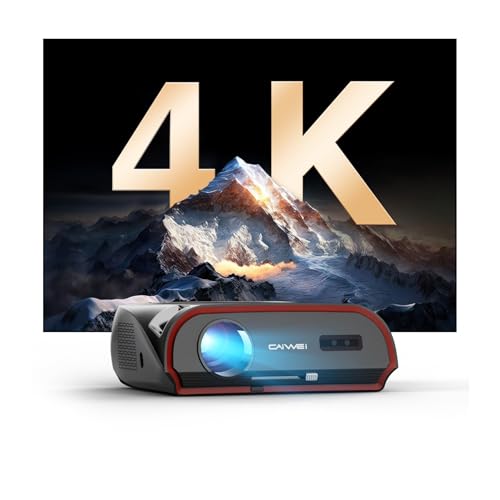
- 1800 ANSI lumens for bright-room use
- 4K decoding, HDR10+, and 16000:1 contrast
- Android TV 11.0, WiFi 6, and Bluetooth 5.2
Best For: Bright indoor spaces and flexible all-in-one setups
Golf Sim Laser Pro Pick
BenQ AH700ST Short-Throw Laser

- 4000 ANSI lumens and Full HD resolution
- Short-throw ratio of 0.69-0.83
- Golf mode plus 20,000-hour laser life
Best For: Dedicated golf simulator rooms with tight projector placement
Mounting Flexibility Pick
JOY worker Universal Ceiling Bracket

- Supports ceiling, wall, or telescoping installs
- Holds projectors up to 33 lbs
- Tilt, swivel, and rotation for alignment
Best For: Anyone needing a sturdy adjustable mount for a simulator room
Premium Golf Room Pick

- 4000 lumens with WUXGA 1920 x 1200
- 1.13-1.46 throw ratio for flexible placement
- IP5X dustproof laser engine
Best For: Bright, reliable golf simulator rooms with flexible mounting needs
Versatile Ceiling Mount
3-in-1 Universal Projector Mount

- Flush ceiling, telescoping ceiling, or wall install
- Built-in cable management for a cleaner setup
- 40 lb capacity with lifetime warranty
Best For: Flexible simulator setups needing universal mounting
Heavy-Duty Ceiling Mount
Universal Wall or Ceiling Projector Mount
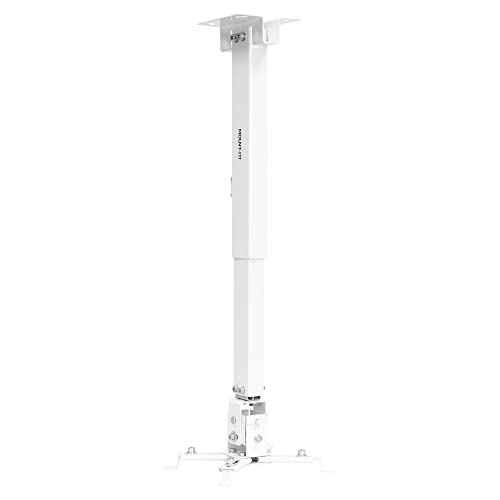
- 44 lb capacity with sturdy steel construction
- Flush ceiling, telescoping ceiling, or wall install
- Pitch, roll, swivel, and height adjustment
Best For: Sim rooms needing a sturdy, adjustable universal mount
Floor-Mounted Shield
Heavy Duty Floor Mounted Golf Sim Enclosure with Fan

- Steel frame and clear panels help reduce impact risk.
- Positionable fan and vents support airflow.
- Turf top cover blends into the sim area.
Best For: Installers who want protected projector placement without ceiling mounting.
Turf Cover Pick
Golf Simulator Projector Cover with Turf

- No-assembly floor cover is quick to place.
- HDPE body and polycarbonate panel add protection.
- Side vents and removable front panel help airflow.
Best For: LED projectors needing a simple, turf-topped floor enclosure.
Reinforced Turf Box
Heavy Duty Floor-Mounted Projector Enclosure

- Reinforced steel frame and acrylic window add protection.
- Fan and vents are designed to improve cooling.
- Synthetic grass top helps it blend into the sim room.
Best For: Budget-minded buyers who want sturdy, floor-mounted projector protection.
Daytime Brightness Smart Pick – 1800 ANSI 4K Android Projector
If you’re comparing ceiling mounted golf simulator projectors for a bright room or multi-use setup, this model stands out for its 1800 ANSI lumens, 4K decoding, and ceiling-mount flexibility. It is designed to stay visible with lights on, while also giving you Android TV 11.0 streaming, WiFi 6, and Bluetooth 5.2 in one unit.
Best For: Bright indoor spaces, casual golf simulator setups, and users who want an all-in-one smart projector.
Pros:
- 1800 ANSI lumens and TS-LED tech are built for daytime viewing.
- 4K decoding, HDR10+, and 16000:1 contrast support detailed images.
- Android TV 11.0 with built-in apps reduces the need for extra devices.
- Supports ceiling, wall, or tripod mounting with 6D/6P keystone and zoom.
Cons:
- Listed as a tabletop mount in the details, so installation expectations should be checked carefully.
- Not a dedicated golf-only model like the BenQ options here.
- Brightness is lower than the 4000-lumen projectors in this roundup.
This is a flexible choice if you want a smart projector that can handle golf simulation and everyday entertainment. Its strength is versatility, especially in spaces where ambient light is hard to control.
Golf Sim Laser Pro Pick – BenQ AH700ST Short-Throw Laser
Among ceiling mounted golf simulator projectors, the BenQ AH700ST is built specifically with golf use in mind. Its short-throw ratio, 4000 ANSI lumens, Full HD resolution, and Golf picture mode make it well suited to producing a bright, detailed image in a simulator bay.
Best For: Dedicated golf simulator rooms that need a purpose-built short-throw laser projector.
Pros:
- 4000 ANSI lumens deliver strong brightness for simulator environments.
- Short-throw ratio of 0.69-0.83 helps with tight projector placement.
- Golf mode is included for optimized visual clarity.
- Laser light source is rated for 20,000 hours for low-maintenance use.
Cons:
- Native resolution is Full HD, not 4K.
- Short-throw design is more specialized than a general-purpose projector.
- Maximum image size is listed at 200 inches, which may be smaller than some users expect.
If your priority is a golf-focused projector for a simulator build, this model is the most specialized option in the list. It balances brightness, placement flexibility, and golf-specific tuning better than a general home theater unit.
Mounting Flexibility Pick – JOY worker Universal Ceiling Bracket
If you already have a projector and just need a dependable mounting solution for ceiling mounted golf simulator projectors, this JOY worker bracket is built for that job. It supports flat or sloped ceilings, wall installation, and adjustable positioning so you can line up the image more precisely.
Best For: Users who need a sturdy, adjustable mount for a home golf simulator or office projector setup.
Pros:
- Heavy-duty steel construction supports projectors up to 33 lbs.
- 3-in-1 design works as a ceiling mount, telescoping ceiling mount, or wall mount.
- Adjustable length from 5.5 inches to 25.2 inches gives placement flexibility.
- 30-degree tilt, 30-degree swivel, and 360-degree rotation help with alignment.
Cons:
- Mount only, so it does not include a projector.
- Compatibility depends on your projector’s mounting hole spacing.
- Users with very heavy projectors should verify weight and fit first.
This is the practical choice if your current projector already fits your simulator needs but needs better overhead placement. The wide adjustment range makes it easier to fine-tune image position in tighter rooms.
Premium Golf Room Pick – BenQ LU710 WUXGA Laser
For ceiling mounted golf simulator projectors in a dedicated bay, the BenQ LU710 offers a strong mix of brightness, throw flexibility, and color accuracy. With 4000 lumens, WUXGA resolution, and a laser light source, it is aimed at consistent performance in a golf setup.
Best For: Golf simulator rooms that need a bright, reliable laser projector with flexible placement.
Pros:
- 4000-lumen brightness suits simulator spaces with controlled or moderate ambient light.
- WUXGA 1920 x 1200 resolution provides a taller 16:10 image than standard 1080p.
- 1.13-1.46 throw ratio offers placement flexibility.
- IP5X dustproof design and 20,000+ hour laser life support low maintenance.
Cons:
- Not as short-throw as the AH700ST, so placement room matters more.
- Maximum image size is listed at 100 inches in the details.
- It is a projector-focused model without built-in smart TV features.
This model makes sense when you want a premium golf simulator image without moving into ultra-short-throw territory. It is especially appealing if you value a dustproof laser engine and more vertical screen space.
Versatile Ceiling Mount – 3-in-1 Universal Projector Mount
If you want one of the more flexible ceiling mounted golf simulator projectors mounting options, this Mount-It! model gives you a lot of placement freedom. It works as a flush ceiling mount, telescoping arm ceiling mount, or wall mount, with full-motion adjustment to help dial in alignment for your hitting bay and screen.
Best For: Buyers who need a universal projector mount with ceiling and wall installation options plus built-in cable management.
Pros:
- 3-in-1 design supports flush ceiling, telescoping ceiling, and wall mounting.
- Adjustable arm and full-motion control help fine-tune projector placement.
- Built-in cable management keeps the setup clean and organized.
- 40 lb capacity and lifetime warranty add confidence for long-term use.
Cons:
- Not suitable for vaulted ceilings or drywall according to the notes.
- Compatibility depends on projector mounting hole pattern and hole count.
Overall, this is a practical pick if you want a versatile mounting solution for a simulator room and need adjustability more than a minimalist look. Just make sure your projector and ceiling structure match the installation requirements before buying.
Floor-Protected Option – Golf Simulator Projector Cover Enclosure
This golf simulator projector option is built around protection instead of ceiling mounting, making it useful if you want to avoid overhead installation altogether. The floor-mounted enclosure keeps the projector at ground level, while the steel body, polycarbonate panels, and cooling fan are aimed at safe, long-session operation.
Best For: Golf sim owners who want a floor-mounted projector enclosure with impact protection and active cooling.
Pros:
- Heavy-duty steel framework and impact-resistant polycarbonate panels.
- Floor-mounted design helps protect the projector from mis-hit balls and accidental kicks.
- Integrated cooling fan and ventilation ports support heat management.
- Synthetic turf topper helps the enclosure blend into the simulator space.
Cons:
- Only fits projectors within the listed interior dimensions.
- Not a ceiling mount, so it may not suit every simulator layout.
For buyers prioritizing protection and easier setup, this enclosure is a strong alternative to traditional ceiling mounted golf simulator projectors. It trades ceiling placement for added safety, cooling, and a cleaner floor-level install.
Heavy-Duty Ceiling Mount – Universal Wall or Ceiling Projector Mount
For ceiling mounted golf simulator projectors, this Mount-It! bracket is a straightforward heavy-duty option with broad compatibility and plenty of adjustment. It supports flush ceiling, telescoping ceiling, and wall installation, and the full-motion design makes it easier to line up the image on your impact screen.
Best For: Users who want a sturdy universal mount with a higher weight capacity and precise adjustment.
Pros:
- 3-in-1 installation supports flush ceiling, telescoping ceiling, and wall mounting.
- 44 lb weight capacity provides a bit more headroom than many universal mounts.
- Full-motion adjustment includes pitch, roll, swivel, and height adjustment.
- Cable management system helps keep the simulator area tidy.
Cons:
- Requires projector mounting holes between 8.85″ and 12.40″.
- White finish may not suit every room aesthetic.
This is a solid pick if you want a dependable, adjustable mount for a simulator build and prefer a higher load rating. It is especially appealing when accurate image placement and organized cabling matter more than extra features.
Floor-Mounted Shield – Heavy Duty Floor Mounted Golf Sim Enclosure with Fan
If you want ceiling mounted golf simulator projectors without the installation hassle, this floor-mounted projector cover is a practical workaround. It places the projector at ground level inside a steel-frame enclosure, adds clear impact protection, and includes ventilation plus a positionable cooling fan for longer practice sessions.
Best For: Home, garage, or commercial sim setups that need protected projector placement without ceiling mounting.
Pros:
- Heavy-duty steel frame with clear panels helps guard against accidental ball contact.
- Includes multiple vents and a positionable cooling fan for better airflow.
- Artificial turf top cover helps it blend into the simulator environment.
- Built-in cable pass-through keeps wiring more organized.
Cons:
- Floor-mounted design is not the same as an overhead ceiling projector setup.
- Fit is limited to projectors within the listed dimensions.
This is a straightforward protection-focused choice for buyers who want stability, airflow, and easier installation. It prioritizes practical enclosure benefits over a more permanent ceiling mount approach.
Turf Cover Pick – Golf Simulator Projector Cover with Turf
GoSports Golf Simulator Projector Cover with Turf - Floor Mounted Enclosure for LED Projectors
Check Price On AmazonFor ceiling mounted golf simulator projectors buyers who want to avoid extra hardware and wiring, this floor cover keeps the projector on the ground while still protecting it from mishits. The turf top gives it a cleaner look in a golf sim room, while side vents and a removable front panel help with airflow for low-heat LED projectors.
Best For: LED projector setups that need simple floor-mounted protection and fast placement.
Pros:
- No assembly required; just place it over the projector and route the cords.
- HDPE construction with a polycarbonate panel adds impact protection.
- Four air and cord vents help manage airflow and cable routing.
- Turf top blends in with a simulator setup.
Cons:
- Only recommended for low-heat LED projectors.
- Does not provide waterproof protection.
- Requires your projector to fit within the listed interior dimensions.
This model stands out for its simplicity and easy setup. If you want a clean, floor-mounted alternative to ceiling installation, it offers a practical mix of protection and convenience.
Reinforced Turf Box – Heavy Duty Floor-Mounted Projector Enclosure
This floor-mounted enclosure is built for buyers looking at ceiling mounted golf simulator projectors but wanting a simpler, lower-cost path. It combines a reinforced steel frame, an impact-proof acrylic window, top-and-side ventilation, and a synthetic grass mat for a more finished sim-room look.
Best For: Budget-conscious golf simulator setups that want sturdy projector protection and easier installation.
Pros:
- 1.4mm reinforced steel frame is built for durability.
- Impact-proof acrylic window helps protect against golf ball strikes.
- Cooling fan and ventilation slots support continuous airflow.
- Synthetic grass top adds immersion and some cushioning.
Cons:
- Requires checking your projector against the listed internal dimensions.
- Assembly is required, even though it uses a quick-access rivet nut design.
This enclosure emphasizes protection and cooling in one package. It makes sense for users who want a robust floor-mounted alternative to a more complex ceiling setup.
How We Picked the Best Ceiling Mounted Golf Simulator Projectors
We looked for products that make simulator setups easier to live with: strong brightness, golf-friendly throw ratios, dependable image alignment, and practical mounting or enclosure features. For ceiling-mounted use, we also prioritized models and accessories that support clean cable routing, stable positioning, and protection in busy hitting bays.
Quick Comparison
In general, the best Ceiling Mounted Golf Simulator Projectors balance three things: brightness for well-lit rooms, a throw ratio that fits your hitting distance, and installation flexibility. Laser models often win for long-term convenience, while short-throw options can reduce shadow issues when space is tight. Mounts and enclosures matter too, especially if you want a secure ceiling install or added protection from balls and dust.
Key Buying Factors for Ceiling Mounted Golf Simulator Projectors
Brightness and Room Light
Look for enough lumens to keep the image clear during normal room lighting. If your simulator space has windows or overhead lights, higher brightness becomes more important than resolution alone.
Throw Ratio and Mounting Height
The projector must match your screen size and ceiling height. Short-throw and near-throw models are often easier to place in golf simulators because they reduce shadows from the golfer and club.
Image Correction and Alignment
Keystone correction, lens shift, and corner adjustment can save time during setup. They are especially useful when the projector has to be centered around structural beams, ceiling fixtures, or an off-center hitting zone.
Mounting Strength and Adjustability
A good ceiling mount should hold the projector securely, offer fine angle control, and support the projector’s weight with margin to spare. Universal mounts are useful, but always verify compatibility with your exact model.
Protection and Noise Control
If the projector sits near the hitting area, an enclosure can add peace of mind. Features like cooling fans, turf tops, and heavy-duty construction help protect the unit while keeping the simulator bay looking finished.
Who Should Buy Which Ceiling Mounted Golf Simulator Projectors?
If you want a straightforward home setup, choose a bright projector with a compatible ceiling mount and basic image correction. If your room is tight or shadow control is a priority, a short-throw golf simulator projector is usually the smarter choice. If your space is exposed to ball strikes, dust, or frequent use, a protective enclosure is worth considering. For buyers building a polished, permanent bay, prioritize adjustable mounting hardware and a projector with enough brightness to stay clear in real-world lighting.