If you’re looking to elevate your golf game, investing in a quality swing analyzer can make all the difference. These innovative tools provide real-time feedback and detailed metrics that help you understand your swing mechanics better. From portable monitors to advanced apps, there’s a wide range of options available for Android users. Curious about which ones stand out and how they can transform your practice sessions? Let’s explore the top picks that could enhance your performance on the course.
Golf Launch Monitor & Simulator for iOS/Android Phones

If you’re serious about improving your golf game, the Golf Launch Monitor & Simulator for iOS/Android phones is a game-changer. This portable swing analyzer is perfect for both indoor and outdoor use, equipped with advanced sensors that adjust for temperature, humidity, and barometric pressure. You’ll benefit from expanded swing metrics like Attack Angle and Launch Angle, plus clubface impact visuals for deeper insights. The immersive 3D virtual driving range offers multiple viewing angles, enhancing your practice. With personalized training modes and a user-friendly app requiring no subscription, you’ll find it convenient and engaging to track your progress and boost your game.
Best For: Golf enthusiasts looking to enhance their performance through detailed swing analysis and immersive practice experiences.
Pros:
- Offers advanced swing metrics and real-time feedback for improved performance.
- Portable and versatile for both indoor and outdoor use.
- No subscription required, making it a cost-effective training tool.
Cons:
- May require a learning curve to fully utilize all features.
- Performance can be affected by extreme weather conditions despite sensors.
- Limited compatibility with older phone models or operating systems.
Portable Golf Launch Monitor and Swing Analyzer

The Portable Golf Launch Monitor and Swing Analyzer is ideal for golfers seeking instant feedback on their performance, whether practicing indoors or outdoors. With a 12-hour battery life, you can track swing speed, ball speed, launch angle, and more in real-time. Utilizing advanced Doppler radar technology, it delivers accuracy within +/- 3% for ball speed and +/- 3 yards for carry distance in target mode. The LCD display and voice output provide immediate insights, while adjustable loft angles enhance your practice sessions. Plus, the MySwingCaddie App integration lets you analyze your statistics effortlessly, making it a must-have for serious golfers.
Best For: Golfers looking for real-time performance feedback to enhance their game, whether practicing indoors or outdoors.
Pros:
- Accurate Measurements: Utilizes Doppler radar technology for precise data collection on swing and ball performance.
- User-Friendly Interface: Features an advanced LCD display and voice output for immediate feedback on shot performance.
- App Integration: Seamlessly connects with the MySwingCaddie App for in-depth analysis of statistics and performance tracking.
Cons:
- Limited Accuracy in Practice Mode: The accuracy for carry distance may vary by +/- 5% in practice mode, which could affect detailed assessments.
- Dependency on Battery Life: A 12-hour battery life may not be sufficient for extended practice sessions without recharging.
- Requires App for Spin Data: Spin numbers are only accessible through the MySwingCaddie App, which may be inconvenient for some users.
Blast Motion Golf Swing & Stroke Analyzer (GEN3 Sensor)

For golfers seeking to elevate their game, the Blast Motion Golf Swing & Stroke Analyzer (GEN3 Sensor) offers unparalleled real-time feedback that can transform your performance. This device tracks essential swing metrics and captures video highlights, giving you instant insights through the Blast golf smartphone app. With a focus on short game improvement, it helps lower scores quickly. New users enjoy a one-month Blast membership for easy setup and management. Plus, the Air Swings mode lets you train anytime, anywhere, even without a ball. Utilize the app to capture and analyze your swings, enhancing your learning experience.
Best For: Golfers of all skill levels looking to improve their swing mechanics and lower their scores through real-time feedback and analysis.
Pros:
- Instant feedback on swing metrics helps users identify areas for improvement.
- Air Swings mode allows for practice without needing a ball, making training flexible and accessible.
- Video capture and analysis features enhance the learning experience by visually showing swing performance.
Cons:
- Requires a smartphone to access the app for full functionality.
- New users may need time to familiarize themselves with the app and sensor setup.
- Performance may vary based on the user’s ability to interpret and apply the feedback effectively.
TheStack™ Radar Golf Launch Monitor and Swing Analyzer
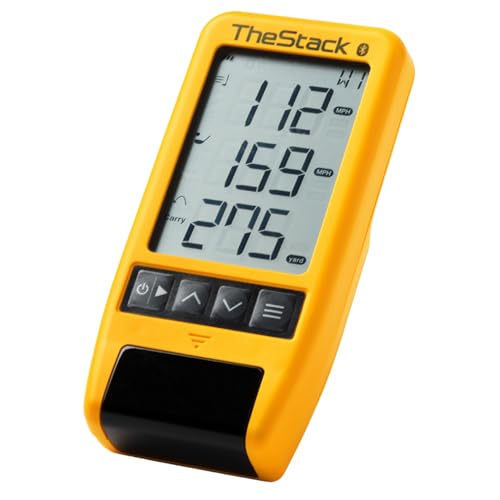
Designed for golfers enthusiastic to elevate their game, TheStack™ Radar Golf Launch Monitor and Swing Analyzer stands out with its impressive ability to measure swing speed, ball speed, estimated carry distance, and smash factor. This portable device connects seamlessly to TheStack App on both iOS and Android, making data tracking effortless. With the Stack Wedging feature, you get gamified practice sessions to refine your wedge distances, along with a free month trial on iOS. Trusted by pros like Matt Fitzpatrick, TheStack Radar is perfect for honing your swing and enhancing your overall performance on the course.
Best For: Golfers looking to improve their swing and wedge performance through data-driven training and practice.
Pros:
- Portable and easy to use, allowing for practice both on the course and at the range.
- Gamified training sessions through the Stack Wedging feature enhance skill development and make practice engaging.
- Endorsed by professional golfers, providing credibility and assurance of effectiveness in performance improvement.
Cons:
- Limited compatibility for certain features, as Stack Wedging is only available on iOS devices.
- Requires a Bluetooth connection, which may lead to connectivity issues in some environments.
- Initial reliance on a smartphone app, which may not appeal to all users who prefer standalone devices.
SC4 PRO Golf Launch Monitor & 3D Driving Range Simulator

Looking to elevate your golf game? The SC4 PRO Golf Launch Monitor & 3D Driving Range Simulator is your go-to tool for indoor and outdoor practice. With its pro-grade accuracy, it provides precise data on your swings, from impact to ball flight. You’ll love the built-in screen and user-friendly interface, making setup a breeze. Plus, it includes access to the 3D Driving Range and E6 Connect simulator. Connect it to the VOICECADDIE S app for advanced stats and swing analysis. Choose from multiple training modes for focused practice sessions, using standard golf balls—no special ones needed.
Best For: Golfers of all skill levels seeking a portable and accurate swing analysis tool for both indoor and outdoor practice.
Pros:
- Pro-grade accuracy with real-time data tracking from swing to impact.
- User-friendly interface and simple setup for effortless use.
- Multiple training modes and access to advanced features through the VOICECADDIE S app.
Cons:
- May require a smartphone or tablet for full functionality with the app.
- Initial investment might be high for casual golfers.
- Performance may be affected by extreme weather conditions when used outdoors.
Rapsodo Mobile Launch Monitor for Golf (iPhone & iPad Only)

The Rapsodo Mobile Launch Monitor stands out as an ideal choice for golfers using iPhones and iPads, thanks to its professional-level accuracy and real-time feedback. This portable device tracks your shot distance, ball speed, and launch angle, providing tour-level insights. Plus, its GPS satellite view guarantees precise shot tracking, whether you’re indoors or outdoors. Transform any space into a golf simulator with swing analysis, shot shape tracking, and interactive games. With video playback and active shot tracers, you can visualize your ball flight and refine your swings, making it perfect for golfers of all skill levels.
Best For: Golfers who want professional-level accuracy and real-time feedback while using their iPhone or iPad, regardless of their skill level.
Pros:
- Delivers tour-level accuracy for shot distance, ball speed, club speed, and launch angle.
- Transforms any space into a golf simulator with interactive games and swing analysis.
- User-friendly design that provides instant feedback and is suitable for both beginners and advanced golfers.
Cons:
- Limited compatibility as it only works with iPhone and iPad.
- May require a learning curve for users unfamiliar with golf technology.
- Performance may vary based on environmental conditions and lighting.
Rapsodo MLM2PRO Golf Launch Monitor for Swing Analysis

For golfers seeking precise swing analysis, the Rapsodo MLM2PRO Golf Launch Monitor stands out with its ability to measure 13 core metrics, including spin rate and swing speed. This advanced device pairs seamlessly with your smartphone or tablet, turning any space into a golf simulator. You’ll benefit from real-time data on ball speed, club speed, and launch angle, helping you refine your skills. Whether you’re indoors or outdoors, the MLM2PRO provides reliable feedback, enhancing your practice sessions. Plus, its integration with leading golf apps offers a realistic full-swing simulator experience, making it an invaluable tool for elevating your game.
Best For: Golfers looking for precise swing analysis and real-time performance metrics to enhance their training sessions.
Pros:
- Provides detailed measurement of 13 core golf metrics, including spin rate and swing speed.
- Seamlessly integrates with smartphones and tablets for a convenient and portable golf simulator experience.
- Offers reliable feedback for both indoor and outdoor practice, enhancing skill refinement.
Cons:
- May require additional purchases for compatible golf apps to fully utilize its features.
- Performance can be influenced by environmental factors, such as lighting and space constraints.
- Initial setup and calibration may be complex for some users not familiar with launch monitors.
Swing Caddie Portable Launch Monitor

Elevate your game with the Swing Caddie Portable Launch Monitor (SC200Plus), designed for golfers who crave instant feedback and precise data analysis. This golf simulator uses Doppler radar technology to provide reliable data, while calibrated atmospheric pressure sensors enhance accuracy. You’ll appreciate the advanced LCD display and voice output, offering real-time assessment of your shot performance. The new swing speed mode lets you practice without a ball, and customizable loft angles allow tailored training. Plus, you can easily store and retrieve shot data and average distances for each club, making your practice sessions more productive and insightful.
Best For: Golfers looking for an effective way to improve their skills through instant feedback and accurate performance data.
Pros:
- Reliable data collection with Doppler radar technology.
- Customizable training conditions with adjustable loft angles and swing speed mode.
- Convenient data management for easy storage and retrieval of shot data and averages.
Cons:
- May require calibration for optimal accuracy in different environments.
- Limited to golf practice, not suitable for other sports or activities.
- Voice output may be distracting for some users during practice sessions.
62″ Phone Tripod & Selfie Stick for Golf Training

Golf enthusiasts looking to refine their swing will appreciate the versatility of a 62″ Phone Tripod & Selfie Stick designed specifically for golf training. This extendable tripod, compatible with both iPhone and Android devices, allows you to record your swings and putt strokes effortlessly. With rotation and tilt adjustments, you can capture your technique from multiple angles, maximizing your practice efficiency. The wireless remote operates from up to 10 meters away, making it easy to film yourself. Plus, its compact design fits neatly in your golf bag, ensuring you’ve got the perfect tool for analyzing and improving your game wherever you go.
Best For: Golf enthusiasts and players seeking to improve their swing technique through video analysis.
Pros:
- Versatile Design: Compatible with both iPhone and Android devices, making it accessible for a wide range of users.
- Adjustability: Features rotation and tilt adjustments for capturing swings from multiple angles, enhancing practice efficiency.
- Compact and Portable: Retractable phone holder fits easily in golf bags, allowing for convenient transport and setup.
Cons:
- Limited Remote Range: The wireless remote only operates effectively within a 10-meter range, which may limit filming distance.
- Setup Time: Although designed for quick setup, some users may require a few minutes to adjust the tripod to their desired height and angle.
- Stability Concerns: While the aluminum and zinc alloy materials offer sturdiness, uneven ground may still affect the tripod’s stability during use.
Pro-Plus Golf Swing Analyzer & Portable Flight Monitor

The Pro-Plus Golf Swing Analyzer & Portable Flight Monitor stands out for players seeking a thorough tool that combines real-time data with advanced technology. With high-precision Doppler radar, it tracks club and ball movement, delivering metrics like club speed, ball speed, and spin rate. You’ll love the immersive 3D practice range, allowing you to visualize shots from multiple angles. Plus, its interactive features include personalized performance testing and real-time voice feedback, helping you stay on track with your improvement. Compatibility with iOS and Android, along with a free smart app, makes it a must-have for golfers looking to elevate their game.
Best For: The Pro-Plus Golf Swing Analyzer & Portable Flight Monitor is best for golfers looking to enhance their performance with advanced metrics and immersive practice features.
Pros:
- Provides real-time data on club and ball performance metrics, including speed and spin rate.
- Features an interactive 3D practice range for realistic shot visualization from multiple angles.
- Offers personalized performance testing and real-time voice feedback to track improvement.
Cons:
- May require a learning curve for users unfamiliar with technology or golf analytics.
- Dependent on having a compatible smartphone for full functionality of the smart app.
- Battery life may be limited during extended practice sessions, requiring frequent recharging.
Factors to Consider When Choosing Golf Swing Analyzers for Android
When choosing a golf swing analyzer for your Android device, there are several key factors to keep in mind. You’ll want to guarantee compatibility with your device, as well as look for features like data accuracy, real-time tracking, and a user-friendly app interface. Additionally, consider the swing metrics offered to find the best fit for your needs.
Compatibility With Android Devices
Choosing a golf swing analyzer that works seamlessly with your Android device is vital for enhancing your game. Start by ensuring the analyzer explicitly states its compatibility with Android, including the required version for ideal performance. Look for models that connect via Bluetooth or Wi-Fi, allowing for smooth data transfer to your Android app. The user experience of the app is essential, so check for features like real-time feedback, performance metrics, and ease of navigation. If you prefer a multilingual experience, verify that the app supports multiple languages. Finally, consider the payment structure: some apps may require a subscription for full features, while others might offer a one-time purchase option to keep your costs manageable.
Data Accuracy and Precision
Accurate data is essential for improving your golf swing, so you’ll want to contemplate factors that influence both accuracy and precision in swing analyzers. Look for devices that achieve an accuracy of +/- 3% or better in key metrics like ball speed and launch angle. Precision is important too; analyzers using advanced technologies like Doppler radar or environmental sensors provide reliable readings. Additionally, make sure the device offers consistent measurements across swings, as repeatability is critical for tracking your progress. Integration with mobile apps can enhance data analysis, giving you real-time feedback and insights. Finally, consider calibration features that adjust for temperature and humidity, guaranteeing accurate data collection in diverse conditions during your practice sessions.
Real-Time Performance Tracking
Understanding data accuracy and precision sets the stage for appreciating the value of real-time performance tracking in golf swing analyzers. With instant feedback on swing speed, ball speed, and launch angle, you can make immediate adjustments during practice. Many analyzers employ advanced technologies like Doppler radar, ensuring accurate data collection in various conditions. Visualizing swing metrics and ball flight paths through integrated apps helps you understand your performance better and pinpoint areas for improvement. Some analyzers even offer real-time voice feedback, providing auditory cues that enhance your training experience. Continuous performance tracking allows you to monitor progress over time, establishing benchmarks and goals that can greatly elevate your game.
User-Friendly App Interface
How important is a user-friendly app interface when selecting a golf swing analyzer for your Android device? It’s vital! An intuitive navigation system lets you quickly access swing metrics and analysis features without confusion, making your practice sessions more effective. Real-time feedback, like voice output or visual alerts, enhances your experience by providing instant insights. If you speak multiple languages, look for compatibility options to make the app more accessible. Easy data storage and retrieval are essential, too, so you can track your progress without hassle. Finally, consider apps that integrate social features or sharing options, as they allow you to compare your performance with others and engage in friendly challenges, keeping your motivation high.
Swing Metrics Offered
When you’re selecting a golf swing analyzer for your Android device, the swing metrics offered can make all the difference in your training. Look for vital metrics like swing speed, ball speed, launch angle, and smash factor for thorough performance analysis. Advanced analyzers provide deeper insights, including attack angle, apex height, and spin rates, which help you understand the nuances of your swing. Clubface impact visuals are essential, as they show how the club interacts with the ball. Consider analyzers with performance test modes to track specific metrics like distance and swing efficiency, allowing you to set and achieve training goals. Finally, guarantee compatibility with mobile apps for real-time feedback and detailed statistics to enhance your learning experience.
Portability and Battery Life
After evaluating swing metrics, you’ll want to contemplate the portability and battery life of your golf swing analyzer. A lightweight design is essential, as it allows you to easily transport the device between home, driving ranges, and courses. Aim for a battery life of at least 10-12 hours, ensuring you can practice extensively without frequent recharging. Many portable analyzers excel in both indoor and outdoor environments, offering versatility for your training sessions. A compact and foldable design enhances portability, making it easier to store in your golf bag or carry case. Additionally, features like wireless connectivity and app integration can streamline your experience, allowing for real-time performance tracking without the hassle of wires.
Training Modes Available
Choosing a golf swing analyzer with versatile training modes can greatly enhance your practice sessions. Look for models that offer swing speed testing, allowing you to practice without hitting a ball, which adds flexibility. Gamified practice sessions can make your training more engaging while helping refine skills like wedge distances and putting. It’s essential to select analyzers with multiple training modes, such as practice/target mode and speed training, for a thorough improvement approach. Personalized performance testing with built-in challenges, like distance tests and efficiency ratings, can help you track your progress effectively. Finally, seek devices that provide instant feedback and voice output during training to facilitate immediate adjustments and enhance your learning experience.
Integration With Other Tools
Maximizing your practice sessions goes beyond just training modes; the integration of your golf swing analyzer with other tools can greatly enhance your overall experience. Look for analyzers that seamlessly connect with mobile apps, allowing for efficient data tracking and performance analysis on your Android device. Compatibility with popular fitness or golf improvement apps is essential for a thorough review of your swing metrics. Cloud service integration enables easy backup and access to your swing data across multiple devices, simplifying progress tracking. Additionally, consider analyzers that support external devices like Bluetooth launch monitors or swing sensors for a more holistic training approach. Features like video capture and analysis can provide valuable visual feedback, helping you refine your technique effectively.