Choosing the right setup can make your simulator feel cleaner, safer, and easier to dial in. The best golf simulator projector floor stands help keep your projector stable while improving placement flexibility.
In this roundup, we focus on options that balance height adjustability, sturdiness, and protection so you can match your room, screen, and projector with less guesswork.
Best 10 Golf Simulator Projector Floor Stands Picks for 2026
OTM-Ready Floor Stand
Adjustable Tripod for Golf Simulators

- 18"-45" height range
- 360° rotating gimbal
- Steel plate for compatible Optoma models
Best For: Compatible OTM projector users needing precise floor placement
Protected Floor Enclosure
No-Assembly Golf Projector Cover

- One-piece frame, no assembly
- Built-in fan and vents
- Galvanized steel with acrylic panel
Best For: Users who want floor-mounted projector protection with cooling
Heavy-Duty Tripod Base

- 33 lb load capacity
- 22"-55" adjustable height
- 360° tray adjustment
Best For: Users needing a sturdy multipurpose floor stand for heavier gear
Turf Floor Cover

- No assembly required
- Polycarbonate panel and HDPE shell
- 4 vents for airflow and cords
Best For: Low-heat LED projector owners who want simple floor protection
Adjustable Floor Stand
Height-Adjustable Projector Tripod Stand
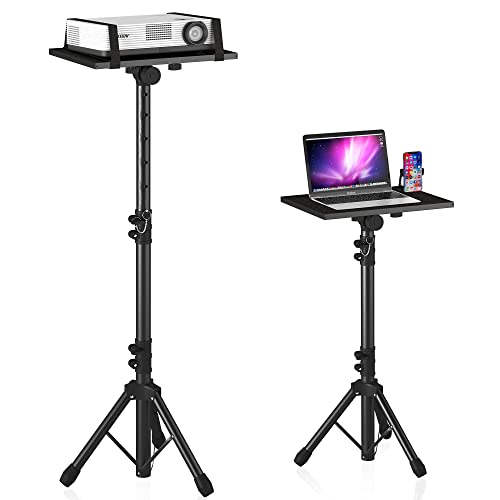
- 23" to 46" height range
- 15" x 11" tray with 180° tilt
- Detachable design with carry bag
Best For: Portable projector or laptop setups that need adjustable floor positioning
Metal Protective Cover
Floor-Mounted Golf Simulator Enclosure
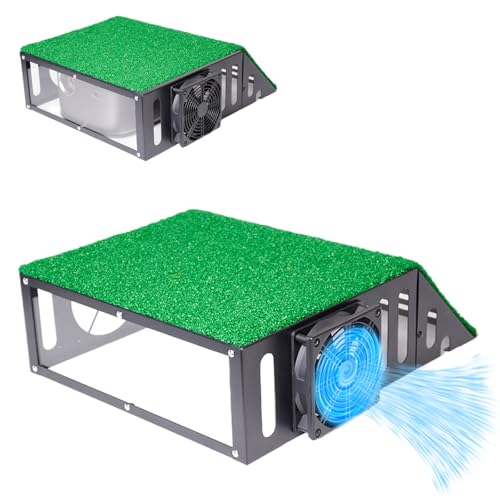
- Steel frame with polycarbonate panel
- Ventilation ports plus cooling fan
- Single-piece design for fast setup
Best For: Golf sim owners who want a compact protective enclosure on the floor
Budget-Ready Floor Enclosure
Heavy Duty Floor Mounted Enclosure Case

- 1.4mm reinforced steel frame
- Cooling fan with ventilation slots
- Synthetic turf top for cleaner integration
Best For: Budget-minded home simulator setups
Compact Steel Protector
Metal Golf Simulator Projector Cover

- Full steel frame with polycarbonate panel
- Fan plus top and side ventilation
- Includes turf pad and spirit level
Best For: Compact setups needing easy floor placement
Flexible Ground Mount
Floor-Mounted Protective Cover with Fan

- Powder-coated steel frame for durability
- Active cooling fan for longer sessions
- Artificial turf top and cable ports
Best For: Players wanting a sturdy, tidy floor-mounted enclosure
OTM-Ready Floor Stand – Adjustable Tripod for Golf Simulators
If you want a flexible option for golf simulator projector floor stands, this adjustable tripod is built around height, angle, and stability. It is especially suited to OTM projector setups, while still offering broader compatibility when the gimbal is removed.
Best For: Golf sim users with compatible OTM projectors who want precise floor-mounted alignment.
Pros:
- 18″ to 45″ adjustable height for dialing in projector placement.
- 360° rotating gimbal makes fine angle adjustments easier.
- Includes a triangular steel plate and hand screws for secure mounting with compatible Optoma models.
- Stable tripod base keeps the setup grounded for indoor simulator use.
Cons:
- Specialized OTM support depends on the included steel plate system.
- Gimbal-based compatibility is more limited than a universal flat mount.
- 30-day warranty is shorter than many buyers may prefer.
This is a practical floor stand if your simulator needs careful aiming and a compact footprint. Its real strength is adjustability for compatible short-throw projector setups rather than broad all-purpose use.
Protected Floor Enclosure – No-Assembly Golf Projector Cover
For shoppers comparing golf simulator projector floor stands, this floor-mounted enclosure is a different approach: it protects the projector instead of lifting it on a stand. It is designed for simple setup, active cooling, and a sturdy protective shell.
Best For: Golf sim owners who want a floor-mounted protective cover with built-in cooling and no assembly.
Pros:
- Integrated one-piece frame means no frame assembly is required.
- Built-in cooling fan and vents help manage heat during long sessions.
- Galvanized steel construction adds rust resistance and impact protection.
- HD acrylic panel and artificial turf give it a clean simulator-room look.
Cons:
- Must fit within the listed internal size limit of 13 x 13 x 6.22 inches.
- Not a ceiling mount, so it still takes floor space near the impact area.
- Designed around projector protection, not height or angle flexibility.
This cover makes sense if your priority is shielding a projector while keeping setup simple. It trades stand-style adjustability for protection, airflow, and a more finished enclosure.
Heavy-Duty Tripod Base – High-Load Projector Stand
If you need a sturdier option among golf simulator projector floor stands, this tripod stand focuses on load capacity and quick setup. Its wide triangular structure and adjustable tray make it useful for projector, laptop, or DJ gear positioning.
Best For: Buyers who want a strong, fast-setting floor stand for heavier equipment in a simulator room or multi-use space.
Pros:
- Supports up to 33 lb for heavier projector or gear setups.
- Height adjusts from 22″ to 55″ for flexible placement.
- 360° tray adjustment helps with aiming and positioning.
- Claims 30-second installation with a stable triangular base.
Cons:
- Bulkier height range may be more than some simulator rooms need.
- General-purpose design is less specialized than golf-only mounts.
- One note mentions a shipping-related hole alignment issue that may require rotating the head.
This stand is a good fit when strength and setup speed matter more than specialized golf-specific features. It offers a broad adjustment range and solid support for users who want one stand for multiple uses.
Turf Floor Cover – GoSports Projector Protection
GoSports Golf Simulator Projector Cover with Turf - Floor Mounted Enclosure for LED Projectors
Check Price On AmazonThis floor-mounted option is aimed at golfers who want protection without the hassle of ceiling installation. For golf simulator projector floor stands searches, it stands out as a low-profile cover with turf styling, airflow vents, and simple placement.
Best For: Sim owners with low-heat LED projectors who want an easy floor cover instead of ceiling mounting.
Pros:
- No assembly required; just place it over the projector and route cords through the side openings.
- Polycarbonate panel and HDPE body provide protective coverage from mishits.
- Four air and cord vents support airflow and cable management.
- Turf exterior blends into a golf simulator setup.
Cons:
- Only recommended for low-heat LED projectors.
- Does not provide waterproof protection.
- Interior size limit of 14 x 15.2 x 5.7 inches may exclude larger units.
This is a straightforward floor protection solution for users who want quick setup and a cleaner sim-room look. It is less about adjustability and more about shielding the projector while keeping installation easy.
Adjustable Floor Stand – Height-Adjustable Projector Tripod Stand
If you need a flexible golf simulator projector floor stand that can also handle general AV use, this tripod-style option keeps setup simple and portable. The height adjusts from 23″ to 46″, and the top tray tilts up to 180° for dialing in a better viewing angle.
Best For: Users who want a portable, adjustable floor stand for projectors or laptops and don’t need a dedicated enclosure.
Pros:
- Thickened aluminum metal construction with a safety latch for added stability.
- Large 15″ x 11″ tray supports projectors, laptops, music players, and DJ gear.
- Height adjusts from 23″ to 46″ and the tray tilts 180°.
- Detachable design and included bag make it easier to carry and store.
Cons:
- Not a dedicated golf simulator enclosure or protective cover.
- 22 lb max load may limit heavier projector setups.
- Best for temporary or mobile use rather than a permanent installation.
Overall, this is a practical choice if your priority is a versatile floor-mounted stand with quick setup and easy height tuning. It works best when you want portability and adjustability more than full projector protection.
Heavy-Duty Turf Enclosure – Floor-Mounted Golf Sim Projector Cover
For golf simulator projector floor stands that prioritize protection, this floor-mounted enclosure is built to keep a projector safe at ground level without a ceiling mount. It combines a steel frame, polycarbonate panels, ventilation ports, an adjustable cooling fan, and a synthetic turf top for a more finished simulator look.
Best For: Golf sim users who want a protected, floor-mounted projector enclosure with cooling and turf styling.
Pros:
- Full-steel framework and impact-resistant polycarbonate panels help shield the projector from hits and kicks.
- Includes ventilation ports and an adjustable cooling fan for heat management.
- Synthetic turf topper blends into a golf simulator setup and adds cushioning.
- Tool-free assembly is designed to be quick and straightforward.
Cons:
- Fits projectors only up to 13.7″ x 12.2″ x 6.3″ internally.
- Not water resistant.
- More of an enclosure than a simple open stand, so it takes up more floor space.
This is a strong pick if you want the extra security of a protective box-style solution rather than an exposed floor stand. The cooling fan and turf top make it especially appealing for a polished golf sim room.
Metal Protective Cover – Floor-Mounted Golf Simulator Enclosure
If you’re shopping for golf simulator projector floor stands but want more protection than a basic stand can offer, this floor-mounted metal enclosure is designed to sit on the ground and shield your projector. It uses a steel frame, polycarbonate paneling, side and top ventilation, and a cooling fan to support safer long-session use.
Best For: Buyers who want a simple, integrated floor enclosure that protects a projector and blends into a golf sim space.
Pros:
- Full steel frame and polycarbonate panel help protect against impact while keeping projection clear.
- Ventilation ports plus a cooling fan support airflow and heat dissipation.
- Synthetic grass mat top helps it blend into the simulator environment.
- Single integrated unit is designed for very fast assembly.
Cons:
- Internal clearance is limited to 16.92″ x 13.58″ x 5.2″.
- Not water resistant.
- Metal enclosure may be bulkier than an open tripod stand.
Compared with a standard stand, this option focuses on protection, cable routing, and a cleaner simulator presentation. It makes the most sense if your projector fits the internal dimensions and you want a quick, floor-mounted solution.
Budget-Ready Floor Enclosure – Heavy Duty Floor Mounted Enclosure Case
If you’re comparing golf simulator projector floor stands and want a safer, simpler alternative to ceiling mounting, this floor-mounted enclosure is built for that job. It places the projector at ground level, adds a reinforced steel frame and acrylic window, and includes a cooling fan plus ventilation slots to help protect the unit during play.
Best For: Home simulator setups that need budget-friendly ground-level projector protection with a turf-topped look.
Pros:
- 1.4mm-thick reinforced steel frame with impact-proof acrylic window
- Cooling fan and top/side ventilation help manage heat
- Synthetic grass mat creates a cleaner, more integrated simulator appearance
- Dedicated cable management ports help keep wiring tidy
Cons:
- Internal space is limited to the listed dimensions, so fit checks are important
- Requires removing the protective film from the acrylic panel before use
This is a practical pick if you want a sturdy floor-mounted projector cover without the complexity of a ceiling install. The enclosure focuses on protection, cooling, and a neat simulator-room finish.
Compact Steel Protector – Metal Golf Simulator Projector Cover
For shoppers looking at golf simulator projector floor stands, this metal enclosure offers a straightforward ground-level protection option with a compact footprint. It combines a full steel frame, polycarbonate front panel, side cord holes, and a cooling fan so the projector can sit safely on the floor while staying ventilated and easier to manage.
Best For: Users who want a durable, easy-to-set-up floor-mounted projector cover with cord management.
Pros:
- Full steel frame with polycarbonate impact panel
- Cooling fan and top/side vents support airflow
- Side cord openings help prevent pinched cables
- Includes synthetic turf pad and a spirit level for setup
Cons:
- Internal dimensions are relatively small, so projector fit must be verified carefully
- Designed for LED projectors, which may narrow compatibility for some buyers
This enclosure leans into convenience: one-piece assembly, simple placement, and a tidy floor-mounted layout. It makes sense if you want a durable cover that adds protection and a more polished simulator look without a complicated install.
Flexible Ground Mount – Floor-Mounted Protective Cover with Fan
If you want golf simulator projector floor stands-style convenience without ceiling hardware, this floor-standing enclosure is designed to keep setup simple. It uses a powder-coated steel frame, an active cooling fan, cable ports, and an artificial turf top so the projector can sit securely at ground level while blending into the room.
Best For: Golf sim users who want a sturdy floor-standing enclosure with active cooling and a clean look.
Pros:
- Powder-coated steel frame for rugged floor-mounted use
- Active cooling fan helps prevent overheating during long sessions
- Artificial turf mat on top creates a more immersive simulator appearance
- Built-in cable ports help keep cords organized
Cons:
- Universal fit still depends on staying within the listed internal dimensions
- Heavier than some alternatives at 12.38 pounds
This model is a solid middle-ground option if you value portability, protection, and a cleaner visual finish. It emphasizes simple placement and reliable cooling, which can be especially useful for longer practice sessions.
How We Picked the Best Golf Simulator Projector Floor Stands
We looked for Golf Simulator Projector Floor Stands and floor-mounted enclosure-style options that prioritize stability, practical height adjustment, and real-world protection. We favored designs that are easier to position near the impact zone, support common projector sizes, and reduce the risk of accidental bumps or ball strikes.
Quick Comparison
In simple terms, tripod-style stands are best for flexibility and fast repositioning, while enclosed floor mounts are the stronger choice when protection matters most. If you move your setup often or need fine-tuning for image alignment, a stand with broad height adjustment is usually the better fit. If your projector stays in one place and sits close to play, a covered enclosure is the safer long-term option.
Key Buying Factors for Golf Simulator Projector Floor Stands
Height Range and Alignment
Check whether the stand reaches your needed lens height without forcing awkward angles. More adjustment makes it easier to clear hitting zones and line up the image with your screen.
Stability and Base Design
A wider tripod footprint or a weighted floor-mounted frame helps reduce wobble. Stability matters most when the stand sits near foot traffic or in a room with hard floors.
Protection Level
If your projector is near the swing path, choose a model with a protective enclosure, fan, or turf cover. This is the biggest advantage of many Golf Simulator Projector Floor Stands designed specifically for simulator use.
Cooling and Ventilation
Covered projector housings should still allow airflow. Built-in fans and open vent paths help prevent overheating during longer practice sessions.
Compatibility and Access
Make sure the stand fits your projector’s size and mounting needs, and that you can still access power, HDMI, and adjustments without pulling the unit apart.
Who Should Buy Which Golf Simulator Projector Floor Stands?
Choose a tripod-style floor stand if you want portability, simpler setup, and flexible positioning. Choose a protective enclosure if your projector is fixed in place and you want the most peace of mind around ball impact and accidental contact. For most home simulator bays, the best choice comes down to whether you value easy adjustment or maximum protection more.
If you are comparing Golf Simulator Projector Floor Stands for a new build, start by measuring your available floor space, lens height target, and ball-flight clearance. Those three numbers will narrow the field quickly and help you buy once.