If you’re building a golf simulator in a room with limited ceiling height, the right mount matters as much as the projector itself. A low-profile design can help you preserve headroom while still dialing in the screen alignment you need.
This roundup focuses on golf simulator projector mounts for low ceilings that balance compact installation, fine-tuned aiming, and sturdy support for home simulator spaces.
Best 10 Golf Simulator Projector Mounts for Low Ceilings Picks for 2026
Low-Profile Universal Mount

- 4.72-inch low profile for tight ceiling clearance
- Adjustable arms from 3.7" to 19"
- 360° rotation with tilt and swivel
Best For: Shoppers wanting a slim, adjustable ceiling mount for low-clearance rooms
3-in-1 Mounting Option
Mount-It! Universal Projector Mount

- Works as flush ceiling, telescoping ceiling, or wall mount
- Extends from 4.5" to 25.5" on ceiling installs
- 40 lb capacity with cable management
Best For: Users who want maximum installation flexibility and a higher weight limit
Compact Telescoping Bracket

- Telescoping pole adjusts from 9" to 15"
- 360° rotation with 90° tilt
- Best for lightweight 1/4-inch thread projectors
Best For: Small projectors that need a compact, adjustable ceiling bracket
Low-Profile Value Pick

- 5-inch low profile for better headroom
- Retractable arms fit 2.83" to 11.42" patterns
- Tilt, swivel, and 360° rotation
Best For: Shoppers wanting a compact, budget-friendly-style adjustable ceiling mount
Versatile Low-Ceiling Mount
3-in-1 adjustable projector mount for ceiling or wall use

- 3-in-1 ceiling, arm, and wall installation options
- Adjustable height from 16.9" to 25.6"
- Supports projectors up to 40 lbs
Best For: Shoppers who want flexible placement for a low-ceiling golf simulator
Drop-Ceiling Space Saver
Low-profile drop-ceiling projector mount with scissor clamp

- Hangs only 6.3" from the ceiling
- Scissor clamp fits suspended metal grids
- Supports up to 29.7 lbs
Best For: Suspended ceiling golf simulator rooms that need a compact mount
Adjustable Heavy-Duty Choice
3-in-1 heavy-duty projector mount for flat or sloped ceilings

- 3-in-1 ceiling and wall mounting options
- Length adjusts from 5.5" to 25.2"
- Supports projectors up to 33 lbs
Best For: Buyers who need a sturdy, highly adjustable low-ceiling mount
Low-Profile Ceiling Pick
VIVO Universal Adjustable Ceiling Projector Mount

- 6-inch low-profile ceiling clearance
- 30 lb steel construction
- Tilt, swivel, and 360° rotation
Best For: Low ceilings that need broad projector compatibility
Long-Reach Adjuster
Full Motion Universal Ceiling Projector Mount
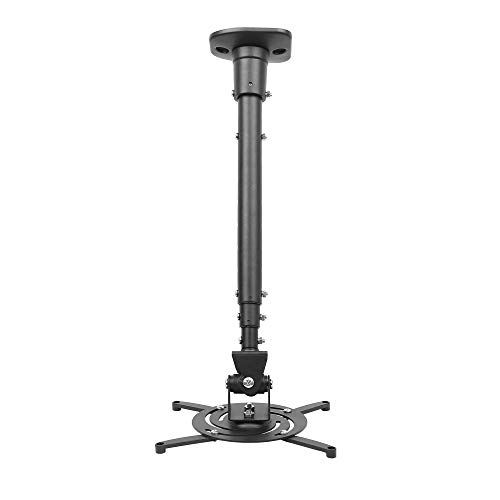
- 43.6-inch extension arm
- 25° tilt, 90° swivel, 360° rotation
- Supports projectors up to 30 lbs
Best For: Spaces that need long reach and flexible aiming
3-in-1 Flexible Mount
Wall/Ceiling Projector Mount with Extension Pole

- 3-in-1 wall or ceiling installation
- 44 lb load capacity
- ±15° tilt and swivel
Best For: Flexible installs that may need wall or ceiling mounting
Low-Profile Universal Mount – SCREEN PRO 4.7" Ceiling Mount
If you need golf simulator projector mounts for low ceilings, this low-profile ceiling option keeps the projector close to the ceiling while still giving you strong adjustment. It supports up to 33 lbs, uses adjustable arms to fit a wide range of mounting patterns, and includes tilt, swivel, and full rotation for dialing in your image.
Best For: Buyers who want a slim ceiling mount with broad arm adjustment and simple quick-release removal.
Pros:
- Low 4.72-inch ceiling drop helps preserve headroom in tighter spaces.
- Adjustable arms span 3.7″ to 19″ for broad compatibility.
- Offers 360° rotation, ±30° swivel, and ±10° tilt for alignment.
- Quick-release design makes attaching and detaching easier.
Cons:
- Not compatible with projectors that use a single mounting hole.
- Compatibility depends on threaded holes, spacing, weight, and interface.
- May not fit every projector even if the brand is listed as universal.
This is a practical pick if your priority is a compact ceiling profile and flexible positioning. Just verify your projector’s mounting specs before buying so the arm range and hole pattern line up correctly.
3-in-1 Mounting Option – Mount-It! Universal Projector Mount
For golf simulator projector mounts for low ceilings, this model stands out because it can work as a flush ceiling mount, a telescoping ceiling mount, or even a wall mount. The removable arm also lets you switch to a low-profile flush setup, while built-in cable management helps keep the install neat.
Best For: Buyers who want one mount that can handle multiple installation styles and heavier projectors.
Pros:
- 3-in-1 design supports flush ceiling, telescoping ceiling, and wall mounting.
- 4.5″ to 25.5″ ceiling extension range gives strong placement flexibility.
- 40 lb capacity suits heavier projectors.
- Integrated cable management keeps cords organized and hidden.
Cons:
- Requires solid ceilings or walls and is not for vaulted ceilings or drywall.
- Compatibility is limited to specific hole patterns between 8.85″ and 12.44″.
- Some installations may be more involved due to the multi-configuration design.
This is the most versatile option in the group if you want flexibility now and later. It makes sense for users who need a clean setup, a strong weight rating, and the ability to adapt the mount to different room layouts.
Compact Telescoping Bracket – Aurzen 9"-15" Ceiling Mount
If you’re comparing golf simulator projector mounts for low ceilings, this compact bracket is a simple way to keep the projector close to the ceiling while still allowing fine aiming adjustments. Its telescoping pole adjusts from 9″ to 15″, and the ball head adds 360° rotation plus 90° tilt for flexible positioning.
Best For: Lightweight projectors that use a centered 1/4-inch thread and need a compact ceiling install.
Pros:
- Adjustable 9″ to 15″ length gives some height flexibility.
- 360° rotation and 90° tilt support easy angle correction.
- Includes mounting hardware, screws, anchors, and manual.
- Lightweight design is suited to smaller projector setups.
Cons:
- Only works with centered 1/4-inch thread projectors.
- Weight limit is just 5.5 lbs on ceilings.
- Not compatible with off-center holes or M6/M8/non-threaded designs.
This is a good fit when the projector is small and the ceiling space is tight, but compatibility is narrow. Check the thread style and weight first, because this mount is built for specific lightweight setups rather than universal use.
Low-Profile Value Pick – XINLEI PR14B Ceiling Mount
For golf simulator projector mounts for low ceilings, this low-profile ceiling bracket keeps the projector just 5 inches from the ceiling while still offering useful adjustment. It supports projectors under 30 lbs, includes retractable arms for broad compatibility, and works on flat or sloped ceilings with tilt, swivel, and rotation.
Best For: Buyers who want a simple low-profile mount with solid adjustment and a moderate weight limit.
Pros:
- Low 5-inch profile helps save ceiling clearance.
- Retractable arms fit mounting holes from 2.83″ to 11.42″.
- Offers ±15° tilt, ±20° swivel, and 360° rotation.
- Works on flat or sloped ceilings and includes quick-release hooks.
Cons:
- Weight capacity tops out at 30 lbs.
- Mounting range may not fit larger or unusual projector patterns.
- Basic design offers fewer advanced features than some higher-end options.
This is a straightforward low-profile option if you want a dependable ceiling mount without overcomplicating the install. It balances compact clearance with enough adjustability to make projector alignment easier in a simulator room.
Versatile Low-Ceiling Mount – 3-in-1 adjustable projector mount for ceiling or wall use
If you need golf simulator projector mounts for low ceilings, this 3-in-1 bracket gives you ceiling, telescoping-arm, and wall installation options. It also offers a short minimum flush-ceiling length and adjustable height, which makes it useful when you need to keep a projector positioned close to the ceiling without giving up aiming flexibility.
Best For: Buyers who want a versatile low-ceiling mount with ceiling, wall, and telescoping-arm options.
Pros:
- 3-in-1 design supports flush ceiling, telescoping arm ceiling, and wall installation.
- Adjustable height extends from 16.9″ to 25.6″ from the ceiling surface.
- Solid steel construction supports projectors up to 40 lbs.
- Includes tilt and swivel adjustment for aiming control.
Cons:
- Not compatible with mini projectors.
- Not intended for vaulted ceilings or regular drywall.
- Requires a hard solid wall and a projector with compatible screw-hole spacing.
This is a practical pick if your setup needs mounting flexibility more than a fixed low-profile design. The tradeoff is stricter installation compatibility, so it works best when your wall or ceiling structure matches the mounting requirements.
Drop-Ceiling Space Saver – Low-profile drop-ceiling projector mount with scissor clamp
For golf simulator projector mounts for low ceilings, this drop-ceiling option keeps the projector hanging just 6.3 inches from the ceiling while using a scissor clamp for suspended metal grid installation. It is built for drop ceilings and includes adjustable arms, making it a tidy choice when you want a compact mount in a finished indoor space.
Best For: Suspended drop ceilings where a short hang distance and clean installation matter most.
Pros:
- Low-profile design hangs 6.3″ from the ceiling.
- Scissor clamp setup is made for suspended metal drop ceilings.
- Supports up to 29.7 lbs.
- Adjustable arms fit most projector brands and can be removed for mini projectors.
Cons:
- Designed specifically for suspended metal drop ceilings.
- Mounting hole spacing must be 12.5″ or less for standard setup.
- Not a universal fit for all ceiling types.
If your simulator room has a drop ceiling, this mount is the most purpose-built of the three. Its short hang distance and clamp-based install make it a strong space-saving option, especially when you want to keep the projector close to the ceiling grid.
Adjustable Heavy-Duty Choice – 3-in-1 heavy-duty projector mount for flat or sloped ceilings
If you want golf simulator projector mounts for low ceilings with a bit more flexibility, this 3-in-1 bracket offers flush ceiling, telescoping-arm ceiling, and wall installation. Its adjustable length from 5.5 inches to 25.2 inches gives you room to fine-tune projector placement while still keeping the unit close to the ceiling.
Best For: Users who want a strong, adjustable mount that can work in flat or sloped ceiling setups.
Pros:
- 3-in-1 mounting supports flush ceiling, telescoping-arm ceiling, and wall install.
- Adjusts from 5.5″ to 25.2″ in length.
- Heavy-duty steel construction supports up to 33 lbs.
- Offers 30-degree tilt, 30-degree swivel, and 360-degree rotation.
Cons:
- Compatible only with projectors using mounting holes 12.5″ or less apart.
- Heavier than some low-profile options at 4.5 lbs.
- Not as specialized for drop ceilings as a clamp-style mount.
This model is a good middle ground for simulator spaces that need both strength and adjustability. It is especially appealing if your room has a flat or sloped ceiling and you want more aiming control than a basic fixed mount.
Low-Profile Ceiling Pick – VIVO Universal Adjustable Ceiling Projector Mount
If you’re comparing golf simulator projector mounts for low ceilings, this VIVO option is built around a low-profile ceiling fit and wide adjustment. It sits just 6 inches from the ceiling surface, supports up to 30 lbs, and gives you tilt, swivel, and 360-degree rotation to help line up your simulator image cleanly.
Best For: Buyers who want a low-hanging ceiling mount with broad projector compatibility and simple angle adjustment.
Pros:
- Low-profile design keeps the projector just 6 inches from the ceiling.
- Adjustable +15° to -15° tilt, +15° to -15° swivel, and 360° rotation.
- Sturdy steel construction supports projectors up to 30 lbs.
- Quick-release hooks and included hardware make installation straightforward.
Cons:
- Not compatible with several specific Epson, Mitsubishi, and LG models listed in the notes.
- Mini projectors require removal of the extension arms.
- Mounting hole spacing must match the stated ranges.
This is a practical choice if ceiling clearance is tight and you still need flexible alignment for a golf simulator setup. It balances a compact profile with enough adjustment to make fine-tuning easier than with a fixed mount.
Long-Reach Adjuster – Full Motion Universal Ceiling Projector Mount
For golf simulator projector mounts for low ceilings, this full-motion bracket stands out because it offers a long extendable arm and a collapsed height that can still stay relatively close to the ceiling. It supports most projector brands under a 12.1-inch hole span, holds up to 30 lbs, and gives you a wide range of angle adjustments for dialing in the image.
Best For: Installations that need extra reach and a lot of positioning flexibility in a home or office simulator space.
Pros:
- Extendable arm reaches 43.6 inches and collapses to 23 inches from the ceiling with the arm attached.
- Full motion adjustment includes 25° tilt, 90° swivel, and 360° rotation.
- Heavy-duty steel build supports projectors up to 30 lbs.
- Pre-assembled design and quick-release hooks simplify setup.
Cons:
- Without the arm, it still sits 8.9 inches from the ceiling, which is less low-profile than some alternatives.
- Only works with projectors that fit the specified mounting-hole spacing.
- Designed for flat ceilings only.
If you want adjustability more than a minimal drop, this mount is built for that job. The long extension and broad motion range can make alignment easier when your simulator screen placement is fixed but the projector location needs flexibility.
3-in-1 Flexible Mount – Wall/Ceiling Projector Mount with Extension Pole
When you need golf simulator projector mounts for low ceilings, a 3-in-1 design can be especially useful because it lets you choose between flush ceiling, telescoping ceiling arm, or wall mount installation. This model supports projectors up to 44 lbs, uses a height-adjustable extension pole, and includes tilt and swivel adjustments for alignment.
Best For: Users who want the most installation flexibility, including wall mounting or a closer ceiling setup.
Pros:
- 3-in-1 system supports flush ceiling, telescoping ceiling arm, or wall mounting.
- Higher 44 lb weight capacity than the other mounts in this group.
- Adjusts with ±15° tilt and ±15° swivel.
- Integrated cable channels and quick-release hooks help streamline installation.
Cons:
- Not suitable for vaulted ceilings.
- Ceiling arm extends 17 to 25.5 inches, so it is not as compact as a true low-profile mount.
- Requires matching the listed diagonal mounting-hole layout range.
This is the most versatile option here if your room layout may force you to switch between ceiling and wall placement. It’s a strong pick for a simulator setup where installation flexibility matters as much as image alignment and load capacity.
How We Picked the Best Golf Simulator Projector Mounts for Low Ceilings
We focused on mounts that suit indoor simulator rooms where clearance is tight and alignment needs to be precise. The best options combine a compact drop, reliable weight capacity, flexible tilt and swivel, and hardware that works with common projector sizes.
We also prioritized practical installation features such as universal compatibility, arm adjustment range, and the ability to mount to a ceiling or wall when room layout demands it.
Quick Comparison
In this category, low-profile ceiling mounts are best when you want maximum headroom. Adjustable arm and extension-style mounts are better if you need to fine-tune throw distance or avoid beams, lights, or ducts. Wall-capable models can be useful when the ceiling is too crowded or uneven.
Key Buying Factors for Golf Simulator Projector Mounts for Low Ceilings
Profile and Clearance
Measure the distance from ceiling to projector body, not just the mount. For low ceilings, every inch matters, especially if players will swing underneath the unit.
Adjustability
Look for tilt, swivel, rotation, and arm-length adjustment so you can align the image to the screen without forcing the projector into an awkward position.
Compatibility and Load Rating
Check the projector’s mounting pattern and weight. A universal mount is convenient, but only if the screw pattern and capacity match your projector safely.
Installation Surface
Confirm whether you need a flat ceiling, sloped ceiling support, drop-ceiling hardware, or a wall-mount option. The wrong mounting surface can complicate a simple setup.
Build Quality
For Golf Simulator Projector Mounts for Low Ceilings, metal construction and secure locking joints are worth prioritizing because the projector should stay stable once aligned.
Who Should Buy Which Golf Simulator Projector Mounts for Low Ceilings?
If you want the cleanest look and the least obstruction, choose a low-profile ceiling mount. If your projector needs more positioning flexibility or the screen distance is tricky, choose an adjustable arm or extension model. If your room has limited ceiling access, beams, or a drop ceiling, a wall/ceiling hybrid or scissor-style mount may be the most practical option.
For most home simulator builds, the best choice is the mount that gives you enough adjustability to center the image while keeping the projector tucked up safely and out of the swing zone.