If you want real insight into your ball flight, spin is one of the most important numbers to track. The right launch monitor can turn practice sessions into usable data you can trust.
Below, we’ve narrowed the field to ten of the best options for golfers who want reliable spin measurement, strong app support, and practical value for home, range, or simulator use.
Best 10 Golf Launch Monitors with Spin Measurement Picks for 2026
Premium Dual-Camera Pick
Rapsodo MLM2PRO with 15 Metrics

- Tracks spin rate, spin axis, and 15 total metrics
- Dual-camera capture with slow-motion swing video
- Works with iOS and Android via Bluetooth
Best For: Golfers who want detailed spin and swing data plus video feedback
iPhone-Only Value Pick
Rapsodo MLM for iPhone and iPad

- Tracks ball speed, club speed, launch angle, and carry
- Video replay with shot tracer for swing review
- Built for iPhone and iPad only
Best For: iPhone and iPad golfers who want portable shot tracking and video replay
Best Overall Spin Tracker
Garmin Approach R10 Portable Launch Monitor

- Tracks ball spin, launch angle, and swing tempo
- Includes shot dispersion charts and video clips
- Works indoors or at the range with up to 10 hours battery
Best For: Golfers who want spin data, shot analysis, and virtual-round features in one portable unit
Tour-Grade Practice System

- Dual Doppler radar and photometric cameras
- Built-in GOLFTEC Speed Training drills
- SkyTrak software for structured practice
Best For: Serious golfers who want premium data and guided improvement
Portable Range Companion
Garmin Approach R10 Launch Monitor
- Tracks ball spin, launch angle, and swing tempo
- Portable for home, indoor, or range use
- Up to 10 hours of battery life
Best For: Golfers who want portable app-based feedback for practice
Photo-Based Spin Tracker

- Photometric tech measures spin rates and shot shape
- Wireless portable design for indoor practice
- Works with iOS, Android, and PC
Best For: Golfers who want spin-focused indoor practice feedback
Tour-Grade Indoor Pick
Bushnell Launch Pro i Circle B Edition
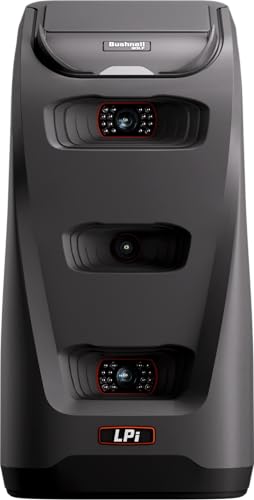
- Three-camera infrared system for impact-based measurement
- Provides carry, launch, spin, and club head speed
- Designed specifically for indoor simulator setups
Best For: Indoor simulator golfers who want precise spin and ball data
Portable Swing Trainer
Voice Caddie SC200Plus Portable Monitor

- Doppler radar with atmospheric pressure calibration
- Real-time LCD and voice feedback
- Swing speed mode works without a ball
Best For: Portable practice and swing-speed training
Spin-Tracking Mobile Pick
Rapsodo MLM2Pro Mobile Launch Monitor

- Dual-camera system measures spin rate and spin axis
- Tracks 13 core metrics for detailed shot analysis
- Works with smartphones or tablets for simulator use
Best For: Mobile golfers who want detailed spin metrics and simulator features
Premium Dual-Camera Pick – Rapsodo MLM2PRO with 15 Metrics
If you want golf launch monitors with spin measurement that do more than show basic distance, the Rapsodo MLM2PRO is built for deeper practice. It combines Doppler radar and dual-camera capture to track 15 metrics, including spin rate, spin axis, ball speed, club speed, club path, launch angle, and carry distance, so you can review full shot data indoors or at the range.
Best For: Golfers who want detailed spin and swing data plus video feedback in a portable setup.
Pros:
- Tracks spin rate, spin axis, club path, carry distance, and other key metrics.
- Works with iOS and Android over Bluetooth for easy setup.
- Includes video swing capture and slow-motion review.
- Comes with a 45-day free Premium trial and simulator features.
Cons:
- Full simulator features require the Premium trial and app ecosystem.
- Best experience depends on using a connected mobile device.
The MLM2PRO stands out if spin and swing visualization are priorities. It offers one of the most complete data sets in this group, while still staying portable enough for home practice or range sessions.
Simple Portable Option – Shot Scope LM1 Mini Launch Monitor
The Shot Scope LM1 is a compact choice for golfers who want a straightforward launch monitor without extra complexity. Its notes highlight ball and club speed tracking, real-time smash factor, and total and carry distance, making it a practical pick for quick feedback during indoor or outdoor practice.
Best For: Golfers who want an easy-to-carry monitor for speed and distance feedback.
Pros:
- Tracks ball speed, club speed, smash factor, and carry distance.
- Works indoors and outdoors.
- Includes speed training mode for practice sessions.
- Offers lifetime session history in the app.
Cons:
- Supplied notes do not mention spin measurement.
- Less feature-rich than models with video or simulator course tools.
The LM1 is best if you want core shot data in a portable format and care more about speed and carry than advanced analytics. It keeps the focus on simple, repeatable practice feedback.
IPhone-Only Value Pick – Rapsodo MLM for iPhone and iPad
For golfers looking at golf launch monitors with spin measurement alternatives, the original Rapsodo MLM focuses on clear shot feedback and video replay rather than spin data in the supplied notes. It delivers ball speed, club speed, launch angle, carry distance, and shot shape, plus shot tracer video, making it a strong practice tool for iPhone and iPad users.
Best For: iPhone and iPad golfers who want portable shot tracking and video replay.
Pros:
- Provides ball speed, club speed, launch angle, carry distance, and shot shape.
- Includes video replay with shot tracer.
- Lightweight and built for iPhone/iPad use.
- Works at the range, in the backyard, or into an indoor net.
Cons:
- iOS only, so Android users need a different model.
- Supplied notes do not list spin measurement.
This model makes sense if your priority is portable feedback on ball flight and swing shape, not the widest metric set. It is a practical option for Apple users who want simple, on-the-go practice data.
Best Overall Spin Tracker – Garmin Approach R10 Portable Launch Monitor
The Garmin Approach R10 is a strong fit if you want golf launch monitors with spin measurement plus a broader practice and simulation package. Paired with the Garmin Golf app, it tracks ball spin, club head speed, ball speed, swing tempo, launch angle, and more, while also offering shot dispersion charts, recorded video clips, and virtual rounds.
Best For: Golfers who want spin data, shot analysis, and virtual-round features in one portable unit.
Pros:
- Tracks ball spin along with launch angle, ball speed, and club head speed.
- Provides shot dispersion charts and training mode in the app.
- Automatically records video clips tied to swing metrics.
- Offers up to 10 hours of battery life and indoor or range use.
Cons:
- Many advanced features depend on the Garmin Golf app and subscription.
- Phone mount and app interaction are part of the overall experience.
The R10 is the most rounded option here for golfers who care about spin and want more than raw launch data. It balances portability with app-based analysis, making it useful for home practice and the driving range alike.
Tour-Grade Practice System – SKYTRAK ST MAX Launch Monitor
If you want golf launch monitors with spin measurement plus a more complete practice system, the SKYTRAK ST MAX is built for serious golfers who want detailed ball and club data in one portable unit. Its dual Doppler radar and photometric cameras are designed to provide a precise picture of each swing, while the built-in GOLFTEC Speed Training adds guided drills and structured improvement.
Best For: Golfers who want a premium launch monitor for data-rich practice, speed training, and simulator use.
Pros:
- Dual Doppler radar plus photometric cameras for detailed ball and club data
- Built-in GOLFTEC Speed Training with guided drills and personalized swing insights
- SkyTrak software tools like Skills Assessments, Bag Mapping, Wedge Matrix, and Randomized Practice
- Dual USB-C ports for simultaneous charging and data transfer
Cons:
- Premium feature set may be more than casual players need
- Designed for serious practice, so setup and use are more involved than a basic monitor
The ST MAX stands out as a high-end training tool rather than just a launch monitor. If you value structured practice and broad shot data, it offers a strong mix of measurement, coaching, and simulator-ready functionality.
Portable Range Companion – Garmin Approach R10 Launch Monitor
For golfers comparing golf launch monitors with spin measurement, the Garmin Approach R10 is an easy-to-carry option for home, indoor, or driving-range practice. Paired with the Garmin Golf app, it tracks key metrics including club head speed, ball speed, swing tempo, ball spin, and launch angle, giving you useful feedback without a bulky setup.
Best For: Golfers who want a portable, app-connected launch monitor for range and home practice.
Pros:
- Tracks ball spin, launch angle, swing tempo, and other key metrics with the Garmin Golf app
- Portable design works at home, indoors, or on the driving range
- Up to 10 hours of battery life for longer practice sessions
- Includes phone mount for easier app viewing and interaction
Cons:
- Renewed condition may not appeal to buyers wanting a new unit
- Requires a smartphone and app pairing to access core analysis features
The Approach R10 is a practical pick if you want spin measurement and other helpful shot data in a compact package. It is especially appealing for golfers who value portability and app-based feedback over a more elaborate launch monitor system.
Photo-Based Spin Tracker – SKYTRAK Golf Launch Monitor
If spin rates are a priority in golf launch monitors with spin measurement, the original SKYTRAK is built around photometric technology and real-time shot feedback. It captures ball speed, launch angle, spin rates, and shot shape data, making it a strong fit for golfers who want detailed practice feedback in a compact, wireless unit.
Best For: Golfers who want a portable photometric launch monitor for indoor practice and simulator use.
Pros:
- Photometric technology delivers ball speed, launch angle, spin rates, and shot shape data
- Wireless and portable design for indoor training or practice away from the course
- Built-in rechargeable battery offers up to 4 hours of continuous use
- Compatible with iOS, Android, and PC devices
Cons:
- Battery life is shorter than some portable alternatives
- Software trial is limited to 14 days, so full use may require additional investment
The original SKYTRAK remains a strong choice for golfers who want photo-based measurement and spin-focused feedback in a portable format. It is best suited to players who care more about accurate practice data than ultra-simple setup.
Tour-Grade Indoor Pick – Bushnell Launch Pro i Circle B Edition
If you want golf launch monitors with spin measurement for an indoor simulator setup, the Bushnell Golf Launch Pro i is built around camera-based accuracy rather than radar assumptions. Its three-camera infrared system measures impact data for exact carry, launch, spin, and club head speed, making it a strong fit for golfers who want precise numbers in a dedicated indoor environment.
Best For: Golfers building an indoor simulator who want camera-based spin and club data.
Pros:
- Three-camera infrared measurement is designed for Tour-level accuracy.
- Provides exact carry distance, launch, spin, and club head speed with an active subscription.
- Made specifically for indoor simulator use and comes ready out of the box.
- Includes a 14-day Gold Subscription trial and setup accessories.
Cons:
- Ball and club data require an active software subscription.
- Focused on indoor use rather than a broad indoor/outdoor training profile.
The Launch Pro i is best viewed as a serious indoor simulator base for golfers who care most about measurable spin and precise impact data. If your priority is accuracy over portability, it offers a very compelling path into a high-quality home setup.
Portable Swing Trainer – Voice Caddie SC200Plus Portable Monitor
The Voice Caddie SC200Plus is a practical choice for golfers comparing golf launch monitors with spin measurement features in a portable, easy-to-use format. It uses Doppler radar technology with atmospheric pressure calibration, gives real-time feedback through an LCD and voice output, and adds a swing speed mode that works without a ball for indoor tempo work.
Best For: Golfers who want a compact practice monitor with instant shot feedback and swing-speed training.
Pros:
- Doppler radar technology with atmospheric pressure sensors for data collection.
- Real-time LCD display and voice output make feedback easy to follow.
- Swing speed mode lets you train without a ball indoors.
- Stores shot data and club statistics for later review.
Cons:
- Does not list dedicated spin measurement in the supplied notes.
- Less simulator-focused than camera-based launch monitors.
For golfers who want a lightweight training aid more than a full simulator system, the SC200Plus keeps the focus on fast feedback and simple practice. It is a solid pick if you value portability, session tracking, and swing-speed work.
Spin-Tracking Mobile Pick – Rapsodo MLM2Pro Mobile Launch Monitor
The Rapsodo MLM2Pro is one of the most relevant golf launch monitors with spin measurement if you want a mobile setup for home or the driving range. Its dual-camera design measures 13 core metrics, including spin rate and spin axis, while pairing with a smartphone or tablet to create a simulator-style practice and analysis experience.
Best For: Golfers who want spin data and simulator features in a mobile launch monitor.
Pros:
- Measures 13 core metrics, including spin rate and spin axis.
- Dual-camera system is built for pro-level accuracy.
- Works with smartphones or tablets for home and range use.
- Includes 3 Chrome Tour balls, tripod, carrying case, and charging cable.
Cons:
- Best results depend on pairing with a compatible smart device.
- Requires setup with apps for the full simulator experience.
If spin measurement is high on your list and you want a monitor you can move between indoor and outdoor practice, the MLM2Pro fits that role well. It blends detailed shot tracking with mobile convenience and simulator-style training tools.
How We Picked the Best Golf Launch Monitors with Spin Measurement
We focused on Golf Launch Monitors with Spin Measurement that offer a strong mix of data quality, ease of setup, and value for different types of golfers. Our shortlist emphasizes products that can track key ball-flight metrics, work well in real practice environments, and suit both indoor and outdoor use where possible.
Quick Comparison
For buyers comparing options, the biggest differences usually come down to measurement technology, portability, simulator compatibility, and how much club and ball data you can access. Some models are better for casual range sessions, while others are aimed at more serious simulator users who want deeper spin and launch detail.
Key Buying Factors for Golf Launch Monitors with Spin Measurement
Measurement Technology
Camera-based and photometric systems are often preferred for tighter spin and launch readings, while radar-based units can be excellent for tracking broader shot data. If spin accuracy is your top priority, pay close attention to how the unit captures ball flight and whether it is designed for indoor or outdoor use.
Data Depth
Look for the metrics that matter most to your practice: backspin, sidespin or spin axis, launch angle, carry distance, club speed, and shot shape. The best Golf Launch Monitors with Spin Measurement do more than estimate distance—they help explain why the ball flew the way it did.
Practice Environment
Some launch monitors perform best in a garage or simulator bay, while others are more flexible for the driving range. Make sure the model you choose matches your space, lighting, and hitting setup.
App and Simulator Support
Good software can make a huge difference. Check whether the unit connects cleanly to your phone, tablet, or simulator software, and whether spin data is presented in a way that is easy to understand during practice.
Who Should Buy Which Golf Launch Monitors with Spin Measurement?
If you want maximum detail for a home simulator or dedicated practice setup, prioritize a model known for stronger ball data and spin consistency. If portability and easy range use matter more, a lighter launch monitor with dependable core numbers may be the better fit. For golfers who mainly want feedback to improve contact and launch conditions, a simpler unit can still deliver plenty of useful information without the higher price tag.
In short, choose the monitor that fits your space, budget, and training goals—not just the one with the longest feature list. The best value comes from a device you’ll actually use often and trust for your swing decisions.