Choosing the right golf swing camera systems with monitor can make practice sessions more productive, more repeatable, and easier to trust. The best setups combine clear swing capture with fast feedback so you can spot issues without guesswork.
In this roundup, we focus on options that suit serious home practice, simulator use, and range work, with a mix of premium launch monitors and simpler camera-based training tools.
Best 10 Golf Swing Camera Systems with Monitor Picks for 2026
Premium All-in-One Simulator

- 3-camera system with impact video and advanced metrics
- 10-inch touchscreen built in for on-device review
- HDMI output for monitor or projector simulator use
Best For: Golfers wanting a premium portable launch monitor and simulator with a built-in screen
Tour-Accuracy Indoor Pick
Bushnell Launch Pro i Circle B
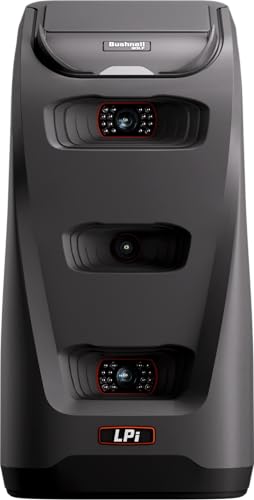
- Three-camera infrared system for impact measurement
- Indoor simulator focus with tour-level accuracy
- Ball and club data need an active subscription
Best For: Indoor golfers wanting accurate camera-based data and a simulator-ready setup
High-Speed Budget Camera

- 1080p video up to 120fps for swing capture
- 12MP sensor with 3X manual optical zoom
- USB plug-and-play for PC and other devices
Best For: Golfers wanting an affordable dedicated camera for swing analysis
Training-Focused Hybrid Monitor

- Dual Doppler radar plus photometric cameras
- Built-in GOLFTEC Speed Training drills
- Software tools for structured practice and improvement
Best For: Serious golfers wanting camera-based data with guided training tools
High-Speed Swing Capture

- 1080p capture up to 120fps
- 3X manual optical zoom lens
- 12MP sensor for detailed stills
Best For: PC-based swing analysis with fast-motion video
Portable Simulator Tracker

- Measures swing speed and launch data
- 3D simulator views on mobile app
- No subscription required
Best For: App-based practice with portable launch-monitor feedback
Pro-Trusted Radar Kit

- 16 club and ball metrics
- Integrated 4K camera with OLED display
- Wi‑Fi and Bluetooth app syncing
Best For: Serious golfers who want data, video, and display in one device
Premium Dual-Camera Launch Monitor
Rapsodo MLM2Pro Mobile Launch Monitor

- Dual camera swing capture
- 15 measured golf metrics
- Indoor and outdoor use
Best For: Golfers who want swing video plus detailed launch data
iPhone/iPad Swing Analyzer
Rapsodo MLM Mobile Launch Monitor

- iPhone and iPad compatible
- GPS shot tracking view
- Video playback with tracers
Best For: iPhone and iPad users who want portable shot analysis
Sim-Ready Dual-Camera Monitor
Rapsodo MLM2PRO with ProV1 Balls

- Dual camera and Doppler radar
- 15 key shot and swing metrics
- 45-day premium trial included
Best For: Golfers who want a feature-rich simulator and swing-analysis bundle
Premium All-in-One Simulator – Garmin Approach R50
If you want golf swing camera systems with monitor support in a true all-in-one package, the Garmin Approach R50 stands out with its built-in 10-inch touchscreen, three high-speed cameras, and HDMI output for a bigger display. It delivers impact video, detailed swing metrics, and simulator play without needing to piece together multiple devices.
Best For: Golfers who want a premium portable launch monitor and simulator with built-in screen and monitor connectivity.
Pros:
- 3-camera system provides precision impact data and high-speed video feedback
- 10-inch built-in color touchscreen makes it easy to review metrics and courses on device
- HDMI output lets you connect to a monitor or projector for a larger simulator setup
- Tracks 15+ metrics, including spin and axis, with indoor and outdoor use
Cons:
- Home Tee Hero virtual rounds require an active Garmin Golf membership
- Face-to-path measurement needs the included tracking sticker
- Up to 4 hours of battery life may be limiting for longer sessions
This is the most complete option here if you want a built-in display plus monitor support in one premium unit. It is best suited to golfers who value convenience, video feedback, and simulator-ready features over simplicity.
Tour-Accuracy Indoor Pick – Bushnell Launch Pro i Circle B
The Bushnell Golf Launch Pro i Circle B Edition is a strong fit for golfers comparing golf swing camera systems with monitor support for indoor simulator use. Its three-camera infrared imaging is built for impact measurement and tour-level accuracy, while the compact design focuses on dependable ball and club data.
Best For: Indoor golfers who want camera-based launch monitor accuracy and an affordable path into simulation.
Pros:
- Proprietary three-camera infrared system is designed for tour-level accuracy
- Built specifically for indoor simulator use
- Provides carry distance, launch, spin, and club head speed data
- Includes starter components plus a 14-day free Gold Subscription trial
Cons:
- Ball and club data require an active software subscription
- Simulation features depend on optional FSX Silver or Gold packages
- Designed for indoor use rather than a do-everything portable setup
This is a focused indoor launch monitor that prioritizes measurement accuracy and simulator value. It makes the most sense if your setup is centered around an indoor screen or monitor and you are comfortable adding software as needed.
High-Speed Budget Camera – 4K 120fps Golf Swing Cam
If you mainly need golf swing camera systems with monitor compatibility rather than a full launch monitor, this USB camera is a practical low-cost option. It is built around a high-speed 120fps capture mode, a 12MP sensor, and manual optical zoom, making it useful for close-up swing analysis on a PC or compatible device.
Best For: Golfers who want a dedicated high-speed USB camera for swing analysis and recording.
Pros:
- 1080p capture up to 120fps helps record fast swing motion smoothly
- 12MP sensor provides detailed image quality for analysis
- 3X manual optical zoom adds flexibility for close-up framing
- USB plug-and-play design works with multiple operating systems
Cons:
- Not a launch monitor and does not provide ball-flight or club metrics
- No built-in display or monitor included
- Manual focus and zoom require hands-on setup
This is the simplest option in the group and works best as a camera add-on for swing recording. Choose it if you want detailed video capture for practice or analysis and already have your own display or recording setup.
Training-Focused Hybrid Monitor – SKYTRAK ST MAX
The SKYTRAK ST MAX is aimed at golfers who want golf swing camera systems with monitor-style data feedback plus structured training tools. Its dual Doppler radar and photometric cameras are designed to capture a fuller picture of ball and club performance, while the built-in GOLFTEC Speed Training feature adds guided practice.
Best For: Serious golfers who want a portable launch monitor with camera-based data and built-in training guidance.
Pros:
- Dual Doppler radar and photometric cameras deliver detailed ball and club data
- Built-in GOLFTEC Speed Training provides guided drills and personalized swing insights
- Software access includes Skills Assessments, Bag Mapping, Wedge Matrix, and Randomized Practice
- Dual USB-C ports support charging and data transfer at the same time
Cons:
- Full use depends on SkyTrak software features and trial access
- Less focused on built-in display convenience than an all-in-one monitor device
- Premium positioning may be more than casual golfers need
This model is strongest for golfers who want more than raw numbers and prefer a practice system with coaching structure. It is a smart fit for improvement-minded players building a serious indoor or portable setup around a monitor.
High-Speed Swing Capture – 4K 120fps USB Golf Webcam
If you want golf swing camera systems with monitor-style review on a PC or laptop, this USB webcam is built for fast-motion capture. It records at up to 120fps at 1080p, and its 3X manual optical zoom lens helps you get a closer look at impact, hands, and club positions during practice.
Best For: Golfers who want a high-frame-rate USB camera for detailed swing analysis on a computer.
Pros:
- 1920×1080 capture at up to 120fps for smooth swing footage
- 3.6-10mm manual zoom lens with 3X optical zoom for tighter framing
- 12MP sensor with up to 3840×3040 still resolution
- Works with Windows, Linux, Mac OS, Android, Ubuntu, and Raspberry Pi
Cons:
- Requires a connected computer or compatible device rather than being a standalone monitor
- Manual focus and zoom mean setup takes a little adjustment
Overall, this is a practical option for golfers who already use a PC-based setup and want fast, detailed swing video. It focuses on capture quality and flexibility more than all-in-one convenience.
Portable Simulator Tracker – Mobile Golf Launch Monitor
This portable launch monitor fits the golf swing camera systems with monitor keyword family in a broader sense by pairing swing analysis with video record features through a mobile app. It is designed for indoor or outdoor use, with environmental sensors that adjust shot data and a virtual driving range experience on iOS or Android.
Best For: Golfers who want a mobile launch monitor with simulator-style feedback and app-based video support.
Pros:
- Built-in temperature, humidity, and barometric pressure sensors
- Tracks metrics like swing speed, launch angle, spin rate, and spin axis
- Includes 3D simulation views and swing-only mode
- No subscription required and supports iOS, Android, and HarmonyOS
Cons:
- Does not include a dedicated built-in monitor
- Depends on a compatible smartphone for use
This is a strong choice if you want portable launch-monitor data plus simulator features without a recurring fee. It is better suited to app-driven practice than to a traditional monitor-and-camera station.
Pro-Trusted Radar Kit – Full Swing Kit with 4K Camera
For golfers shopping golf swing camera systems with monitor features, this launch monitor stands out because it combines radar data, an integrated 4K camera, and an OLED display in one portable unit. It is designed for fast setup indoors or outdoors, with no alignment sticks or stickers required.
Best For: Golfers who want premium launch-monitor data plus onboard display and swing video in one unit.
Pros:
- Measures 16 club and ball metrics, including carry, spin rate, and attack angle
- Integrated 4K camera with 1080p output for swing review
- Built-in OLED display and app sync via Wi‑Fi and Bluetooth
- Portable design with protective travel case and no complicated calibration
Cons:
- Heavier and larger than a simple USB camera setup
- Premium feature set may be more than casual users need
If you want one of the most complete practice tools in this group, this model is the most polished all-in-one option. It blends shot data, video review, and on-device display for a serious training setup.
Premium Dual-Camera Launch Monitor – Rapsodo MLM2Pro Mobile Launch Monitor
If you want golf swing camera systems with monitor features that also deliver serious launch data, the Rapsodo MLM2Pro is built for all-around practice. It pairs dual-camera swing capture with 15 metrics, giving you a practical way to study both your motion and your shot results at home or on the range.
Best For: Golfers who want dual-camera swing review plus a monitor-ready launch monitor for indoor and outdoor practice.
Pros:
- Dual camera setup helps capture swing and contact details from more than one angle.
- Measures 15 metrics, including spin rate, spin axis, and swing speed.
- Works for both indoor simulator sessions and outdoor driving range use.
- Integrates with leading golf apps for a more complete simulator experience.
Cons:
- Requires a smartphone or tablet to run the experience.
- Best value comes if you plan to use the simulator and app features regularly.
This is the most feature-rich option in the group, especially if you care about combining swing video with launch monitor data. For golfers building a more advanced practice setup, it offers a strong mix of feedback, portability, and simulation potential.
IPhone/iPad Swing Analyzer – Rapsodo MLM Mobile Launch Monitor
For golfers looking for golf swing camera systems with monitor-style feedback on an iPhone or iPad, the Rapsodo MLM keeps things portable and straightforward. It tracks shot distance, ball speed, club speed, and launch angle, while GPS satellite view and video playback add helpful context to every swing.
Best For: iPhone and iPad users who want portable swing analysis with GPS tracking and video playback.
Pros:
- iPhone and iPad compatibility makes it easy to use with devices many golfers already own.
- Provides shot tracking data including ball speed, club speed, and launch angle.
- GPS satellite view and shot scatter mapping help visualize shot patterns.
- Records video playback with active shot tracers for swing review.
Cons:
- Compatible with iOS only, so Android users will need a different option.
- Does not include the dual-camera feature found on newer premium models.
This model is a good fit if you want a simpler, app-connected monitor without extra complexity. It focuses on the essentials: shot data, video feedback, and portability for practice anywhere.
Sim-Ready Dual-Camera Monitor – Rapsodo MLM2PRO with ProV1 Balls
Rapsodo Golf Launch Monitor - Swing Analyzer, Spin Rate, Indoor/Outdoor, 3 Pro V1 Balls
Check Price On AmazonIf you’re comparing golf swing camera systems with monitor features for a more complete practice setup, this MLM2PRO bundle stands out for its dual-camera capture and premium trial access. It measures 15 key metrics and adds slow-motion swing viewing, impact vision, and simulator access for golfers who want deeper feedback from each session.
Best For: Golfers who want a dual-camera launch monitor bundle with simulation tools and extra practice features.
Pros:
- Doppler radar and dual camera setup support detailed shot and swing capture.
- Tracks 15 metrics, including spin rate, spin axis, carry distance, and club path.
- Includes a 45-day premium trial with simulator and app integration features.
- Bundle includes tripod, carrying case, charging cable, and 3 ProV1 golf balls.
Cons:
- Many of the most attractive features depend on the premium trial and ongoing membership.
- More advanced than a basic monitor if you only want simple distance feedback.
This is the most practice-focused bundle here, especially if you want camera-based swing review plus simulation tools. It gives golfers a strong platform for detailed analysis, but it makes the most sense if you plan to use the premium features.
How We Picked These Golf Swing Camera Systems with Monitor
We looked for systems that deliver useful swing feedback, dependable tracking, and a monitor or screen view that makes analysis easier. Priority went to models with strong ball and club data, clear camera performance, practical portability, and compatibility with simulator or training setups.
We also considered whether each option fits real-world buyers: home golfers, coaching environments, and players who want a more complete practice station rather than a basic recording device.
Quick Comparison
Premium all-in-one units are the best fit for golfers who want a built-in display and deeper analytics. Camera-based launch monitors and simulator systems offer more advanced data and better indoor practice value. Mobile-first models are usually the simplest entry point, while dedicated USB swing cameras are best for buyers who want affordable video capture alongside a separate monitor or PC.
Key Buying Factors for Golf Swing Camera Systems with Monitor
Tracking Quality
Look for systems that measure both ball flight and club motion when possible. Radar, photometric cameras, and hybrid systems generally provide more complete feedback than basic video alone.
Display and Usability
A built-in monitor is convenient, but external app support can be just as valuable if the interface is clean and data is easy to review. Fast setup matters if you plan to use the system often.
Indoor and Outdoor Use
Some Golf Swing Camera Systems with Monitor are optimized for indoor simulators, while others work well at the range. Make sure the unit fits your practice space, lighting, and ball-flight needs.
Software and Simulator Compatibility
If you want games, swing replay, or virtual courses, confirm the software ecosystem before buying. Compatibility can matter as much as raw hardware specs.
Budget and Training Goals
Choose the simplest setup that still gives you the feedback you actually use. Competitive players may want advanced metrics and camera detail, while casual golfers may prefer a lighter, mobile system with easy viewing.
Who Should Buy Which Golf Swing Camera Systems with Monitor?
Buy a premium all-in-one monitor if you want the easiest path to a full practice station. Choose a launch monitor with cameras if you care most about data depth and simulator use. Pick a mobile model if portability is the priority, and choose a USB swing camera if you mainly want affordable video analysis with a separate computer or monitor.
For most golfers, the best choice is the one that matches your practice space, your feedback needs, and how often you’ll actually use it.